
A cheer bow, appreciation keychain, and mini computer personalize very different parts of daily life. I compare six options for team recognition, game-day accessories, compact workstations, local AI projects, and everyday computing, focusing on the details that shape real use rather than adding feature lists to every choice.
The Lineup, Simplified

DEEKA 16-Piece Pink Collegiate Long-Tail Ribbon Cheer Bows
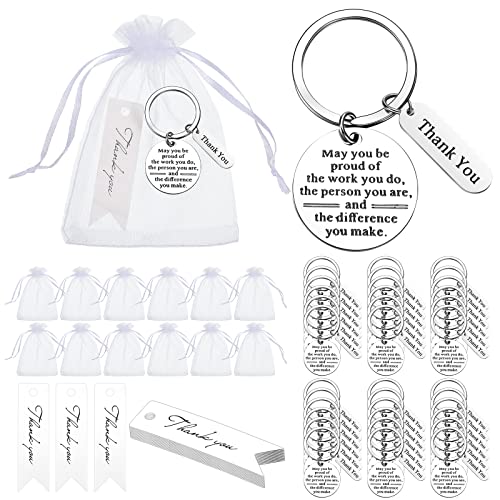
Yinkin 150-Piece Employee Thank-You Keychains

VZMORE AX9 Max Mini PC 32GB 1TB

VZMORE iX9 Max Mini PC 24GB 1TB

VZMORE iX7 Mini PC 32GB DDR5 1TB

VZMORE iX5 Max Mini PC 32GB 1TB
More Details on the Top Picks
Game-day dressing calls for an accessory with visible movement, and these oversized bows bring that look to ponytails. Each measures 5.5 by 9 inches, with 1.5-inch grosgrain ribbon and a long, narrow tail that suits collegiate-inspired cheer uniforms.
I find the 16-piece count especially useful for a full squad, although individual team members can still wear one. The elastic attachment is easier to manage than tying ribbon directly around the hair, and the roughly 10-gram weight keeps each bow light during a busy game day.
Strong Points
- A 16-piece assortment covers a sizable cheer group without requiring separate color coordination.
- Long ribbon tails create the traditional cheer-bow silhouette for softball, pep events, and game days.
- Elastic hair ties make repeated placement around ponytails straightforward.
- Hand assembly gives the bows a handmade appearance suited to team apparel.
Small Caveats
- The large ribbon may arrive slightly flattened, so gentle reshaping by hand may be needed before wear.
- The 9-inch length is substantial, which may feel less natural with shorter hairstyles or smaller uniforms.
At A Glance
Made For
Teen cheerleaders, softball players, and team organizers seeking matching pink bows for game days.
A Better Fit Elsewhere
Yinkin 150-Piece Employee Thank-You Keychains suit appreciation favors, while the DEEKA bows specialize in ponytail decoration.
A large recognition event becomes easier to organize when each place setting already contains a useful gift, card, and bag. This set includes 50 stainless-steel keychains, 50 white organza bags, and 50 thank-you cards, covering 50 gifts in a coordinated package.
I would consider it for teachers, support staff, coworkers, or volunteers because the inscriptions add a personal message without requiring separate personalization. The keychains are about 1.18 inches across, giving them a compact profile for keys, bags, or desk storage.
Noteworthy Benefits
- All 50 place settings include a keychain, card, and organza bag, reducing assembly work.
- Stainless steel gives the keychains a smooth finish suited to frequent handling.
- The compact keychain size works for apartment keys, lockers, and desk drawers.
- Two inscriptions provide ready-made messages for colleagues and community professionals.
Trade Offs
- The fixed wording and pink-and-white design may not suit every recognition theme or corporate color scheme.
- The 50 complete sets mean some events could still need additional packaging or gifts for later attendees.
Who Will Love This
Office managers, school leaders, and event planners who want 50 ready-to-package appreciation gifts.
Another Choice May Suit
The VZMORE iX7 Mini PC is a better fit for a permanent desk workspace, while Yinkin focuses on removable appreciation favors.
Developers moving between several applications benefit from the AX9 Max’s Ryzen AI 9 HX 470, 12 cores, 24 threads, and 32GB of DDR5 memory. Its Radeon 890M graphics also make it a more credible compact system for creative work and supported 1080p games.
A vapor chamber spreads heat across a larger surface than conventional heat pipes, while bottom intake and vertical airflow move air through the chassis. I would prioritize this model for demanding local AI work: its NPU, a processor dedicated to supported AI tasks, is paired with up to 86 TOPS of overall AI performance.
Positive Takeaways
- Three power modes range from 45W Silent to 65W Performance for different workload levels.
- 32GB DDR5-5600 memory supports heavy multitasking and expandable configurations.
- Four-display output suits trading screens, engineering applications, and creative timelines.
- Local AI tools can run compatible models without sending every task to a cloud service.
- Windows 11 Pro is preinstalled, and Linux support adds operating-system flexibility.
Factors To Consider
- Its 65W ceiling and advanced features place it above more basic office mini PCs.
- Four-display and dual-network setups require compatible monitors, cables, and network infrastructure.
Technical Highlights
Built With In Mind
Software developers, digital creators, and technical professionals running demanding desktop workloads.
Where A Sibling Pick Shines
The VZMORE iX9 Max suits Intel-based professional workflows, while the AX9 Max offers more memory expansion and AMD graphics.
Intel’s Core Ultra 9 185H gives the iX9 Max 16 cores and 22 threads, a strong foundation for compiling software, encoding media, and running many work applications at once. The three V-Boost Pro modes range from 20W Silent to 65W Performance.
Its 135 × 131.8 × 57.7mm chassis is small enough for a crowded desk, and VESA mounting can place it behind a compatible display. Compared with the AX9 Max, the main distinction is platform preference and memory: this model starts with 24GB rather than 32GB.
Useful Highlights
- The aluminum-alloy chassis provides a compact enclosure for professional workspaces.
- Six USB-A ports, two USB4 Type-C ports, and an SD card reader support varied equipment.
- Dual 2.5GbE Ethernet ports permit separate wired networks or a NAS connection.
- Intel Arc graphics handle accelerated media and compatible light gaming.
Practical Considerations
- Starting memory is lower than the AX9 Max’s 32GB, which matters for large project files.
- USB4 display use depends on compatible adapters or displays with appropriate DisplayPort support.
Feature Snapshot
Right Fit For
Intel-focused developers, editors, engineers, and traders who need several screens and wired network options.
Reach For A Different Pick When
The VZMORE AX9 Max fits creators seeking 32GB memory, 256GB expansion, and Radeon 890M graphics.
The iX7 sits between a basic office computer and a specialist workstation without relying on the highest power setting. Its Core Ultra 7 356H has 16 cores and 16 threads, while 32GB of DDR5 handles demanding office work, development, and creative applications.
For a mixed creative and productivity setup, I find the 50W Performance mode useful, though the 25W Silent mode offers a calmer option for routine work. The 50 TOPS NPU handles compatible transcription, editing effects, and local assistance while leaving more processor and graphics capacity available.
Useful Strengths
- 32GB of dual-channel DDR5 provides a generous starting point for heavy multitasking.
- Memory can expand to 128GB, offering more flexibility than a fixed-memory notebook.
- Two HDMI 2.1 FRL and two USB4 Type-C ports support four displays.
- Wi-Fi 7, Bluetooth 5.4, and 2.5Gbps Ethernet cover common connection needs.
Points To Keep In Mind
- The 50W Performance ceiling is lower than the 65W offered by the AX9 Max and iX9 Max.
- Four-display operation requires compatible displays and the necessary HDMI or USB4 connections.
The Right Fit
Hybrid workers, students, and creators balancing productivity software, media tasks, and occasional local AI tools.
Swap It Out When
The VZMORE AX9 Max better serves sustained heavy workloads because it supports a 65W mode and memory expansion to 256GB.
The iX5 Max focuses on everyday computing rather than maximum sustained power. Its Core Ultra 5 125U provides 12 cores and 14 threads, enough for office applications, media processing, coding, and the multi-window work that fills a typical workday.
Despite its entry-level processor position, 32GB of LPDDR5 memory gives it room for numerous open applications. LPDDR5 is compact, low-power memory soldered onto the board, so the storage slots remain available for expansion even though the memory itself is not listed as upgradeable.
Useful Touches
- 32GB of memory supports heavy browser use, office software, and many background applications.
- A 1TB SSD provides useful starting capacity for documents and active projects.
- Two HDMI and two USB4 Type-C ports support as many as four displays.
- Dual 2.5GbE, Wi-Fi 7, and Bluetooth offer flexible wired and wireless connections.
Some Limits To Know
- The onboard LPDDR5 memory cannot match the expansion path of the iX7’s 32GB DDR5 configuration.
- The 50W power ceiling is more restrained than the 65W modes in the premium models.
Quick Facts
Whose Shelf It Belongs On
Office professionals, students, and home workers who value 32GB memory and abundant ports in a compact daily system.
Look Elsewhere When
The VZMORE iX7 is the stronger choice for upgradeable DDR5 memory and a 50W performance mode.
What Matters Before Personalizing a Desktop
A mini PC becomes more customizable through memory, storage, displays, and networking than through decorative personalization alone. The right combination depends on which applications remain open and how many screens the workspace actually supports.
Processor Choice and Daily Workload
Core Ultra 5, Core Ultra 7, Core Ultra 9, and Ryzen AI 9 tiers serve different needs. Office work and browsing place fewer demands on the processor than rendering, compiling, encoding, or running local models.
Memory and Storage Expansion
DDR5 memory generally remains upgradeable, while onboard LPDDR5 is attached to the board. Storage is easier to add because several models include two PCIe 4.0 slots, a high-speed internal connection used for solid-state drives.
Ports, Displays, and Networking
Four-display support is useful for data monitoring, trading, and editing, but it demands compatible screens and cables. Dual 2.5GbE ports, meaning Ethernet connections rated at 2.5Gbps each, suit NAS devices and separated network segments.
Power Mode and Cooling
Silent modes favor shared rooms and lighter work, while higher power settings benefit rendering and compilation. A vapor chamber spreads heat over a broad surface, helping the cooling system move heat away from processors during extended activity.
Common Mistakes in Compact Desktop Choices
Pitfalls Shoppers Hit
A fast processor cannot compensate for insufficient memory in heavily multitasked work. I would also confirm monitor support, display-adapter requirements, and network ports before settling on a multi-screen configuration.
What the Higher Tier Adds
The upper models add stronger processors, higher power limits, more memory capacity, and broader expansion. Those differences matter for sustained rendering, development, local AI, and trading setups, while routine office tasks may not require every extra capability.
Frequently Asked Questions for Customizable Pcs
Which mini PC has the most expandable memory?
The VZMORE AX9 Max supports memory expansion up to 256GB. The iX9 Max also has a strong platform, but its listed configuration begins with 24GB of memory.
Is 32GB of RAM enough for everyday work?
Yes, 32GB comfortably supports office applications, many browser tabs, and typical multitasking. Software development, large media projects, and local AI models can require more memory or faster storage.
Can these mini PCs support four monitors?
The four VZMORE mini PCs listed support up to four displays through HDMI and USB4 Type-C connections. Compatible displays, cables, adapters, and operating-system support remain important compatibility checks.
Does a vapor chamber make a mini PC silent?
A vapor chamber helps distribute heat, but fan noise still depends on the selected power mode and workload. Silent settings generally suit routine tasks better than sustained rendering or compilation.
Which option works best for a compact office computer?
The VZMORE iX5 Max offers 32GB of memory, abundant ports, and a modern Core Ultra 5 processor in a compact design. The iX7 is a stronger choice when upgradeable memory and a higher performance mode matter more.
Wrap Up
The best match depends on the actual job. DEEKA handles team styling, Yinkin simplifies appreciation gifting, and the VZMORE models cover compact computing from daily office work to demanding development and local AI. I would choose the model whose limits align with the actual workspace, rather than paying for capabilities that never get used.
