
At a cluttered work desk, a decent headset can still sound thin when the signal comes from a PC’s built-in audio jack. A digital-to-analog converter, or DAC, translates the computer’s digital audio into an analog signal, while an integrated amplifier adds enough power for headphones that need more drive. I focus on six practical options for PC gaming, music, and mixed setups, with particular attention to connection type, headphone output, and desk-friendly control.
The Essentials At A Glance
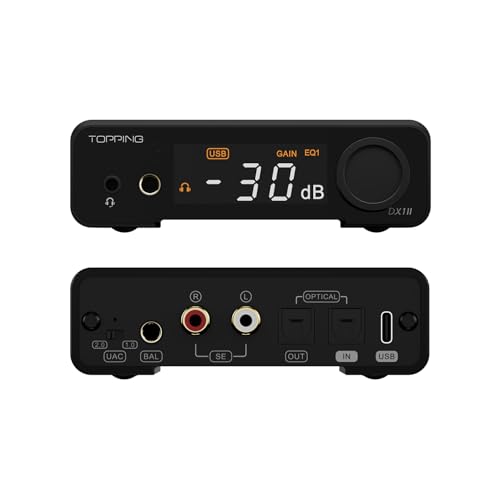
Topping DX1 II Game HiFi DAC Headphone Amp, ES9039Q2M, Balanced

FiiO K11 R2R Desktop DAC Amp

Topping DX3 Pro+ USB/Optical/Coax DAC Amp with Bluetooth
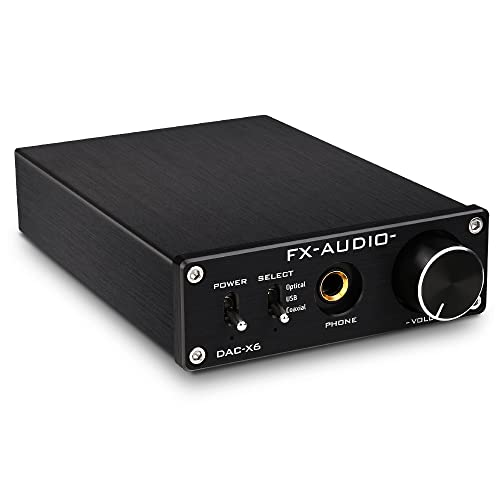
FX-Audio DAC-X6 Mini HiFi DAC Headphone Amp, USB/Optical/Coax

FiiO/JadeAudio KA13 Portable USB-C DAC Amp, 3.5mm/4.4mm, Desktop Mode

Fosi Audio SK02 USB/Optical DAC Amp, Balanced Outputs and Preamp
What Each Pick Brings To The Table
The DX1 II is built around a direct PC-to-headset path rather than a larger home-audio arrangement. A single USB-C connection handles digital audio and power, which makes the setup attractive for a gaming desk where cable clutter already competes for space. For most gaming setups, that simplicity may matter more than the broader input selection found on the Topping DX3 Pro+.
Its balanced 4.4mm output serves compatible headsets, while the 3.5mm jack covers conventional wired headphones and earbuds. The listed 1000mW x 2 output and preamp function suggest enough flexibility for louder gaming sessions, although the honest read is that actual volume and tonal balance still depend on the particular headset.
Advantages To Know
- USB-C carries both power and digital audio, reducing the number of desk connections.
- Separate 3.5mm single-ended and 4.4mm balanced outputs support different headsets.
- The ES9039Q2M conversion chip targets a dedicated desktop listening path.
- Selectable USB Audio Class modes can ease compatibility with different systems.
- Preamp capability gives the unit a role beyond basic headset amplification.
Trade Offs
- The 4.4mm output requires a headset and cable that support balanced connections.
- A PC-centric connection set is less versatile than the DX3 Pro+ for optical, coaxial, and Bluetooth sources.
Feature Snapshot
Who It Suits Best
PC gamers and streamers who want one-cable operation, amplified wired audio, and a choice of balanced or single-ended outputs.
Where Another Pick Suits Better
The Fosi Audio SK02 suits listeners who also need optical input and preamp output for a small speaker system.
The K11 takes a different route from the DX1 II with its resistor-based R2R conversion design. R2R DACs use a ladder of precision resistors to turn digital samples into an analog voltage, giving this desktop unit a distinctly deliberate approach to signal conversion. That makes it most compelling for a stationary music-focused setup rather than a frequently changing gaming station.
Its four-channel, fully differential arrangement means each channel has its own signal path. Within the stated design, each channel uses 48 thin-film resistors, for 192 across the unit, and the listed 0.1% component tolerance supports matching between channels. I see the K11 as a specialist choice for listeners who appreciate component-level design and plan to keep it on a dedicated desk.
Strong Points
- The 24-bit R2R array provides an alternative to the DX1 II’s ES9039Q2M conversion stage.
- Four fully differential channels support a balanced internal signal design.
- Thin-film resistors with 0.1% accuracy suit listeners who value careful channel matching.
Practical Considerations
- A permanent desk position makes less sense for mobile listening than the FiiO/JadeAudio KA13.
- Game-focused listeners may prefer the DX1 II’s simpler USB-C and headset-oriented arrangement.
- The connection layout should be checked against the planned PC, headphone, and speaker setup before ordering.
Right Fit For
Stationary music listeners who want a dedicated R2R desktop DAC and headphone amplifier with carefully matched conversion channels.
Consider Something Else When
The Topping DX1 II fits a gamer who prioritizes a simple USB-C connection and readily available balanced headset output.
The DX3 Pro+ is the most accommodating desktop unit here when a PC is only one part of the audio setup. USB, optical, coaxial, and Bluetooth inputs cover computers, game consoles, televisions, and wireless sources, while line and headphone outputs handle two kinds of downstream equipment. Compared with the DX1 II, it trades single-cable simplicity for a much broader connection map.
The ES9038Q2M handles digital conversion, and a QCC5125 Bluetooth receiver supports LDAC, AAC, SBC, aptX, aptX LL, and aptX HD. A remote control is included for convenient operation from across a desk. For a multi-device household, that flexibility may be the main attraction, though Bluetooth codec support must exist on both ends.
Useful Touches
- USB, optical, and coaxial inputs support several source types.
- Bluetooth adds convenient wireless listening for compatible phones and computers.
- Line output allows connection to an additional amplifier or powered speakers.
- The remote control is useful when the unit sits away from the listening position.
Details To Watch
- Wireless playback depends on codec support in the source device and receiving headset.
Core Details
Made For
Multi-device listeners who want USB, legacy digital connections, Bluetooth, line output, and headphone amplification in one desktop component.
A Better Fit Elsewhere
The FiiO/JadeAudio KA13 is a better travel companion because its USB-C dongle format and dual headphone outputs suit mobile listening.
The DAC-X6 fits a practical desktop upgrade built around familiar connections. USB, optical, and coaxial inputs accept a PC or several other digital sources, while RCA and headphone outputs provide paths for stereo equipment and amplified headphones. That mix makes it less specialized than the DX3 Pro+, yet potentially easier to incorporate into an existing audio shelf.
The stated 24-bit/96kHz support and 16-300 ohm headphone range cover a broad collection of wired equipment. I find that flexibility most useful for a mixed setup involving music, games, and older digital components. A desktop amplifier with 12V power also needs a suitable power supply and enough room behind the unit for cable routing.
Good Reasons To Consider
- Three digital inputs make it easy to connect a PC alongside other source equipment.
- RCA and headphone outputs support both stereo systems and personal listening.
Possible Compromises
- The 24-bit/96kHz ceiling is lower than the DSD256 and 32-bit/384kHz formats stated for the SK02.
- A USB cable and appropriate digital or analog cables may need to be added to the setup.
- Headphone sensitivity and balance still influence the usable output level within the stated impedance range.
- Its range of inputs can create more setup choices than the straightforward DX1 II.
At A Glance
Best Suited To
Budget-conscious PC listeners building a mixed digital and analog desktop setup with a range of wired headphones.
Another Choice May Suit
The Fosi Audio SK02 suits higher-resolution file playback and compact speaker use because it adds a preamp role and broader format support.
The KA13 is built to move between a laptop, phone, tablet, and home desk without becoming a desk-bound component. Its USB-C form provides a direct digital path, while 3.5mm and 4.4mm headphone outputs cover both conventional earbuds and balanced equipment. That makes it a natural PC companion for someone who travels with the same headphones used at home.
Inside, two CS43131 DAC chips handle conversion, paired with two low-noise SGM8262 operational amplifiers, which shape and strengthen the analog signal. Desktop Mode raises balanced output to 550mW for more demanding headphones. I would reserve that setting for a stationary high-power case, since the portable configuration is otherwise the simpler everyday choice.
A Strong Showing
- The dongle format preserves a small, portable footprint for laptop and mobile listening.
- Dual 3.5mm and 4.4mm outputs support both single-ended and balanced headphones.
- Desktop Mode provides 550mW of balanced output for more demanding loads.
- Compatibility spans PC, Android, iOS, and music players with USB-C connections.
Things To Consider
- A 4.4mm balanced lead and a compatible headphone are additional requirements for balanced use.
- Computers without USB-C need a suitable physical adapter before connection.
Who Will Love This
Mobile PC listeners and commuters who want a compact converter with both ordinary and balanced headphone connections.
Look Elsewhere When
The Topping DX3 Pro+ is the better desktop option for optical input, coaxial sources, Bluetooth, and line-level speaker connections.
The SK02 occupies the useful middle ground between a portable dongle and a larger desktop system. USB and optical inputs handle a computer, television, projector, or CD player, while 3.5mm and 4.4mm outputs cover single-ended and balanced headphones. Its preamp role also allows it to feed active speakers or another amplifier, making it useful in a compact listening setup.
Format support reaches DSD256 and PCM 32-bit/384kHz, with a stated 16-300 ohm headphone range. The enclosure is machined from aluminum and given a sandblasted finish, giving the small unit a neat appearance beside a monitor. Unlike the DX1 II’s gaming-focused one-cable path, this model is more at home bridging headphones and a small pair of speakers.
Where It Excels
- USB and optical inputs support computers as well as common home-audio sources.
- DSD256 and PCM 32-bit/384kHz support cover high-resolution formats.
- Both 3.5mm and 4.4mm headphone outputs support different wired designs.
- The preamp function can feed active speakers or a separate power amplifier.
- Its 16-300 ohm range covers many common headphones and earbuds.
- The CNC-machined aluminum body suits a compact desktop arrangement.
Where It Is Less Suited
- Bluetooth and coaxial input are not part of the stated connection set, so source selection matters before purchase.
Technical Highlights
The Right Fit
PC listeners building a small home-audio system around high-resolution files, wired headphones, and active speakers.
Swap It Out When
The Topping DX3 Pro+ fits a multi-source setup that specifically needs Bluetooth, coaxial input, and line output.
What Matters Before Buying A PC DAC
USB Connection And System Fit
USB is the most straightforward route from a modern PC to a DAC, but the connector type still matters. A USB-C DAC works directly with compatible modern computers, while a desktop model with a full-size USB socket may require an additional cable. Optical and coaxial inputs matter more for older consoles, CD players, televisions, and stereo components. Checking the intended source first prevents an otherwise capable DAC from becoming a shelf ornament.
Headphone Output And Amplification
A DAC converts the digital signal, but an integrated amplifier also supplies headphone power. Headphones with higher impedance often benefit from more drive, although sensitivity and electrical balance determine the result as well. The 3.5mm jack is the familiar choice for earbuds and many gaming headsets, while 4.4mm balanced output requires matching cables and compatible equipment.
Resolution Versus Practical Value
DSD256 and PCM 32-bit/384kHz labels indicate format capability, not a guaranteed audible improvement. Source files, software settings, and the connected headphones shape the final result. A simpler R2R design, a wireless desktop unit, and a portable dual-output dongle can each serve a distinct need more sensibly than choosing solely by the largest format number.
Common Buying Mistakes
Wrong Connector For The Setup
Checking the DAC’s input and output layout before ordering prevents the most common disappointment. A USB-C dongle is not a direct replacement for a full-size USB desktop unit, and a balanced jack remains useless without compatible hardware. I also check whether the planned source uses optical, coaxial, or analog connections rather than assuming every computer setup is identical.
What Separates Premium From Basic
The Value Of Specialized Design
Higher-tier cost often reflects converter architecture, headphone power, multiple inputs, metal construction, and a preamp function. The FiiO K11 spends that budget on a detailed R2R conversion design, while the Topping DX3 Pro+ buys connection breadth. The Fosi Audio SK02 may offer the more balanced value for a listener who needs high-resolution decoding and a small speaker setup without a large collection of source-specific functions.
Frequently Asked Questions for Dac For Pc
Do I need a DAC for a PC?
A DAC can improve a PC setup by providing a dedicated conversion stage and stronger headphone drive. It is most useful with demanding wired headphones, an external amplifier, or a larger desktop audio system.
Does a USB-C DAC work with every PC?
A USB-C DAC works with PCs that have a compatible USB-C port and the required audio class support. A full-size USB model may need a Type-A cable or adapter, so port inspection comes before purchase.
What is the benefit of a balanced headphone output?
Balanced output carries the left and right signals separately, which can reduce shared signal-path interference. The 4.4mm jack still requires a balanced cable and a compatible headphone or earbud.
Does a DAC include a headphone amplifier?
Many PC-focused DACs include an amplifier, but specifications vary. The K11, DX1 II, KA13, and SK02 combine conversion and headphone amplification, while some desktop models also offer line output for speakers.
Can a DAC connect to speakers?
A model with a preamp or line output can feed powered speakers or a separate amplifier. The Fosi Audio SK02 includes this function, and the Topping DX3 Pro+ provides line output for a similar role.
Final Verdict
For a simple PC gaming setup, the Topping DX1 II offers the neatest balance of USB-C operation, balanced output, and headset-focused amplification. The FiiO K11 leans toward dedicated R2R desktop listening, while the DX3 Pro+ handles the broadest source mix. The DAC-X6 favors accessible legacy connections, the KA13 travels well, and the SK02 bridges high-resolution headphones with a compact speaker system. Each choice becomes clearer once the primary source and headphone connection are settled.
