
Finding a desktop that handles modern work while still fitting a crowded desk is harder than it sounds. I built this shortlist around compact business systems, touchscreen all-in-ones, and a roomy tower for people who regularly move between documents, calls, and media. One important catch sits beneath the category: two of these desktops explicitly have no optical drive, so anyone relying on physical discs will need to account for that before checkout.
The Shortlist At A Glance

Dell OptiPlex 7020 Business Desktop, Intel i5-14500, 8GB DDR5, 512GB SSD
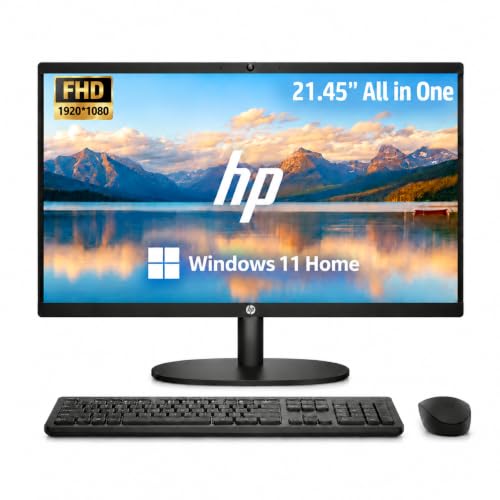
HP 8GB/512GB Touchscreen PC

HP 16GB/1TB Touchscreen PC

HP 16GB/512GB Touchscreen PC
HP 32GB/1TB Touchscreen PC

HP Pro Tower 290 G9, Intel Core i3-13100, 32GB RAM, 1TB SSD
Why These Options Stand Out
A crowded office desk makes the OptiPlex 7020 particularly easy to appreciate. Its small-form-factor enclosure measures 11.5 by 11.4 by 3.6 inches, yet the Intel Core i5-14500 supplies 14 processing cores for demanding office applications, analysis, and busy browser sessions. I favor it for teams that need conventional expansion and more than one display.
Unlike the HP all-in-ones farther down the list, this Dell keeps the computer, monitor, and peripherals separate. That makes it easier to adjust the viewing angle, reuse an existing display, and connect a second or third screen for spreadsheets or financial dashboards.
What Earns Its Place
- Four-display support can divide work among calls, documents, and reference material.
- The i5-14500 combines six performance cores with eight efficiency cores for demanding multitasking.
- Wi-Fi 6E, Bluetooth, and Gigabit Ethernet cover wireless and wired office networks.
- Ten USB ports reduce the need for a crowded desktop hub.
- Windows 11 Pro supports business-oriented workflows and includes a keyboard and mouse.
Trade-Offs To Consider
- There is no internal optical drive, so physical-disc use requires an external solution.
Key Specs
Built With In Mind
This model suits office-based teams that value multi-screen work, wired networking, and a compact, serviceable desktop format.
Another Choice May Suit
The HP Pro Tower 290 G9 offers more physical room for a busy office desktop, while the HP 16GB/1TB Touchscreen PC fits shared desks that prioritize touch interaction.
A dorm room, bedroom, or compact study area benefits from a computer that keeps the screen and hardware together. This HP combines its 23.8-inch display, camera, speakers, and internal components in one shell, removing the separate tower that usually occupies desk space. The touchscreen also gives short study sessions and casual browsing a more direct interface.
The 8GB-memory and 512GB-storage configuration makes more sense for a focused student or household computer than a heavily loaded office. Compared with the Dell OptiPlex 7020, it creates less desk clutter but offers less flexibility for multiple external displays and attached office equipment.
What It Does Well
- The anti-glare Full HD panel remains usable for reading and everyday browsing.
- Integrated speakers and camera reduce the number of desk accessories.
- Windows 11 Pro covers productivity, online learning, and communication needs.
- Wi-Fi 6 and Bluetooth 5.3 support common wireless peripherals.
Worth Noting
- The fixed all-in-one design does not allow the display to be positioned independently of the computer.
- A touchscreen does not provide optical-disc support, so disc-based tasks need a separate connection method.
Made For
Students, casual home users, and shared-space households will find this all-in-one especially convenient when desk space matters.
Look Elsewhere When
The HP 16GB/1TB Touchscreen PC is the better fit for intensive schoolwork or a large media library that requires additional memory and storage.
Online classes become easier to manage when a classroom, video-call window, and research document need to share the same screen. This configuration pairs 16GB of memory with a 1TB SSD, giving the 23.8-inch touchscreen all-in-one more room for coursework, photos, and several active applications. I see it as the most balanced version of the shared HP design.
Compared with the 8GB/512GB model, the extra memory helps when several browser tabs, calls, and documents remain open together. The larger storage also reduces the pressure to move personal files onto removable media, although the touchscreen still does not make the computer a disc-based system.
Positive Points
- Full HD IPS display offers wide viewing angles for shared workspaces.
- 16GB RAM gives heavier multitasking routines more breathing room.
- A 1TB SSD accommodates substantial collections of coursework, media, and documents.
- The infrared camera supports sign-in and video calls.
- Integrated construction leaves a relatively uncluttered desk.
Points To Note
- The Intel Core i3-N300 is intended for everyday work rather than demanding creative software.
- Physical discs still require an external drive or another separate device.
Feature Snapshot
Who It Suits Best
Students, remote workers, and families handling regular study or office tasks will receive a useful mix of memory, storage, and touchscreen convenience.
Where A Sibling Pick Shines
The Dell OptiPlex 7020 suits a business office that needs multiple monitors and conventional peripheral connections rather than a touchscreen-centered layout.
The 16GB/512GB configuration occupies an awkward but practical middle ground in the HP range. It gives me more multitasking room than the 8GB model without the larger storage allocation of the 1TB version. For a home office handling documents, email, streaming, and regular video calls, that balance can feel more manageable.
The touchscreen remains useful for casual browsing, photo organization, and shared-screen demonstrations. Against the HP 16GB/1TB Touchscreen PC, this version leaves more room for files but stores fewer of them locally, which may suit a household that already uses cloud storage.
What Stands Out
- 16GB RAM supports simultaneous work, study, and communication applications.
- The 23.8-inch anti-glare touchscreen stays clear in a room with ambient light.
- Integrated speakers, camera, and display keep the desktop uncluttered.
Small Caveats
- The 512GB SSD is more modest than the 1TB alternatives in this roundup.
- The all-in-one construction leaves less freedom to reposition the screen independently.
- Optical media requires a separate drive, and the touchscreen adds no disc-reading function.
Core Details
The Right Fit
Home-office users and students who value multitasking memory over maximum file capacity will find this configuration practical.
Reach For A Different Pick When
The HP 32GB/1TB Touchscreen PC makes more sense for memory-intensive routines and larger local media collections.
Large project folders and many open applications can make a compact computer feel cramped. The 32GB of memory here provides ample room for heavy tab use, video calls, school materials, and background applications, while the 1TB SSD handles a substantial local library. The touchscreen adds a practical touch point for casual browsing and presentations.
Compared with the HP 16GB/1TB Touchscreen PC, the main change is memory rather than storage or display design. That extra capacity helps with multitasking, although the shared Intel Core i3-N300 processor remains the more important limit for sustained, processor-heavy work.
Real Benefits
- 32GB RAM gives demanding multitasking routines more room to remain open.
- The 1TB SSD stores large document, photo, and video collections locally.
- Full HD touch input simplifies browsing, zooming, and casual app use.
- Windows 11 Pro, Wi-Fi 6, and Bluetooth cover core everyday needs.
Possible Compromises
- Additional memory does not turn the everyday N300 processor into a workstation-class system.
- Disc-based software and media still require separate hardware.
Who Will Love This
Power users, students, and shared-family computers that keep many applications and files open at once will benefit from the generous memory.
Swap It Out When
The Dell OptiPlex 7020 is the better choice for a managed office needing four-display support and a higher-tier processor.
Some offices prefer a tower that can sit beneath a desk rather than a screen and computer sharing one enclosure. The HP Pro Tower 290 G9 follows that layout and includes 32GB of memory, a 1TB SSD, wired keyboard and mouse, plus Wi-Fi and RJ-45 Ethernet. It feels like a traditional office machine with room to grow around the workstation.
HDMI and VGA provide two display options, although that is fewer than the Dell OptiPlex 7020’s four-display arrangement. The most important category caveat is explicit: this tower has no optical drive, so a desktop needing physical discs requires an external solution.
Useful Strengths
- 32GB RAM supports heavy multitasking and demanding office routines.
- The 1TB SSD provides substantial room for business files and media.
- HDMI and VGA support two displays through a familiar tower setup.
- Wi-Fi and wired Ethernet cover both wireless and fixed-network environments.
- A wired keyboard and mouse are included for immediate setup.
Trade-Offs To Consider
- No internal optical drive is included for DVDs or other disc media.
- The tower occupies more physical space than the compact Dell OptiPlex or HP all-in-ones.
Technical Sheet
Whose Shelf It Belongs On
Traditional business desks, family workrooms, and shared offices that prefer a separate monitor and tower will appreciate this layout.
A Better Fit Elsewhere
The HP 16GB/1TB Touchscreen PC fits bedrooms and study spaces where a compact footprint and integrated display matter more than tower flexibility.
How To Match A Desktop To The Desk
Start with the physical media requirement. DVD support is not interchangeable with a touchscreen, compact enclosure, or large storage allocation. The Dell OptiPlex 7020 and HP Pro Tower 290 G9 explicitly lack optical drives, so disc-based software, installers, or media require an external drive. I would avoid assuming that a modern all-in-one includes one.
Next comes display placement. The three HP touchscreen all-in-ones place the 23.8-inch panel directly above the hardware, which suits a study desk, bedroom, or shared family area. The Dell small-form-factor system works better with separate monitors and sits at only 3.6 inches tall, making it easier to conceal beneath a larger desk.
Processor and memory serve different purposes. The Core i5-14500 in the Dell provides stronger headroom for intensive work than the N300 in the HP all-in-ones. Memory improves multitasking capacity, so 16GB or 32GB is useful for many browser tabs, video calls, and large working sets, but it does not replace a more capable processor for demanding software.
Storage is the final practical check. A 512GB SSD may be sufficient for a focused student or office user who relies on cloud storage. The 1TB configurations provide more room for media, documents, and local project files, though neither feature makes the computer suitable for reading optical discs.
Desktop Pitfalls and Upgrade Decisions
Mistakes Worth Dodging
A common mistake is treating touchscreen capability as a sign of full workstation versatility. Touch helps with browsing and casual interaction, but display positioning, external-monitor support, and internal expansion still matter. Another error is focusing only on RAM while ignoring the processor, especially when comparing the N300 all-in-ones with the Dell’s i5-14500.
The Upgrade Payoff
Additional money can buy faster storage, more memory, a stronger processor, or a smaller chassis, depending on the model. The Dell makes the most sense when processor capability and multiple displays matter, while the 32GB/1TB HP all-in-one makes more sense when memory and local file capacity are the priorities. I would spend on the attribute that removes the largest daily constraint.
Frequently Asked Questions
Do These Desktops Include a DVD Drive?
No listed configuration includes a built-in DVD drive. The Dell OptiPlex 7020 and HP Pro Tower 290 G9 explicitly omit an optical drive, while the HP all-in-one models are not presented as optical-drive systems.
Can I Use DVDs With One of These Computers?
A compatible external DVD drive can provide disc access. I would confirm that the drive supports the media type and connection method used by the selected desktop.
Which Model Fits the Smallest Desk?
The Dell OptiPlex 7020 offers the most compact enclosure, measuring 11.5 by 11.4 by 3.6 inches. The HP touchscreen all-in-ones need desk space for their 23.8-inch displays, while the HP Pro Tower 290 G9 requires room beneath or beside the monitor.
Is More RAM Always Better?
More RAM helps when many applications remain open at once. I still consider the processor, storage capacity, display arrangement, and intended workload before treating extra memory as the deciding factor.
Which Option Handles Multiple Screens Best?
The Dell OptiPlex 7020 supports up to four displays through HDMI, two DisplayPorts, and USB-C. The HP Pro Tower 290 G9 supports two displays through HDMI and VGA, while the all-in-one models center their attention on the integrated touchscreen.
Closing Remarks
I would choose the Dell OptiPlex 7020 for processor-heavy office work and multiple monitors, or one of the HP all-in-ones for a clean, touch-friendly family or study space. None of these choices should be mistaken for a built-in DVD solution, so disc-based workflows need explicit external hardware and a compatibility check.
