
A crowded kitchen table can turn a simple computer purchase into a tangled decision. A complete all-in-one offers the shortest setup, while a compact mini PC can free valuable desk space but may require separate components and accessories.
I narrowed the field around six practical setups for 2026, including a ready-to-use Lenovo all-in-one, a customizable Intel NUC, and several GEEKOM mini PCs for office work, creative projects, and business deployments. The exact fit depends on memory, storage, display needs, and how much room remains for peripherals.
The Essentials At A Glance
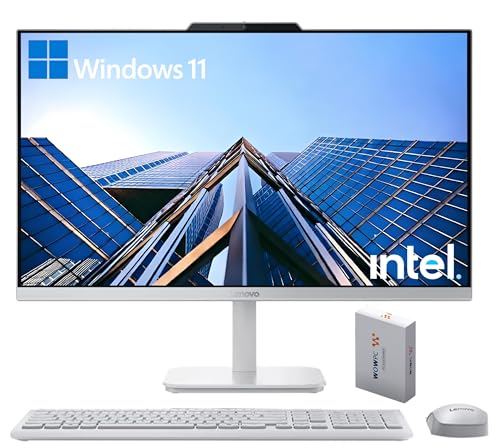
Lenovo 24-Inch FHD All-in-One Desktop Computer, 8GB RAM, 128GB SSD

Intel NUC 10 Pro NUC10i5FNH Core i5 Barebone

GEEKOM IT15 AI Mini PC, Ultra 9 285H, 32GB DDR5, 1TB SSD, Wi-Fi 7
GEEKOM AX8 Max Ryzen 7 8745HS Mini PC, 16GB DDR5

GEEKOM IT13 MAX Ultra 9 185H Mini PC, 24GB RAM

GEEKOM IT13 MAX AI Mini PC 2026, Ultra 9 185H, 24GB LPDDR5
The Picks, Examined More Closely
The Lenovo all-in-one makes sense in a home office where a single screen, keyboard, and mouse should form a complete workstation. Its 23.8-inch Full HD IPS panel uses anti-glare technology, which can make everyday documents and video calls easier to view in a bright room.
Unlike the barebone and compact systems later in the list, this setup includes Windows 11 Pro, a wireless keyboard, and a mouse. The Intel N100 processor handles ordinary office tasks, while 8GB of DDR4 memory and a 128GB PCIe SSD give the computer a ready foundation for documents, web work, and school assignments.
Useful Strengths
- The all-in-one design reduces cable clutter and combines the computer with a 23.8-inch display.
- Anti-glare IPS display imagery suits shared rooms and everyday study spaces.
- Wi-Fi 6 and Bluetooth 5.2 support modern wireless accessories and network connections.
- The included keyboard and mouse reduce the need for extra desktop peripherals.
- Eight USB ports plus HDMI and Ethernet offer practical connection options.
Practical Considerations
- The 8GB memory configuration may feel limited during heavy multitasking or large creative projects.
- The N100 chip is better suited to routine productivity than demanding rendering or intensive computation.
Quick Facts
Made For
Students, home offices, and shared family spaces benefit most from the included display and peripherals.
A Better Fit Elsewhere
GEEKOM IT15 AI Mini PC suits workrooms needing more memory, storage, and multi-display flexibility than this all-in-one provides.
A small cubicle or reception desk often needs a computer that can disappear into the setup. The Intel NUC 10 Pro uses a 25-watt Core i5-10210U processor with four cores, eight threads, and integrated Intel UHD graphics, giving it a useful balance of computing and energy efficiency.
The catch appears in the word barebone. It arrives without RAM, solid-state storage, or an operating system, so unlike the Lenovo all-in-one, it cannot go straight onto a desk. People comfortable choosing compatible components can build around it; first-time computer owners may prefer a complete package.
Everyday Advantages
- The compact chassis leaves room for a larger monitor, keyboard, or docking arrangement.
- Eight processor threads support typical office multitasking more comfortably than a basic dual-core system.
- Integrated graphics keep the system simple for document work, browsing, and business applications.
- The barebone format lets component choices match a specific budget and workload.
Things To Consider
- Memory, SSD, and operating-system setup all require additional attention before use.
- Display, keyboard, mouse, and possibly networking accessories must be accounted for separately.
- Compact dimensions can make internal servicing less convenient for inexperienced builders.
Who It Suits Best
Compact-workplace enthusiasts and experienced builders gain the most control from this customizable Intel NUC foundation.
Another Choice May Suit
Lenovo 24-Inch FHD All-in-One Desktop Computer suits anyone wanting a complete setup without assembling memory and storage.
A busy conference room can quickly turn a small mini PC into the center of a demanding workstation. The GEEKOM IT15 pairs an Intel Core Ultra 9 285H with 16 cores, 32GB of DDR5 memory, and a 1TB SSD, making it the strongest fit here for enterprise desks that handle several demanding applications at once.
The listed 99 TOPS figure describes trillions of operations per second, a measure of theoretical AI-related processing capacity. Quad 8K or 4K display support and Wi-Fi 7 further suit modern meeting rooms, digital signage, and multi-panel workstations.
Noteworthy Benefits
- Sixteen CPU cores provide substantial parallel processing for demanding business software.
- Thirty-two gigabytes of DDR5 memory supports heavier multitasking and more active data.
- The 1TB SSD offers useful capacity for applications, project files, and local assets.
- Quad high-resolution display support suits information-dense and multi-monitor environments.
- Intel Arc 140T graphics add a dedicated GPU component for visual workloads.
Possible Compromises
- The high-core-count platform is unnecessary for light document work.
- Four high-resolution displays require a matching desk, cables, and compatible adapters.
- Specialized datasets and virtual environments can still exceed 32GB of memory.
Technical Sheet
Best Suited To
Business deployments, meeting rooms, and digital signage stations benefit from its processing and display capacity.
Where Another Pick Shines
GEEKOM AX8 Max Ryzen 7 8745HS Mini PC offers a more modest eight-core alternative for technical workspaces without quad-display demands.
An engineering office or editing suite often needs a capable computer without filling the desk with a tower. The GEEKOM AX8 Max places an eight-core Ryzen 7 8745HS processor, reaching up to 4.9GHz, into a compact mini PC format suited to CAD, media, and trading workspaces.
Compared with the GEEKOM IT15 AI Mini PC, the AX8 Max uses an AMD processor with fewer listed cores and half the memory, but it also includes a 1TB SSD. The trade-off centers on workload and expansion needs rather than desk space, and the “Max” designation gives this model a clear performance-oriented identity.
Advantages To Know
- Eight Ryzen 7 cores support demanding office, design, and technical applications.
- The compact enclosure preserves desk area for monitors and specialized equipment.
- DDR5 memory handles modern productivity and creative multitasking.
- A 1TB SSD provides useful room for active projects and media files.
Minor Gripes
- Sixteen gigabytes of memory may become restrictive when many large applications run together.
- The eight-core Ryzen configuration offers less listed parallelism than the IT15’s 16-core chip.
Feature Snapshot
The Right Fit
Creative studios, automotive teams, and technical offices benefit from the Ryzen 7 chip and compact format.
Swap It Out When
GEEKOM IT15 AI Mini PC is the stronger match for parallel applications and four-display deployments requiring more memory.
A video editor working from a small studio may appreciate a full desktop-class processor without a large tower. The GEEKOM IT13 MAX uses the Intel Core Ultra 9 185H, a 16-core and 22-thread chip reaching up to 5.1GHz, alongside Intel Arc graphics and an AI Boost NPU.
The NPU is a dedicated processor for selected AI tasks, while the Arc graphics component handles visual work. This configuration suits 4K video editing, 3D design, coding, and 8K media workflows, although the included 500GB SSD may fill quickly with large project libraries.
What Makes Sense
- The 16-core, 22-thread processor handles rendering, coding, and application switching.
- Twenty-four gigabytes of memory supports substantial creative multitasking.
- Intel Arc graphics and an AI Boost NPU suit visually intensive and AI-assisted work.
- The SSD is upgradeable, giving creators a path beyond the original capacity.
Small Caveats
- Large video projects and 3D assets can consume a 500GB SSD quickly.
- Twenty-four gigabytes of memory is ample for most work, but very large projects may need more.
- A separate display, keyboard, and mouse are needed for the full workstation experience.
Who Should Grab It
Video editors, developers, and 3D designers benefit most from the processor, graphics, and upgradeable storage.
Look Elsewhere When
GEEKOM IT15 AI Mini PC suits deployments prioritizing 32GB of memory, 1TB of storage, and quad high-resolution displays.
Corporate studios and specialized deployment teams can use the GEEKOM IT13 MAX AI Mini PC as a compact compute platform. Its Intel Core Ultra 9 185H provides 16 cores and 22 threads, reaching up to 5.1GHz, while 24GB of LPDDR5 memory supports demanding applications without filling a full desktop tower.
That processor and memory combination closely resembles the GEEKOM IT13 MAX listed earlier, but this listing identifies a 500GB SSD and emphasizes the 2026 AI Mini PC configuration. It supports 8K media workflows, making it a credible fit for creative studios, simulation desks, and compact enterprise installations.
Why It Works Well
- The 16-core processor provides strong parallel performance for compute-heavy applications.
- Twenty-four gigabytes of LPDDR5 memory handles advanced creative and business workloads.
- Eight-core media support suits high-resolution editing and professional displays.
- The compact chassis supports deployments where full-sized towers are impractical.
Where It May Fall Short
- The 500GB SSD may be modest for large media collections and project archives.
- The fixed 24GB configuration offers less memory than the 32GB GEEKOM IT15 option.
- Display and input accessories remain separate from this mini PC setup.
Key Product Details
Built With In Mind
Creative studios and enterprise deployment teams benefit from the combination of processing power and compact construction.
Reach For A Different Pick When
GEEKOM AX8 Max Ryzen 7 8745HS Mini PC better serves technical offices favoring AMD processing and 1TB of storage.
Where Your Desktop Budget Should Go
Start With The Workload
Document editing, browsing, video calls, and coursework place memory and display quality ahead of processor specialization. Video editing, 3D design, code compilation, and large project files benefit from additional cores, a capable GPU, and faster storage. A complete all-in-one is convenient, while a mini PC offers more freedom once peripherals are accounted for.
Memory And Storage Matter
Eight gigabytes suits lighter productivity, though heavy browser sessions and creative software can make that amount feel modest. A 500GB SSD may fill quickly with video, while a 1TB option offers more room for active projects. Barebone computers need compatible memory and storage added before use.
Account For The Whole Desk
A mini PC needs a monitor, keyboard, mouse, and suitable network or audio connections. An all-in-one consolidates the display and basic peripherals, making it easier to establish a complete workstation. Multi-display deployments also require the correct cables, adapters, and desk space.
Mini PC Or All-in-One?
I favor the Lenovo all-in-one for a straightforward home-office setup. For a compact professional desk, the GEEKOM IT15 AI Mini PC offers stronger memory and display capability, while the Intel NUC 10 Pro appeals to people ready to configure the internal components themselves.
Two Lessons Before I Make the Call
Mistakes Worth Dodging
A barebone listing is not a complete computer, and a mini PC is not an all-in-one. Check the included monitor, keyboard, mouse, memory, storage, and operating system before calculating the full setup cost.
What Separates Premium From Basic
Higher-tier processors add cores, graphics capability, and faster memory for demanding work. That extra capability matters for media editing, simulation, and large multitask loads, while routine office work can be served by a more basic configuration.
Frequently Asked Questions
Is a mini PC better than an all-in-one desktop?
A mini PC offers greater flexibility and typically requires separate peripherals, while an all-in-one provides a simpler, more integrated setup. The Lenovo model suits people wanting one complete package, whereas mini PCs fit desks with separate monitors.
Is 8GB of RAM enough for home office work?
Eight gigabytes handles documents, browsing, messaging, and routine school tasks comfortably. Heavy multitasking, large spreadsheets, and creative applications can benefit from additional memory.
Does a barebone Intel NUC include memory and storage?
The Intel NUC 10 Pro NUC10i5FNH is a barebone system without RAM, SSD, or an operating system. Compatible components and installation are required before use.
Which mini PC has the most listed memory?
The GEEKOM IT15 AI Mini PC has 32GB of DDR5 memory, compared with 24GB for the GEEKOM IT13 MAX models and 16GB for the GEEKOM AX8 Max. Memory-intensive business and creative work gives the IT15 an advantage.
Is 500GB enough storage for video editing?
A 500GB SSD can hold an active project, but high-resolution footage, project files, and applications may consume that capacity quickly. The GEEKOM IT13 MAX model offering upgradeable storage gives editors more flexibility.
Final Verdict
I would start with the Lenovo for the simplest complete home-office arrangement, then move toward a GEEKOM mini PC for compact professional desks and heavier workloads. The Intel NUC remains attractive for people ready to select compatible components. The honest choice comes down to setup simplicity, memory, storage, and the number of displays the workspace actually needs.
