
A coding desk often has to balance a busy editor, several browser tabs, containers, and remote servers without becoming a miniature server rack. I focus on processor capacity, memory, storage, connectivity, and desk space so developers, freelancers, and students can find hardware that fits the work instead of merely carrying impressive-looking labels.
The Shortlist At A Glance

HP Desktop Pro Tower, 32GB RAM

Dell Pro Tower, i3-14100, 16GB
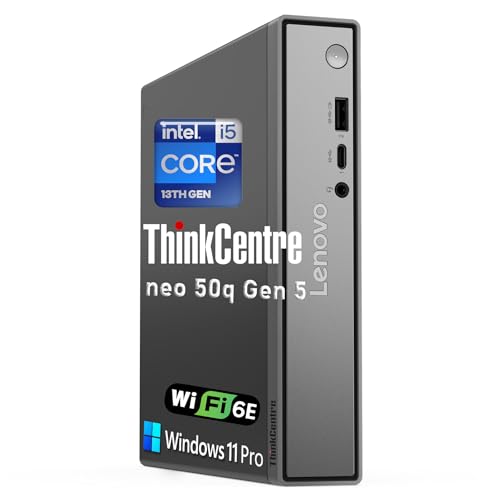
Lenovo ThinkCentre neo 50q Gen 5

Lenovo ThinkCentre neo 50q, 16GB, Wi-Fi 6

Lenovo ThinkCentre neo 50q 1L

ZYNEEX Ryzen 5 5500 Gaming PC, RTX 3050 6GB
A Closer Look At Each Pick
The HP Desktop Pro Tower gives me plenty of breathing room for development work that involves multiple projects, browser tabs, and a remote server. Its 32GB of RAM acts as the machine’s working memory, while the 1TB NVMe SSD provides fast access to project files and software. Compared with the Dell Pro Tower, this model carries twice the stated memory and double the storage capacity, which matters for larger repositories and local development environments.
The included keyboard, mouse, and wireless USB adapter make this a convenient complete setup rather than a bare tower requiring extra purchases. I find that especially useful for a home office assembled quickly, although the 6.10 by 11.93 by 13.27-inch chassis needs a little more desk or floor space than the Lenovo mini desktops.
What Earns Its Place
- 32GB of RAM supports several heavy applications without constant unloading.
- The 1TB PCIe NVMe SSD combines generous file capacity with quick access.
- Keyboard and mouse reduce the setup required for a new workstation.
- Front USB ports and a headset connection simplify everyday peripheral access.
- HDMI and VGA outputs provide practical options for one or two monitors.
Practical Considerations
- The full tower occupies more space than each ThinkCentre neo 50q model.
- Four CPU cores and eight threads may feel limited for heavy parallel compilation or large container fleets.
Key Specs
Made For Multitasking Developers
This tower suits developers who regularly keep multiple services, editors, and virtual environments open at the same time.
Another Choice May Suit
The Lenovo ThinkCentre neo 50q 1L serves developers who value a much smaller footprint and a newer hybrid processor more than 32GB of memory.
The Dell Pro Tower is a conventional business desktop for programmers who want current Intel processing without moving to a tiny system. The 14th-generation Core i3-14100 provides four cores and eight threads with speeds reaching 4.7GHz, a sensible foundation for IDEs, Git operations, web development, and virtualized business applications.
Windows 11 Pro adds the professional management and security tools expected in an office environment. DisplayPort 1.4 and HDMI 2.1 make it easier to connect modern displays, while the included accidental-damage coverage and round-the-clock assistance offer useful ownership support beyond the manufacturer’s warranty.
Practical Pluses
- The 14th-generation i3 handles routine coding and office tasks efficiently.
- 16GB of DDR5 memory gives newer applications a responsive working set.
- A 512GB PCIe SSD supports quick startup and application loading.
- DisplayPort 1.4 and HDMI 2.1 cover common modern monitor connections.
- Protection coverage includes accidental damage and breakdown support.
Worth Noting
- Sixteen gigabytes is less generous than the HP tower’s 32GB.
- A 512GB drive also requires closer file management than the HP’s 1TB SSD.
- Four CPU cores may not suit unusually parallel build workloads.
Right Fit For
Office-based developers and IT-managed teams benefit from the Windows 11 Pro feature set and straightforward tower design.
A Better Fit Elsewhere
The HP Desktop Pro Tower, 32GB RAM offers more memory and storage for developers running several containers or large project folders simultaneously.
Measuring 7.05 by 7.20 by 1.42 inches, the ThinkCentre neo 50q changes the desktop conversation by fitting into a much smaller footprint. I can picture it beside a monitor or tucked beneath a compact workstation, where the tower options would consume valuable room. The processor also moves beyond the four-core layout of both earlier picks.
The Core i5-13420H uses eight cores and 12 threads, reaching up to 4.6GHz with a 12MB cache. That combination suits developers running an editor, browser-based documentation, and several lighter services without needing a large tower. The honest limitation is physical: compact does not mean expandable, so future hardware additions deserve careful thought.
Useful Strengths
- Eight CPU cores provide more parallel capacity than the i3 towers.
- The tiny chassis preserves usable desk space in compact offices.
- Twelve threads assist with multitasking across development tools.
Small Caveats
- The slim 1.42-inch enclosure may limit room for later internal expansion.
Feature Snapshot
Built With In Mind
Remote workers and students benefit from the small footprint and eight-core processor when office space is tightly controlled.
Consider Something Else When
The Lenovo ThinkCentre neo 50q, 16GB, Wi-Fi 6 is a better fit for a turnkey setup that needs stated memory, storage, wireless networking, and Windows 11 Pro.
This complete configuration of the ThinkCentre neo 50q is more practical for many offices than the bare processor emphasis of the preceding listing. It combines the Core i5-13420H with 16GB of DDR5 memory, a 512GB PCIe SSD, Wi-Fi 6, and Windows 11 Pro. I appreciate that the main components are stated clearly rather than being spread across separate configuration choices.
Wi-Fi 6 is a newer wireless standard intended for efficient communication with compatible routers and access points. The compact 7.05 by 7.20 by 1.42-inch enclosure then makes the system practical for reception desks, shared offices, and home workspaces where a full tower would feel cumbersome.
The Helpful Details
- The eight-core i5 handles coding, conferencing, and business applications.
- 16GB of DDR5 memory supports a conventional professional workload.
- The 512GB PCIe SSD provides quick file access and project storage.
- Wi-Fi 6 offers modern wireless connectivity for flexible offices.
- Windows 11 Pro includes business-oriented management features.
Less Ideal Details
- The compact enclosure offers less room for internal expansion than a tower.
- Its 512GB SSD holds half the storage stated for the HP Desktop Pro Tower.
Who Will Love This
IT-supported offices and mobile professionals benefit from the combination of Windows 11 Pro, wireless networking, and a compact enclosure.
Where Another Pick Shines
The ZYNEEX Ryzen 5 5500 Gaming PC, RTX 3050 6GB suits developers who need discrete graphics for graphics-heavy applications or local accelerated workloads.
The Core 5 210H version of the ThinkCentre neo 50q 1L brings a newer hybrid processor design to the same general idea of a compact development machine. Four performance cores handle demanding tasks, while four efficiency cores can manage lighter background work with different power characteristics. For a developer moving between an editor, terminal, and remote services, that balance can be more useful than raw core count alone.
I see this model as a sensible compact option for a fresh workstation, though the listing concentrates on processor capability rather than a complete set of memory and storage details. The 1-liter form also means a developer must accept less physical expansion space than a standard tower provides.
Benefits That Matter
- Eight cores split between performance and efficiency tasks.
- Twelve threads support concurrent development workloads.
- Speeds reach up to 4.8GHz for responsive short bursts.
- The one-liter enclosure preserves substantial desk space.
Possible Compromises
- Processor emphasis leaves fewer stated details for comparing complete configurations.
- The compact case restricts room for internal expansion.
- A dedicated graphics card is not part of the stated configuration.
Core Details
The Right Fit
Compact-workstation developers benefit from hybrid processing, particularly those balancing compilation, terminals, and background services.
Swap It Out When
The HP Desktop Pro Tower, 32GB RAM is the better match for developers who prioritize abundant memory, large storage, and more room for physical expansion.
The ZYNEEX desktop changes the decision from basic computing to graphics capability. Its Ryzen 5 5500 processor uses six cores and 12 threads, while the GeForce RTX 3050 supplies dedicated graphics rather than relying solely on integrated graphics. That distinction matters for game development, 3D work, GPU-accelerated tooling, and developers who also want a capable gaming machine.
Storage is another practical strength: the 1TB NVMe SSD provides room for engines, source-control repositories, and project assets, and 16GB of DDR4 memory supports a busy development session. The ARGB air-cooling system and Wi-Fi support complete a flexible tower setup, although 6GB of graphics memory remains the key constraint for unusually demanding visual workloads.
Advantages To Know
- The RTX 3050 provides dedicated graphics for visual development tasks.
- Six CPU cores and 12 threads support multitasking and compilation.
- 16GB of DDR4 3200MHz memory handles common development workloads.
- The 1TB NVMe SSD combines substantial capacity with fast access.
- ARGB cooling and built-in Wi-Fi suit a shared gaming setup.
Details To Watch
- Six gigabytes of graphics memory can constrain very large 3D scenes or local models.
- Its 16GB system memory is lower than the HP tower’s stated 32GB.
Feature Card
Whose Shelf It Belongs On
Game developers, streamers, and creative programmers benefit from the dedicated RTX graphics card and expandable tower format.
Another Choice May Suit
The Dell Pro Tower, i3-14100, 16GB is more appropriate for conventional business development that places little emphasis on discrete graphics.
What Matters Before Buying a Coding Desktop
Processor Cores and Threads
Cores handle separate processing tasks, while threads let a core address multiple tasks concurrently. I generally favor a Core i5 or Core 5 configuration with eight cores for developers running builds, containers, and communication tools together. A four-core Core i3 can still handle focused web development, but heavier parallel work gives the larger models more breathing room.
Memory and Project Storage
RAM is temporary working memory, and SSD capacity determines how many repositories, virtual machines, dependencies, and build artifacts can live locally. Sixteen gigabytes covers many common development sessions, while 32GB gives large repositories and multiple containers more room to remain active. A 1TB SSD is easier to live with than a smaller drive when Docker images, SDKs, and game engines accumulate.
Graphics, Connectivity, and Physical Space
Discrete graphics matter for shader development, 3D rendering, local accelerated software, and gaming, but they add little to ordinary text editing or web development. Display connections should match the selected monitor, while wireless standards and Ethernet support determine networking options. Mini desktops reclaim desk space, yet towers generally make internal expansion and cooling easier to accommodate.
Avoiding Costly Desktop Mistakes
Common Shopping Slip Ups
Processor cores attract attention, but daily coding comfort often depends more on memory, SSD capacity, and monitor connectivity. I would avoid buying a compact model without checking desk dimensions and expansion needs. A discrete graphics card also adds little to standard repository work, so paying extra for one should match a specific development task.
What The Higher Tier Buys
A higher-tier desktop may provide more cores, additional memory, larger storage, stronger integrated graphics, or a dedicated GPU. The extra capability becomes worthwhile for parallel builds, large local projects, 3D work, or frequent switching between demanding applications. Basic editing and web development can leave much of that additional hardware unused.
Frequently Asked Questions
How Much RAM Does a Coding Desktop Need?
Sixteen gigabytes handles standard editors, browsers, documentation, and lightweight containers. I would move toward 32GB for large repositories, virtual machines, or several development environments running together.
Is a Mini Desktop Good for Programming?
A mini desktop can be excellent for coding when its processor and memory match the workload. The Lenovo ThinkCentre neo 50q models are particularly attractive for developers who need less desk space and do not expect extensive internal expansion.
Does Coding Require a Dedicated Graphics Card?
Ordinary application development and web projects generally do not require one. A dedicated GPU becomes relevant for game engines, 3D rendering, shader work, local accelerated software, or combining development with substantial gaming.
Should a Coding Desktop Have Core i5 or Core 5?
Both can suit development, with the exact configuration mattering more than the naming. I would compare core count, memory, storage, connectivity, and case size, then choose the model that supports the intended software and workspace.
Is a Tower Better Than a Mini Desktop for Coding?
A tower provides more physical expansion room and easier cooling, while a mini desktop preserves desk space. I choose the tower for extensive upgrades and the mini desktop for a fixed, compact workstation setup.
Final Verdict
I find the HP Desktop Pro Tower, 32GB RAM the most balanced option for everyday coding because its memory and storage reduce friction across busy projects. The Lenovo ThinkCentre neo 50q models suit compact workspaces, the Dell Pro Tower fits managed office environments, and the ZYNEEX system stands apart for dedicated graphics. The right choice comes down to workload, storage needs, and the amount of physical space the desk can spare.
