
A graphic designer’s workstation has to keep several demanding applications organized without taking over the entire studio. These compact desktops approach that balance differently: some prioritize multi-monitor output, others emphasize color-conscious displays, and several bundle the peripherals needed to begin working without assembling a full tower setup.
The Leading Options At A Glance

HP Mini Desktop PC Intel i7-12700T 16GB RAM 512GB SSD 3X 4K Output Windows 11 Pro
HP Mini Desktop PC Intel i7-12700T 32GB RAM 1TB SSD 3X 4K Output Windows 11 Pro
HP Mini Desktop PC Intel i7-12700T 16GB RAM 1TB SSD 3X 4K Output Windows 11 Pro
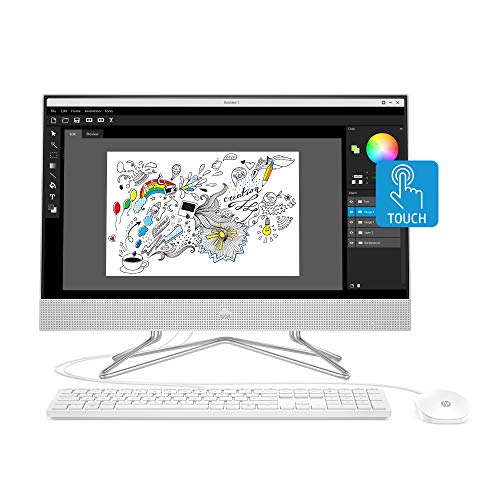
HP 24-inch All-in-One Touchscreen Desktop Ryzen 5 4500U 12GB RAM 512GB SSD

Dell 23.8-inch All-in-One Intel Core 3

HP OmniStudio 23.8-inch All-in-One FHD Ryzen 5 40 8GB RAM 512GB SSD 24-cv0002
Taking A Closer Look At The Options
Three displays can turn a cramped studio desk into a much more useful design station. This HP uses two DisplayPort connections and one HDMI connection for three 4K screens at 60Hz, a practical advantage for comparing layouts, artwork, and reference material side by side.
The 12th-generation Intel Core i7-12700T provides 12 cores, while the compact enclosure measures 6.97 inches. Compared with the all-in-one models later in the list, this machine offers more screen connections and a separate display arrangement, though its smaller storage capacity deserves attention for large project libraries.
Useful Highlights
- Three 4K outputs support detailed canvases, client previews, and reference windows without requiring a large tower.
- 16GB of DDR4 memory, meaning system memory, gives active applications room to remain open during demanding sessions.
- The 512GB NVMe solid-state drive provides quick access to applications and recently used design files.
- Seven USB ports, including two 20Gbps USB-C connections, cover peripherals such as tablets, drives, and calibrated monitors.
- The wired keyboard, mouse, stand, 90W adapter, and Windows 11 Pro create a complete desk setup.
Practical Considerations
- Three active screens require compatible DisplayPort or HDMI cables, along with enough desk area and suitable monitor placement.
- The 512GB drive may require careful asset organization for extensive footage, texture libraries, and archived client files.
Core Details
Built With In Mind
This desktop suits freelance designers and studio teams that regularly work across multiple screens in a small office.
A Better Fit Elsewhere
Designers wanting more memory and storage should consider the HP Mini Desktop PC Intel i7-12700T 32GB RAM 1TB SSD 3X 4K Output Windows 11 Pro.
The clearest reason to move beyond the 16GB configuration is simple: this version doubles the system memory and doubles the NVMe storage. That extra capacity matters in a busy studio where illustration files, browser references, video timelines, and client applications may all remain open.
Unlike the more affordable HP Mini Desktop PC Intel i7-12700T 16GB RAM 512GB SSD 3X 4K Output Windows 11 Pro, this model retains the same compact body and three-display arrangement. The trade-off is a larger investment for a workstation whose storage demands are likely to grow over time.
What Helps Most
- 32GB of DDR4 memory gives demanding multitasking more breathing room than the 16GB alternative.
- The 1TB NVMe drive holds larger project libraries and reduces the need to move active assets to external storage.
- Three 4K display outputs preserve the multi-screen workflow valued by designers and editors.
Small Caveats
- Extra memory and storage add cost without making the underlying processor any more powerful than the 16GB model.
- A separate monitor setup adds desk space and cable management compared with a single all-in-one display.
Key Product Details
Made For
Designers handling large libraries, frequent video editing, or simultaneous client and creative applications benefit most from this configuration.
Another Choice May Suit
The HP Mini Desktop PC Intel i7-12700T 16GB RAM 1TB SSD 3X 4K Output Windows 11 Pro better fits creators who prioritize storage over additional memory.
This middle HP mini configuration makes a practical compromise between storage capacity and memory. Its 1TB NVMe drive gives designers room for larger libraries, while 16GB of DDR4 handles a substantial set of working applications without taking on the higher cost of the 32GB model.
For a freelance designer moving between illustration, layout, and occasional video work, that balance feels sensible. The three-screen capability remains more useful for reference-heavy work than the single built-in screens offered by the all-in-one alternatives.
What Pays Off
- A 1TB NVMe drive provides twice the storage capacity of the 512GB HP mini configuration.
- 16GB of memory supports routine creative multitasking while leaving the 32GB model available for heavier loads.
- Three 4K outputs make it practical to separate canvas, tools, and client reference material.
- The included keyboard, mouse, stand, adapter, and Windows 11 Pro simplify initial setup.
Points To Keep In Mind
- Large motion-graphics or video projects may place more demand on memory than the 16GB configuration can comfortably absorb.
- Three external screens require suitable cables, monitor support, and sufficient desk width.
- Unlike an all-in-one, this mini desktop does not include the display in the package.
The Right Fit
This model suits freelancers and small creative teams that need substantial file storage alongside a three-screen workspace.
Reach For A Different Pick When
Designers running exceptionally memory-intensive applications should favor the HP Mini Desktop PC Intel i7-12700T 32GB RAM 1TB SSD 3X 4K Output Windows 11 Pro.
A touchscreen can be genuinely useful during visual review, presentation work, or navigating touch-friendly creative applications. Paired with a 24-inch display, this HP all-in-one offers a larger built-in canvas than the mini desktops without requiring a separate monitor for every desk.
The Ryzen 5 4500U, 12GB of memory, and 512GB solid-state drive suit everyday illustration, layout, and presentation work. Compared with the Dell 23.8-inch All-in-One Intel Core 3, the touch interface and adjustable stand give this model a more hands-on character for creative studios.
Positive Takeaways
- The 24-inch touchscreen supports direct interaction with compatible illustration and presentation tools.
- The all-in-one format reduces cable clutter and leaves desk space available for a keyboard, mouse, or drawing tablet.
- The removable panel is designed for hardware upgrades, adding a practical path for future expansion.
- A pop-up privacy camera retracts when it is not in use, which suits shared workspaces and video calls.
Trade Offs
- The 12GB memory configuration offers less room for heavy multitasking than the HP mini desktops with 16GB or 32GB.
- Windows 10 Home may lack some Windows 11 Pro administration and software-compatibility features.
Feature Snapshot
Who Will Love This
Presenters, illustrators, and home studios wanting a tidy touchscreen computer with an upgradeable internal design will appreciate this model.
Where A Sibling Pick Shines
Creative professionals working across three detailed displays should choose the HP Mini Desktop PC Intel i7-12700T 32GB RAM 1TB SSD 3X 4K Output Windows 11 Pro instead.
Display quality can matter more than raw specifications for designers reviewing color, type, and interface details. This Dell uses a 23.8-inch full-high-definition IPS panel with a 99% sRGB color range, giving it a clear visual-design angle in a compact all-in-one format.
The narrow border keeps the screen relatively unobtrusive, while Dell ComfortView Plus is designed for long viewing sessions. Compared with the HP 24-inch touchscreen model, this machine favors a conventional display and Intel Core 3 100U processor rather than touch-first interaction.
Where It Delivers
- The 99% sRGB IPS display provides a broad color range for interface design and visual review.
- Full-high-definition resolution on a 23.8-inch panel offers a practical balance of detail and desk footprint.
- The narrow-border all-in-one construction creates a clean appearance suited to smaller spaces.
Less Ideal Details
- The single built-in display offers less workspace flexibility than the three-output HP mini desktops.
- Designers running many demanding applications should assess the Core 3 100U against their particular workload before committing.
Whose Shelf It Belongs On
This all-in-one suits design students, home studios, and office workers who value a color-conscious display and minimal desk clutter.
Consider Something Else When
Professionals who routinely separate tools, artwork, and references across multiple screens should favor the HP Mini Desktop PC Intel i7-12700T 16GB RAM 1TB SSD 3X 4K Output Windows 11 Pro.
The OmniStudio brings a different mood to a creative workspace through its 23.8-inch full-high-definition display and cotton-white finish. It suits a home office where coordinated furniture and a compact computer matter as much as application performance.
An AMD Ryzen 5 40 processor and Radeon graphics provide the hardware foundation for everyday design work, while 8GB of memory remains the deciding constraint. Compared with the Dell 23.8-inch All-in-One Intel Core 3, this model has less listed memory, so extensive multitasking deserves closer scrutiny.
The Helpful Details
- The Radeon graphics configuration supports general visual-design and media applications in a compact enclosure.
- The cotton-white finish and narrow 23.8-inch format suit styled home-office setups.
Where It May Fall Short
- The 8GB memory allocation is the main limitation for keeping several demanding creative applications open.
- A 512GB drive is modest for designers who regularly retain large footage, texture, and image libraries.
- The built-in 23.8-inch screen provides less immediate workspace than a multi-monitor arrangement.
Technical Highlights
Right Fit For
Light-to-moderate design work, study, and home-office use suit this stylish all-in-one with modest application demands.
Swap It Out When
Professionals managing large files and concurrent editing tasks should choose the HP Mini Desktop PC Intel i7-12700T 32GB RAM 1TB SSD 3X 4K Output Windows 11 Pro.
What Matters in a Creative Desktop
Memory for Active Applications
Memory holds data from open applications, unsaved documents, and temporary project files. I would give particular attention to 16GB or 32GB for designers running illustration software alongside browser-based research and communication tools, since a small allocation can force frequent restarts.
Storage for Project Libraries
A solid-state drive improves application loading and file access, but capacity determines how many large files remain close at hand. Designers working with video, layered images, or large texture collections should compare available storage with their active library rather than judging capacity by project count alone.
Display Connections and Color
Multi-monitor support creates more room for artwork, timelines, and references, while an IPS display with a stated sRGB range provides useful color information for digital work. The best fit depends on whether screen area, touch interaction, or a single coordinated computer matters more.
Avoid These Desktop Buying Traps
Common Shopping Slip Ups
The most common mistake is treating processor names as a complete measure of performance. Memory, storage, display quality, and application demands all shape the experience. Another common error is overlooking desk space, monitor cables, and the need for compatible peripherals.
What The Higher Tier Buys
Higher memory allows more applications and project data to remain active at once. More storage keeps large libraries available without constant transfers, while additional display outputs can remove the frustration of compressing working windows into a single screen.
Frequently Asked Questions
Is 16GB of RAM enough for graphic design?
Yes for many illustration, layout, and presentation workflows, especially when the computer is not running several intensive applications simultaneously. Video editing, 3D work, and large asset libraries benefit from 32GB.
Does a mini desktop support three monitors?
The HP mini models in this roundup support three 4K displays at 60Hz through a combination of DisplayPort and HDMI. Compatible monitors, cables, and sufficient desk space remain necessary.
Is an all-in-one better for a home studio?
An all-in-one reduces cable clutter and combines the computer with its display, which works well in compact rooms. A mini desktop offers more screen connections and usually makes it easier to arrange multiple monitors.
Should I prioritize RAM or SSD capacity?
RAM helps active applications run together, while SSD capacity determines how many project files remain readily available. Designers with heavy multitasking need memory, while large local libraries benefit from more storage.
Is a touchscreen useful for graphic design?
A touchscreen helps with touch-compatible illustration, presentation, and review applications. Precise pen or mouse work still depends on the hardware and software involved, so the built-in display should not replace a color-calibrated external monitor by default.
Final Verdict
The HP mini desktops lead for multi-monitor work, with the 32GB model offering the strongest balance of memory, storage, and screen capacity. The touchscreen HP suits touch-oriented creators, while the Dell and OmniStudio all-in-ones fit smaller, style-conscious spaces where a coordinated display matters more than expansion. The right choice comes down to screen layout, project size, and the number of demanding applications kept open each day.
