
A comfortable office setup starts with the space in front of you, but a computer with a cramped screen can undo that comfort. Home offices, study rooms, and shared workspaces each have different needs, from a compact all-in-one to a broad desk mat that gives a mouse and keyboard more room to move. I focus on the details that shape daily comfort, storage, screen handling, and desk organization.
The Leading Options At A Glance
Deokke Large Gaming Mouse Pad 31.5 x 15.7 in, Black Leopard

SXCKANG Gothic Moth Desk Pad 35.4 x 15.7 in
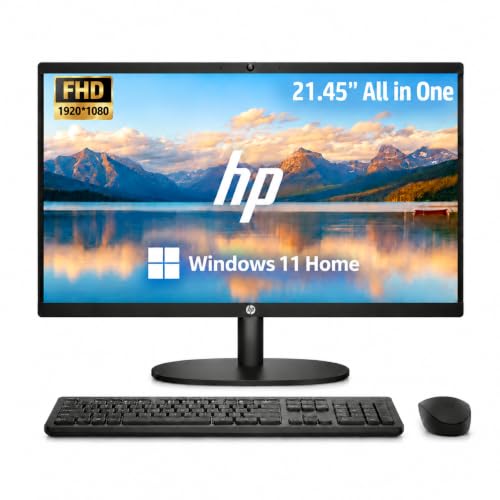
HP 23.8-inch All-in-One Desktop, 8GB RAM, 512GB SSD

HP 23.8-inch All-in-One Desktop, 16GB RAM, 1TB SSD

HP 23.8-inch All-in-One Desktop, 16GB RAM, 512GB SSD
HP 23.8-inch All-in-One Desktop, 32GB RAM, 1TB SSD
Inside Each Recommended Option
A crowded desk makes document work and mouse control feel awkward, so the Deokke mat expands the usable area around a keyboard and mouse. Its 31.5 by 15.7-inch footprint gives both hands room without taking over an entire workstation. That makes it a practical addition to a home office where desk space carries a premium.
The black leopard graphic brings more character than a plain work surface, while the micro-woven top layer gives optical, mechanical, and wireless mice a consistent surface for movement. Compared with the larger SXCKANG option, this mat takes up less desk width and presents a more restrained pattern for a conventional office.
Features That Help
- The wide surface accommodates a mouse, compact keyboard, and writing area together.
- The soft micro-woven texture supports smooth movement across supported mouse types.
- A natural-rubber underside helps keep the mat from shifting during active use.
- Reinforced stitched edges protect the perimeter from fraying and deformation.
- The washable surface makes drink spills and routine desk messes easier to address.
Practical Considerations
- The 31.5-inch width may crowd a compact desk, so measuring the available area matters.
- The bold leopard print may feel less suitable for a deliberately understated office.
Quick Facts
Made For
This mat suits hybrid workers and students who need more mouse freedom on a medium or large desk.
A Better Fit Elsewhere
The SXCKANG Gothic Moth Desk Pad suits people who prioritize a wider surface and a more expressive black-and-orange design.
The SXCKANG desk pad turns an ordinary workstation into a more personal space with its moth, floral, and moon-phase artwork. The black background grounds the orange and botanical details, giving a creative desk or gaming setup a clear visual identity without needing extra decorative objects.
At 35.4 by 15.7 inches and 3 millimeters thick, the mat offers more width than the Deokke model and room for a mouse, gaming keyboard, laptop, and other small accessories. Its smooth woven top suits work and gaming, while the rubber underside provides a more stable base during long sessions.
Noteworthy Benefits
- The broad 35.4-inch width creates a shared landing area for several devices.
- The 3-millimeter profile adds a thin protective layer without substantial bulk.
- The detailed pattern gives a plain desk a distinctive gothic theme.
- A water-resistant coating helps limit damage from small drink spills.
Small Caveats
- The wide footprint demands a roomy desk and may be awkward on a narrow workstation.
- The protective coating calls for prompt wiping rather than leaving liquid sitting on the surface.
Right Fit For
This mat suits creative professionals, gamers, and students who enjoy a workspace with a strong visual theme.
Another Choice May Suit
The Deokke Large Gaming Mouse Pad suits people who want a roomy work surface with a less ornate animal-print appearance.
A single cable-heavy computer can make a small office feel crowded, and this HP all-in-one avoids that visual clutter by housing the display, camera, speakers, and computer together. Its 23.8-inch screen fits comfortably into a home office, dorm, or shared study area while leaving more desk space available.
The 1920 by 1080 IPS panel supports touch input, wide viewing angles, and an anti-glare finish, which helps during long document sessions or video calls. The 8GB memory and 512GB solid-state drive cover basic office needs, although the larger RAM and storage configurations suit heavier multitasking more comfortably.
The Value In It
- The integrated construction reduces visible components around the display.
- Touch controls add practical value during browsing and everyday app use.
- Wi-Fi 6 and Bluetooth 5.3 support modern wireless accessories.
- The included keyboard and mouse simplify the initial desk setup.
Worth Noting
- Eight gigabytes of memory can feel limited with many large applications open.
- A 512GB drive offers less local file space than the 1TB configurations.
- The Intel Core i3-N300 is intended for routine office tasks rather than intensive workloads.
Feature Snapshot
Who Will Love This
This configuration suits first-time computer users handling email, documents, browsing, and occasional video calls.
Where A Sibling Pick Shines
The HP 23.8-inch All-in-One Desktop with 16GB RAM and 1TB SSD suits heavier multitasking and larger local file collections.
The 16GB and 1TB configuration gives this HP all-in-one the most balanced profile among the conventional office choices. It has enough memory for a busy collection of browser tabs, documents, and communication tools, plus more local storage for project folders and media.
That balance matters for someone moving between spreadsheet work, video meetings, and personal study. The touchscreen remains useful for direct interaction, while the anti-glare IPS display and 178-degree viewing angle help when the computer is positioned away from direct frontal light. Nothing looks flashy, and that restraint suits a shared room.
Reasons It Performs
- Sixteen gigabytes of RAM supports demanding everyday multitasking.
- The 1TB SSD provides room for applications, documents, photos, and videos.
- The touchscreen makes routine app navigation feel direct and natural.
- Integrated speakers and camera reduce the need for separate desk equipment.
- Windows 11 Pro provides a familiar environment for office and study tasks.
Details To Watch
- The 23.8-inch display may feel modest beside a larger multi-monitor arrangement.
- The i3-N300 processor favors general productivity rather than specialized creative workloads.
Key Specs
Built With In Mind
This model suits remote workers, students, and home offices that regularly mix document editing, research, and video calls.
Swap It Out When
The HP 23.8-inch All-in-One with 32GB RAM and 1TB SSD better fits intensive multitasking across many simultaneous applications.
Sixteen gigabytes of memory makes this configuration more comfortable for multitasking than the 8GB model, while the 512GB drive keeps the footprint of the computer simple. I see it as a practical middle point for study spaces where browser use, written assignments, and video classes overlap throughout the day.
The same 23.8-inch touchscreen and all-in-one construction apply, so desk organization remains straightforward. Compared with the 1TB version, the storage reduction may require more careful file management, but it still offers a useful amount of local capacity for documents, coursework, and routine media.
Everyday Wins
- Sixteen gigabytes of RAM gives active applications more room to coexist.
- The 512GB SSD provides useful capacity for everyday documents and applications.
- The compact body keeps computer, camera, display, and speakers in one unit.
- Touch navigation adds flexibility for browsing, media, and shared tasks.
Trade Offs
- Local storage is more limited than the 1TB HP configurations.
- Touch features may take more desk attention than a conventional display and keyboard setup.
The Right Fit
This model suits students and office users who prioritize smooth multitasking while keeping file storage moderate.
Consider Something Else When
The HP 23.8-inch All-in-One with 16GB RAM and 1TB SSD suits people who retain larger media archives or project collections locally.
Thirty-two gigabytes of memory makes this the roomiest configuration for an office desktop, particularly when numerous browser tabs, work applications, and communication windows remain open together. The 1TB drive adds generous local storage, so large project folders do not need to be constantly moved to external storage.
The familiar strengths of the all-in-one design remain, including the touch-enabled 23.8-inch display, integrated camera, speakers, and wireless connectivity. For a powerful multitasker, the honest trade-off is that the i3-N300 processor remains an everyday-office component, so extra memory does not turn the machine into a specialized workstation.
Where It Helps
- Thirty-two gigabytes of RAM supports extensive simultaneous application use.
- The 1TB SSD accommodates extensive document, media, and application collections.
- The touchscreen supports direct interaction for browsing and routine tasks.
- Integrated components keep a busy desktop visually orderly.
Factors To Consider
- The additional memory provides the clearest benefit when many applications are already open simultaneously.
Core Details
Whose Shelf It Belongs On
This configuration suits intensive multitaskers, remote workers, and shared households that keep many work applications active.
Reach For A Different Pick When
The HP 23.8-inch All-in-One with 16GB RAM and 1TB SSD offers a more restrained configuration for lighter everyday computing.
What Matters Before Buying an Office Computer
Match Memory to the Workday
RAM is short-term working memory for open applications and files. The 8GB model suits basic browsing and documents, while 16GB feels more comfortable for frequent tab-heavy work. The 32GB option makes sense when several demanding applications remain open together.
Keep Storage Practical
SSD storage holds applications and local files, and the difference between 512GB and 1TB becomes noticeable with large document collections, photos, or videos. A 512GB drive still works for lighter use, though regular file organization becomes more important.
Check the Entire Footprint
An all-in-one reduces visible cables and separate equipment, but the 23.8-inch display still needs adequate desk depth. Measure the work area before placing one beside a laptop stand, monitor arm, or large keyboard.
Choose the Input Experience
A touchscreen adds direct interaction for browsing, media, and shared tasks. A conventional display may feel more focused for long document sessions, so the input preference should guide the final choice.
Two Details That Affect Office Computer Choices
Mistakes Worth Dodging
A common mistake is judging only by screen size while overlooking desk depth, storage needs, and memory. Another is assuming a touchscreen replaces a comfortable keyboard setup. I would measure the desk, list the applications used each day, and check whether the display angle suits the room.
When Paying More Pays Off
Higher configurations add memory or storage rather than better everyday display features. Paying more makes sense when many applications run simultaneously or sizable files remain stored locally. For basic document work, the lower-memory model may already provide enough practical capacity.
Frequently Asked Questions
Can an all-in-one computer handle regular office work?
Yes, these models target browsing, email, documents, online learning, and communication. The 16GB and 32GB configurations provide more room for several applications running together.
Is 8GB of memory enough for an office computer?
It covers many basic tasks, including documents, browsing, and video calls. Heavy tab use and several demanding applications can make the 16GB or 32GB options more comfortable.
Does a touchscreen help with office work?
Touch controls make browsing, media, and some applications easier to operate directly. A keyboard and mouse remain useful for long typing sessions and detailed document work.
Is 512GB of storage sufficient?
It suits a moderate collection of applications, documents, and media. Local archives, large project files, and extensive media libraries benefit from the 1TB configurations.
Should an office desk have a large mouse pad?
A large mat gives the mouse and keyboard more room while helping protect the surface beneath them. Its footprint should be measured against the desk so the pad does not crowd the keyboard or other equipment.
Final Verdict
I would choose the 16GB RAM and 1TB SSD HP all-in-one for most office routines, then move up to 32GB RAM for heavy multitasking. The 512GB versions serve lighter storage needs, while the two large desk mats complement setups that need more room for mouse movement and a stronger visual identity. The best result comes from matching the computer, storage, and desk dimensions to the actual workspace.
