
For a Linux setup, the practical challenge is balancing processor capability, memory, storage, display support, and desk space without paying for performance the workload never needs. I would start with Linux distribution support and monitor arrangement, then compare each option against the workload. The six choices here cover stick-style and compact mini PCs, plus a higher-powered Tiny Desktop for demanding office and development tasks.
The Choices Worth Comparing

MeLE PC Stick PCG02 N100 8GB 128GB

MeLE Quieter 4C N100 Mini PC 16GB 512GB
MeLE Quieter 4C N150 Mini PC 8GB 128GB
MeLE Quieter 4C N100 Mini PC 8GB 128GB
MeLE Quieter 4C N150 Mini PC 8GB 256GB
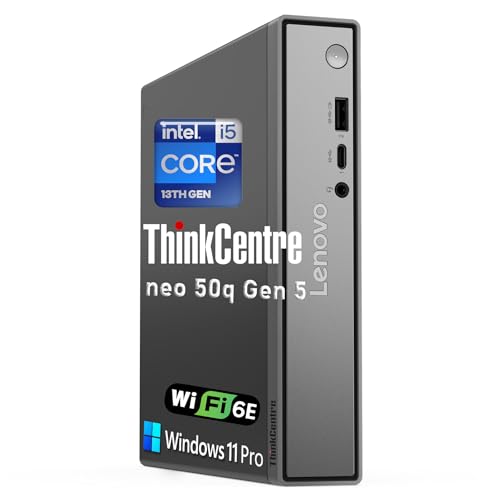
Lenovo ThinkCentre neo 50q Gen 5 i5
Inside Each Recommended Option
The MeLE PC Stick PCG02 is built around the idea that a Linux computer can disappear behind a display. Its male HDMI 2.0 connector plugs directly into many monitors, while the 137.5 × 53 × 16.3 mm body weighs only 130 g. A VESA mount, the standard used for attaching equipment to display backs, also allows a cleaner installation.
For a study desk or media shelf, the N100 processor and 8GB memory appear suited to browsing, Linux learning, video calls, and light office work. Unlike the larger MeLE Quieter models reviewed later, this stick prioritizes footprint over expansion and display flexibility.
Good Reasons To Consider
- The direct HDMI connection reduces cable clutter around a monitor.
- Passive cooling removes fan noise and moving parts from the equation.
- Linux and Ubuntu support make the stick approachable for a dedicated Linux station.
- USB-C with DisplayPort 1.4 allows a second 4K display at 60 Hz.
- Wi-Fi 5, Gigabit Ethernet, and Bluetooth 5.1 cover common connection needs.
Practical Considerations
- The 128GB eMMC storage, meaning flash memory mounted directly on the board, is modest for large Linux installations and media libraries.
- The direct HDMI connection depends on monitor compatibility, so a suitable socket may be necessary.
At A Glance
Made For
Linux learners, students, and home users who value a minimal footprint over high storage capacity.
A Better Fit Elsewhere
The MeLE Quieter 4C N100 Mini PC 8GB 128GB better suits Linux users who need three-display support and a conventional desktop chassis.
The MeLE Quieter 4C N100 Mini PC takes a more balanced approach than the PC Stick PCG02. Its 16GB of memory gives Linux more room for browser sessions, office applications, and several services, while the 512GB M.2 drive provides substantially more local storage. M.2 describes a compact circuit-board form factor that can use a high-speed PCIe connection.
I see this as a sensible home-office or study system with Ubuntu and Debian support. The 131 × 81 × 18.3 mm chassis can sit behind a monitor, and passive cooling keeps it silent in a shared room.
Real-World Strengths
- Sixteen gigabytes of memory supports more simultaneous applications than the 8GB alternatives.
- The 512GB M.2 SSD gives Linux distributions, documents, and media more breathing room.
- Dual HDMI and USB-C DisplayPort 1.4 can drive three 4K displays at 60 Hz.
- Auto Power On, scheduled wake, Wake-on-LAN, and PXE network boot suit signs, kiosks, and managed deployments.
Small Caveats
- The N100 has less processor headroom than the N150 models for sustained compilation or heavy multitasking.
- Passively cooled systems can feel warmer during sustained workloads.
- The 512GB drive is useful, but large software collections can still fill it quickly.
Key Specs
Best Suited To
Students, remote workers, and Linux hobbyists who want more memory and storage without moving to a full-size tower.
Another Choice May Suit
The MeLE PC Stick PCG02 N100 8GB 128GB better suits Linux users whose main priority is the smallest possible footprint.
The MeLE Quieter 4C N150 Mini PC shares the compact, fanless approach of the larger-storage N100 model, but it raises the processor ceiling to 3.6 GHz. For ordinary Linux work, the difference may be subtle, yet it adds a little more breathing room for browser use, coding tools, and simultaneous office applications.
Its 128GB TLC eMMC storage keeps the configuration restrained, and Ubuntu and Debian compatibility makes it straightforward to use as a dedicated home-office machine. Compared with the MeLE Quieter 4C N100 Mini PC 16GB 512GB, this model trades substantial memory and storage capacity for a slightly higher clock rating.
Noteworthy Benefits
- The N150’s four cores and higher clock rating provide a modest step above the N100 models.
- Passive cooling keeps the system quiet for calls, study, and shared workspaces.
- Triple-display support covers productivity setups with multiple Linux desktops.
Where It May Fall Short
- The 128GB eMMC is the main constraint for large distributions, project repositories, and local media.
Right Fit For
Linux users handling general office tasks, web applications, and light development in a compact workspace.
Where Another Pick Suits Better
The MeLE Quieter 4C N150 Mini PC 8GB 256GB better suits Linux hobbyists who need more storage for projects and local media.
The MeLE Quieter 4C N100 Mini PC 8GB 128GB brings the standard Quieter chassis to a restrained configuration. The 7W N100 processor handles browsing, calls, documents, and light productivity, while 8GB of memory remains sufficient for several ordinary applications. Its fanless enclosure fits naturally into a dorm room, study shelf, or home office.
Unlike the stick-shaped PCG02, this model uses dual HDMI connectors and a full-function USB-C port for up to three 4K displays. I would favor it for a multi-monitor Linux arrangement, although the 128GB storage remains the limiting factor.
Where It Delivers
- Passive cooling produces quiet operation without a fan.
- Two HDMI ports and USB-C DisplayPort support three displays.
- Gigabit Ethernet, dual-band Wi-Fi 5, and Bluetooth cover wired and wireless networking.
- Unlocked BIOS controls support scheduled wake, Wake-on-LAN, PXE boot, and automatic restart after power loss.
Points To Note
- Eight gigabytes of memory is adequate for routine work but limited for memory-heavy development.
- Storage expansion would be more practical for a large Linux installation or media collection.
Feature Snapshot
Who It Suits Best
Budget-conscious Linux users who need quiet operation and a multi-monitor desk without a full-size computer.
Consider Something Else When
The MeLE Quieter 4C N100 Mini PC 16GB 512GB better suits Linux users who need more memory and roomier local storage.
The MeLE Quieter 4C N150 Mini PC 8GB 256GB combines the higher-clocked N150 with a 256GB M.2 SSD, making it the more useful version of the 8GB model. The SSD offers faster file access than embedded storage and gives a Linux workstation room for applications, repositories, and documents without immediately crowding the drive.
I would consider it for local development, home media management, or a compact machine mounted behind a wide monitor. Ubuntu and Debian support is stated, and the unlocked BIOS adds remote-management and scheduled-start options for small deployments.
Real Benefits
- The N150 processor adds clock headroom over the N100 alternatives.
- The 256GB M.2 SSD improves local file access and storage flexibility.
- Three-display support enables separate work, reference, and communication screens.
- The VESA mount helps conceal the 203 g chassis behind a compatible display.
Some Limits To Know
- Eight gigabytes of memory may constrain large container workloads or many browser sessions.
- The processor is intended for light productivity rather than intensive rendering or large compilation projects.
- Expansion beyond 256GB may require adding a larger drive or using external storage.
Built With In Mind
Linux developers, self-hosting hobbyists, and home users who want SSD storage in a quiet, mountable mini PC.
Reach For A Different Pick When
The Lenovo ThinkCentre neo 50q Gen 5 i5 better suits Linux professionals who need substantially greater processing power.
The Lenovo ThinkCentre neo 50q Gen 5 i5 changes the scale of the comparison. Its Intel Core i5-13420H processor has eight cores and 12 threads, with boost speeds reaching 4.6 GHz. Cores handle separate processing tasks, while threads let each core handle multiple instructions, giving this desktop more headroom for compilation, virtual machines, and heavy multitasking.
The 7.05 × 7.20 × 1.42-inch chassis still fits beneath a desk or behind a monitor. I would check the exact Linux distribution, driver support, and included configuration before selecting it for a Linux-only environment.
What It Does Well
- Eight cores and 12 threads provide stronger multitasking capacity than the N100 and N150 models.
- The 12 MB processor cache supports responsive performance in demanding workloads.
- The compact chassis preserves desk space while offering much greater computing headroom.
- Damage and breakdown protection, plus 24/7 technical support, adds practical ownership support.
Trade-Offs To Consider
- Protection terms vary by plan, so the applicable coverage deserves confirmation.
- Linux users should verify driver and operating-system support for the exact configuration.
Technical Sheet
The Right Fit
Developers, technical professionals, and power users who need more Linux computing headroom than the fanless MeLE models provide.
Where A Sibling Pick Shines
The MeLE Quieter 4C N100 Mini PC 16GB 512GB better suits quiet Linux offices that prioritize compactness, passive cooling, and stated Ubuntu and Debian support.
Linux Desktop Decisions That Actually Matter
Processor Headroom
I would match the processor to the heaviest recurring task rather than the most ambitious task planned for the future. The N100 and N150 chips suit browsing, communication, learning, and light productivity, while the Core i5 option makes more sense for development builds, virtual machines, and sustained multitasking.
Memory and Storage
Memory supports active applications, while storage holds the operating system and working files. The 8GB configurations suit routine use, whereas 16GB gives a Linux desktop more room for browser tabs and background services. An M.2 SSD is also easier to expand than the smaller 128GB embedded-storage configurations.
Displays and Physical Fit
Display requirements can drive the decision before processing power does. The PC Stick PCG02 offers the smallest footprint and a direct HDMI connection, while the four Quieter models support up to three 4K displays. I would also check monitor connectors, mounting space, and the placement required for a wired keyboard and mouse.
Linux Compatibility
Ubuntu and Debian support is stated for the MeLE Quieter models, while the PC Stick PCG02 supports Linux and Ubuntu. For the Lenovo system, I would verify the intended Linux distribution, graphics driver, network hardware, and peripherals against the exact configuration.
Avoiding Costly Desktop Mismatches
Pitfalls Shoppers Hit
A common mismatch is focusing on processor speed while overlooking memory, storage, or monitor compatibility. I would check the Linux distribution, required displays, and available ports before checkout. Another common error is overlooking cable routing, since a compact computer can still create clutter without the right HDMI and USB-C arrangement.
When Paying More Pays Off
Higher-tier models provide faster processors, larger storage, or more memory, but the extra capability matters only when the workload needs it. A developer running builds or virtual machines may benefit from the Core i5 option, while a basic browsing station can stay with a quieter N100 configuration.
Frequently Asked Questions
Can These Mini PCs Run Linux?
Yes. The MeLE PC Stick PCG02 supports Linux and Ubuntu, while the four MeLE Quieter models list Ubuntu and Debian compatibility. Linux support for the Lenovo depends on the exact configuration and peripheral set.
Which Model Is Quietest for a Shared Desk?
The MeLE PC Stick PCG02 and all four MeLE Quieter models use passive fanless cooling. I would favor the PC Stick PCG02 for minimum physical size, or the Quieter models for more memory, storage, and display flexibility.
Is 8GB of Memory Enough for Linux?
Eight gigabytes works well for browsing, office applications, video calls, and a modest number of background services. Development tools, containers, and many simultaneous browser sessions benefit from the 16GB MeLE Quieter 4C N100 Mini PC 16GB 512GB.
Can I Use Multiple Monitors With Linux?
Yes. The four MeLE Quieter models support as many as three 4K displays at 60 Hz through two HDMI ports and USB-C DisplayPort 1.4. The PC Stick PCG02 supports two displays, including its direct HDMI connection.
When Is the Lenovo Tiny Desktop Worth Choosing?
The Lenovo ThinkCentre neo 50q Gen 5 i5 makes more sense for compilation, virtual machines, heavy multitasking, and other processor-intensive work. I would use the smaller MeLE systems for quieter, more storage-conscious everyday Linux stations.
Final Thoughts
I would choose the MeLE PC Stick PCG02 for the smallest Linux station, the MeLE Quieter 4C N100 Mini PC 16GB 512GB for balanced everyday work, and the Lenovo ThinkCentre neo 50q Gen 5 i5 when processing power drives the decision. The N100 and N150 variants cover the useful middle ground, with memory and storage making the clearest practical difference.
