
Photoshop becomes frustrating when the computer stalls while opening large images, applying filters, or juggling several creative apps. I focus on memory, graphics hardware, storage, display quality, and the practicality of each setup, whether the work happens in a compact home office or a dedicated creative station. Five computers and one workspace accessory made the cut, including a mouse mat built for learning Photoshop shortcuts.
A Side-By-Side Look

HP 24" All-in-One Desktop, Athlon Silver 3050U, Snow White
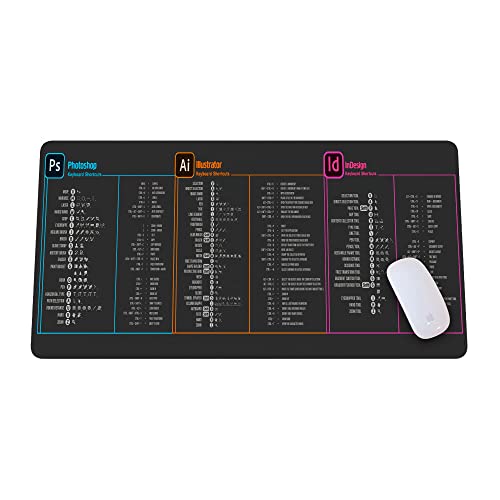
Designfullprint Photoshop Shortcut Mouse Mat, 31.5 x 11.8 Inches

Apple 2024 Mac mini M4 Desktop, 10-Core CPU/GPU, 24GB Unified Memory, 512GB SSD, Gigabit Ethernet
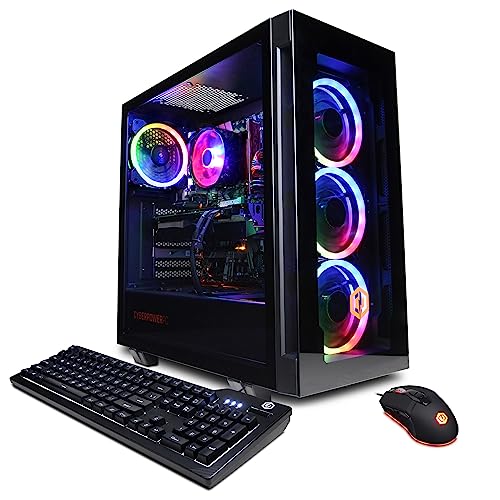
CYBERPOWERPC Gamer Master Ryzen 5 7600, RTX 4060 8GB, 16GB DDR5

Apple 2024 iMac 24-inch, M4 10-Core CPU/GPU, 16GB Unified Memory, 512GB SSD, Silver
2020 Apple iMac 27-inch Retina 5K
What Each Pick Brings To The Table
The built-in 23.8-inch FHD display makes this a straightforward option for a bedroom, dorm, or first creative office. Its 1920-by-1080 resolution gives a crisp canvas for menus and ordinary photo edits, although the Athlon Silver processor, 8 GB of memory, and integrated Radeon graphics form a modest foundation for demanding Photoshop work.
For light retouching, school projects, and occasional image exports, the combined computer and display reduces desk clutter. I would look toward a discrete-graphics system such as the CYBERPOWERPC Gamer Master when large RAW files or intensive filters become routine.
Everyday Advantages
- The all-in-one design combines the computer and display in one unit.
- Windows 11 Home supports the standard Adobe Creative Cloud desktop applications.
- The 256 GB SSD provides fast, compact local storage for active project files.
- Front-facing speakers add convenience for media playback during a work session.
- The pop-up privacy camera stays hidden until it is raised.
Practical Considerations
- Eight gigabytes of memory is modest for many large images and applications open together.
- Integrated Radeon graphics offer less headroom for intensive 3D, rendering, and large filter workloads than a discrete graphics card.
At A Glance
Made For
This model suits students, beginners, and light editors who value a simple Windows setup more than intensive processing headroom.
Consider Something Else When
The CYBERPOWERPC Gamer Master suits creators who need a discrete RTX 4060 and 16 GB of DDR5 memory.
This is a desk accessory rather than a computer, so it belongs beside an existing workstation rather than in a direct performance comparison. The printed Photoshop and photography shortcuts create a useful reference area for beginners who repeatedly reach for menus and tools during an edit.
Its 31.5-by-11.8-inch surface can hold a mouse, compact keyboard, and a few small essentials. For a photographer learning Photoshop while using a separate desktop, that added reference could make the desk feel more purposeful without taking up much room.
Benefits That Matter
- Keyboard shortcut reminders stay visible during common editing steps.
- The broad surface gives a mouse more travel than a compact pad.
- A rubber underside helps stop the cloth from shifting across the desk.
- The flexible material can be rolled for storage or transport.
- The soft surface can reduce the sound produced by vigorous typing.
Small Caveats
- This mat adds no processing power and cannot replace a suitable desktop.
- The printed shortcuts may not match every Adobe Creative Cloud interface or keyboard layout.
Right Fit For
Beginner photographers and students who want Photoshop shortcut reminders beside a full-size keyboard will find the concept especially useful.
Another Choice May Suit
The HP 24" All-in-One Desktop is the better fit for a complete, self-contained computer setup rather than a desk accessory.
A five-by-five-inch enclosure makes the M4 Mac mini appealing for a compact editing station that already has a monitor. Its 10-core CPU and 10-core GPU handle general creative workloads, while 24 GB of unified memory gives Photoshop and other Adobe applications more room to coexist.
Unified memory is shared by the processor and graphics system, which helps keep a small workstation simple. Compared with the older 27-inch iMac, this model offers a newer chip and more memory but requires a separate display, making it a better fit for an organized desk with room for a monitor arm.
What Helps Most
- The small enclosure occupies very little desk space.
- Twenty-four gigabytes of unified memory supports substantial multitasking.
- The 10-core graphics processor provides a capable creative platform.
- A 512 GB SSD offers useful room for active Adobe projects.
- Thunderbolt, HDMI, Gigabit Ethernet, front USB-C, and a headphone jack provide flexible connections.
Where It May Fall Short
- A separate display is required, so the initial setup will not be as simple as an all-in-one.
Quick Facts
Built With In Mind
Mac-based photographers and designers who want a compact creative computer with substantial shared memory will appreciate this configuration.
Reach For A Different Pick When
The Apple 2024 iMac is preferable for creators who prefer a built-in Retina display and a single integrated enclosure.
The Ryzen 5 7600 and RTX 4060 give this tower a more expandable visual workload than the integrated systems in this roundup. Sixteen gigabytes of DDR5 memory is a sensible starting point for Photoshop, while the 500 GB NVMe SSD reduces the wait when loading active project files.
For a photographer moving between large RAW adjustments, detailed retouching, and rendering, the eight gigabytes of dedicated graphics memory adds useful headroom. The tempered-glass side panel and RGB lighting also suit a desk setup where the computer remains visible, although styling is a matter of taste.
Good Reasons To Consider
- The RTX 4060 provides dedicated graphics hardware for demanding visual work.
- The Ryzen 5 7600 has six cores and twelve threads for multitasking.
- Sixteen gigabytes of DDR5 memory gives Photoshop and companion applications room to run together.
- The PCIe Gen4 NVMe SSD supports rapid file access with less delay than a mechanical drive.
- HDMI, DisplayPort, Ethernet, Wi-Fi, and several USB ports cover common accessory needs.
Trade Offs
- A 500 GB SSD may require regular transfer of completed projects to external storage.
- The eight gigabytes of graphics memory is modest for unusually large creative scenes.
- The larger tower and RGB components suit a visible setup rather than a minimalist desk.
Feature Snapshot
Who Should Grab It
Windows-based creators who regularly handle large images, intensive filters, or video-related editing will find the discrete graphics configuration useful.
Swap It Out When
The Apple Mac mini is a better fit for an Adobe-focused creator who prioritizes compact size and a macOS workflow.
The 24-inch iMac brings the M4 chip and a Retina display into one streamlined enclosure, reducing the need for a separate monitor in a home studio. Its 10-core CPU and 10-core GPU provide the same broad processing foundation as the M4 Mac mini, though with less shared memory in this configuration.
The silver finish and thin all-in-one design suit a visible creative workspace better than a basic office box. Compared with the 27-inch 5K iMac, the smaller screen takes up less room, while the newer M4 platform offers a more current foundation for Adobe Creative Cloud applications.
A Few Highlights
- The built-in Retina display creates a focused, clutter-free editing area.
- The M4 chip provides ten CPU cores and ten graphics cores.
- Unified memory is shared efficiently between the processor and graphics system.
- The 512 GB SSD configuration offers useful capacity for applications and active projects.
Possible Compromises
- Sixteen gigabytes of unified memory is less generous than the M4 Mac mini configuration.
- The built-in display may be smaller than the editing canvas desired for detailed photo work.
Who Will Love This
Mac users who value a polished, compact creative station and want the convenience of a built-in Retina display will find this iMac appealing.
Where A Sibling Pick Shines
The M4 Mac mini offers more unified memory and takes up less space, making it preferable for a multi-monitor desk with limited room.
The large 27-inch Retina 5K panel remains the defining reason to consider this iMac for photo editing. Its 5120-by-2880 resolution provides enough canvas for detailed views, while the 500-nit brightness and one-billion-color specification support a vivid editing environment.
Underneath, the tenth-generation Intel Core processor, Radeon Pro 5000-series graphics, and 512 GB SSD create a familiar Mac editing platform. The eight gigabytes of memory is the key limitation, and a newer M4-based iMac or Mac mini may serve a demanding workflow more comfortably.
Practical Advantages
- The 27-inch 5K display provides generous space for detailed image editing.
- Thunderbolt 3 connectivity uses the versatile USB-C format.
- The 512 GB SSD provides useful local capacity for creative assets.
- The Radeon Pro 5000-series GPU is designed for professional visual workloads.
- The all-in-one design keeps the display and computer together.
Where It Is Less Suited
- Eight gigabytes of memory limits comfort with many large files and applications running together.
- The 2020 Intel platform is older than the M4 systems elsewhere in this roundup.
- The large enclosure requires more desk depth than the Mac mini or 24-inch iMac.
Essential Details
The Right Fit
Photographers who prioritize a large, high-resolution built-in display and can manage a more modest memory configuration will find this iMac useful.
A Better Fit Elsewhere
The Apple 2024 iMac provides a newer M4 platform and 16 GB of unified memory for creators who want a more current all-in-one system.
What Photoshop Work Really Demands From A Computer
Processor And Graphics
The processor manages general application work, while the graphics processor handles filters, rendering, and other visual tasks. For occasional edits, a modern entry-level system may be sufficient, but creators working with large RAW files, detailed layers, or 3D elements gain more flexibility from discrete graphics and additional memory.
Memory And Storage
I consider 16 GB a practical starting point for regular Photoshop use because Photoshop, a file browser, and related applications need room to operate together. An SSD also makes a meaningful difference when opening project files, so storage capacity should be judged alongside the amount of active media, archive files, and cloud space available.
Display And Workspace
A higher-resolution display gives more room for panels, toolbars, and image detail, but resolution alone does not establish color accuracy. I would check the screen against the project requirements, keep the workspace uncluttered, and consider the larger 5K iMac only when the additional physical canvas solves a genuine need.
Avoiding Common Desktop Purchasing Errors
Where Shoppers Go Wrong
Choosing a computer from processor speed alone can distract attention from memory, graphics, and storage. I would confirm that the display size, operating system, Adobe software, and available desk space all fit the actual workflow before ordering.
What Separates Premium From Basic
Higher-tier systems commonly add memory, stronger graphics, larger storage, or a better display. The extra expense matters when large images and intensive filters are routine; a modest setup remains more sensible for schoolwork, web design, and occasional retouching.
Frequently Asked Questions
How Much RAM Is Needed For Photoshop?
I consider 16 GB a practical starting point for regular Photoshop work involving multiple layers or several open applications. Eight GB can handle lighter editing, though large documents and multitasking create more pressure.
Is A Mac Or Windows Desktop Better For Photoshop?
Both operating systems support Adobe Creative Cloud applications, so the better choice depends on hardware, accessories, and familiarity. Mac systems fit the integrated Apple workflow, while the CYBERPOWERPC Gamer Master offers a more graphics-focused Windows configuration.
Does Photoshop Need A Dedicated Graphics Card?
A dedicated graphics card becomes more valuable for intensive filters, 3D work, large RAW files, and rendering. Integrated graphics are more reasonable for basic retouching and a modest document workload.
Is A 4K Monitor Worth It For Photo Editing?
A 4K monitor provides a detailed canvas and room for editing panels, especially on a 27-inch display. Its value still depends on color accuracy, brightness, and the ability to display the required color space.
Does A Photoshop Shortcut Mouse Mat Help?
A shortcut mat provides a permanent visual reference for common commands, which can reduce repeated menu searching. It is most helpful during the learning stage, although it does not affect computer speed or image quality.
Final Verdict
I would choose the M4 Mac mini for compact macOS work, the CYBERPOWERPC Gamer Master for dedicated graphics, and the 2024 iMac for a polished built-in display. The HP all-in-one serves lighter editing with minimal desk clutter, while the shortcut mouse mat is a useful companion for a photographer learning the tools. The right choice comes down to workload, workspace, and preferred operating system.
