
A crowded desk leaves little room to position screens comfortably, especially when two large displays compete with keyboards, notebooks, and charging cables. I focus on dual monitor mounts that can handle demanding screen sizes, support flexible positioning, and suit different desk arrangements, including setups needing a 34-inch display. The right choice depends mainly on VESA compatibility, weight capacity, and whether the screens sit side by side or stack vertically.
An Overview Of The Picks
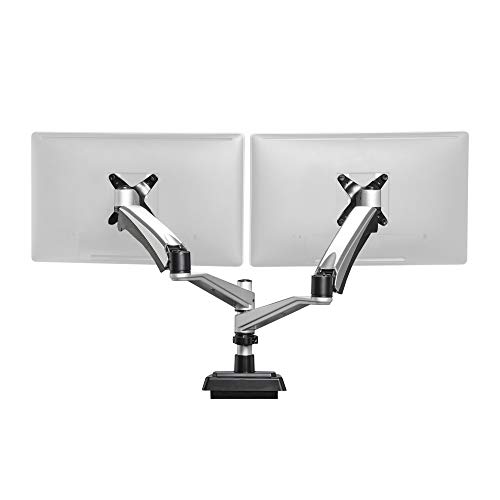
Vari Dual Monitor Arm, 360-Degree VESA Monitor Mount

MOUNTUP Vertical Dual Monitor Stand for 32-Inch Screens

MOUNTUP Quad Monitor Stand for Four Adjustable 17–32-Inch Screens

monTEK Heavy-Duty Dual Monitor Stand

ARES WING Heavy-Duty Full-Motion Dual Monitor Arm for 17–49-Inch Screens

monTEK Full-Motion Dual Monitor Arm
What Each Pick Brings To The Table
The Vari Dual Monitor Arm turns a crowded workstation into a more adaptable one by lifting two screens above the desktop. Each arm rotates through 360 degrees and adjusts in several directions, so two displays can be aligned side by side, angled inward, or moved into portrait orientation. That flexibility suits a commuter handling documents and messages across separate screens.
Both arms use tension-assisted movement, which should make repeated positioning feel more deliberate than manually repositioning screens on their original stands. The clamp fits desks and tables up to 1.375 inches thick, while the arm can raise a display as much as 12 inches above the surface. Compared with the heavier monTEK Heavy-Duty Dual Monitor Stand, the Vari offers broader directional movement.
Good Reasons To Consider
- 360-degree rotation supports both landscape and portrait arrangements.
- Tension-assisted movement helps hold each screen at a chosen position.
- The desk clamp clears valuable surface space beneath the displays.
- Both arms can be adjusted independently for side-by-side work.
Practical Considerations
- The 27-inch recommendation falls short of a dedicated 34-inch display.
- The clamp requires a compatible desk edge and a compatible VESA pattern.
Key Specs
Made For Adjustable Workstations
The Vari arm suits office workers and multitaskers who frequently alternate between landscape and portrait screens on a movable desk.
Look Elsewhere When
The ARES WING Heavy-Duty Full-Motion Dual Monitor Arm for 17–49-Inch Screens suits setups requiring a 34-inch, ultrawide, or deeply curved display.
The MOUNTUP Vertical Dual Monitor Stand makes desk width a less restrictive factor by placing one screen above the other. That arrangement works well in a compact home office where side-by-side monitors would crowd the keyboard or overlap neighboring equipment. The steel construction gives the stand a purposeful look without requiring a separate arm for each display.
Most displays from 13 to 32 inches fit, with support for up to 33 pounds per monitor. Swivel, tilt, and height adjustment add flexibility, while the vertical arrangement can help keep both panels within a narrow viewing area. In my view, this is more about reclaiming horizontal space than creating a broad cinematic display.
Positive Takeaways
- Vertical stacking keeps the overall desk footprint narrow.
- Height adjustment helps align stacked screens more naturally.
- The 33-pound limit comfortably covers many full-size monitors.
- Swivel and tilt support several viewing arrangements.
Trade Offs
- A narrow desk may leave little space between the stacked panels.
- The 32-inch limit excludes larger 34-inch and ultrawide models.
- A VESA adapter remains necessary for displays without a supported pattern.
Quick Facts
Built With Compact Desks In Mind
This stand benefits apartment workers, students, and remote employees working at a narrow desk with two displays.
Another Choice May Suit
The Vari Dual Monitor Arm, 360-Degree VESA Monitor Mount provides more independent arm movement when landscape and portrait positioning matter more than vertical stacking.
Four screens create a commanding workstation, and the MOUNTUP Quad Monitor Stand handles that task without requiring four separate desk arms. Each 17-to-32-inch display can rotate between landscape and portrait, making the arrangement useful for market charts, editing timelines, surveillance views, or live production controls.
Despite its four-screen capacity, each arm supports up to 17.6 pounds, below the 22-pound figure of the monTEK Heavy-Duty Dual Monitor Stand. Installation can use a compatible table between 0.39 and 3.15 inches thick or a suitable desk opening. The trade-off is obvious: extra screen capacity comes with more complexity and a lower per-arm load rating.
Useful Highlights
- Four independently adjustable displays create several workflow layouts.
- Rotation supports portrait use for documents and narrow interfaces.
- Two installation paths accommodate different desk constructions.
- The central structure reduces the number of separate mounts.
Room For Improvement
- Four screens require more desk depth and working space than a dual setup.
- The 17.6-pound limit is lower than several dual-monitor options.
- Every display still needs a supported VESA mounting pattern.
Right Fit For Control Rooms
This four-screen stand suits traders, video editors, and technical operators who benefit from a consolidated visual command center.
Swap It Out When
The Vari Dual Monitor Arm, 360-Degree VESA Monitor Mount is a better fit for a workstation that needs exactly two displays and uncluttered desk space.
The monTEK Heavy-Duty Dual Monitor Stand focuses on support rather than elaborate motion. Reinforced steel joints, thickened VESA plates, and anti-slip base pads give it a settled appearance suited to larger office monitors. That makes it a sensible choice for a permanent workstation where displays remain in place for most of the day.
Each arm carries up to 22 pounds and accepts 17-to-32-inch screens with either 75 x 75 mm or 100 x 100 mm VESA mounting holes. Tilt and swivel movement allow the screens to face the seated user rather than sitting rigidly toward the room. Compared with the MOUNTUP Quad Monitor Stand, the monTEK handles fewer displays but assigns more capacity to each one.
Practical Pluses
- The 22-pound arm rating supports larger monitor assemblies.
- Thickened mounting plates suit frequently handled displays.
- Anti-slip pads help stabilize the base on the desk.
- Tilt and swivel improve alignment for a seated workstation.
Points To Note
- The stated size range ends at 32 inches rather than 34.
- The lower movement range favors stable positioning over constant repositioning.
Core Details
Who Will Love This
This stand suits fixed office workstations using heavier 17-to-32-inch monitors that need stable support with basic angle adjustment.
Reach For A Different Pick When
The ARES WING Heavy-Duty Full-Motion Dual Monitor Arm for 17–49-Inch Screens fits larger curved screens and heavier components.
The ARES WING mount tackles the part of this category that many alternatives leave out: very large curved displays. Each arm supports screens from 17 to 49 inches and a load of up to 44 pounds, including 1000R curved models. That capacity makes it the natural starting point for a 34-inch monitor or an ultrawide panel that needs two substantial arms.
Gas-spring arms and full-motion adjustment allow the displays to move through a wide range of positions. The tilt mechanism is designed to support curved screens, while the stacked arm arrangement preserves a broad viewing field. Compared with the monTEK Heavy-Duty Dual Monitor Stand, the ARES WING handles much larger hardware, though that extra capacity may be unnecessary for ordinary office panels.
Advantages To Know
- The 49-inch range comfortably covers 34-inch and ultrawide displays.
- A 44-pound rating supports substantial monitor assemblies.
- Gas springs make frequent repositioning easier.
- The tilt design accommodates strongly curved panels.
Less-Strong Areas
- Displays without a 75 x 75 mm or 100 x 100 mm pattern require an adapter.
- Large screens need sufficient desk space and careful arm positioning.
- Smaller monitors gain less from the mount’s higher capacity.
Best Suited To Large Displays
This mount suits gamers, creative professionals, and simulation users running paired 34-inch, ultrawide, or curved monitors.
Where Another Pick Shines
The MOUNTUP Vertical Dual Monitor Stand for 32-Inch Screens offers a narrower stacked footprint for compact desks with conventional monitors.
The monTEK Full-Motion Dual Monitor Arm is built for desks where screen position changes throughout the day. Mechanical spring arms support two 17-to-32-inch displays, and the reinforced steel frame is intended to resist sagging. That combination makes it a natural choice for a shared workstation or a sit-and-stand setup with frequently moved screens.
Each arm can lift a display up to 15.9 inches high and extend as far as 19.9 inches. Compared with the Vari Dual Monitor Arm, 360-Degree VESA Monitor Mount, the monTEK emphasizes mechanical spring assistance and a broad reach range. Its 20-pound limit trails the monTEK Heavy-Duty Dual Monitor Stand, so display weight deserves a careful check.
The Practical Payoff
- Mechanical springs support smooth movement during daily repositioning.
- The 19.9-inch extension brings screens closer when needed.
- A 15.9-inch lift helps place displays at a comfortable height.
- The steel frame supports two separate 17-to-32-inch screens.
Worth Bearing In Mind
- The 20-pound rating may exclude heavier monitor-and-mount combinations.
- The stated screen range does not include 34-inch displays.
Technical Highlights
Built With In Mind
This arm suits hybrid workers and shared desks where two standard monitors move frequently between sitting and standing positions.
A Better Fit Elsewhere
The monTEK Heavy-Duty Dual Monitor Stand is a better fit for a permanent setup using heavier 17-to-32-inch screens with basic adjustment needs.
What Matters Before Mounting Two Large Screens
Check The Mounting Pattern First
VESA is the square-hole pattern connecting a monitor to its mount. Compatibility with 75 x 75 mm or 100 x 100 mm covers many displays, but an unusual pattern requires an adapter. I would verify the dimensions and included hardware before ordering, especially for a curved or ultrawide model.
Match Screen Size And Weight
Screen width and carrying capacity are separate limits. The ARES WING reaches 49 inches and carries 44 pounds per arm, while most options stop at 32 inches. A heavy display may still exceed a smaller mount’s rating, so both the panel and any attached hardware need to remain within the stated limit.
Choose The Layout Before The Mount
Side-by-side arms offer a conventional wide view, while vertical stacking saves horizontal desk space. The MOUNTUP Vertical Dual Monitor Stand for 32-Inch Screens makes that trade-off clearest. For a 34-inch screen, the ARES WING offers the necessary size range, although the display and arm still need room to extend.
Account For Desk Construction
Desk-clamp models require enough thickness and a suitable edge, while grommet-mounted designs require an opening in the work surface. The Vari clamp accepts desks up to 1.375 inches thick, and the MOUNTUP Quad Monitor Stand supports tables from 0.39 to 3.15 inches thick. Measuring before installation prevents an avoidable fit problem.
Avoiding Common Monitor Mount Traps
Mistakes Worth Dodging
Screen size alone does not determine compatibility. The mounting pattern, display weight, desk thickness, and intended layout all matter. Ignoring any one of those details can turn a promising mount into an awkward fit.
What The Higher Tier Buys
Higher-capacity mounts add stronger structural elements, broader reach, or support for larger and curved screens. That capability helps when the display is heavy or exceptionally wide. For two conventional monitors on a compact desk, a simpler vertical or mid-range dual mount may serve more practically.
Frequently Asked Questions
Can These Monitor Stands Hold 34-Inch Displays?
The ARES WING Heavy-Duty Full-Motion Dual Monitor Arm for 17–49-Inch Screens is the option in this group rated for 34-inch displays. It also supports ultrawide and deeply curved models.
What Is A VESA Mounting Pattern?
VESA is the standard screw-hole layout used to attach a monitor to an arm or stand. The supported patterns here are 75 x 75 mm and 100 x 100 mm.
Is A Four-Monitor Stand Better Than A Dual Mount?
A four-screen stand suits workflows that need four live displays at once. The Vari Dual Monitor Arm, 360-Degree VESA Monitor Mount offers a simpler arrangement for a two-screen desk.
Which Option Supports The Heaviest Monitors?
The ARES WING Heavy-Duty Full-Motion Dual Monitor Arm for 17–49-Inch Screens has the highest stated capacity at 44 pounds per arm. Display weight still needs to be checked after accounting for any attached hardware.
Can A Monitor Mount Fit Any Desk?
No, the mounting method must match the desk construction and dimensions. The Vari model uses a clamp for desks up to 1.375 inches thick, while the MOUNTUP Quad Monitor Stand offers clamp and desk-opening options.
Closing Remarks
I would choose the ARES WING for a 34-inch, curved, or ultrawide dual-screen setup, with the Vari arm serving smaller adjustable workstations and the MOUNTUP vertical stand addressing narrow desks. Checking VESA patterns, display weight, and desk construction before ordering is the clearest path to a balanced installation.
