
A gaming laptop has to survive more than a demanding game. It travels to friends’ houses, sits through late-night sessions, handles video calls, and still needs to feel dependable when the cooling system is working hard. I focus on the hardware, display, storage, connectivity, and support details that matter for regular use.
A Side-By-Side Look
<div class="lv-picks">
<h2 class="lv-picks__title">A Side-By-Side Look</h2>
<div class="lv-picks__table">
<div class="lv-picks__head">
<span>Pick</span><span>Why We Picked It</span><span>Best For</span><span>Action</span>
</div>
<div class="lv-picks__row">
<div class="lv-picks__product">
<a href="https://www.amazon.com/dp/B0GVPSK8M7/?tag=qazws-20" target="_blank" rel="nofollow noopener">
 </a>
<div>
<span class="lv-badge">Editor’s Choice</span>
<p>msi Stealth 16 AI+ 16” 240Hz QHD+ OLED Laptop, RTX 5070Ti, 32GB</p>
</div>
</div>
<div>Premium hardware and support</div>
<div>High-end gaming and creation</div>
<div><a class="lv-cta" href="https://www.amazon.com/dp/B0GVPSK8M7/?tag=qazws-20" rel="nofollow noopener" target="_blank">Check on Amazon</a></div>
</div>
<div class="lv-picks__row">
<div class="lv-picks__product">
<a href="https://www.amazon.com/dp/B09SVQ25XH/?tag=qazws-20" target="_blank" rel="nofollow noopener">
 </a>
<div>
<span class="lv-badge">Value Pick</span>
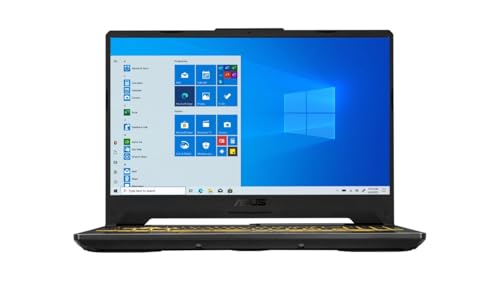
<p>ASUS TUF F15 15.6” 144Hz IPS Laptop, i5-10300H, GTX 1650</p>
</div>
</div>
<div>Affordable gaming with practical cooling</div>
<div>Budget-conscious everyday gaming</div>
<div><a class="lv-cta" href="https://www.amazon.com/dp/B09SVQ25XH/?tag=qazws-20" rel="nofollow noopener" target="_blank">View Latest Price</a></div>
</div>
<div class="lv-picks__row">
<div class="lv-picks__product">
<a href="https://www.amazon.com/dp/B0GJ3VPJBG/?tag=qazws-20" target="_blank" rel="nofollow noopener">
 </a>
<div>
<span class="lv-badge">Performance Leader</span>
<p>msi Crosshair A16 HX 16” 2.5K QHD+ 240Hz Laptop, RTX 5070, 32GB</p>
</div>
</div>
<div>Fast display and strong multitasking</div>
<div>Competitive gaming and streaming</div>
<div><a class="lv-cta" href="https://www.amazon.com/dp/B0GJ3VPJBG/?tag=qazws-20" rel="nofollow noopener" target="_blank">Check Latest Price</a></div>
</div>
<div class="lv-picks__row">
<div class="lv-picks__product">
<a href="https://www.amazon.com/dp/B0DZFVBQLK/?tag=qazws-20" target="_blank" rel="nofollow noopener">
 </a>
<div>
<span class="lv-badge">Gaming Ready</span>
<p>msi Katana 15 HX 15.6” 165Hz QHD+ Laptop, i9-14900HX, RTX 5070</p>
</div>
</div>
<div>Responsive QHD+ gaming experience</div>
<div>Fast-paced competitive play</div>
<div><a class="lv-cta" href="https://www.amazon.com/dp/B0DZFVBQLK/?tag=qazws-20" rel="nofollow noopener" target="_blank">View on Amazon</a></div>
</div>
<div class="lv-picks__row">
<div class="lv-picks__product">
<a href="https://www.amazon.com/dp/B0GVVR9SBN/?tag=qazws-20" target="_blank" rel="nofollow noopener">
 </a>
<div>
<span class="lv-badge">Premium Pick</span>
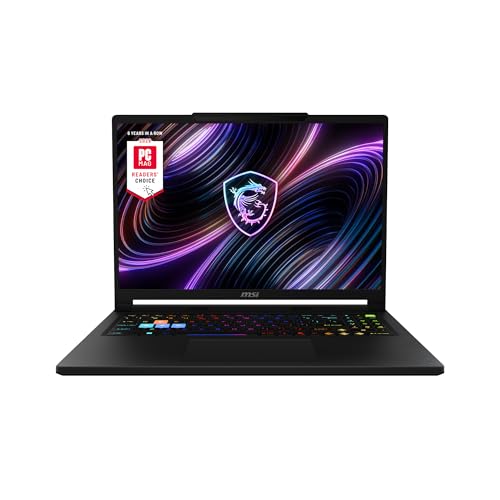
<p>msi Raider A16 HX 16” 240Hz QHD+ Laptop, RTX 5080, 2TB</p>
</div>
</div>
<div>High-end graphics and generous storage</div>
<div>AAA gaming and heavy workloads</div>
<div><a class="lv-cta" href="https://www.amazon.com/dp/B0GVVR9SBN/?tag=qazws-20" rel="nofollow noopener" target="_blank">Check on Amazon</a></div>
</div>
<div class="lv-picks__row">
<div class="lv-picks__product">
<a href="https://www.amazon.com/dp/B0FSGJZDNT/?tag=qazws-20" target="_blank" rel="nofollow noopener">
![]() </a>
<div>
<span class="lv-badge">Design Standout</span>
<p>msi Cyborg 17 17.3” FHD 144Hz Laptop, RTX 5060, 16GB</p>
</div>
</div>
<div>Large display with distinctive styling</div>
<div>Big-screen gaming and portability</div>
<div><a class="lv-cta" href="https://www.amazon.com/dp/B0FSGJZDNT/?tag=qazws-20" rel="nofollow noopener" target="_blank">View Latest Price</a></div>
</div>
</div>
</div>
Inside Each Recommended Option
The Stealth 16 AI+ makes sense for a gamer who wants one machine to handle games, creative work, and long periods of connected use. The 16-inch OLED panel is specified at QHD+ resolution and 240Hz, so fast movement receives a smoother presentation than a standard 60Hz screen. That combination is particularly useful during competitive matches where visual timing matters.
Inside, the Intel Core Ultra 9 386H and GeForce RTX 5070Ti provide the high-end processing and graphics foundation. I see this configuration as more compelling for demanding software and multitasking than the lower-tier ASUS TUF F15, though the Stealth’s larger screen and premium component mix may not suit a tight budget. Wi-Fi 7 also matters for busy wireless environments, depending on the router and network.
The Value In It
- The 240Hz OLED display combines high refresh rate with QHD+ detail, benefiting competitive games and media.
- RTX 5070Ti graphics give this model a stronger foundation for demanding games and GPU-heavy applications.
- 32GB of DDR5 memory supports comfortable multitasking, including games, browser tabs, and creative software.
- A 1TB NVMe SSD provides fast local storage for a large game library and active projects.
- 24/7 expert support and accidental-damage coverage options add practical ownership assistance.
Things To Consider
- The premium hardware may be unnecessary for casual games, office work, and lighter creative projects.
- Wi-Fi 7 requires compatible network equipment to deliver its intended connectivity benefits.
Key Specs
Built With In Mind
This model best suits a dedicated gamer or creator who values a high-refresh OLED screen and premium hardware.
Another Choice May Suit
The ASUS TUF F15 fits a shopper who needs the essential gaming experience at a substantially more modest hardware level.
The TUF F15 is the practical entry point in this group for someone who wants a dedicated gaming notebook without paying for a high-end graphics card. Its 15.6-inch IPS-type display runs at 144Hz, a useful step above a basic office screen for fast shooters and competitive games. The 15.6-inch size also tends to be easier to manage during travel than a larger 17.3-inch chassis.
The specified Core i5-10300H, GTX 1650, and 8GB DDR4 memory make this a less demanding platform than the msi models with RTX 5070-series graphics and 32GB of memory. The older component mix still has value for budget-conscious gamers, but demanding modern titles may require careful settings. ASUS describes the F15 with a dust-management cooling system, which is a sensible detail for owners who play in rooms with dusty carpets or frequently take the laptop on the move.
Where It Excels
- The 144Hz IPS-type panel offers a useful balance of motion clarity and everyday viewing comfort.
- Anti-Dust Cooling is designed to help maintain airflow as dust accumulates inside the chassis.
- Wi-Fi 6 supports modern wireless networks in homes, offices, and shared spaces.
- The 512GB PCIe SSD keeps game installation and file access straightforward.
Worth Noting
- Eight gigabytes of DDR4 memory is limited for simultaneous games, streaming software, and heavy browser use.
- The GTX 1650 sits below the RTX 5070 and RTX 5080 choices in graphics capability.
- The 512GB SSD may require careful storage management for a large modern game library.
- Older 10th-generation Intel and 4th-generation NVIDIA hardware may offer less headroom for future titles.
Made For
This laptop fits a beginner or budget-conscious gamer who values a high-refresh display and practical gaming features over maximum graphics power.
Where A Sibling Pick Shines
The msi Crosshair A16 HX is a better fit for a gamer who wants a larger, sharper display and substantially more memory and graphics capability.
The Crosshair A16 HX stands out for the balance between a 2.5K QHD+ panel and 240Hz refresh rate. That pairing gives competitive players more visual detail than the 15.6-inch 144Hz ASUS TUF F15 while retaining the high refresh rate useful for fast movement. For a desk-based setup, the 16-inch format leaves room for a comfortable keyboard and a clear view of game menus.
The Ryzen 9 8940HX and RTX 5070 give this model a strong foundation for modern gaming, while 32GB of DDR5 memory leaves room for streaming, Discord, and multiple applications. Wi-Fi 6E and USB-C expand connection choices, though network speed still depends on the home router. Compared with the msi Katana 15 HX, the Crosshair favors display resolution and refresh rate; the Katana instead uses a QHD+ 165Hz panel.
Real-World Strengths
- The 2.5K QHD+ display provides finer detail for games, desktop work, and video editing.
- A 240Hz refresh rate supports smooth motion in competitive titles.
- 32GB DDR5 memory is useful for gaming while running streaming and communication tools.
- The RTX 5070 offers a strong graphics platform for modern gaming and GPU workloads.
- USB-C connectivity supports flexible peripheral arrangements.
Trade Offs
- The 16-inch display and high-end internals can be less convenient to carry than the TUF F15.
- Wi-Fi 6E requires a compatible router and network for its full capability.
At A Glance
The Right Fit
This model suits a competitive gamer or streamer who wants a sharp, fast display and enough memory to keep several applications open.
Reach For A Different Pick When
The msi Katana 15 HX suits a shopper who prefers a smaller 15.6-inch footprint while still wanting QHD+ resolution and an RTX 5070.
The Katana 15 HX brings high-end gaming components into a more compact 15.6-inch form. Its QHD+ display at 165Hz is a middle ground between the Crosshair A16 HX’s 240Hz panel and the ASUS TUF F15’s 144Hz screen. That can be a sensible choice for a gamer who wants a detailed display without moving to a larger 16-inch or 17.3-inch notebook.
The Core i9-14900HX and RTX 5070 provide strong processing and graphics capability, while 32GB of DDR5 memory handles games alongside streaming or editing software. The RGB keyboard adds visible character, though I would consider it secondary to the core specifications. Compared with the Stealth 16 AI+, this Katana trades an OLED 240Hz display for a 165Hz QHD+ panel and a smaller footprint.
What Pays Off
- QHD+ resolution provides a sharper desktop and gaming view than the FHD panel on the Cyborg 17.
- The 165Hz refresh rate supports smooth motion without the larger footprint of a 16-inch display.
- RTX 5070 graphics are suited to demanding games and graphics-heavy applications.
- 32GB DDR5 memory supports multitasking with games, browsers, and creative tools.
- Wi-Fi 6E offers modern wireless connectivity for compatible networks.
Minor Gripes
- The 165Hz panel is less fluid for fast competitive play than the Crosshair A16 HX’s 240Hz display.
- The RGB keyboard is a styling feature rather than a practical gaming specification.
- A 15.6-inch high-resolution screen may still feel less spacious than a larger desktop monitor.
Who Will Love This
The Katana fits a gamer who wants strong performance, sharp visuals, and a manageable 15.6-inch size for regular travel.
Consider Something Else When
The msi Cyborg 17 is a better fit for someone who prioritizes a larger 17.3-inch display over a compact chassis.
The Raider A16 HX is the most deliberately high-end option here, with an RTX 5080, 2TB NVMe storage, and a 16-inch QHD+ 240Hz display. That combination makes sense for AAA games, demanding creative software, and a workstation that handles large project files without relying on a separate desktop. The 240Hz screen is specified for smooth motion, while QHD+ keeps menus and game environments detailed.
The Ryzen 9 8940HX and 32GB DDR5 memory support heavy multitasking, and Wi-Fi 7 is useful for newer high-capacity networks. I would favor this model for a desk-based setup where the larger screen and stronger graphics make sense, rather than for a shopper focused on light travel. The msi Stealth 16 AI+ has a similar display size, but the Raider adds more storage and steps up to the RTX 5080.
The Upside
- RTX 5080 graphics provide the most advanced GPU specification in this group.
- The 2TB NVMe SSD provides substantial room for games, recordings, and project files.
- A 240Hz QHD+ display serves both detailed desktop work and fast-moving games.
- 32GB DDR5 memory supports demanding applications and heavy multitasking.
- Wi-Fi 7 connectivity is useful with compatible routers and modern wireless setups.
Where It May Fall Short
- The advanced graphics and storage combination may be excessive for lighter gaming and office tasks.
- A 16-inch gaming laptop may be less convenient to carry than the ASUS TUF F15.
Feature Snapshot
Who Should Grab It
This laptop suits an enthusiast who plays demanding titles, creates 3D or video content, and keeps a large local project library.
Look Elsewhere When
The msi Stealth 16 AI+ is a better fit for a shopper who values OLED contrast and a slightly more restrained storage configuration.
The Cyborg 17 is built around a large 17.3-inch FHD display, making it the most distinctive choice for a desk setup where screen size matters more than a compact profile. The 144Hz refresh rate supports responsive motion in fast-paced games, while the translucent black finish gives the chassis a more expressive appearance than the conventional black designs in this group.
The Intel Core 7-240H and RTX 5060 provide a capable midrange platform for gaming and everyday creative work, and 16GB of DDR5 memory is more practical than the 8GB listed for the ASUS TUF F15. The 1TB NVMe SSD offers enough room for a solid game collection. I would compare the FHD resolution carefully against the sharper QHD+ panels on the Katana, Crosshair, and Raider.
Well-Handled Touches
- The 17.3-inch display provides an expansive view for games, desktop work, and media.
- 144Hz refresh rate supports smooth movement during active play.
- Translucent black styling gives the laptop a distinctive visual character.
- 16GB DDR5 memory gives modern applications more room than 8GB configurations.
- USB-C and Wi-Fi 6E provide modern connection options.
Less Ideal Details
- FHD resolution provides less sharpness than the QHD+ or 2.5K displays in the other msi models.
- The large 17.3-inch footprint may be less practical for frequent commuting or travel.
- The RTX 5060 is a step below the RTX 5070 and RTX 5080 choices for demanding graphics work.
Quick Facts
Whose Shelf It Belongs On
The Cyborg fits a gamer or creator who works primarily at a desk and prefers a large display with a distinctive chassis design.
Swap It Out When
The msi Crosshair A16 HX is a better fit for someone who wants a sharper 2.5K screen and a more powerful RTX 5070 graphics option.
What Matters Before Choosing a Durable Gaming Laptop
Start With The Games
The right specification level depends on the games and the desired settings. The ASUS TUF F15’s GTX 1650 and Core i5-10300H are aimed at more modest gaming, while the RTX 5070 and RTX 5080 models provide much more graphics headroom. I would match the hardware to the games rather than assume a high-refresh screen alone can compensate for limited graphics performance.
Think About Memory And Storage
Thirty-two gigabytes of DDR5 gives modern systems more breathing room during multitasking, particularly with games, streaming tools, browsers, and editing software open together. The 16GB Cyborg 17 sits in the middle, while the TUF F15’s 8GB is the most constrained. Storage also matters: 1TB leaves room for a decent library, and the Raider’s 2TB suits larger collections and media files.
Display Size Changes The Experience
A 15.6-inch laptop is easier to move, while 16-inch models offer a more generous gaming view. The 17.3-inch Cyborg 17 is the most substantial option here. Resolution and refresh rate also affect the experience independently: the Crosshair combines 2.5K QHD+ with 240Hz, whereas the Cyborg uses FHD at 144Hz.
Check Connectivity And Support
Wi-Fi 6, Wi-Fi 6E, and Wi-Fi 7 are not interchangeable in practice because the faster standards need compatible routers and network conditions. USB-C adds useful peripheral flexibility across several models. I also value the listed 24/7 expert support and accidental-damage coverage options, though plan terms and eligibility deserve careful reading before purchase.
Shopping Details That Prevent Regrets
Common Shopping Slip Ups
A common mistake is focusing on refresh rate while overlooking resolution and GPU capability. A 240Hz FHD screen does not automatically outperform a 144Hz QHD+ panel. I also check the complete memory and storage combination, because a strong processor with only 8GB of RAM can be held back during ordinary multitasking.
When Paying More Pays Off
Higher-tier models add faster graphics, more memory, sharper displays, or larger storage. That expense makes sense for demanding games, large project files, and a machine expected to handle several heavy applications. For lighter play, the ASUS TUF F15 may provide a more reasonable starting point.
Frequently Asked Questions
Which model is best for demanding AAA games?
The msi Raider A16 HX offers the strongest listed graphics specification with its RTX 5080, plus 32GB of memory and 2TB of storage. The msi Crosshair A16 HX and Katana 15 HX with RTX 5070 are also strong choices, with the Crosshair offering the sharper and faster display.
Is a 240Hz display worth the extra cost?
A 240Hz display benefits fast competitive games, though the GPU still needs enough capability to maintain those frame rates. The Crosshair A16 HX pairs 240Hz with 2.5K QHD+ resolution, while the Stealth 16 AI+ combines 240Hz with OLED technology.
How much RAM matters for gaming?
Memory matters when a game runs alongside streaming software, a browser, voice chat, and other applications. The 32GB models in the Stealth, Crosshair, Katana, and Raider have the most room for that kind of workload, while the TUF F15’s 8GB configuration is more constrained.
Which laptop is easiest to carry?
The ASUS TUF F15 has the smallest listed display at 15.6 inches, followed by the 15.6-inch Katana 15 HX. The 16-inch models provide more screen space, while the 17.3-inch Cyborg 17 is the largest option and may be less convenient for frequent commuting.
Does Wi-Fi 7 work with any router?
No. Wi-Fi 7 requires compatible network equipment to deliver its intended benefits. The Stealth 16 AI+ and Raider A16 HX support Wi-Fi 7, while the other listed models use Wi-Fi 6 or Wi-Fi 6E.
Final Thoughts
I find the msi Stealth 16 AI+ the most balanced premium choice, with the Crosshair A16 HX offering a strong gaming-display alternative. The Katana 15 HX suits a shopper who wants high-end performance in a smaller body, while the Raider A16 HX serves the most demanding workloads. For lower-cost gaming, the TUF F15 is the straightforward entry, and the Cyborg 17 makes the most sense when a large display matters more than a compact footprint.
