
A laptop screen becomes frustrating when a spreadsheet, video call, and reference document compete for the same display. I focus on six portable monitors that can create a more practical dual-screen workspace, with particular attention to connection requirements, portability, viewing flexibility, and the physical space each setup occupies. My recommendations cover everything from ultralight travel equipment to larger screens for stationary work.
The Lineup, Simplified
AOC 14-Inch Laptop Screen Extender

Maxfree 15.6-Inch FHD Extender
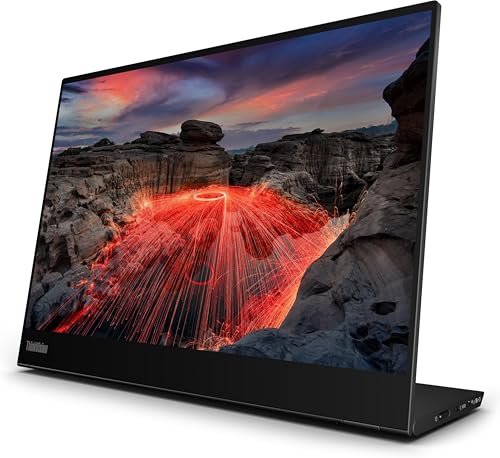
Lenovo ThinkVision M14t Gen2

SideTrak Swivel 12.5-Inch FHD Dual Screen with USB or HDMI and Kickstand
Macsecor 14-Inch FHD Triple Portable Monitor with Two USB-C Cables

SideTrak Swivel Pro 13.3-Inch FHD IPS Monitor with Kickstand and USB-C
Inside Each Recommended Option
I like the AOC 14-Inch Laptop Screen Extender for travelers who need more workspace without carrying a separate desktop display. It weighs 3.5 pounds, folds into a compact arrangement, and comes with a carrying case, making it a more deliberate travel kit than a bare screen.
I can see it serving remote workers, students, and creative professionals who regularly divide tasks across several applications. The 14-inch IPS panel runs at 1920 by 1080 with 100% sRGB color coverage, giving me confidence for presentations and visual work. Compared with the larger Maxfree model, it saves screen space but demands more careful port planning.
Everyday Perks
- My remote-work setup gains up to three visible workspaces without requiring a desktop monitor.
- I appreciate the 100% sRGB color coverage for consistent color reproduction across supported creative tasks.
- The included full-function USB-C and HDMI cables remove the need to hunt for extra adapters.
- I find the folding design and supplied case more travel-friendly than a rigid freestanding display.
Practical Considerations
- My laptop needs either two USB-C ports, including one full-function port, or one full-function USB-C port plus HDMI.
- The three-screen arrangement and carrying case need more room in a bag than the Maxfree 15.6-Inch FHD Extender.
Quick Facts
Made For
I recommend the AOC model to mobile professionals and students who value color accuracy, a three-screen layout, and a managed carrying case.
Consider Something Else When
I would choose the Maxfree 15.6-Inch FHD Extender for a larger display with detachable, rotatable screens and built-in speakers.
I find the Maxfree 15.6-Inch FHD Extender more adaptable than the AOC model because its screen can rotate 90 degrees, detach, and move between landscape, portrait, stacked, and single-screen arrangements. That flexibility suits a train table, a shared office, or a desktop where screen position changes throughout the day.
My eye is drawn to the IPS panel’s combination of 330-nit brightness, HDR support, a 1000:1 contrast ratio, and 100% sRGB coverage. The detachable portion weighs 1.3 pounds, although the complete 15.6-inch arrangement remains less compact than the AOC option.
Everyday Wins
- I can rotate the display vertically for documents, code, or a narrow side panel.
- The anti-glare coating and low-blue-light feature support longer viewing sessions in varied lighting.
- Built-in speakers add useful audio for videos, music, and games.
- My display can mirror the laptop, extend its desktop, or operate as a second screen.
Minor Gripes
- My travel bag needs enough space for the larger 15.6-inch screen and its stand.
- Additional power may call for a 5V, 2A adapter despite the included USB-A to USB-C cable.
Feature Snapshot
Right Fit For
I favor the Maxfree model for commuters, hybrid workers, and media viewers who want a large screen that can change orientation.
Reach For A Different Pick When
I prefer the AOC 14-Inch Laptop Screen Extender for a lighter three-screen arrangement with a dedicated carrying case.
I see the Lenovo ThinkVision M14t Gen2 as a compact option for people who prioritize resolution over a large viewing area. Its 14-inch display operates at 2240 by 1400, giving desktop applications and documents more spatial detail than the 1920 by 1080 panels used by several alternatives.
My attention goes to the balance between portability and readability. The screen remains easier to carry than the 15.6-inch Maxfree, while the higher resolution may appeal to writers, developers, and analysts working with dense information. In practical terms, the display size and operating system arrangement still need to suit the laptop I use every day.
Positive Takeaways
- I appreciate the higher 2240 by 1400 resolution for compact, information-heavy workspaces.
- The 14-inch size balances a useful second display with easier carrying than a 15.6-inch model.
Trade Offs
- My document view remains smaller than on the Maxfree 15.6-Inch FHD Extender.
- I would confirm the chosen connection method and display arrangement against my specific laptop before committing.
Who Will Love This
I recommend the ThinkVision M14t Gen2 to compact-workstation users who want finer screen resolution in a portable form.
Where A Sibling Pick Shines
I would select the Maxfree 15.6-Inch FHD Extender for a larger surface, 90-degree rotation, and built-in speakers.
The SideTrak Swivel 12.5-Inch FHD Dual Screen stands apart through its patented hinge, which allows a 360-degree swivel and a 270-degree rotation. I can picture using that movement to share a presentation, reposition the display beside a laptop, or bring it closer for a collaborator.
My attention goes to the broad connection choice for a compact screen. USB or HDMI makes the SideTrak easier to pair with several laptop configurations than the USB-C-only SideTrak Swivel Pro, while the kickstand provides a freestanding alternative to clamp-on designs.
A Strong Showing
- I can reposition the display through an unusually broad range of hinge movements.
- USB and HDMI options give me more choices when matching a laptop’s available ports.
- The kickstand supports a practical freestanding setup for travel or presentations.
Points To Note
- My sightline may feel cramped on the 12.5-inch panel during prolonged document work, particularly beside the 14-inch AOC.
Key Specs
Built With In Mind
I favor the SideTrak Swivel for collaborative work, screen sharing, and compact setups where display movement matters.
Swap It Out When
I would choose the SideTrak Swivel Pro 13.3-Inch FHD IPS Monitor for a larger IPS panel and an ultraslim design.
The Macsecor 14-Inch FHD Triple Portable Monitor centers on a three-screen layout in a slim clamp-on format. I see that arrangement benefiting intensive multitaskers who want the laptop display plus two separate areas for communication, research, and active work.
Two USB-C cables support a cable-managed setup, and the stated compatibility covers Windows, Mac, Android, and Chrome. The 14-inch panel also suits laptops from 13 to 17 inches, but I would verify that the available USB-C ports on my device support video output and power delivery as required.
Bright Spots
- My three-screen layout separates more tasks than a conventional two-display arrangement.
- The slim clamp-on structure reduces the desk space required by a conventional external monitor.
- Two USB-C cables simplify the physical connection between the display and my laptop.
Details To Watch
- My desk still needs enough width to position the extended screens comfortably.
- USB-C port capabilities need checking because a charging-only connection cannot carry the display image.
Who Should Grab It
I recommend the Macsecor model to heavy multitaskers who want three Full HD workspaces in a slim portable format.
A Better Fit Elsewhere
I would select the AOC 14-Inch Laptop Screen Extender for a managed carrying case and a documented 100% sRGB color specification.
I see the SideTrak Swivel Pro 13.3-Inch FHD IPS Monitor as a polished middle ground between a tiny travel screen and a large desk display. The 13.3-inch IPS panel offers a comfortable work surface, while the kickstand and patented swivel hinge let me reposition the display around a laptop.
Its USB-C connection keeps the cable arrangement simple for Mac, PC, and Chromebook setups. Compared with the 12.5-inch SideTrak Swivel, the Pro model offers a larger IPS screen and a slimmer profile, though the older model provides both USB and HDMI choices.
Features That Help
- My documents and applications gain a 13.3-inch workspace without the bulk of the Maxfree model.
- The IPS panel provides a more natural fit for office documents, presentations, and general media.
- The kickstand creates a simple freestanding arrangement for a home office.
- The swivel hinge helps me share the display during meetings or collaborative sessions.
Some Limits To Know
- My laptop needs a compatible USB-C video connection because HDMI is not listed as an option.
At A Glance
The Right Fit
I recommend the Swivel Pro for office-focused users who want a slim IPS display with flexible positioning and a straightforward USB-C connection.
Another Choice May Suit
I would choose the SideTrak Swivel 12.5-Inch FHD Dual Screen with USB or HDMI and Kickstand for broader port flexibility.
What Matters Before Buying a Portable Second Screen
Connection support comes first
I start with the ports available on my laptop, since an image connection must carry both video and power in the arrangement I need. A full-function USB-C port provides the simplest modern option, while HDMI remains useful with older or mixed-port systems. I would avoid buying around an unknown port configuration and check the laptop specification first.
Screen size changes the working experience
I distinguish between a larger screen and a sharper one, since each has a different purpose. The 15.6-inch Maxfree model offers more visible area, while the 14-inch Lenovo raises the stated resolution to 2240 by 1400. For dense documents, I balance screen area against resolution rather than assuming the larger panel is automatically more suitable.
Rotation and folding affect desk use
I consider how a portable monitor will actually move during a workday. Rotating, stacking, and detaching a screen can make narrow tables and shared workspaces more practical. The SideTrak hinges add positional flexibility, while the AOC folds into a travel-oriented package.
Color and viewing details serve different work
I use color coverage and brightness specifications as task-specific clues rather than universal measures. The AOC includes 100% sRGB coverage, and the Maxfree combines 100% sRGB with 330-nit brightness and anti-glare treatment. I pay more attention to those figures for visual projects than for basic office tasks.
Common Mistakes Worth Avoiding
Wrong Turns To Avoid
I would not assume every USB-C port carries a display signal, because charging-only ports cannot provide the required video connection. I also avoid equating a larger screen with a more portable one, since the 15.6-inch Maxfree occupies substantially more room than the 12.5-inch SideTrak. Checking laptop compatibility, display dimensions, and the intended desk arrangement prevents most expensive surprises.
The Upgrade Payoff
I see the higher-value models earning their place through larger panels, greater color specifications, flexible hinges, or a complete multi-screen arrangement. An extra investment makes sense for frequent travelers, professional color work, or users who switch between laptop and desktop duties. For occasional document viewing, a compact Full HD model may cover the practical need more economically.
Frequently Asked Questions
Can I use a portable monitor with any laptop?
I can connect one when my laptop supports a compatible video signal, commonly through a full-function USB-C port or HDMI. I would check the manufacturer’s port requirements and operating system compatibility before ordering.
Does a larger portable monitor always work better?
I consider a larger panel more useful for documents, media, and presentations, but it also takes up more desk and bag space. A smaller, higher-resolution screen may suit a compact mobile setup better.
Is a detachable portable monitor easier to travel with?
I find detachable designs convenient because one portion can be carried separately from the stand. The complete package still needs to fit in my available bag space, so I would check the full dimensions and included components.
Do portable monitors need drivers?
I prefer models that connect through standard video inputs without requiring extra software. The AOC and Maxfree options explicitly support plug-and-play operation, reducing setup time on a temporary workstation.
Is a triple-screen laptop setup practical?
I find it practical for multitaskers who need communication, reference material, and active work visible at once. Desk width matters, so I would check whether the expanded arrangement fits the space available at home or while traveling.
Final Verdict
I favor the AOC 14-Inch Laptop Screen Extender for a balanced travel kit with color coverage and a three-screen layout. The Maxfree 15.6-Inch FHD Extender serves me best when screen area and rotation matter, while the SideTrak models suit flexible positioning and compact work. I would match the connection, footprint, and viewing needs to the actual workstation rather than choosing on display size alone.
