
A second screen can turn a cramped laptop desk into a more useful workspace, especially for research, editing, spreadsheets, and presentations. I chose these options for different routines: portable travel, desktop productivity, shared workspaces, and multi-application work. The right setup depends less on screen count than on portability, connection requirements, viewing space, and how much hardware I want to carry.
The Lineup, Simplified

KYY Portable Monitor 15.6" FHD K3-1
domyfan 14" FHD IPS Laptop Screen Extender
HP 27h Full HD Monitor with 75Hz IPS

RICOO TS7311 Dual Monitor Mount, 13-27 Inch
KYY Triple Screen Laptop Extender 15.6" FHD

KYY 15.6" Travel Laptop Screen Extender
More On The Choices That Made The List
The KYY K3-1 is built for the moment when a laptop screen is simply too small for the task at hand. Its 15.6-inch IPS panel provides 1920 by 1080 resolution, while the 0.3-inch profile and 1.7-pound weight make it easier to pack than a conventional desktop display. I see it as a practical travel companion for a work trip where spreadsheets need to stay visible beside a document or video call.
Unlike the domyfan extender that clamps directly over a laptop display, this KYY model works as a separate screen and can connect through USB-C or Mini-HDMI. That distinction matters for anyone who wants a different viewing angle or needs to use the laptop screen and external display as separate workspaces. The built-in speakers and adjustable landscape or portrait orientation add flexibility, though the screen remains less convenient to move than a clamp-on unit.
Practical Pluses
- The slim 0.3-inch body and low 1.7-pound weight support travel and hotel-desk use.
- USB-C and Mini-HDMI connections give me more setup options than a single-port portable screen.
- The smart cover protects the panel and folds into a viewing stand.
- Extend, duplicate, and portrait modes cover presentations, shared screens, and narrow workflows.
- Two built-in speakers reduce the need to carry a separate desktop speaker.
Points To Note
- The one-cable USB-C arrangement requires a device with Thunderbolt 3 or 3.1 USB Type-C video support.
- A 15.6-inch screen and separate stand take more room than a compact clamp-on extender.
Feature Snapshot
Built With In Mind
This screen suits frequent travelers and hybrid workers who need a genuine second display without carrying a desktop monitor.
Consider Something Else When
The domyfan 14" FHD IPS Laptop Screen Extender is a better fit for people who value a foldable clamp-on design over a freestanding portable monitor.
The domyfan extender takes a different approach from the KYY K3-1. Instead of standing beside a laptop, it attaches to the top edge of the display and adds a second 14-inch panel above or beside it. I find that arrangement useful during a business trip because the folding design and included carry bag reduce desk clutter. The 180-degree rotation also helps when the second screen needs to face someone across a table.
The IPS panel operates at 1920 by 1080 with a 1000:1 contrast ratio, and the built-in speakers can handle casual media or calls. Its three display modes cover extension, duplication, and a standalone second screen, which makes the setup more versatile than a basic duplicate-only display. The catch is connection compatibility: a full-featured USB-C port is preferred, while HDMI plus USB-A provides a fallback for systems with a power-only USB-C port.
Practical Advantages
- The clamp-and-fold format keeps the extra display attached to the laptop rather than requiring a separate stand.
- The 14-inch IPS screen gives me a useful workspace for chat windows, reference material, or monitoring panels.
- Brightness, contrast, rotation, and display modes can be adjusted directly.
- The 2.33-pound weight makes the extender reasonable to carry in a laptop bag.
- The included bag and cables support travel use across Windows, Mac, Android, and game systems.
Trade Offs
- The clamp must fit a 13.3- to 17-inch laptop, so larger desktop notebooks are outside the stated range.
- Some USB-C laptops provide power without video, requiring the HDMI and USB-A connection path.
- The extending frame sits close to the laptop hinge, which may feel cramped on a very shallow desk.
Right Fit For
I recommend this extender to mobile laptop users who work across several applications and need a screen that folds away with the computer.
Another Choice May Suit
The KYY Portable Monitor 15.6" FHD K3-1 suits people who prefer a freestanding display and flexible USB-C or HDMI placement.
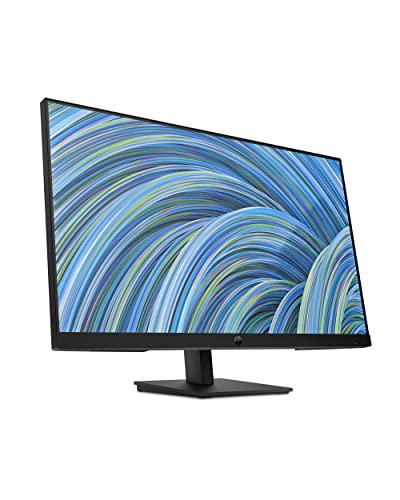
The HP 27h makes more sense as the anchor display in a permanent home-office setup than as a travel accessory. Its 27-inch Full HD IPS panel gives me enough room to keep communication, reference material, and active work visible, while the 75Hz refresh rate handles everyday motion more smoothly than a basic office panel. For a hybrid worker, the built-in dual speakers can also cover audio from a laptop connected to the display.
Compared with the portable KYY and domyfan options, this monitor is a fixed workstation choice. The 100mm height adjustment and tilt let me align it more easily beside a laptop or at the center of a desk, and the three-sided micro-edge bezel keeps the frame visually restrained. I also appreciate the practical port mix of HDMI, DisplayPort, and VGA, which gives me options for older and newer desktop systems.
Real-World Strengths
- The large IPS panel supports a permanent multi-window workspace at a desk.
- Height adjustment and tilt make it easier to align with a laptop and reduce neck strain.
- Built-in dual speakers provide a simpler listening option for calls and media.
- HDMI, DisplayPort, and VGA connections support several device types.
- The 75Hz refresh rate gives routine scrolling and cursor movement a smoother appearance.
Small Caveats
- Full HD resolution on a 27-inch panel may feel less detailed than a smaller high-resolution display for dense text.
- This is a stationary monitor, so it does not solve the need for a portable second screen.
- The height and tilt adjustments are useful, but the listed adjustment range is more limited than a full ergonomic arm.
Key Product Details
Made For
This monitor suits hybrid workers and home offices that need one dependable large display alongside a laptop.
Reach For A Different Pick When
The RICOO TS7311 is more useful when the goal is arranging two separate desktop screens rather than pairing one large display with a laptop.
The RICOO TS7311 is the structural piece that makes a two-screen desktop feel less improvised. It supports two flat panels from 13 to 27 inches on a freestanding, double-arm base, giving me a way to reclaim desk space while keeping both screens raised and adjustable. I would consider it for a shared workstation where two people need separate displays, or for a desk too deep to place monitors comfortably side by side.
Its movement options are the main appeal. Each side can swivel, tilt through 45 degrees in either direction, rotate through a full circle at the front plate, and adjust vertically. The stated load capacity is 17.6 pounds, while the 790mm maximum width gives room for two widescreen panels. Compared with the fixed HP 27h, this mount does not add image quality or speakers, but it solves the physical placement problem.
The Helpful Details
- The freestanding base avoids requiring a wall or desk-clamp installation.
- Height, swivel, tilt, and rotation make it easier to align two displays with different viewing needs.
- Support for 13- to 27-inch panels covers common office and gaming screen sizes.
- VESA mounting patterns of 75 by 75mm and 100 by 100mm offer broad hardware compatibility.
- The maximum combined width of 790mm suits a side-by-side widescreen arrangement.
Details To Watch
- Both displays must fit the stated size range, weight limit, and VESA pattern.
- The base occupies desk space, so very small work surfaces may be tight.
- This is a mount only, so separate displays and cables are still required.
Technical Highlights
Whose Desk It Belongs On
This mount suits people building a permanent dual-display desk for focused office work, shared workstations, or gaming setups.
Where Another Pick Suits Better
The HP 27h is the better fit for a single-monitor home office, while this RICOO model is for arranging two existing screens.
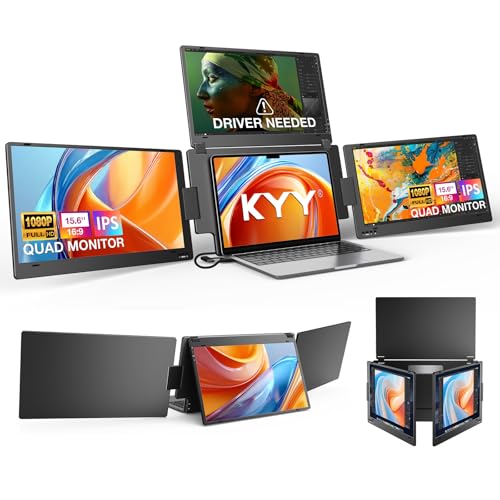
The KYY triple-screen extender is built for a laptop that has become the center of a busy digital workstation. Its 15.6-inch Full HD displays create a multi-application area for code, spreadsheets, communication, and reference material, with the whole arrangement linking through one USB-C connection. I can see the appeal for an analyst working from home or a developer who wants several windows visible without reaching for a large desktop display.
Aluminum construction gives the frame a more substantial feel than a simple screen, and automatic rotation lets the side displays follow the orientation of the laptop. The stated compatibility covers 12- to 17.3-inch laptops running macOS, Windows, Linux with Ubuntu, or Android with the required driver. That driver requirement is the detail I would check first, since the one-cable setup cannot help a device that lacks compatible video output.
What Pays Off
- Three 15.6-inch Full HD panels create a broad area for simultaneous applications.
- A single USB-C connection reduces cable clutter at a shared desk.
- Automatic rotation follows the laptop orientation for changing workflows.
- Aluminum construction suits frequent repositioning in a mobile workstation.
- Support for Ubuntu and Android broadens the range of connected devices.
Worth Noting
- The laptop must fall within the 12- to 17.3-inch range.
- Android use requires a driver, and the host port must support video output.
- The three-panel footprint needs more room than a single portable monitor or clamp-on extender.
Who Will Love This
I recommend this setup for programmers, analysts, sellers, and creators who need several full-size application windows beside a laptop.
Skip It When
The domyfan 14" FHD IPS Laptop Screen Extender is the more manageable choice for people who need one added panel rather than a three-screen workstation.
The KYY 15.6-inch travel extender is aimed at people who want more screen area without assembling a permanent desk setup. Its alloy construction gives the display a sturdy feel, while the single-cable approach can simplify a temporary workstation made from a laptop and one additional panel. I picture it beside a hotel room desk, with the laptop handling calls and the extender showing a document, dashboard, or editing timeline.
Compared with the larger KYY triple-screen extender, this model is easier to position because it adds only one display. The one-cable arrangement still depends on the laptop having a Type-C or USB-A port that supports video output, and the context notes that a driver is needed. That setup is more convenient than juggling several adapters, but it is not suitable for every computer, especially older systems without modern video output.
What Helps Most
- The 15.6-inch panel provides a comfortable secondary workspace for common laptop tasks.
- One-cable operation keeps temporary travel setups relatively tidy.
- The alloy body gives the portable screen a more substantial feel.
- The simpler one-display format takes less room than a triple-screen extender.
Possible Compromises
- The host computer needs a Type-C or USB-A port with video-output support.
- The stated setup requires a driver, which adds a setup step compared with standard plug-and-play displays.
- Travelers still need to account for the added screen size when packing.
Quick Facts
Who Should Grab It
This extender suits travelers and remote workers who need one additional screen for short-term work away from a fixed desk.
Look Elsewhere When
The KYY Portable Monitor 15.6" FHD K3-1 is a better fit when a folding smart cover, Mini-HDMI, and adjustable stand matter more than the one-cable concept.
What Matters Before Adding a Second Screen
Portability versus workspace
I start with the desk and the bag. A portable monitor works well for a small laptop and frequent travel, while a large desktop display is more comfortable for a permanent workstation. The domyfan model is especially useful when the extra screen should fold against the laptop, and the HP 27h is better for a fixed office arrangement.
Connection requirements
USB-C is convenient only when the port supports video output. Some laptops provide power through USB-C without transmitting a display signal, so I check the computer specifications before choosing a one-cable design. HDMI, DisplayPort, and VGA can provide useful alternatives when the host device is older or has limited USB-C support.
Screen size and resolution
Resolution describes the number of pixels available on a display, while size determines how much physical space appears on the desk. The KYY options and domyfan extender favor portable 14- to 15.6-inch screens, and the HP 27h provides a larger Full HD canvas. I also consider whether the added panel should show fine text, video, or broad application windows.
Mounting and movement
A stand or clamp changes the entire desk arrangement. The RICOO TS7311 supports two displays with height, swivel, tilt, and front-plate rotation, but it requires compatible VESA mounting holes and enough room for its base. Portable extenders need less desk space, though their connection and orientation can be more restrictive.
Key Details Before Making the Call
Mistakes Worth Dodging
I would not judge a portable extender by screen count alone. A device that lacks video output or needs an extra driver may be less convenient than a simpler two-screen arrangement. I also check laptop dimensions, port layout, desk depth, and VESA compatibility before buying.
When Paying More Pays Off
A higher-tier setup tends to help when a person works with dense documents, code, or several live applications. The extra cost may be justified by a larger panel, stronger construction, or flexible movement, but portability can be more valuable than maximum screen space for frequent travelers.
Frequently Asked Questions
What is the easiest way to add a second screen to a laptop?
The easiest setup uses a compatible USB-C video connection or an HDMI cable with the required adapter. I confirm the laptop’s video-output support before choosing a portable extender.
Can I use a portable monitor with a desktop computer?
Yes, as long as the desktop has a compatible video output and the monitor includes a matching connection. The KYY and domyfan options support several device types, while the RICOO TS7311 is a mount for two existing displays.
Is a larger second screen always better for productivity?
No. A larger panel helps with spacious work, but portability, desk depth, viewing distance, and connection simplicity can matter more. A 15.6-inch portable screen may suit a travel setup better than a larger stationary monitor.
Do USB-C portable monitors need drivers?
Most basic portable monitors connect directly, but some multi-screen designs require additional software for full operation. I check the product requirements and the host device’s compatibility before purchase.
Should I buy a dual monitor mount or a portable extender?
I choose a dual monitor mount for a permanent two-screen desk and a portable extender for travel, presentations, or temporary laptop workstations.
Final Verdict
A dual screen computer setup works best when it matches the actual workspace. I favor the KYY K3-1 for travel, the domyfan extender for foldable laptop use, the HP 27h for a dedicated desk, and the RICOO TS7311 for arranging two full-size displays. Choosing the connection and physical format first usually makes the rest of the decision much easier.
