
A mouse that forces the wrist to bend sharply can make a long workday feel much longer. I focus on vertical grips, trackball control, wireless connectivity, and realistic daily use to help people with hand discomfort find a mouse that suits their desk and habits.
How The Shortlist Stacks Up
TECKNET BT5.3 Silent Vertical Mouse

Nulea M501 Wireless Trackball Mouse

Uineer Tri-Mode 12-Month Vertical Mouse
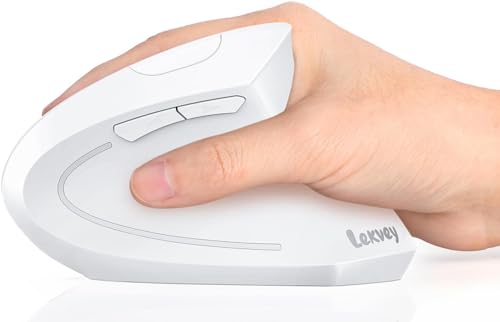
Lekvey Rechargeable Vertical Mouse, White

Lekvey Green Purple Rechargeable Vertical Mouse

Lekvey Rechargeable 2.4G Vertical Mouse
The Details Behind The Selections
The TECKNET mouse suits office work that moves among a laptop, tablet, and desktop. Its 57-degree vertical position places the hand in a more upright alignment than a conventional flat mouse, while silent switches reduce distractions during calls and focused work.
I find the three-device switching especially useful for a shared office, although the shape is intended for medium hands and may feel less natural for larger grips. The six sensitivity levels also make it more adaptable than the four-level Uineer model.
A Favorable Mix
- Bluetooth 5.3, Bluetooth 3.0, and 2.4GHz modes support three connected devices.
- The 57-degree angle supports a straighter wrist during extended office sessions.
- Quiet operation makes the mouse practical in shared rooms and libraries.
- Rechargeable power removes the need for regular disposable-battery changes.
Points To Keep In Mind
- Medium hands are the intended fit, so hand size deserves careful consideration.
- The side buttons do not function in macOS.
Quick Facts
Who It Suits Best
Office workers with medium hands benefit most from its balance of vertical support, quiet buttons, and three-device switching.
Where Another Pick Suits Better
The Nulea M501 Wireless Trackball Mouse is a better fit for a cramped surface where moving the hand is inconvenient.
Instead of pushing a conventional mouse across the desk, the Nulea M501 uses thumb-driven trackball movement. That makes it a practical choice for a crowded workspace, a couch-side computer, or a small table with little room for broad hand movement.
Unlike the TECKNET mouse, the Nulea keeps the palm stationary and rolls the ball under the thumb. Some people adapt quickly, while others may find the learning curve awkward, so a short adjustment period is sensible.
Useful Strengths
- Stationary trackball operation reduces the need for repeated arm movement.
- Bluetooth or the stored 2.4GHz receiver supports up to three devices.
- Back and forward buttons support common desktop navigation.
Trade Offs
- The six buttons are not programmable.
- Charging requires the supplied cable and a 5V source, so a fast charger is unsuitable.
Feature Snapshot
The Right Fit
People working on couches, beds, or unusually narrow desks gain the most from its stationary trackball design.
A Better Fit Elsewhere
The TECKNET BT5.3 Silent Vertical Mouse suits people who prefer conventional pointer movement and silent buttons.
The Uineer mouse combines a 59-degree vertical profile with three wireless connection methods, making it a straightforward choice for mixed-device work. Compared with the Nulea trackball, it preserves familiar whole-hand movement and may feel more natural to someone changing from a standard mouse.
Its included AA battery avoids a charging routine, while the automatic sleep function reduces idle consumption. The vertical shape still demands some adjustment, and hand size and grip preferences remain more important than a stated adjustment period.
Notable Gains
- The 59-degree angle encourages a neutral wrist orientation.
- Bluetooth 5.0, Bluetooth 4.0, and 2.4GHz permit flexible device switching.
- Soft left and right buttons reduce noise in shared workspaces.
- Forward and backward controls speed up routine navigation.
Worth Noting
- Side buttons do not work in macOS.
- The four sensitivity levels are fewer than the TECKNET mouse provides.
Core Details
Built With In Mind
Multi-device office workers benefit from its broad wireless compatibility and simple battery-based power.
Consider Something Else When
The Nulea M501 Wireless Trackball Mouse offers a better fit for people who need to keep the hand nearly motionless.
The white Lekvey mouse brings a restrained vertical design to a home office where visual clutter matters. Its handshake-like orientation supports the forearm and wrist differently from a flat mouse, making it worth examining for people who feel strain during prolonged computer work.
I see this as a simple, rechargeable option rather than a feature-heavy one. Compared with the Uineer, it offers less visible device-switching support, but the uncluttered setup may suit a dedicated computer more than a changing workstation.
A Few Highlights
- The vertical shape reduces wrist twisting compared with a flat mouse.
- A rechargeable battery avoids routine disposable-battery purchases.
- The white finish suits clean, understated workspaces.
Small Caveats
- The vertical angle may feel unusual during the first few days of use.
- People needing Bluetooth or multi-device switching may prefer the Uineer model.
Who Will Love This
Design-conscious office workers with one primary computer enjoy its clean vertical profile and rechargeable convenience.
Look Elsewhere When
The Uineer Tri-Mode 12-Month Vertical Mouse is a better fit for frequent switching among computers and tablets.
Green and purple give the Lekvey vertical mouse a more expressive appearance than the white version, which makes it easy to coordinate with a colorful desk setup. The vertical orientation still provides the central ergonomic benefit: less wrist rotation during ordinary pointer work.
Its receiver-based connection keeps setup simple, with the nano 2.4GHz receiver stored underneath the mouse. That is convenient for one computer, although the absence of Bluetooth makes the dedicated 2.4GHz approach a more important consideration than it would be with the TECKNET or Uineer.
What Stands Out
- The two-tone finish adds personality to a home office.
- Three hours of charging support up to 150 hours of use.
- Plug-and-play 2.4GHz operation keeps the connection simple.
Practical Considerations
- There is no Bluetooth connection for tablet or phone use.
- The receiver must remain within radio range of the computer.
At A Glance
Made For
Color-focused home offices and dorm-style desks benefit from its expressive finish and simple receiver connection.
Another Choice May Suit
The Lekvey Rechargeable Vertical Mouse, White is a better fit for a restrained, monochrome workspace.
The Lekvey Rechargeable 2.4G Vertical Mouse keeps the setup deliberately focused. It suits a single desktop, laptop, or dock where a stable receiver connection matters more than switching among several devices throughout the day.
Compared with the green-and-purple Lekvey, the main distinction is functional rather than visual. This model centers the 2.4GHz USB connection and rechargeable operation, offering a straightforward path for anyone moving away from a conventional flat mouse.
Where It Delivers
- The vertical grip supports a more neutral wrist position.
- Rechargeable power removes routine battery replacements.
- USB 2.4GHz connectivity works well with a dedicated computer.
Where It May Fall Short
- The receiver occupies a USB port while the mouse is in use.
- Its single-device focus is less convenient for frequent device changes.
Best Suited To
People with a stationary computer setup benefit from the focused 2.4GHz connection and rechargeable design.
Where A Sibling Pick Shines
The Uineer Tri-Mode 12-Month Vertical Mouse offers a better fit for people who regularly alternate among several devices.
What Matters Before Buying an Ergonomic Mouse
Start with the grip
A vertical mouse changes how the hand rests, so the transition is not always instant. I recommend comparing the mouse angle with the shape of a familiar mouse and allowing a short adjustment period before deciding whether the fit feels natural.
Match the control method
Trackball users move the ball while the hand stays near one spot, while vertical-mouse users move the entire device. The Nulea works best for constrained surfaces, whereas conventional pointer movement may feel more familiar on a broad desk.
Account for device switching
Bluetooth is useful for tablets and laptops, while a 2.4GHz receiver is a simple choice for one computer. Multi-device controls add convenience, but they also create another connection method to learn and maintain.
Consider power and desk space
Rechargeable models remove regular disposable-battery changes, while AA models offer a more familiar power system. The receiver, charging cable, and larger vertical body also need room near the keyboard and mouse pad.
Key Ideas Before Making a Choice
Mistakes Worth Dodging
Choosing only by the angle can miss the more important issue of hand fit. I would compare grip size, desk space, connection needs, and adjustment tolerance before settling on a model.
What Separates Premium From Basic
The costlier options here add features such as three-device switching, more sensitivity levels, silent buttons, or a trackball mechanism. Paying more makes sense only when one of those additions removes a regular inconvenience.
Frequently Asked Questions
Is a vertical ergonomic mouse better for wrist discomfort?
A vertical mouse can reduce wrist twisting by holding the hand in a more upright position. Comfort still depends on hand size, grip habits, desk setup, and time spent using it.
Are trackball mice suitable for carpal tunnel discomfort?
A trackball can limit repeated arm and wrist movement because the pointer is controlled by rolling a ball with the thumb. It may suit a cramped desk, though some people find thumb movement unfamiliar at first.
How many devices can these ergonomic mice connect to?
The TECKNET, Nulea, and Uineer support up to three devices. The two Lekvey models featuring 2.4GHz connections are designed around receiver-based use with a computer.
How long does an ergonomic mouse need to feel comfortable?
Adjustment varies by person and depends on the previous mouse used. A brief daily period is sensible, particularly when moving from a flat mouse to a vertical or trackball design.
Should I choose a rechargeable or battery-powered model?
Rechargeable models reduce repeated battery changes and suit people who prefer a cable-based routine. AA models provide a familiar power source and remove the need to recharge, though battery replacement eventually remains part of ownership.
Closing Remarks
I find the TECKNET model most balanced for a quiet, multi-device office, while the Nulea trackball makes the strongest case for a cramped surface. The Uineer serves people who value wireless flexibility, and the Lekvey options cover straightforward single-computer setups with different visual styles.
The most useful choice is the one that matches the hand, desk, and connection routine rather than simply looking more ergonomic.
