
A gaming setup can feel cluttered even when the essentials are all in place: the mouse drifts across a small pad, a wrist gets uncomfortable, monitors sit too low, and streaming controls crowd the keyboard. I’ve organized six accessories around those real problems, with special attention to desk space, equipment fit, and the difference between useful features and unnecessary extras.
An Overview Of The Picks
LIMKRIAN Flower Mouse Pad 31.5×11.8 in
BelugaDesign Shark Wrist Rest, Pastel Blue Kawaii Anime Nonslip Mat, Padded Arm Rest

TEAMIX 31.5-inch Dual Monitor Stand

FIFINE AmpliGame D6 White Gaming Controller, 15 OBS Shortcuts, Macro Keys
FIFINE AmpliGame D6 Stream Controller, 15 Macro Keys for Mac and PC

FIFINE AmpliGame V3 Video Capture Card, 1080p60 HDMI-to-USB, PS4/Switch/Xbox
More Details On Our Top Picks
The LIMKRIAN Flower Mouse Pad brings a colorful floral look to a desk that might otherwise be dominated by black hardware. Its 31.5-by-11.8-inch surface has enough room for a keyboard and mouse, which helps during long gaming sessions or busy creative work.
Unlike the compact BelugaDesign Shark Wrist Rest, this mat prioritizes coverage rather than wrist elevation. The smooth tracking surface, rubber base, and stitched perimeter make it practical for someone who wants both a broad movement area and a cheerful desk.
Where It Excels
- The extended surface reduces the need to reposition a mouse during keyboard-and-mouse layouts.
- A nonslip rubber base helps keep the mat stationary during rapid movement.
- Reinforced stitched edges help limit fraying along the perimeter.
- The wipe-clean, waterproof surface suits busy desks where drinks and small spills happen.
Trade Offs
- The broad footprint may be harder to accommodate on a compact desk, especially in a dorm room.
- Its pink floral styling suits creative setups more than a restrained industrial gaming theme.
Key Specs
Made For
This mat fits gamers, students, and creative professionals who want a large floral work area with room for both keyboard and mouse.
Consider Something Else When
The BelugaDesign Shark Wrist Rest suits people who need dedicated wrist support rather than the broad mouse coverage of the LIMKRIAN Flower Mouse Pad.
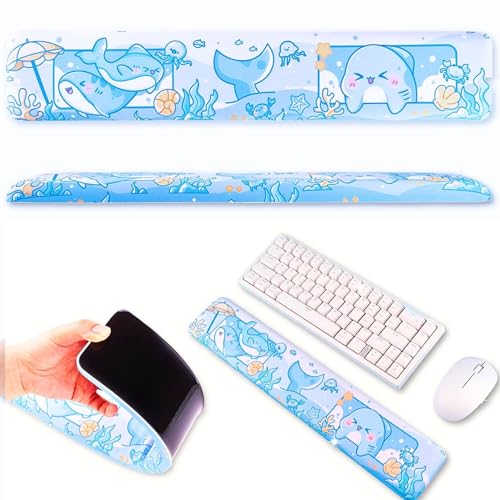
The BelugaDesign Shark Wrist Rest turns a small section of the desk into a padded landing place for the forearms. Its pastel-blue underwater artwork, complete with sharks, jellyfish, and coral, suits a playful setup where a plain black pad would feel out of place.
Where the LIMKRIAN Flower Mouse Pad covers the whole keyboard area, this compact accessory focuses on wrist placement. The 7.3-by-3.14-inch footprint makes it more appropriate beside a compact keyboard or laptop, especially during extended typing or gaming sessions.
Benefits That Matter
- Soft padding gives the wrists a more cushioned contact point than a bare desk.
- The rubber base is designed to resist sliding during active mouse use.
- Machine washing makes regular cleaning straightforward on a shared or busy desk.
- The playful ocean theme adds personality without requiring a matching full-size mat.
Points To Note
- The 7.3-by-3.14-inch size is narrower than a full forearm support, so positioning matters.
- The machine-washable design calls for air drying rather than a high-heat dryer.
Right Fit For
Gamers and students with compact desks benefit from the focused cushioning and washable surface, especially when using a laptop or small keyboard.
Another Choice May Suit
The LIMKRIAN Flower Mouse Pad is the better match for a creator who needs broad mouse coverage and prefers a floral design over an anime theme.
Two monitors often create the same problem: a wide desk with little room for the keyboard, console, or everyday objects. The TEAMIX 31.5-inch Dual Monitor Stand raises the screens while creating storage space below them for a laptop, keyboard, console, or similar equipment.
Compared with the flat LIMKRIAN Flower Mouse Pad, this stand changes the entire vertical layout of the desk. Its steel-and-wood construction suits a permanent workstation rather than a temporary accessory, while the 5.5-inch height gives dual-screen users a more elevated view.
Positive Points
- The steel frame and MDF wood construction support a listed load capacity of 150 pounds.
- A 4.1-inch inner clearance creates practical storage below the raised screens.
- Its 5.5-inch total height suits sit-and-stand desk setups.
- Assembly reportedly takes about 10 minutes with the included hardware and instructions.
Practical Considerations
- The 31.5-by-9.5-inch footprint requires a reasonably wide desk surface.
- Both monitors must fit the stand’s length and support area, so model dimensions deserve checking first.
At A Glance
Built With In Mind
Dual-monitor players, editors, and office workers benefit from the raised display position and concealed storage.
Where A Sibling Pick Shines
The BelugaDesign Shark Wrist Rest is more useful for a single-monitor setup that lacks room for a full-width riser.
The FIFINE AmpliGame D6 White Gaming Controller is a shortcut keypad for creators who want frequent streaming actions away from the main keyboard. Fifteen customizable keys can handle tasks such as scene changes, chat responses, and other repeatable commands without requiring a long reach across the desk.
Unlike the TEAMIX 31.5-inch Dual Monitor Stand, which reshapes the physical workspace, this device adds a dedicated control surface. OBS support, trigger actions, PC media controls, and a white finish make it most relevant to a PC streaming setup.
Practical Advantages
- Fifteen shortcuts give creators a separate place for frequently repeated actions.
- Customizable keys can reduce reliance on small mouse targets during a live broadcast.
- Trigger actions offer another layer of control beyond ordinary key presses.
- The white finish coordinates well with pale desk mats and lighter studio equipment.
Minor Gripes
- Mac compatibility is not established for this model, making the FIFINE AmpliGame D6 Stream Controller a safer cross-platform choice.
- The extra keypad adds another device to position within reach of the main keyboard.
Feature Snapshot
Who Will Love This
PC streamers and content creators benefit from the 15 dedicated shortcuts, particularly when OBS controls need to be accessible during a broadcast.
Look Elsewhere When
The FIFINE AmpliGame D6 Stream Controller suits creators who need confirmed Mac and PC support and customizable LCD macro keys.
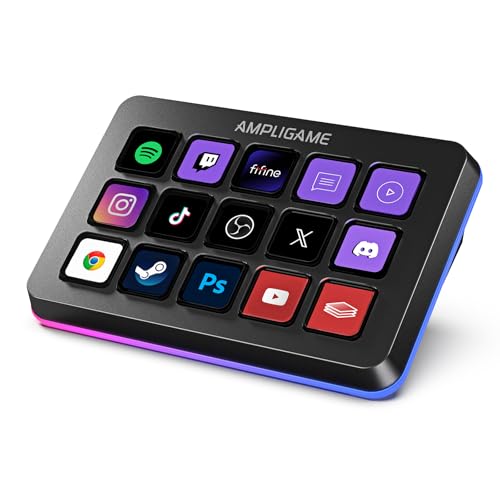
The FIFINE AmpliGame D6 Stream Controller offers 15 customizable macro keys in a compact layout made for OBS, Twitch, YouTube, and Streamlabs. Each key can launch an application or carry out a recurring broadcast action, reducing the need to search through software menus mid-session.
Mac and PC compatibility distinguishes it from the white D6 controller, which lists PC media functions without establishing the same cross-platform coverage. The LCD macro keys also add visible context to each assigned command, which can be helpful when several shortcuts perform related tasks.
Real-World Strengths
- Fifteen assignable keys provide dedicated control over common streaming actions.
- LCD macro keys help identify each shortcut’s current function at a glance.
- Mac and PC support suits creators who move between different computers.
Possible Compromises
- The LCD-equipped design may be unnecessary for a simple set of keyboard shortcuts.
- Some streaming platforms can require software configuration before every shortcut works as intended.
The Right Fit
Cross-platform streamers and remote workers benefit from the 15 customizable LCD keys, especially when switching between Mac and PC systems.
Reach For A Different Pick When
The FIFINE AmpliGame D6 White Gaming Controller is a closer fit for a PC creator who values trigger actions, PC media controls, and a white finish.
The FIFINE AmpliGame V3 Video Capture Card brings console and desktop video into a USB-based streaming setup. It captures at up to 1080p at 60 frames per second, while its HDMI loop-out can pass through 4K video at up to 30 frames per second to another display.
That makes it more versatile than the FIFINE AmpliGame D6 Stream Controller, which controls broadcast actions rather than moving video into a computer. Compatibility with PS4, Windows, Mac OS, Switch, and Xbox expands its use across console and computer-based gaming, subject to the source device’s own output settings.
Standout Benefits
- 1080p60 capture supports smoother motion for fast-paced games and live broadcasts.
- USB 3.0 provides the connection path from the capture card to a compatible computer.
- HDMI loop-out can send a 4K/30fps signal onward while the card handles capture.
- Support spans several major consoles and both Windows and Mac OS.
Things To Weigh
- Capture and loop-out resolutions use different maximum frame rates, so the intended display and broadcast need separate planning.
- The original USB cable is recommended for the intended connection, which matters for setups using a substitute cable.
Core Features
Whose Shelf It Belongs On
Console streamers, competitive players, and creators recording gameplay benefit from the 1080p60 capture capability and broad source-device compatibility.
Swap It Out When
The FIFINE AmpliGame D6 White Gaming Controller is a better fit for creators who need shortcut control rather than a hardware video-capture path.
What Matters Before Building a Gaming Desk
Start With the Main Bottleneck
A crowded desk rarely needs every possible accessory at once. I would address mouse movement first for competitive play, wrist comfort for long laptop sessions, and monitor position for a permanent dual-screen setup. A capture card becomes relevant when recording or broadcasting a console, while shortcut controllers help creators repeat actions without navigating software menus.
Measure the Available Footprint
The LIMKRIAN Flower Mouse Pad needs a broad surface, the BelugaDesign Shark Wrist Rest needs only a narrow landing area, and the TEAMIX 31.5-inch Dual Monitor Stand requires substantial width. Measuring the desk before ordering prevents a favorite accessory from becoming another obstacle in a crowded workspace.
Check Software and Connection Requirements
The FIFINE AmpliGame D6 controllers relate to specific streaming software and computer systems, so compatibility deserves confirmation before setup. The V3 capture card depends on HDMI source output, USB 3.0, and suitable streaming software, making the full connection path more important than the card alone.
Match Accessories to Actual Tasks
A flashy desk mat has little effect on gameplay performance, but it can make the setup more pleasant and provide a larger tracking area. A wrist rest may matter more for laptop-heavy work than for a mouse-only station. I keep each purchase tied to a specific habit, such as switching OBS scenes, recording console play, or reclaiming desk space.
Two Details That Matter Before Checkout
Mistakes Worth Dodging
A large accessory can still be the wrong scale for the desk, so dimensions deserve more attention than appearance. Another common error is assuming every streaming shortcut works immediately, even though software configuration can determine the final behavior. I also check whether the intended source device, computer system, and application are all supported before buying.
When Paying More Pays Off
Additional spending matters when a core requirement cannot be met by a basic option. Cross-platform support can justify a dedicated stream controller, while 1080p60 capture serves a different need than shortcut buttons or desk organization. The strongest upgrade is the one that removes a limitation already present in the current setup.
Frequently Asked Questions
What size gaming mouse pad is best for a keyboard and mouse?
A 31.5-by-11.8-inch pad offers room for both devices and leaves space for mouse movement. Compact desks may require a separate keyboard and smaller mouse surface instead.
Are keyboard wrist rests useful for gaming?
They can provide a cushioned contact point during long laptop, typing, or gaming sessions. A compact model works best when it sits in a natural position without pushing the keyboard away from the user.
What does a video capture card do?
A capture card transfers video from an HDMI source, such as a console, into a computer for recording or streaming. The FIFINE AmpliGame V3 supports capture up to 1080p60 and HDMI loop-out up to 4K/30fps.
Do streaming controllers replace a keyboard?
No, they add dedicated shortcuts for repeated actions such as changing scenes or adjusting audio. A standard keyboard remains necessary for regular text entry and broader computer control.
What matters most when choosing gaming computer accessories?
Compatibility, desk dimensions, and the specific task matter most. An accessory works better when it supports the existing equipment and resolves a real limitation rather than simply adding another feature.
Closing Remarks
My short list moves from immediate physical improvements to equipment that supports recording and broadcasting. I start with the desk mat for broad mouse coverage, the shark wrist rest for compact setups, and the TEAMIX stand for dual-screen organization. The three AmpliGame options serve more specialized needs, with the D6 models handling shortcuts and the V3 moving console video into a streaming workflow. The right choice depends on the bottleneck already present at the desk.
