
A gaming session that stutters can spoil a good evening, whether the action is fast-paced competitive play or a sprawling open world. I built this roundup around six gaming laptops that serve different needs, from a 2.8-pound LG gram built for mobility to ASUS and Acer models with dedicated RTX graphics. My focus is on the processor, graphics, display, memory, storage, and practical fit for everyday use.
The Lineup, Simplified
LG gram 15-inch Copilot+ Laptop, Ryzen AI 7 350, 16GB, 1TB SSD

Acer Nitro V 16S AI PC, RTX 5060
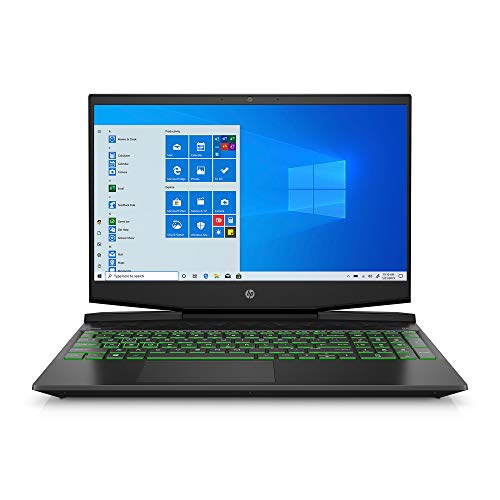
HP Pavilion Gaming 15-dk0096wm, Core i5, GTX 1650 4GB, 8GB RAM, 256GB SSD

ASUS V16, Core 7 240H, RTX 5060, 32GB RAM, 1TB SSD, 16-inch 144Hz

Acer Nitro 5 AN515-54-5812, Core i5-9300H, GTX 1650, 8GB, 256GB SSD
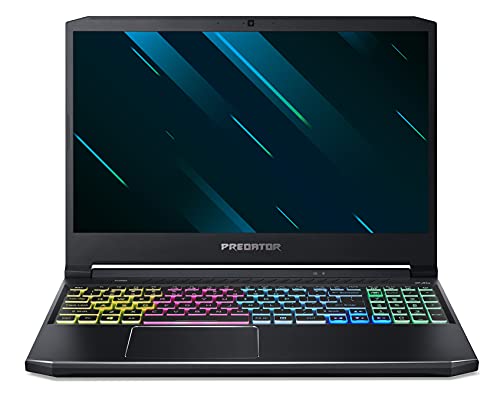
Acer Predator Helios 300 PH315-53-72XD, i7-10750H, RTX 2060, 16GB, 512GB
The Picks, Examined More Closely
The LG gram puts mobility ahead of gaming specialization. At 2.8 pounds and 0.7 inches thick, it slips more easily into a commuter bag than a conventional 16-inch gaming machine. The 15.6-inch touchscreen adds useful flexibility for everyday browsing, coursework, and media.
Ryzen AI 7 350 processing, 16GB of memory, and a 1TB solid-state drive give it respectable everyday-computer credentials. Compared with the Acer Nitro V 16S AI PC, RTX 5060, the LG emphasizes portability rather than a listed gaming graphics card, making it more natural for a day spent moving between classes, offices, and home.
Where It Delivers
- The 2.8-pound chassis reduces the physical burden of carrying a full-size laptop.
- A 1TB drive provides ample room for coursework, game installations, and media files.
- The 16GB memory configuration suits ordinary multitasking without demanding frequent system changes.
- Round-the-clock assistance is included for setup, connectivity, and troubleshooting.
Practical Considerations
- I would check the exact graphics configuration against the games in mind, since the gaming emphasis here is limited.
- The included protection plan has terms and limits that deserve a careful read before relying on accidental-damage coverage.
At A Glance
Made For
This model best suits students and commuters who need a capable everyday laptop that remains easy to carry.
Consider Something Else When
The Acer Nitro V 16S AI PC, RTX 5060, suits someone whose priority is dedicated gaming graphics in a larger portable chassis.
The Acer Nitro V 16S makes a clearer gaming argument than the LG gram because its RTX 5060 is dedicated gaming hardware. That distinction matters for graphically demanding titles, where an integrated graphics solution is not interchangeable with a discrete GPU. The 16S designation also signals a larger chassis than the LG’s slim 15.6-inch design.
Ryzen AI 7 350 processing and the slim gaming format suit a desktop replacement that still gets carried between locations. The included protection plan offers coverage for qualifying accidental damage and breakdowns, subject to its terms, making it useful for a frequently transported machine.
Useful Highlights
- RTX 5060 graphics provide a stronger foundation for modern gaming workloads.
- The slim 16-inch form balances screen space with reasonable portability.
- Ryzen AI 7 350 processing supports gaming, streaming, and ordinary multitasking.
- Setup and troubleshooting assistance is available around the clock.
Trade Offs
- A 16-inch gaming chassis needs more bag space than either 15.6-inch option in this roundup.
- I would confirm the exact panel, memory, and storage configuration on the listing because the core configuration emphasizes the processor and GPU.
Feature Snapshot
Right Fit For
This laptop fits gamers who want RTX 5060 graphics without choosing one of the bulkier traditional gaming designs.
A Better Fit Elsewhere
The ASUS V16, Core 7 240H, RTX 5060, 32GB RAM, 1TB SSD, 16-inch 144Hz, suits someone who also values a specified high-refresh display and more memory.
The HP Pavilion takes a familiar approach: a 15.6-inch Full HD gaming laptop built around a Core i5 processor and GTX 1650 graphics. The GTX 1650 includes 4GB of dedicated graphics memory, which gives it more gaming-oriented hardware than a basic integrated GPU. For older or less demanding titles, that simplicity can be easier to understand.
Compared with the Acer Nitro V 16S AI PC, RTX 5060, this Pavilion uses an older processor and graphics generation, but its smaller screen may be easier to manage. The webcam, wireless connectivity, and Bluetooth support also make it practical for classes, calls, and general home use between gaming sessions.
A Few Highlights
- A 1920-by-1080 Full HD panel provides a familiar 16:9 viewing format.
- GTX 1650 graphics with 4GB of dedicated memory support casual and older gaming.
- The 15.6-inch chassis is easier to carry than the larger 16-inch alternatives.
- Webcam, wireless networking, and Bluetooth cover common communication needs.
Some Limits To Know
- The 8GB memory configuration can become restrictive once games, browser tabs, and voice chat run together.
- A 256GB SSD leaves limited room for modern game libraries, so storage management matters.
- The GTX 1650 and ninth-generation Core i5 are aging components for demanding new releases.
Who Will Love This
This Pavilion suits a beginner or casual gamer who values a familiar 15.6-inch design and straightforward components over newer graphics.
Another Choice May Suit
The Acer Nitro 5 AN515-54-5812, Core i5-9300H, GTX 1650, 8GB, 256GB SSD, suits someone who wants the same GPU generation with an IPS panel, backlit keyboard, and extra storage-slot flexibility.
The ASUS V16 brings together the most clearly specified performance package in this group. Its RTX 5060 handles gaming graphics, while 32GB of memory gives games, streaming software, and heavy multitasking more breathing room. A 1TB SSD also reduces the pressure to remove games and media frequently.
The 16-inch WUXGA display uses a 1920-by-1200 resolution, 16:10 format, and 144Hz refresh rate. A higher refresh rate displays more frames per second, which can make movement feel smoother. The Core 7 240H processor adds 10 cores and 16 threads for mixed workloads, although this larger machine is less travel-friendly than the 15.6-inch HP Pavilion.
Everyday Wins
- RTX 5060 graphics provide a capable platform for current gaming workloads.
- The 144Hz display benefits fast movement and competitive titles.
- 32GB of memory comfortably supports several demanding applications at once.
- The 1TB drive provides useful room for a larger game library.
- The 16:10 panel offers more vertical space than a standard 16:9 screen.
Where It May Fall Short
- The 16-inch chassis adds bulk compared with the 15.6-inch HP and Acer models.
- A sustained 300-nit brightness may be less comfortable than a brighter panel in a very bright room.
Quick Facts
Built With In Mind
This model best fits a dedicated PC gamer who values high-refresh visuals, dedicated graphics, and generous memory.
Swap It Out When
The LG gram 15-inch Copilot+ Laptop, Ryzen AI 7 350, 16GB, 1TB SSD, suits someone who prioritizes a 2.8-pound body over gaming-specific hardware.
The Acer Nitro 5 combines a 15.6-inch IPS display with a GTX 1650 and a ninth-generation Core i5. An IPS panel offers wider viewing-angle flexibility than a basic TN-style panel, which helps when the laptop sits away from a desk. The 256GB NVMe SSD also gives games and applications quicker response than a conventional hard drive.
Two M.2 storage positions are present, with one slot available according to the supplied configuration, giving this model more expansion potential than the HP Pavilion listing. The backlit keyboard helps in dim rooms, while Wi-Fi 6 can provide a suitable connection on a compatible router. Compared with the ASUS V16, the Nitro 5 uses older components but a smaller chassis.
Positive Points
- The 15.6-inch Full HD IPS display remains usable from a wider range of seating positions.
- Wi-Fi 6 supports faster local wireless connections on compatible networks.
- The backlit keyboard adds comfort during late-night gaming.
- An available M.2 slot creates a practical path for additional storage.
Points To Keep In Mind
- The 8GB of memory is limited for combining demanding games with several background applications.
- The GTX 1650 and ninth-generation processor are better aligned with older and less demanding games.
- Wi-Fi 6 requires a compatible router and network to deliver its full benefit.
Whose Shelf It Belongs On
This Nitro 5 fits a budget-conscious gamer who values a backlit keyboard, IPS panel, and future storage expansion.
Where A Sibling Pick Shines
The Acer Predator Helios 300 PH315-53-72XD, i7-10750H, RTX 2060, 16GB, 512GB, suits someone willing to use an older platform for stronger graphics, more memory, and a faster display.
The Predator Helios 300 balances gaming hardware with a familiar 15.6-inch footprint. Its RTX 2060 carries 6GB of dedicated graphics memory, compared with the 4GB offered by the GTX 1650 models in this roundup. That distinction matters for graphics-heavy games that need more room for textures and other visual data.
The Core i7-10750H, 16GB of dual-channel memory, and 512GB NVMe SSD form a practical configuration for mixed gaming and productivity. Its Full HD IPS panel runs at 144Hz with a 3ms overdrive response time, a combination that can keep fast motion visually crisp. Against the Acer Nitro 5, this model offers a larger GPU, more memory, and twice the listed storage.
The Case For It
- The RTX 2060 provides 6GB of dedicated graphics memory for demanding games.
- The 144Hz IPS display suits fast-paced and competitive titles.
- Dual-channel 16GB memory supports gaming and everyday multitasking.
- The 512GB SSD offers twice the storage listed for the other 15.6-inch options.
- Wi-Fi 6 and an RGB keyboard add useful everyday gaming features.
A Few Limitations
- The 10th-generation Core i7 and RTX 2060 belong to an older hardware generation.
- A 512GB drive can fill quickly with several modern game installations and saved media.
Technical Sheet
The Right Fit
This Helios 300 suits a gamer who values 6GB of graphics memory, a 144Hz panel, and 16GB of system memory in a familiar 15.6-inch size.
Reach For A Different Pick When
The ASUS V16, Core 7 240H, RTX 5060, 32GB RAM, 1TB SSD, 16-inch 144Hz, suits someone prioritizing a newer processor, more memory, and larger storage.
Matching a Gaming Laptop to the Play
I start with the games, since the GPU and display determine how smoothly a title can run and look. The ASUS V16 and Acer Nitro V 16S pair RTX 5060 graphics with newer processors, while the older GTX 1650 and RTX 2060 systems make more sense for established libraries. Display refresh rate also matters for competitive play because 144Hz can present noticeably more frames per second than a standard 60Hz panel.
GPU Memory and Display
Graphics memory is dedicated VRAM, or video memory, used by the GPU to hold textures and visual data. The 6GB in the Predator Helios 300 exceeds the 4GB listed for the HP Pavilion and Acer Nitro 5, giving newer games and richer visual effects more room. I also compare screen size, resolution, and refresh rate, because a larger display is not automatically more comfortable in a cramped workspace.
Memory and Storage
RAM is short-term working memory for open applications, while SSD storage holds the operating system, games, and files. The 32GB in the ASUS V16 supports heavy multitasking, and the 1TB drive reduces the need for frequent deletion. At 8GB and 256GB, the HP Pavilion and Acer Nitro 5 require more active storage management, though the Nitro 5 includes an available M.2 slot for expansion.
Portability and Protection
Weight becomes decisive for anyone carrying a laptop across campus, through airports, or between meeting rooms. The LG gram is the clear portability option at 2.8 pounds, while the 16-inch ASUS V16 and Acer Nitro V 16S need more bag space. I also read protection-plan terms carefully, since accidental-damage and breakdown coverage can vary by plan and specific incident.
Avoiding Common Gaming Laptop Traps
Mistakes Worth Dodging
A large screen does not automatically provide a high refresh rate, so I check both resolution and refresh rate before choosing. I also avoid judging a laptop by processor generation alone, since the GPU, memory, and game requirements still shape the experience. Confirming the exact configuration before buying prevents a mismatch between expectations and the installed hardware.
The Upgrade Payoff
Spending more can provide a newer GPU, more system memory, a larger SSD, or a faster display. Those additions become worthwhile when I play demanding games, stream while gaming, or keep many applications open. A portable everyday computer can still be more practical when dedicated gaming hardware is not the main requirement.
Frequently Asked Questions
Which gaming laptop has the most memory?
The ASUS V16, Core 7 240H, RTX 5060, 32GB RAM, 1TB SSD, 16-inch 144Hz, has the highest listed memory at 32GB. That amount supports heavy multitasking and modern games more comfortably than an 8GB configuration.
Which model has the most storage?
The ASUS V16 and LG gram each list 1TB of storage, while the Predator Helios 300 provides 512GB. Game libraries, media files, and applications can consume space quickly, so I consider available expansion before choosing a smaller drive.
Are the older GTX 1650 laptops still useful?
The HP Pavilion and Acer Nitro 5 remain practical for older games, lighter titles, and mixed school or work use. Their 4GB GTX 1650 graphics and older processors place clear limits on demanding new releases.
Which laptop is easiest to carry?
The LG gram is the lightest model listed at 2.8 pounds and is only 0.7 inches thick. The 15.6-inch HP Pavilion and Acer Nitro 5 also travel more easily than the larger 16-inch gaming systems.
What matters most in a high-refresh display?
Refresh rate indicates how many times the screen updates each second, and 144Hz can make fast movement appear smoother. Resolution, brightness, panel type, and GPU capability also influence the complete visual and gaming experience.
Final Verdict
The ASUS V16 is my choice for serious gaming because its RTX 5060, 32GB of memory, 1TB SSD, and 144Hz display form the most balanced specified package. The Acer Nitro V 16S offers a slimmer route to RTX 5060 gaming, while the LG gram serves mobility. The Acer models and HP Pavilion remain sensible choices for older games or lighter gaming demands.
