
A Friday-night match begins, and the display keeps pace with fast movement. I built this guide around the screen side of a fixed-budget gaming PC, where refresh rate, resolution, panel type, and desk space matter as much as the components inside the case. One important distinction: all six products here are gaming monitors, not complete desktop systems. They represent possible display upgrades for a gaming desktop build rather than six standalone PCs.
For competitive shooters, the 240Hz KTC H32S17F puts speed ahead of pixel density. At the other end of the scale, the QHD models give desktop work and detailed games more room, while the 24-inch H24T7 suits smaller desks. The shortlist below covers each major screen size and resolution combination, with honest compromises included.
The Shortlist At A Glance

KTC 32-Inch Curved Monitor H32S17C

KTC 32-Inch 240Hz Monitor H32S17F

KTC 27-Inch QHD 220Hz H27T22C-3

KTC 27-Inch 200Hz QHD Fast IPS Monitor H27T6 with 131% sRGB, Speakers, White
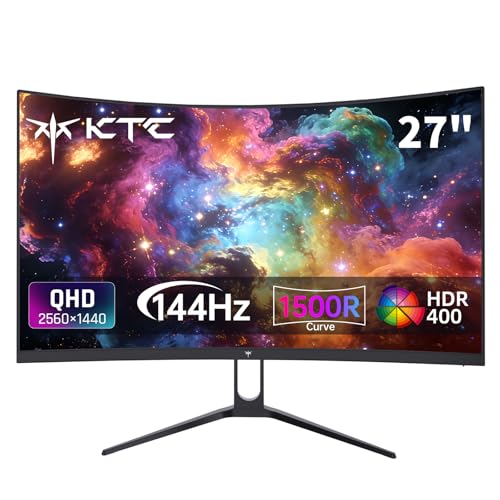
KTC 27-Inch Curved QHD 144Hz H27S5C

KTC 24-Inch 180Hz QHD Fast IPS Monitor H24T7 with HDR 400 and VESA Mount
Taking A Closer Look At The Options
The H32S17C favors a large, curved 1080p display with a 165Hz refresh rate, meaning it can present substantially more frames each second than a conventional 60Hz screen. That makes it a practical match for fast arcade games, shooters, and competitive sessions where responsive motion matters. The 1500R curve also gives a 32-inch panel a more immersive shape than a flat screen.
Compared with the H32S17F later in the list, this model trades some speed for a lower-resolution format, while the 32-inch size creates a comfortable viewing area without demanding a QHD-class display. For a typical competitive player working within a fixed PC budget, that balance can be sensible. The honest read is that it favors fluid large-screen gaming over fine desktop detail.
Good Reasons To Consider
- A 165Hz refresh rate smooths rapid movement compared with standard 60Hz displays.
- The curved 32-inch format adds immersion to racing, action, and shooter games.
- Full HD resolution places less pressure on a budget gaming GPU than QHD.
Worth Noting
- 1080p at 32 inches shows less fine detail than the QHD models in this guide.
- Desk depth matters for a curved display, so a shallow workstation may feel cramped.
Quick Facts
Made For
The H32S17C suits competitive players and casual gamers who prefer a large 1080p screen without allocating a budget to a QHD panel.
Where Another Pick Suits Better
Competitive shooters benefit more from the faster 240Hz refresh rate of the KTC 32-Inch 240Hz Monitor H32S17F.
The H32S17F is built around a 240Hz refresh rate, a figure that matters most in competitive games where quick aim changes and constant movement leave little room for visual delay. Its listed 1ms response time indicates how quickly the panel can change between pixel states. Together, those specifications make this the speed-focused option in the shortlist.
That speed comes with a clear trade-off: the display remains 1080p rather than QHD. Against the H32S17C, the step up is in motion handling rather than sharpness, so a player who can see enemies clearly at a distance may notice little difference. I would favor this model for a dedicated competitive rig and consider the QHD H27T22C-3 for mixed gaming and productivity.
Positive Takeaways
- The 240Hz refresh rate gives this model the highest listed motion rate in the group.
- A 1ms response time supports sharp transitions during quick directional changes.
- The 32-inch curved panel adds a wide field of view for immersive play.
- 1080p resolution places a comparatively light demand on the graphics system.
Trade Offs
- The lower pixel count limits fine detail compared with every QHD alternative here.
- A 240Hz capability benefits most from a capable graphics card and an environment built around competitive play.
Right Fit For
The H32S17F best suits competitive shooters, fighting games, and esports-focused players who prioritize rapid motion over maximum resolution.
Consider Something Else When
The KTC 27-Inch QHD 220Hz H27T22C-3 offers more desktop space and sharper text for creators working beside games.
At 2560 x 1440, the H27T22C-3 uses QHD resolution, which provides roughly twice the pixel count of 1080p without reaching the workload of 4K. That extra room makes text and interface elements more defined while still fitting a 27-inch panel. The 220Hz refresh rate keeps fast scenes fluid, giving this model a useful balance between detail and movement.
Built-in speakers add convenience for casual sessions, alerts, and videos without requiring another desktop speaker immediately. Compared with the flat Fast IPS H27T6, this option has a simpler feature set, but its combination of QHD clarity and 220Hz speed is especially attractive for a general-purpose gaming PC. Depending on the desk, its 27-inch footprint may be a more natural fit than the larger 32-inch models.
Noteworthy Benefits
- QHD resolution gives games, documents, and menus more visible detail.
- The 220Hz refresh rate handles quick movement without using a 32-inch footprint.
- Integrated speakers cover basic audio without another desktop speaker immediately.
Small Caveats
- A 220Hz display benefits from a GPU capable of driving the higher frame rate.
- The fixed 27-inch size may feel smaller beside a 32-inch curved model in a large room.
Feature Snapshot
Built With In Mind
This model suits mixed-use PC owners who want QHD detail, a high refresh rate, and simple built-in audio in one gaming display.
Another Choice May Suit
The KTC 27-Inch 200Hz QHD Fast IPS Monitor H27T6 is a better fit for setups needing height adjustment, swiveling, and pivot movement.
The H27T6 combines QHD resolution with a 200Hz refresh rate and a Fast IPS panel, a display type known for responsive pixel changes and broad viewing angles. It also lists overclocking up to 220Hz, giving capable systems a little additional headroom. The practical appeal lies in combining everyday flexibility with a strong competitive specification set.
Its stand supports tilt, swivel, pivot, and height adjustment, which is a meaningful advantage for a shared workstation or a desk that needs frequent positioning changes. HDMI and DisplayPort connections support different PC and GPU arrangements, while the listed 131% sRGB coverage and built-in speakers broaden its appeal beyond competitive gaming. Compared with the H27T22C-3, it sacrifices some peak refresh rate for far greater physical adjustability.
What Helps Most
- The 200Hz base refresh rate handles fast movement with little visual lag.
- QHD resolution keeps text and game imagery defined at a practical 27-inch size.
- Height, tilt, swivel, and pivot adjustments make the stand unusually versatile.
- HDMI and DisplayPort give the display useful connection options.
- Built-in speakers and 131% sRGB coverage support entertainment as well as games.
Possible Compromises
- The listed 220Hz figure depends on overclocking and compatible hardware.
- Its feature-heavy stand takes more room than a basic fixed stand.
- The white finish may not match every desk and PC setup.
Technical Highlights
Who Will Love This
The H27T6 suits mixed-use gamers who want a fast QHD screen, frequent stand adjustment, built-in audio, and flexible connections.
A Better Fit Elsewhere
The KTC H27S5C 27-Inch Curved QHD 144Hz H27S5C is a better fit for a seated media setup that values curvature and HDR 400 over extensive stand movement.
The H27S5C combines a 27-inch curved panel with 2560 x 1440 resolution, making it a comfortable middle ground between the large 32-inch screens and smaller desk options. A 1500R curve wraps the edges toward the viewer, which can make games and films feel more encompassing. For a typical living-room PC or seated gaming setup, that shape may matter more than a very high refresh rate.
The 144Hz refresh rate remains fluid for most action games, although it trails the 165Hz H32S17C and the faster competitive models. HDR 400 adds a higher dynamic range designation for supported content, but it should not be confused with a guarantee of exceptional brightness. Compared with the flat H27T6, the H27S5C centers its appeal around immersion and media rather than stand adjustment.
What Works In Its Favor
- The curved 1500R design creates an immersive presentation for games and video.
- QHD resolution provides a useful balance of detail and graphics-system demand.
Where It May Fall Short
- The 144Hz rate offers less competitive headroom than several faster models here.
- Curved displays need adequate desk depth, so compact workstations deserve a fit check.
The Right Fit
The H27S5C suits entertainment-focused PC owners who prefer a curved QHD display for gaming, streaming, and video playback.
Reach For A Different Pick When
The KTC 32-Inch 240Hz Monitor H32S17F suits competitive players who prioritize fast motion more than curved media aesthetics.
The H24T7 packs several larger-screen features into a 24-inch footprint. Its 2560 x 1440 resolution gives compact desks noticeably more working area than 1080p, while the Fast IPS panel supports responsive motion and wider viewing angles. At 180Hz, with overclocking listed up to 185Hz, it also handles fast games well despite its smaller dimensions.
Height adjustment, tilt, and pivot functions make it easier to align with a smaller desk or an existing mounting arrangement. The VESA mount capability adds further flexibility for an arm or wall setup, a notable benefit in a crowded room. Compared with the 27-inch H27T6, this screen occupies less width but lacks the H27T6’s swivel adjustment and built-in speakers.
The Helpful Details
- QHD detail remains usable at a compact 24-inch size.
- The 180Hz refresh rate supports fast competitive and action games.
- Height, tilt, and pivot controls support easier desk alignment.
- VESA mounting creates a practical path for an arm or alternative placement.
Less-Strong Areas
- A 24-inch panel shows less content than the larger models in the guide.
- Overclocking up to 185Hz depends on compatible hardware and signal support.
- Compact displays demand close viewing distance for comfortable text work.
Key Product Details
Whose Shelf It Belongs On
The H24T7 suits small-room and compact-desk owners who need QHD clarity, a high refresh rate, and flexible mounting options.
Swap It Out When
The KTC 27-Inch QHD 220Hz H27T22C-3 is a better fit for a larger viewing area and built-in speakers without changing the general QHD format.
Matching A Monitor To A Fixed Gaming PC Budget
Start With Resolution And GPU Headroom
Resolution determines how many pixels the graphics system must move, while refresh rate determines how many times those pixels can refresh each second. QHD at 2560 x 1440 provides a clearer workspace than 1080p, although a stronger graphics card helps it reach high frame rates. I match the resolution to the intended workload rather than choosing the largest number available.
A 1080p monitor places a lighter demand on the GPU and leaves more room elsewhere in the build. The KTC 32-Inch Curved Monitor H32S17C therefore remains relevant for competitive systems where fast frame delivery matters more than fine text. At QHD, the H24T7 and H27T22C-3 make more sense for a PC intended to balance games, work, and entertainment.
Match Refresh Rate To The Type Of Game
Refresh rate represents the number of times the display updates each second. The 240Hz H32S17F makes the strongest case for competitive shooters, fighting games, and esports, where fast aim changes and constant movement define the experience. A 165Hz or 180Hz panel still provides a marked increase over 60Hz, though the extra smoothness becomes harder to appreciate in slower strategy or adventure games.
Resolution and refresh rate are separate decisions. The 144Hz H27S5C may deliver a more comfortable curved image for a cinematic game, while the 220Hz H27T22C-3 combines a high rate with QHD clarity. I avoid paying the whole budget for speed when the actual play style rarely demands it.
Check Panel Features And Desk Space
Fast IPS panels, listed on the H27T6 and H24T7, prioritize responsive pixel transitions and wide viewing angles. Adaptive Sync coordinates refresh timing with compatible graphics systems, which can reduce visible tearing. HDR 400 on the H27S5C and H24T7 adds a dynamic-range feature for supported games and video, though it remains distinct from the brightest HDR classifications.
Curved screens need enough desk depth to sit at a comfortable distance. The H32S17C and H32S17F can feel oversized in a compact room, while the 24-inch H24T7 is easier to position. Height adjustment and VESA compatibility matter in shared spaces or workstations where the display must align with other equipment.
Leave Room For The Complete Computer
These monitors form only one part of a gaming desktop. The processor, graphics card, memory, storage, cooling, and operating system still need to work together without exhausting the set budget. I reserve enough room for a capable graphics card before selecting a high-refresh display, since a 240Hz panel cannot reach its intended capability with a mismatched system.
Built-in speakers also have limits. The H27T22C-3 and H27T6 offer convenient everyday audio, but a serious gaming setup still benefits from separate speakers or headphones. I treat those built-ins as a practical starting point rather than a substitute for a complete audio solution.
Key Monitor Features At A Glance
Wrong Turns To Avoid
A high refresh rate does not compensate for a weak graphics card, and a large screen does not guarantee a comfortable fit. I check GPU capability, desk dimensions, and connection requirements before focusing on the largest headline specification. Overclocked refresh figures also need compatible hardware, so I treat the standard rate as the more dependable baseline.
What The Higher Tier Buys
Higher-tier displays allocate more capability to resolution, refresh rate, panel technology, or adjustability. A 240Hz model serves competitive play, while QHD adds working space and sharper detail. The added benefit matters only when the games, hardware, and physical setup can take advantage of it.
Frequently Asked Questions
Are These Complete Gaming Desktops?
No. All six items are gaming monitors designed for a separate gaming PC. I have treated them as display options for a fixed-budget desktop build, not as complete systems.
Which Model Is Best For Competitive Shooters?
The KTC 32-Inch 240Hz Monitor H32S17F has the highest listed refresh rate and a 1ms response time. The KTC 32-Inch Curved Monitor H32S17C offers a lower-cost 165Hz alternative for competitive gaming.
Is QHD Better Than 1080p For Gaming?
QHD provides more visible detail and desktop space, while 1080p usually places a lighter graphics demand on the PC. Competitive players may accept 1080p for speed, while mixed-use setups often benefit more from QHD.
Does A Curved Monitor Improve Gaming?
Curvature can create a more encompassing image and make wide content feel more immersive. The effect depends on desk depth and viewing distance, so a curved screen may not suit a compact workstation or multi-monitor arrangement.
Which Option Fits The Smallest Desk?
The KTC 24-Inch 180Hz QHD Fast IPS Monitor H24T7 has the smallest screen in the group. Its height adjustment, pivot control, and VESA compatibility also make placement easier in a confined area.
Closing Thoughts
The right display depends on what the gaming PC still needs. I favor the H32S17F for competitive speed, the H27T22C-3 for a balanced QHD setup, and the H24T7 for compact desks. The H27S5C adds curved immersion, while the H27T6 leads on stand flexibility, and the H32S17C keeps large-screen 1080p gaming approachable.
