
A fast desktop still needs a display that can keep pace with competitive shooters, open-world games, and quick daily sessions. For a budget build, I focus on six KTC monitors that balance resolution, refresh rate, color coverage, and desk-friendly features.
One important distinction: every model here is a monitor rather than a complete desktop tower. Each one serves as a display upgrade for a budget gaming desktop or an existing gaming setup.
A Side-By-Side Look

KTC 25M2 Pro 400Hz 24.5-Inch 1080p Fast IPS Gaming Monitor with Shielding Hood

KTC H27T6 27-Inch 1440p 200Hz Fast IPS Gaming Monitor with Speakers

KTC H27F7 27-Inch 1080p 240Hz Fast IPS Gaming Monitor, Black

KTC 27M1 27-Inch 1440p 200Hz Fast IPS Gaming Monitor
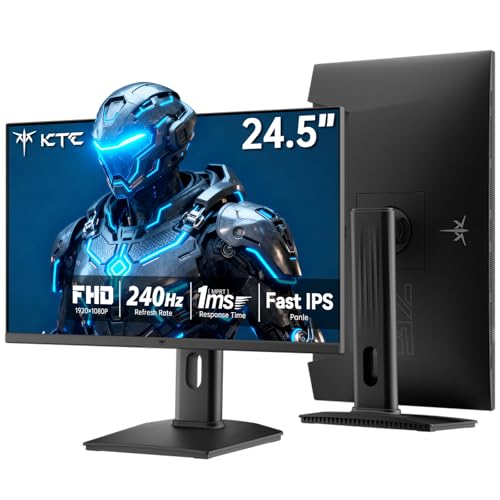
KTC H25T7-3 24.5-Inch 1080p 240Hz Fast IPS Gaming Monitor

KTC H24T7 24-Inch 1440p 180Hz Fast IPS Gaming Monitor
Taking A Closer Look At The Options
The 25M2 Pro puts unusually high motion performance at the center of its design. Its 400Hz refresh rate means more screen redraws per second, while the 1ms GTG figure describes gray-to-gray pixel transition timing on the Fast IPS panel.
I find the 24.5-inch 1080p format most convincing for a competitive desktop, where quick reactions matter more than expansive workspace. The shielding hood can reduce peripheral distractions, and the adjustable stand includes tilt, swivel, pivot, and height changes.
Advantages To Know
- 400Hz offers exceptional motion headroom
- Fast IPS suits fast-moving competitive scenes
- Shielding hood limits peripheral visual distractions
- Adjustable stand supports varied desk positions
- HDMI and DisplayPort cover common PC connections
Points To Note
- A PC that cannot render 400 frames per second will not make full use of the headline refresh rate
Key Specs
Made For
This model best serves competitive PC gamers with capable graphics hardware and a desk built around fast reflex-driven games.
A Better Fit Elsewhere
The KTC H25T7-3 suits players who prefer 240Hz with HDR 400 and a wider DCI-P3 color gamut.
Compared with the 25M2 Pro’s compact 1080p canvas, the H27T6 trades headline speed for more detail and a larger screen. QHD, or 2560 by 1440 resolution, gives games, desktop windows, and videos noticeably finer imagery than 1080p.
The 200Hz rate still supports fluid competitive play, while built-in speakers add convenient audio for a shared desk. For daily gaming and entertainment, I see this as a more balanced configuration than chasing the highest refresh number alone.
Reasons It Performs
- QHD resolution improves visual detail
- Built-in speakers reduce desktop clutter
- Fast IPS suits competitive and fast-paced games
- Height, pivot, swivel, and tilt adjustments improve ergonomics
Trade Offs
- Higher resolution places more demand on the graphics system
- The 200Hz refresh rate is modest beside the 25M2 Pro
Quick Facts
Right Fit For
This display fits budget gaming desktops that need sharp visuals, smooth motion, and built-in audio for everyday use.
Another Choice May Suit
The KTC 27M1 offers a shielding hood and an overclocked 210Hz mode for players who prefer a more focused competitive arrangement.
The H27F7 favors screen size over the 25M2 Pro’s extreme refresh ceiling. Its 27-inch 1080p Fast IPS panel reaches 240Hz, a rate that feels particularly relevant in shooters, racing games, and other fast-moving competitive titles.
The stated 1ms MPRT figure uses moving picture response time, a different measurement from the 25M2 Pro’s GTG timing. I would compare the refresh rates rather than treating those response specifications as interchangeable.
Everyday Advantages
- 240Hz refresh rate supports competitive motion
- Large 27-inch canvas feels more immersive
- Height, tilt, and pivot adjustments aid positioning
Small Caveats
- 1080p provides less detail than the QHD alternatives
- Reaching 240Hz requires capable PC hardware
- A 27-inch display needs adequate desk width and clearance
Built With In Mind
This monitor suits competitive players who want a large FHD display and already have hardware capable of driving high frame rates.
Where A Sibling Pick Shines
The KTC H25T7-3 adds HDR 400 and 94% DCI-P3 coverage for players who also care about compact vertical placement and richer color.
The 27M1 brings together several features that usually compete for space on a gaming display. It combines a 27-inch QHD Fast IPS panel with a 200Hz refresh rate, an overclocked 210Hz mode, built-in dual 2-watt speakers, and a shielding hood.
Compared with the H27T6, the resolution and base refresh rate remain similar, but the hood creates a more enclosed viewing environment. I find that combination especially sensible for a desk devoted mainly to competitive gaming.
What Earns Its Place
- Native QHD resolution sharpens games and desktop text
- Dual 2-watt speakers handle basic desktop audio
- Shielding hood reduces peripheral distractions
- Adaptive Sync supports smoother frame presentation
- VESA mount and flexible stand simplify positioning
Room For Improvement
- The 210Hz rate is overclocked, so 200Hz is the more conservative choice to plan around
Feature Snapshot
Who Will Love This
This model appeals to competitive players who value QHD clarity, a distraction-reducing hood, and a broad 200Hz base refresh rate.
Swap It Out When
The KTC H24T7 suits mixed gaming and office work better because its 24-inch QHD screen adds HDR 400 support in a smaller footprint.
Among the 240Hz options, the H25T7-3 takes the compact vertical route. Its 24.5-inch FHD Fast IPS panel pairs a 1ms MPRT specification with Adaptive Sync, making it a practical choice for a narrow gaming desk.
The color specification gives it another distinction. Its 94% DCI-P3 coverage represents a broad color gamut for FHD gaming, while HDR 400 support adds a useful option for compatible games and desktop video.
A Few Strong Suits
- Vertical orientation conserves desk width
- 240Hz supports fast competitive gameplay
- Wide DCI-P3 gamut enriches game color
- HDR 400 supports compatible HDR content
Factors To Consider
- FHD offers less fine detail than the 1440p models
- Consistently reaching 240Hz still depends on strong PC performance
Whose Shelf It Belongs On
This monitor fits competitive gamers with a narrow desk, a preference for vertical placement, and a need for a broad color gamut.
Consider Something Else When
The KTC H24T7 is the better fit for productivity-focused setups because its 24-inch QHD screen presents more text and desktop detail.
The H24T7 is a 24-inch QHD alternative to the larger 27-inch models. Its 180Hz refresh rate can overclock to 185Hz, while the Fast IPS panel keeps the design centered on responsive gaming and readable desktop imagery.
Compared with the H25T7-3, the H24T7 sacrifices some refresh-rate headroom for a sharper resolution. I favor it for a desk that handles both games and ordinary computer work rather than competitive play alone.
Notable Gains
- QHD resolution supports detailed desktop work
- Compact 24-inch size suits smaller desks
- HDR 400 adds compatible high-dynamic-range content
Some Limits To Know
- The 180Hz base rate trails the 240Hz and 400Hz models
- The 185Hz rate depends on the overclocked setting
- HDR appearance varies with the PC, settings, and room lighting
At A Glance
The Right Fit
This display fits budget PC owners who divide their time between gaming, browsing, and general desktop work.
Reach For A Different Pick When
The KTC H27T6 better serves larger-screen and media-heavy setups with its 27-inch QHD panel, 200Hz refresh rate, and built-in speakers.
Matching a Budget Gaming Desktop to Its Display
Resolution and screen size
QHD provides a more detailed desktop than 1080p, which matters when windows, text, and game interfaces share the screen. A 27-inch panel also creates a more expansive view, while the 24-inch and 24.5-inch models can simplify desk planning without surrendering high refresh rates.
Refresh rate and response
Refresh rate is the number of redraws a monitor performs each second, and higher rates can make fast motion look smoother. GTG and MPRT describe different response measurements, so I compare like with like and place more weight on the specifications that the manufacturer uses consistently.
Connections, mounting, and desk fit
HDMI and DisplayPort cover most modern gaming PCs, while VESA mounting provides a standardized pattern for compatible arms and mounts. Height, pivot, swivel, and tilt adjustments make an initially good monitor much easier to live with in a cramped bedroom or shared workspace.
Costs, Capabilities, and Common Traps
Common Shopping Slip Ups
A headline refresh rate does not guarantee smooth gameplay unless the PC can deliver matching frame rates. I would also avoid choosing resolution before checking desk space, since a larger QHD screen offers more detail but demands more room and graphics power.
What The Higher Tier Buys
A higher-tier display usually adds resolution, refresh-rate headroom, broader color coverage, or better physical adjustments. Those improvements matter most for fast competitive games, detailed desktop work, or HDR content, while a balanced midrange model can suit ordinary mixed use.
Frequently Asked Questions
Which monitor suits high-refresh competitive gaming?
The KTC 25M2 Pro leads this group with its 400Hz refresh rate and 1ms GTG response specification. Its performance depends on a PC capable of delivering a very high frame rate.
Does QHD matter more than 240Hz?
QHD provides finer detail, while 240Hz emphasizes motion smoothness. Competitive players often value the faster rate more, whereas mixed-use setups may prefer the added sharpness of QHD.
Are built-in speakers sufficient for gaming?
The H27T6 and 27M1 include built-in speakers for basic desktop audio. Headphones or a separate audio system remain preferable for clearer, more immersive sound.
Does vertical orientation make a monitor more compact?
Vertical orientation reduces the width occupied on a desk while increasing its height. The KTC H25T7-3 and H24T7 both support that arrangement for narrow workspaces.
What should match before using a 400Hz monitor?
The graphics card, game settings, and frame rate must support the monitor’s 400Hz mode. Even a capable display cannot create additional frames that the PC does not produce.
Final Verdict
The right display depends on what the budget gaming desktop must handle. I favor the 25M2 Pro for maximum competitive speed, the H27T6 for balanced QHD gaming and media, and the H24T7 for a compact mixed-use desk. Each choice delivers a different balance rather than repeating the same idea.
