
A gaming Ethernet switch matters when the console, gaming PC, and television all compete for the same home network. A wired connection removes Wi-Fi contention from the equation, while the right port speed and switch capacity keep local traffic moving smoothly.
I’ve narrowed the field to six options for different gaming setups, from a simple five-port hub to managed 2.5GbE models for demanding multi-device homes.
The Picks In Brief
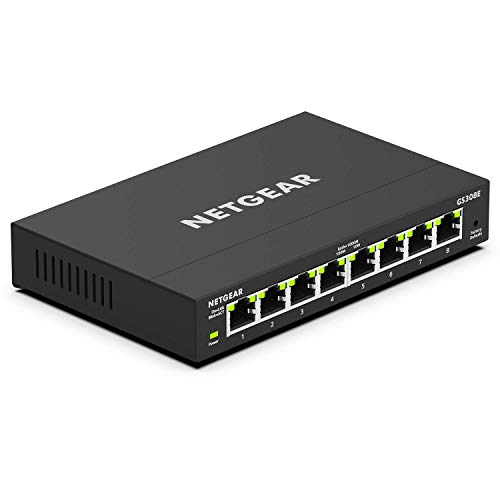
NETGEAR GS308E 8-Port Gigabit Ethernet Plus Switch, Silent Operation

D-Link DGS-105GL-V2 5-Port Gigabit Unmanaged Ethernet Switch, Fanless

UGREEN 5-Port 2.5GbE Switch

BrosTrend 8-Port 2.5G Switch

BrosTrend 5-Port 2.5G Switch

BrosTrend 8-Port 2.5G VLAN Switch
What Each Pick Brings To The Table
The GS308E handles the practical part of gaming networking well: eight Gigabit Ethernet ports, silent operation, and placement on a desk or wall. Gigabit Ethernet supports connections up to 1 Gbps, which remains practical for many consoles, televisions, and standard home-office devices.
Its Plus software adds a layer of control that plain Gigabit alternatives may lack. VLANs separate network traffic, QoS prioritizes selected services, cable diagnostics identify connection issues, and loop prevention helps keep network mistakes from spreading. I would favor this model for a mixed household that wants eight wired connections without giving up basic traffic separation.
Key Advantages
- Eight Gigabit ports cover a console, gaming PC, television, NAS, and several other wired devices.
- Plus software provides useful control over VLANs, priorities, cable health, and network loops.
- Silent operation suits a bedroom, office, or living area where fan noise would be distracting.
- Desktop or wall mounting makes it easy to place near cable runs.
- IEEE 802.3az energy efficiency reduces power use on inactive links.
Things To Consider
- The 1 Gbps port ceiling is lower than the 2.5GbE speed available from the UGREEN and BrosTrend models.
- Management features require extra setup compared with a basic unmanaged switch.
Key Specs
Made For Mixed Networks
This model suits households that value traffic separation and easy diagnostics alongside a generous set of 1 Gbps ports.
A Better Fit Elsewhere
The UGREEN 5-Port 2.5GbE Switch fits a smaller setup where multi-gigabit link speeds matter more than eight ports.
The DGS-105GL-V2 is refreshingly direct. Five Gigabit ports, a fanless metal housing, and automatic connection setup make it a sensible centerpiece for a console, television, and a few computers. Compared with the NETGEAR GS308E, it offers fewer ports and less traffic-management control, but the setup should feel easier for someone who wants basic connectivity without a configuration screen.
QoS, or Quality of Service, prioritizes selected traffic through eight queues per port. That can help keep voice calls and video traffic from sharing the same priority with less delay-sensitive transfers. I like the combination of wall mounting, silent cooling, and energy-saving behavior for a home office or compact entertainment area.
Benefits That Matter
- Auto-negotiation and Auto MDI/MDIX handle speed and cable arrangements without manual configuration.
- The 10 Gbps switching fabric supports simultaneous traffic across the five ports.
- QoS queues give selected voice, video, and other sensitive traffic a higher priority.
- The fanless metal case stays quiet and resists the heat associated with active cooling.
- Desktop and wall mounting suit both visible and hidden installations.
Practical Considerations
- Five ports leave little room for expansion without another switch or connection to the router.
- The 1 Gbps limit means a single connection cannot benefit from 2.5GbE equipment.
At A Glance
Right Fit For
Beginners and straightforward gaming households will find the five-port layout easy to organize around a few essential devices.
Consider Something Else When
The BrosTrend 8-Port 2.5G Switch offers more connections and faster individual links for a crowded gaming setup.
The UGREEN switch moves beyond the 1 Gbps ceiling with five 2.5GbE ports. Multi-gigabit Ethernet can provide a useful middle ground for a fast gaming PC, network storage, and a router with multi-gigabit ports, especially for local file transfers and other traffic that never needs to cross the internet.
Unlike the five-port D-Link DGS-105GL-V2, this model automatically negotiates among 100 Mbps, 1 Gbps, and 2.5 Gbps connections. It also uses a metal enclosure, heatsinks, thermal pads, and ventilation openings to manage heat without a fan. For most compact gaming desks, that balance of speed, silence, and physical construction makes good sense.
Real-World Strengths
- Five 2.5Gbps ports support faster local links than standard Gigabit Ethernet.
- Automatic speed negotiation connects mixed 100M, 1G, and 2.5G devices without manual setup.
- The unmanaged design needs no software or configuration, which keeps installation direct.
- Metal construction, heatsinks, and thermal pads support heat dissipation during sustained use.
- Fanless operation, non-slip feet, and flexible placement make it easy to keep tidy.
Worth Noting
- Connected devices need their own 2.5GbE support before the faster links can be used fully.
- Five ports may be restrictive for a household with several consoles, computers, and network storage devices.
Built With In Mind
This model fits a focused gaming station with a multi-gigabit PC, router, and NAS rather than a large collection of 1 Gbps devices.
Swap It Out When
The BrosTrend 8-Port 2.5G Switch serves a similar speed class but offers twice as many connections for a crowded network.
Eight wired connections make the BrosTrend 8-Port 2.5G Switch a natural center for a busy entertainment area. It can accommodate several consoles, gaming PCs, televisions, and other networked equipment while giving each connected device access to a 2.5 Gbps port. That extra headroom distinguishes it from the eight-port 1 Gbps NETGEAR GS308E.
The switch provides a 40 Gbps switching capacity, which is the internal amount of traffic the hardware can move between ports. In a gaming household, that figure matters more with several active devices than it does with a single console and one television. Fanless operation also keeps the enclosure quiet beside a desk or media console.
The Good Stuff
- Eight 2.5Gbps ports provide a useful mix of speed and connection count.
- The 40 Gbps switching capacity supports a dense collection of active wired devices.
- Fanless operation suits bedrooms, offices, and shared entertainment spaces.
- Support options cover setup, connection issues, and troubleshooting.
- Protection options include accidental damage, breakdowns, and power surges under the listed plan terms.
Points To Note
- Unmanaged operation does not provide the VLAN or QoS controls found on the NETGEAR GS308E.
- Ten total 2.5Gbps links require compatible routers, cables, and endpoints to make full use of the port speed.
Who Will Love This
Gamers with multiple consoles, PCs, and streaming devices in one room will appreciate the combination of eight ports and 2.5GbE.
Another Choice May Suit
The D-Link DGS-105GL-V2 fits a smaller five-device network and keeps the setup limited to standard Gigabit speeds.
Five 2.5G ports keep the BrosTrend 5-Port 2.5G Switch focused on the essentials. A gaming PC, console, television, NAS, and router can all participate in the local network without stretching beyond its physical port count. It covers many common gaming layouts more neatly than the eight-port BrosTrend alternative.
The internal 25 Gbps switching capacity provides ample room for the five active links, though a careful check remains important because the fastest possible transfers also depend on the endpoint, router, storage, and cabling. The unmanaged format keeps ownership simple, while the listed support and protection options add assistance for setup, connectivity issues, accidental damage, and power surges.
A Strong Showing
- Five 2.5Gbps ports suit a tightly defined gaming and media setup.
- The 25 Gbps switching capacity handles the aggregate traffic profile of five multi-gigabit links.
- No management software is required for basic network expansion.
- PCs, game consoles, NAS devices, and servers can all benefit from wired 2.5G connections.
- Listed protection includes accidental damage, breakdowns, and power surge scenarios.
Small Caveats
- Five ports leave little spare capacity for later device additions.
- The absence of VLAN and traffic-priority controls makes it less flexible than the NETGEAR GS308E.
Best Suited To
A focused gaming desk with a PC, one or two consoles, a television, and nearby storage will find the layout easy to accommodate.
Look Elsewhere When
The UGREEN 5-Port 2.5GbE Switch suits a similarly small setup while adding a more explicitly described thermal and physical design.
This model adds network segmentation to the speed and port count found in the basic BrosTrend eight-port model. A VLAN, which is a virtual private network, separates devices into different logical networks. That can keep guest traffic, cameras, consoles, and work devices from sharing the same local broadcast space.
Static link aggregation is the other defining feature. It combines multiple physical connections into one logical connection, a useful option for compatible network equipment. With eight 2.5Gbps ports, a 40 Gbps switching capacity, and fanless operation, this is the most control-oriented switch in the group, though those features also demand more setup than a basic unmanaged model.
What Earns Its Place
- Eight 2.5Gbps ports combine high link speed with extensive device capacity.
- VLAN support separates network traffic without requiring separate physical switches.
- Static link aggregation can combine compatible physical links into a logical connection.
- The 40 Gbps switching capacity handles a substantial multi-device traffic load.
- Fanless operation suits quiet living spaces and offices.
Possible Compromises
- Network segmentation and aggregation require compatible devices and careful configuration.
- The extra control may add complexity to a simple living-room network.
Feature Breakdown
Whose Shelf It Belongs On
Technically inclined gamers running several connected devices will find VLAN separation and link aggregation worth the additional setup.
Reach For A Different Pick When
The BrosTrend 8-Port 2.5G Switch fits a crowded entertainment network that needs more ports but not advanced traffic separation.
Match The Switch To The Network
Start With Port Speed
Standard Gigabit Ethernet supports link speeds up to 1 Gbps and remains appropriate for many game consoles and televisions. Multi-gigabit Ethernet extends that ceiling to 2.5 Gbps, which becomes useful when the gaming PC, router, storage, and cabling support it. I would avoid paying for 2.5GbE hardware around devices limited to 1 Gbps, since the faster port cannot improve the slowest connection.
Count Real Connections
The port count should reflect current equipment plus modest room for expansion. Five ports suit a focused desk or media setup, while eight ports suit a shared entertainment area with several consoles and computers. A switch connected to a router can also extend the wired network, so I would count actual cables rather than every device in the home.
Decide How Much Control Matters
An unmanaged switch handles connection and speed negotiation without a configuration interface. A managed model adds VLANs, priorities, diagnostics, or link aggregation, but each extra capability requires compatible hardware and more deliberate setup. Basic gaming households usually gain little from advanced controls, while mixed-device networks may benefit from traffic separation.
Two Details Often Overlooked
Common Shopping Slip Ups
A fast switch cannot make a slow internet connection faster, and a 2.5Gbps port remains limited by a 1 Gbps endpoint. I would also check the router’s available LAN ports, cable categories, and the number of devices that genuinely need a wired connection before deciding how many ports to purchase.
What The Higher Tier Buys
Higher-tier switches add speed, port count, and traffic control rather than improving every moment automatically. The additional cost makes sense for compatible 2.5GbE equipment, dense networks, or VLAN segmentation. A basic five-port Gigabit switch remains more practical for ordinary console and television connections.
Frequently Asked Questions
Does a gaming Ethernet switch reduce lag?
It can remove Wi-Fi contention and provide a stable wired path between devices. Internet latency still depends on the router, service provider, server, and game traffic.
Is 2.5GbE useful for gaming?
It helps most with local transfers and communication between compatible multi-gigabit devices. Standard game servers and many internet connections do not require 2.5Gbps.
Is an unmanaged gaming switch easier to set up?
Usually, because it handles connections without a management interface. A managed switch offers more control but requires compatible devices and deliberate configuration.
How many Ethernet ports are enough?
Five ports cover a focused gaming desk, while eight suit several consoles, computers, televisions, and storage devices. I would leave some room for expansion.
Does a gaming switch improve Wi-Fi speed?
No, because it creates a separate wired segment. It can still help by reducing the number of devices competing for the wireless network.
Final Verdict
The D-Link DGS-105GL-V2 serves a simple five-device gaming setup, while the NETGEAR GS308E adds useful traffic controls. Multi-gigabit networks favor the UGREEN or BrosTrend models, and advanced segmentation points to the BrosTrend 8-Port 2.5G VLAN Switch. I would match the model to the devices already in use rather than paying for speed the connected equipment cannot use.
