
A gaming laptop with 64GB of memory sounds ideal, but memory alone does not determine game performance. I focus on the details that shape daily use: dedicated graphics, display quality, processor capability, storage, portability, and whether the system can handle more than games.
A Quick View Of The Lineup

HP HyperX OMEN 15 Gaming Laptop RTX 5050

HP Chromebook 14 Kompanio 540 8GB

Apple MacBook Pro M4 Pro 16.2-inch 24GB
HP OmniBook 5 16-inch Snapdragon 16GB

NIMO 17.3-inch Ryzen 7 32GB 1TB
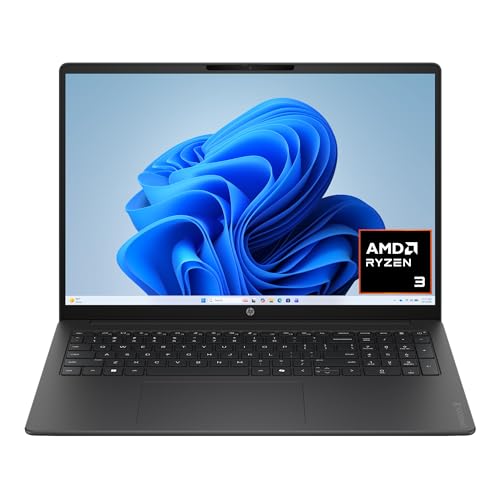
HP OmniBook 3 16-inch Ryzen 3 8GB
What Each Pick Brings To The Table
The HP HyperX OMEN 15 puts dedicated gaming graphics first, making it the most directly relevant option in this group for PC games. The RTX 5050 includes 8GB of dedicated GDDR7 memory, while the 1920 x 1200 IPS panel runs at 165Hz. That combination feels more relevant to a gaming laptop than the larger, less game-focused screens found on several alternatives.
For daily use, the Ryzen 5 240 processor and 16GB DDR5 memory should handle browsing, streaming, and a busy mix of applications. I like the 512GB PCIe Gen4 NVMe drive for game storage, although 16GB of RAM falls short of a 64GB configuration and may matter for heavy multitasking or memory-heavy game mods.
What Stands Out
- RTX 5050 graphics provide dedicated GPU memory for demanding games and GPU-heavy applications.
- The 165Hz 2K display supports smoother motion than a standard 60Hz panel.
- OMEN AI recommends settings intended to improve frame rates with less manual adjustment.
- Wi-Fi 6 and Bluetooth 5.4 support faster wireless connections and accessory pairing.
- AMD FreeSync Premium technology helps synchronize the display and graphics output.
Worth Noting
- The 16GB memory configuration does not meet a strict 64GB requirement.
- The 15-inch display is compact for a workstation-style layout, so portability comes before screen space.
Key Specs
Who It Suits Best
This model suits PC gamers who value dedicated graphics, a high-refresh display, and a compact 15-inch design over maximum memory capacity.
Where Another Pick Suits Better
The NIMO 17.3-inch Ryzen 7 32GB 1TB is a better fit for people who prioritize 32GB memory and 1TB storage over dedicated gaming graphics.
The HP Chromebook 14 is built for people who need a straightforward computer for schoolwork, browsing, streaming, and writing rather than a dedicated gaming machine. Its MediaTek Kompanio 540 processor and ARM Mali-G57 MC2 graphics suit Chrome OS applications and everyday visual tasks, while the 1-million-pixel display gives movies and photos a clear presentation.
Chrome OS keeps the workflow familiar through web-based tools and automatic platform updates. The 8GB LPDDR5 memory and 128GB UFS storage should serve lighter users well, though the capacity falls far below a 64GB memory target and the device is not aimed at demanding games or desktop creative software.
Notable Gains
- Chrome OS offers a low-friction setup for browsing, documents, and online learning.
- The 128GB UFS drive uses less power while supporting portable everyday use.
- Gemini assistance is accessible from the home screen for planning, writing, and learning.
- The 8GB LPDDR5 memory helps with normal tab-heavy school or office tasks.
Small Caveats
- The 8GB memory and Chrome OS environment do not suit serious gaming or advanced desktop applications.
- Storage is limited to 128GB, so large media libraries may require cloud or external storage.
- The Kompanio processor is a general-purpose mobile platform rather than a dedicated gaming chip.
Made For
Students, casual users, and commuters who mainly need browsing, writing, streaming, and online learning will find this Chromebook straightforward to use.
Consider Something Else When
The HP HyperX OMEN 15 Gaming Laptop RTX 5050 serves people who need dedicated graphics and a high-refresh display for actual PC gaming.
The Apple MacBook Pro M4 Pro is the strongest creative-work alternative here because it pairs a 14-core CPU with a 20-core GPU and a large Liquid Retina XDR display. The 16.2-inch panel reaches up to 1600 nits peak brightness, a useful feature for detailed photo work, video editing, and color-sensitive tasks.
The M4 Pro configuration includes 24GB of unified memory and a 512GB SSD, giving it more memory than the HP gaming model and the Chromebook. It remains below a 64GB requirement, so demanding 3D rendering or professional software may still call for the higher-memory M4 Max configuration. Apple Intelligence support also depends on the software and account environment.
Benefits That Matter
- The M4 Pro chip combines a 14-core CPU with a 20-core GPU for demanding creative and development tasks.
- The 16.2-inch Liquid Retina XDR display offers up to 1600 nits peak brightness for detailed visual work.
- 24GB unified memory handles heavier multitasking than the 8GB and 16GB alternatives here.
- All-day battery life supports work away from a wall outlet.
- The M4 Max option provides more processing power for intensive workflows.
Trade Offs
- The 24GB configuration is still below a 64GB memory requirement.
- The 16.2-inch size is less convenient in a small bag than the OMEN 15-inch model.
- Apple-based software compatibility may not match the wider Windows gaming ecosystem.
Technical Sheet
The Right Fit
This MacBook Pro fits video editors, developers, and creative professionals who value a high-quality display and Apple’s unified memory architecture.
Swap It Out When
The NIMO 17.3-inch Ryzen 7 32GB 1TB is a better fit for Windows-based development workflows that benefit from more conventional RAM and storage capacity.
The HP OmniBook 5 16-inch is shaped around efficient Windows use, with a Snapdragon X X1-26-100 processor and 16GB of memory. Its 2K display gives office documents, web pages, and video calls a roomy canvas, while the 512GB SSD provides useful local storage for files that do not belong in the cloud.
This is a portable productivity machine rather than a dedicated gaming laptop. The Qualcomm Adreno GPU handles everyday graphics, but the 16GB memory and Arm-based platform make it a less natural choice for a 64GB gaming setup. Windows applications that depend on specialized gaming drivers also deserve a compatibility check before purchase.
Positive Points
- The 16-inch 2K display creates a comfortable workspace for documents, browsing, and media.
- 16GB RAM supports general multitasking and common productivity applications.
- The 512GB SSD offers enough room for a practical mix of local files and software.
- The Snapdragon platform emphasizes efficiency for mobile work and everyday computing.
Where It May Fall Short
- The 16GB memory configuration is well below a 64GB requirement.
- Adreno integrated graphics are not positioned for demanding 3D gaming.
- Arm-based Windows compatibility varies by application, so important software needs checking.
Core Details
Who Should Grab It
This OmniBook suits mobile professionals and students who need a large Windows display for documents, calls, and light multitasking away from a desk.
Another Choice May Suit
The HP HyperX OMEN 15 Gaming Laptop RTX 5050 is the better choice for people whose priority is gaming rather than portable Windows productivity.
The NIMO 17.3-inch model is built around capacity. Its Ryzen 7 8745HS processor has eight cores, while 32GB of DDR5 memory and a 1TB SSD create a generous platform for development, simulation, video work, and heavy multitasking. The larger 17.3-inch Full HD screen also gives large documents and timelines more room than the OMEN’s 15-inch panel.
The Radeon 780M graphics described for this laptop support general graphics and AI-related workloads, but they are not a substitute for a dedicated gaming GPU. That distinction matters for modern 3D games. For heavy multitasking, 32GB is a meaningful step above 16GB, though a hard 64GB requirement still calls for a different configuration.
The Good Stuff
- The eight-core Ryzen 7 8745HS supports demanding multitasking and production workloads.
- 32GB DDR5 memory gives development and editing environments more breathing room.
- The 1TB SSD provides substantial storage for projects, libraries, and applications.
- The 17.3-inch Full HD display creates a spacious canvas for detailed work.
- Radeon 780M graphics handle everyday visuals and AI-oriented workloads.
Potential Drawbacks
- The 32GB memory configuration still misses a strict 64GB requirement.
- Integrated Radeon graphics are a compromise for people who want serious gaming performance.
- The 17.3-inch footprint is less convenient for frequent commuting than a 14-inch or 15-inch laptop.
Built With In Mind
This NIMO laptop fits developers, STEM students, and video editors who need more memory and storage than a typical general-purpose laptop provides.
Where A Sibling Pick Shines
The Apple MacBook Pro M4 Pro 16.2-inch 24GB fits creative professionals who prioritize a high-brightness display and a stronger dedicated graphics platform.
The HP OmniBook 3 16-inch prioritizes a large, interactive workspace over gaming hardware. Its 2K touchscreen makes browsing, streaming, sketches, and document navigation comfortable on a desk, while the Ryzen 3 30 processor handles routine productivity without introducing a more specialized platform.
The 8GB of memory is modest for modern gaming, intensive editing, or many applications running at once. The 512GB SSD helps with local storage, and the Radeon 610M GPU covers basic graphics needs. In a home office or classroom, that balance can work well, but a 64GB memory goal needs a substantially different configuration.
The Practical Payoff
- The 2K touchscreen adds direct interaction to browsing and media use.
- The 16-inch display provides a comfortable workspace for documents and video.
- The Ryzen 3 30 processor supports everyday productivity tasks.
- The 512GB SSD offers useful local storage for files and applications.
Less Ideal Details
- 8GB RAM is below a 64GB target and can become restrictive with many open applications.
- Radeon 610M integrated graphics are a limited choice for demanding games.
- The 16-inch touchscreen design is best suited to a desk or table rather than constant travel.
Quick Facts
Whose Shelf It Belongs On
This OmniBook suits students, home-office users, and media consumers who prefer a large touchscreen for browsing and entertainment over intensive gaming.
Not Your Match When
The HP HyperX OMEN 15 Gaming Laptop RTX 5050 is the better match for people who need dedicated graphics and a high-refresh gaming display.
What Matters For A 64GB Gaming Setup
A 64GB memory target changes the decision from simple spec shopping to workload planning. Memory, sometimes called RAM, holds active applications and game data while the system is running. More capacity can help with large game installations, streaming tools, browser tabs, background software, and creative applications, but a larger memory figure cannot compensate for weak graphics.
Memory Capacity And Upgrades
The NIMO 17.3-inch Ryzen 7 32GB 1TB offers twice the memory of several models here, and its 1TB SSD is the largest stated storage capacity. The Apple MacBook Pro M4 Pro 16.2-inch 24GB uses unified memory, where the CPU and GPU share one memory pool. Neither listed configuration reaches 64GB, so a strict requirement needs confirmation that the model can be configured with 64GB or paired with a different system.
Graphics And Display Refresh
The RTX 5050 with 8GB of dedicated GDDR7 memory gives the HP HyperX OMEN 15 the clearest gaming advantage in this group. Its 1920 x 1200 panel also runs at 165Hz, while the other laptops emphasize general graphics, touch input, or creative displays. For competitive games, dedicated graphics and refresh rate deserve priority over raw memory alone.
Screen Size And Portability
The 15-inch OMEN is easier to carry than the 17.3-inch NIMO and the 16-inch OmniBooks. The 16-inch models provide more workspace, while the Apple MacBook Pro adds a high-brightness XDR display. Screen size, weight, and keyboard comfort matter more in daily use than a long specification list.
Storage For Games And Projects
A 1TB SSD is useful for large game libraries, development environments, and video projects. The OMEN and both OmniBooks provide 512GB, while the Chromebook’s 128GB is modest. Since games and applications can expand quickly, the available storage and any upgrade path deserve checking before buying.
Before Making A Laptop Choice
Common Shopping Slip Ups
A frequent mistake is treating 64GB of RAM as a substitute for capable graphics. I would first identify the games, resolution, and refresh rate that matter, then check the GPU and display. Another mistake is overlooking software compatibility, especially with an Arm-based Snapdragon laptop, so important programs deserve a quick review before purchase.
Where The Extra Money Goes
A higher-tier laptop often adds a stronger CPU, dedicated graphics, a brighter display, more memory, and faster storage. The Apple MacBook Pro M4 Pro 16.2-inch 24GB demonstrates how those upgrades support demanding creative work, while the OMEN shows the value of dedicated gaming graphics and a high-refresh panel. Paying more is sensible only when the extra hardware matches the intended workload.
Frequently Asked Questions
Do any of these laptops have 64GB of RAM?
No listed configuration reaches 64GB. The NIMO 17.3-inch Ryzen 7 32GB 1TB has the most conventional memory at 32GB, while the Apple MacBook Pro M4 Pro 16.2-inch 24GB uses 24GB of unified memory.
Which listed laptop is best suited for PC gaming?
The HP HyperX OMEN 15 Gaming Laptop RTX 5050 is the most directly game-focused option because it combines dedicated RTX 5050 graphics, 8GB of GDDR7 memory, and a 165Hz display.
Is a 64GB gaming laptop still useful with an integrated GPU?
Yes, for some games and lighter settings, though a high frame rate in demanding titles depends heavily on the graphics processor. Memory helps smooth multitasking, but it cannot replace a capable GPU for heavy 3D rendering.
Which model offers the most storage?
The NIMO 17.3-inch Ryzen 7 32GB 1TB lists 1TB of SSD storage. The other larger laptops list 512GB, while the HP Chromebook 14 Kompanio 540 8GB has 128GB.
Can these laptops handle everyday school or office work?
Yes, although the Chromebook and OmniBooks focus more directly on general productivity. The MacBook Pro and NIMO provide more memory for heavy multitasking, and the OMEN adds dedicated graphics for gaming.
Final Verdict
I find the HP HyperX OMEN 15 the most practical choice for gaming, while the NIMO leads in memory and storage and the MacBook Pro leads for creative work. A true 64GB configuration still requires checking beyond this lineup, and the best match depends on whether gaming, portability, or production work comes first.
