
A Friday-night gaming session can expose the wrong laptop fast: stuttering graphics, a screen that feels cramped, or memory that runs out while a game and voice chat compete for resources. I compare six systems around the 2,000-dollar class for gamers, streamers, and creative professionals, with attention to the hardware that changes the experience in practice. The best balance of graphics, memory, display quality, and portability depends on the games, screen space, and workload, so the details matter more than the model name.
Your Options, Compared

Lenovo LOQ RTX 5050 Gaming Laptop

MSI Creator M14 2.8K i7-13620H RTX 4050 16GB 1TB A13VE-083US
Acer Aspire Ultra 7 258V Laptop

NIMO 17.3-inch FHD R7 Laptop
GIGABYTE Gaming A16 RTX 5060 Ryzen 7 260 16GB 1TB 165Hz WUXGA

NIMO 15.6-inch FHD Copilot Laptop
Inside Each Recommended Option
The Lenovo LOQ puts the essentials in an unusually useful order: 32GB of memory, a 1TB NVMe drive, and an RTX 5050 with 8GB of GDDR7 graphics memory. For a commuter who also keeps a game, browser tabs, and a streaming utility open, that headroom is more meaningful than a flashy secondary feature.
The 15.6-inch 144Hz IPS panel suits competitive play better than a conventional 60Hz screen because it can present smoother movement. I like the included folding radiator too, although the backlit keyboard, numeric keypad, and generous port selection make the Lenovo easier to live with between sessions.
What It Does Well
- 32GB of DDR5 memory supports demanding games without crowding out everyday applications.
- The 1TB PCIe NVMe drive provides practical space for libraries, updates, and project files.
- RTX 5050 graphics bring 8GB of dedicated GDDR7 memory for modern gaming workloads.
- Three USB-A ports, USB-C, HDMI, and Ethernet cover common desk and travel setups.
Practical Considerations
- The 1080p resolution is less expansive than the higher-resolution MSI Creator M14 display.
- The RTX 5050 sits below the RTX 5060 configuration in the GIGABYTE Gaming A16.
Feature Snapshot
Who It Suits Best
This fits gamers who want a well-rounded daily machine without moving to a 17-inch display or a thin creator chassis.
Look Elsewhere When
Creative professionals who need a sharper 2.8K canvas will find the MSI Creator M14 more suitable.
The MSI Creator M14 makes a strong case for people who divide their time between games and detailed creative work. Its 2.8K display provides more working space than the Lenovo LOQ’s 1080p panel, which matters when editing a timeline, arranging clips, or comparing small design details.
Unlike the Lenovo’s newer RTX 5050, this MSI pairs an RTX 4050 with a 13th-generation Core i7 processor and 16GB of memory. Ray tracing, which simulates the interaction of light with surfaces, adds a visual layer to supported games, while Cooler Boost gives the system a focused thermal-management feature.
The Upside
- The 2.8K panel provides finer detail for editing and more usable desktop space.
- The 14-inch body is easier to carry than larger gaming systems.
- RTX 4050 graphics support hardware-accelerated ray tracing in compatible titles.
- A 1TB NVMe drive leaves room for a substantial game and project library.
- Windows 11 Home covers everyday productivity without requiring a separate operating-system purchase.
Trade Offs
- 16GB of memory is less generous than the 32GB offered by the Lenovo and NIMO models.
- The RTX 4050 is an older graphics tier than the RTX 5050 and RTX 5060 alternatives here.
- The compact screen may feel restrictive during a busy multiplayer session.
The Right Fit
It best serves mobile creators and gamers who value display detail and portability over maximum memory capacity.
A Better Fit Elsewhere
The Lenovo LOQ RTX 5050 Gaming Laptop suits players who prioritize newer graphics and 32GB of working memory.
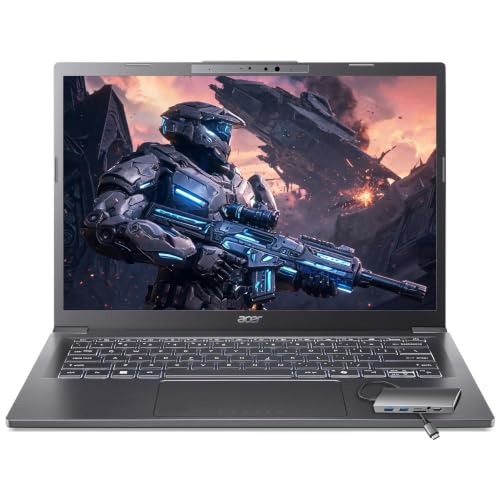
The Acer Aspire is more compelling as an AI-focused productivity laptop than as a dedicated gaming machine. Its Intel Core Ultra 7 258V processor includes a dedicated neural processing unit, or NPU, designed to handle selected AI tasks efficiently without relying entirely on the main processor.
For a remote worker or student, 32GB of memory and a 1TB SSD leave ample room for research, video calls, and large documents. The touchscreen adds practical value for browsing and note-taking, although this configuration does not include the discrete gaming graphics found in the other dedicated gaming choices.
Where It Helps
- The 47 TOPS NPU supports local AI features such as background blur and auto-framing.
- 32GB of RAM handles extensive multitasking and large project files.
- The 1TB SSD provides useful storage for coursework, media, and applications.
- A touchscreen makes casual browsing and on-screen controls more convenient.
Less Ideal Details
- No discrete gaming GPU is identified, so it is a poor match for graphics-intensive games.
- The 2026 branding may matter more to a current replacement cycle than to gaming performance.
Key Product Details
Made For
This serves students, creators, and remote workers who value local AI tools and generous memory more than dedicated gaming graphics.
Another Choice May Suit
The GIGABYTE Gaming A16 is the more appropriate option for a shopper whose priority is playing graphics-heavy games.
The NIMO 17.3-inch model is built around room rather than dedicated gaming graphics. Its 17.3-inch full-high-definition screen gives students, developers, and media workers more visible workspace than the 14-inch MSI Creator M14, while 32GB of memory supports many applications at once.
The Ryzen 7 8745HS has 8 cores and 16 threads, and the integrated Radeon 780M graphics handle everyday visuals and lighter games. My honest read is that the screen and memory are the main attractions; anyone expecting the sustained gaming capability of the Lenovo or GIGABYTE should look elsewhere.
Real-World Strengths
- The 17.3-inch display gives code, documents, and media more visible space.
- 32GB of DDR5 memory supports heavy multitasking and large working sets.
- The Ryzen 7 8745HS provides 8 cores and 16 threads for demanding productivity tasks.
- A 1TB SSD accommodates a large project and application library.
Areas To Watch
- Integrated Radeon 780M graphics are less suited to demanding games than the dedicated RTX options.
- The 17.3-inch body takes more room in a backpack than the MSI Creator M14.
- Full HD resolution provides less desktop detail than a 2.8K or WUXGA panel.
Quick Facts
Who Will Love This
It fits students, developers, and office workers who need a large display and 32GB of memory for mixed productivity tasks.
Consider Something Else When
The MSI Creator M14 is easier to carry and offers a substantially sharper display for mobile creative work.
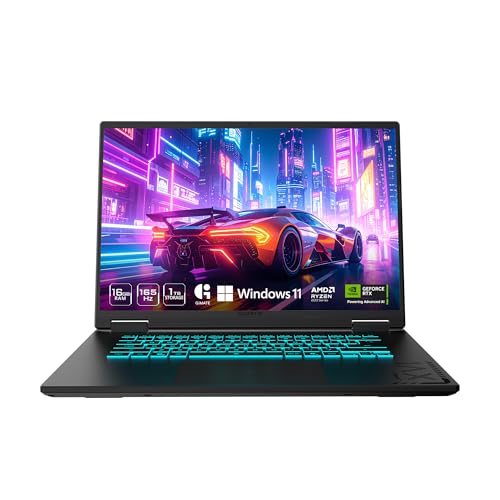
The GIGABYTE Gaming A16 makes the strongest dedicated gaming case in this group. Its RTX 5060 sits above the RTX 5050 and RTX 4050 configurations, giving shoppers interested in newer graphics hardware a clear reason to compare this model closely.
The 16:10 WUXGA display at 165Hz also stands apart from the Lenovo’s 16:9 1080p panel, offering a wider view and a higher refresh rate. A 180-degree hinge lets the screen lie flat for shared viewing, while the 19.45mm chassis keeps the machine slimmer than a typical bulky gaming system.
A Few Highlights
- RTX 5060 graphics provide the newest dedicated GPU tier represented here.
- The 165Hz WUXGA display supports smooth motion and a wider 16:10 workspace.
- The Ryzen 7 260 handles gaming, recording, and background applications.
- The 180-degree hinge adds flexibility for media viewing and shared screens.
- At 19.45mm thick, the chassis is relatively slim for a gaming notebook.
Possible Compromises
- 16GB of memory is lower than the 32GB configurations in the Lenovo and NIMO systems.
- The 1TB SSD has less room for large game libraries than a multi-terabyte setup.
- GiMATE adds platform features, but dedicated GPU hardware remains the central gaming factor.
Best Suited To
This is the strongest fit for gamers who want newer RTX graphics, a high-refresh display, and a relatively slim chassis.
Reach For A Different Pick When
The Lenovo LOQ RTX 5050 Gaming Laptop is the better option for a gamer who places more value on 32GB of memory.
The NIMO 15.6-inch model is better understood as a basic everyday computer than a serious gaming laptop. Its Intel N150 has 4 cores, and the combination of 8GB of RAM and a 256GB SSD suits browsing, coursework, video calls, and document work without carrying the demands of modern games.
Windows 11 and the 15.6-inch full-high-definition screen provide a practical foundation for school or office use. I would not choose it for a dedicated gaming setup, but it remains a lower-cost fallback when a student needs a functional notebook and the main machine already handles games.
Where It Excels
- The 15.6-inch full-high-definition screen suits everyday school and office work.
- Windows 11 is included for common productivity and communication tasks.
- The 256GB SSD provides a straightforward setup for documents and applications.
Small Caveats
- 8GB of memory becomes restrictive with demanding games or many open applications.
- 256GB of storage offers little room for a substantial game library.
- The four-core N150 is poorly matched to graphics-heavy gaming.
At A Glance
Built With In Mind
It best serves students, travelers, and office workers who need lightweight secondary-device functions more than gaming performance.
Where A Sibling Pick Shines
The NIMO 17.3-inch FHD R7 Laptop is the stronger choice for serious multitasking, larger files, and more demanding productivity work.
What Matters Most in This Laptop Class
Graphics Carry the Main Decision
The graphics processor does the heaviest lifting in games, while the CPU handles the broader system. The RTX 5060 in the GIGABYTE Gaming A16 represents the newest dedicated graphics option here, followed by the Lenovo LOQ’s RTX 5050 and the MSI Creator M14’s RTX 4050. The NIMO 17.3-inch model relies on integrated Radeon 780M graphics, while the Acer Aspire and the basic NIMO laptop are not positioned around dedicated gaming GPUs.
Memory Keeps Games and Apps Open
DDR5 is faster data memory than the previous DDR4 generation, though its real benefit appears in capacity. The Lenovo LOQ and NIMO 17.3-inch model offer 32GB, which leaves more room for games, browser tabs, voice chat, and creative software. The 16GB MSI and GIGABYTE configurations can work well, but demanding multitasking makes the memory ceiling more noticeable.
Display Size Changes the Experience
Resolution determines how much detail appears on the screen, while refresh rate affects how smoothly motion looks. The MSI Creator M14’s 2.8K panel offers dense detail, the GIGABYTE uses a wider 16:10 WUXGA display at 165Hz, and the Lenovo uses 15.6-inch 1080p at 144Hz. A large 17.3-inch screen also provides more workspace, although it is less convenient to carry.
Choosing the Right Combination of Power and Portability
Common Shopping Slip Ups
A long specification list can hide an unbalanced system, especially when processor claims receive more attention than graphics memory, storage, or thermal design. Shoppers should compare the actual gaming GPU, memory capacity, display resolution, and refresh rate together rather than treating a faster processor as the only sign of performance. A dedicated graphics chip also matters more for 3D games than a “Copilot” label or an AI-focused processor.
Where The Extra Money Goes
Higher-tier configurations often spend more on discrete graphics, faster or higher-resolution screens, additional memory, and stronger cooling. That upgrade makes sense for demanding games, video editing, or heavy multitasking, while basic school and office tasks rarely require the same graphics hardware. The best fit depends on the workloads that need the additional capacity, not on a category label.
Frequently Asked Questions
Is 32GB of RAM important for a gaming laptop?
Yes, especially when a game, browser, streaming software, and chat remain open simultaneously. The Lenovo LOQ and NIMO 17.3-inch model offer 32GB, while 16GB configurations remain workable for more focused sessions.
Does a higher refresh rate improve the picture?
It makes movement appear smoother, particularly in fast-paced games, and complements a capable graphics processor. The GIGABYTE’s 165Hz panel and the Lenovo’s 144Hz screen are better aligned with competitive play than a standard 60Hz display.
Is a touchscreen useful for gaming?
A touchscreen offers little advantage in most keyboard-and-mouse games, though it can be convenient for browsing or casual controls. The Acer Aspire’s touchscreen is more relevant to general productivity than competitive gaming.
Should a gaming laptop have a 2.8K display?
A 2.8K screen provides sharper detail and more usable space, making the MSI Creator M14 attractive for creative work. Resolution alone does not guarantee better gaming performance, so the RTX 4050 still needs consideration for demanding titles.
Which option is best for a small laptop bag?
The MSI Creator M14 has the smallest listed display at 14 inches, making it the most portable choice in this group. The Lenovo LOQ offers a larger gaming-focused screen, while the 17.3-inch NIMO requires considerably more bag space.
Closing Verdict
The Lenovo LOQ RTX 5050 Gaming Laptop is my strongest general recommendation because it balances dedicated graphics, 32GB of memory, a high-refresh display, and useful ports. The GIGABYTE Gaming A16 appeals to gamers focused on the newest RTX tier, while the MSI Creator M14 favors portable creative work. I would choose based on the software and screen that matter most, then confirm the remaining configuration fits the intended use.
