
A gaming session can turn a lap or desk into a heat map, especially with a laptop already working hard under a demanding game. I compare six cooling pads by airflow design, fit, power requirements, portability, and desk comfort, helping gamers separate the features that genuinely reduce heat from the extras that merely look impressive.
The Main Contenders

IETS GT600 RGB Cooling Pad with 5.5-Inch Fan, 14.1-19.3 Inches
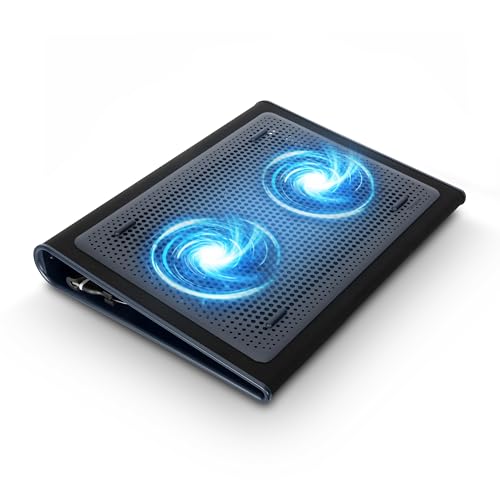
Targus 17-Inch Dual Fan Lap Chill Mat with Neoprene, AWE55US
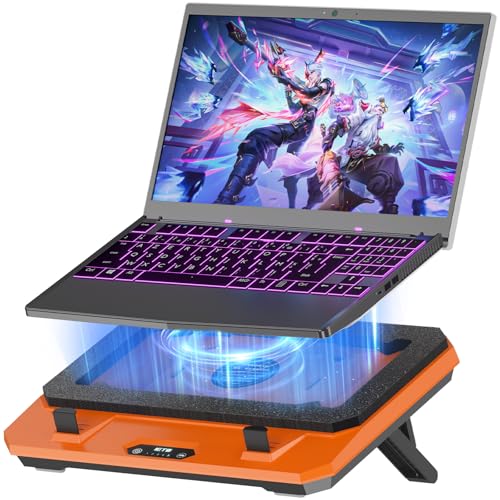
IETS GT300 Adjustable Gaming Laptop Cooling Pad, 10-17 Inches

ICE COOREL 8-Fan Gaming Laptop Cooling Pad, 15-17.3 Inches
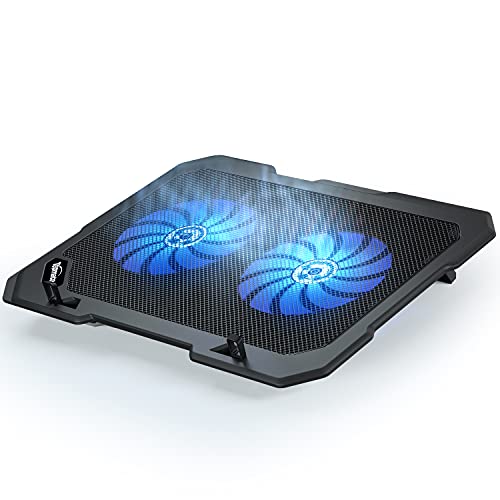
TopMate C302 Slim Laptop Cooler

IETS GT500 5000 RPM Gaming Laptop Cooler with 3-Port USB Hub
The Details Behind The Selections
The GT600 takes a direct approach: one large 5.5-inch turbine-style fan pushes air through a sealed foam opening. That ring of flexible material helps direct airflow toward the laptop intake, while the broad 14.1-to-19.3-inch range suits many full-size gaming machines.
For a desk dedicated to gaming, the large fan and RGB lighting make this a visually confident choice. Compared with the smaller Targus AWE55US, it favors airflow capacity and a wider range of supported laptop sizes rather than soft lap use.
Noteworthy Benefits
- The 5.5-inch fan provides a substantial central airflow source.
- Sealing foam improves contact around the laptop intake.
- The 3-port USB hub adds a shared connection point for accessories.
- Compatibility extends from 14.1 to 19.3 inches.
- A dust filter helps catch debris passing through the cooling area.
Practical Considerations
- The large footprint takes more room than a flat portable cooler.
- The 3-port hub still requires an available USB connection for powered accessories.
Feature Snapshot
Built With In Mind
This pad fits gamers with large desks who need broad laptop compatibility and a focused cooling surface.
A Better Fit Elsewhere
The TopMate C302 Slim Laptop Cooler suits commuters who value a low-weight, flat design more than a large fan and accessory hub.
The Targus AWE55US treats cooling as part of the working surface. Two small fans move air beneath a 17-inch laptop, while the neoprene base adds cushioning for a laptop resting on someone’s legs. The angled surface also lifts the keyboard slightly during mobile work.
I see this as a comfort-focused alternative to the IETS GT600’s large desktop footprint. It works best for students, commuters, and office workers who regularly use a laptop away from a full desk, although a dedicated gaming desk offers more room.
Where It Excels
- Soft neoprene improves comfort during lap-based use.
- Dual fans distribute cooling across the laptop base.
- The tilt makes the keyboard more comfortable for typing.
- USB-A power works with a laptop or another suitable USB power source.
Less-Strong Areas
- The soft base and angled design are less practical for a crowded desk.
- USB-A connectivity requires a compatible port or an appropriate power source.
Made For
Mobile workers and students who regularly place a compatible laptop directly on their lap will appreciate the padded surface.
Consider Something Else When
The IETS GT300 Adjustable Gaming Laptop Cooling Pad is the better fit for a fixed gaming desk needing height adjustment and sealed airflow.
The GT300 combines a 4,000-RPM fan, a concentrator nozzle, and a flexible sealing ring. RPM means rotations per minute, so the figure indicates how quickly the fan spins. A concentrator narrows the airflow into a more focused stream, while the sealing ring helps keep that stream aligned with the laptop intake.
Its adjustable stand makes this more versatile than the flatter Targus AWE55US. A gamer can raise the screen, fit laptops from 10 to 17 inches, and use the USB connection directly from a laptop or through a suitable adapter.
Real-World Strengths
- The 4,000-RPM fan supports a focused high-speed airflow design.
- The flexible sealing ring helps accommodate different intake positions.
- An adjustable stand improves screen positioning and airflow clearance.
- Air filtration and a USB hub add useful desk functions.
Small Caveats
- The sealing ring needs enough clearance to sit around the laptop intake rather than cover it.
Quick Facts
The Right Fit
Gamers with 10-to-17-inch laptops and a preference for an adjustable viewing angle will find this pad especially practical.
Swap It Out When
The Targus 17-Inch Dual Fan Lap Chill Mat suits anyone who regularly works on a lap and prioritizes padding over an adjustable stand.
Eight small fans make the ICE COOREL stand visually busy in a way that fits a gaming setup. Vents above and below the laptop area help distribute air, while selectable fan modes let a gamer adjust the cooling setup for different games or lighter tasks.
The six height settings are the more useful feature for daily work, bringing the keyboard and screen closer to a comfortable position. Two USB ports and a phone stand also help it function as a broader desk accessory rather than a simple cooling plate.
Positive Points
- Eight fans create multiple airflow points beneath the laptop.
- Six height levels accommodate different viewing preferences.
- RGB lighting complements a gaming desk setup.
- Two USB ports provide extra connection points.
- The phone stand adds a place for a mobile device.
Points To Keep In Mind
- The 15-to-17.3-inch range excludes smaller laptops.
- Eight fans and the raised platform make this less convenient for travel.
- USB accessories need access to the cooler’s power connection.
Who Will Love This
Desktop gamers who want RGB lighting, several height settings, and a phone stand in one crowded workstation will find this design appealing.
Where Another Pick Shines
The TopMate C302 Slim Laptop Cooler is easier to carry and takes less room in a bag than this multi-feature gaming stand.
The C302 prioritizes a low profile over a dramatic cooling structure. Two 4.93-inch fans sit beneath the laptop, and the entire pad weighs 1.09 pounds. It can also remain flat for storage, making it more realistic to carry between a desk, classroom, and travel accommodation.
This differs from the IETS GT500’s single high-speed turbine approach. The TopMate uses two quieter 1,300-RPM fans, which feels more appropriate for a shared room or a long session where low-profile practicality matters alongside cooling.
The Upside
- Its 1.09-pound weight and flat profile support easy packing.
- Two 4.93-inch quiet fans suit shared or travel environments.
Trade Offs
- The two-fan layout offers fewer visible features than the ICE COOREL model.
- Power and laptop dimensions should be checked before packing it for a trip.
Feature Facts
Travel Ready For
Commuters and students who regularly move between locations will appreciate the C302’s light, flat construction.
Not My Match When
The IETS GT500 5000 RPM Gaming Laptop Cooler offers more direct speed control for a stationary gaming setup.
The GT500 gives a gamer direct control over its 5000-RPM fan, ranging from zero to the stated maximum. Variable speed matters in practice because a lighter task may not call for the same airflow as a demanding game, and the sealed foam helps keep the directed air close to the intake.
Unlike the GT300’s 4,000-RPM adjustable stand, the GT500 focuses on a broader speed range. It supports laptops from 13 to 17.3 inches and adds three USB ports, but its fixed cooling format makes it more of a permanent desk component than a portable accessory.
Key Advantages
- Fan speed varies continuously from 0 to 5000 RPM.
- Sealed foam helps maintain focused airflow near the intake.
- The 3-port hub supports several wired accessories.
- The 13-to-17.3-inch range covers many common gaming laptops.
Details To Watch
- The sealing foam must fit around the laptop’s cooling intake.
- The fixed desktop format takes more commitment than a flat travel cooler.
Technical Highlights
Whose Shelf It Belongs On
Gamers with a fixed desk setup and a 13-to-17.3-inch laptop will appreciate the wide speed control.
Reach For A Different Pick When
The TopMate C302 Slim Laptop Cooler is a more natural fit for a backpack than this fixed-format desktop model.
What Matters Most in a Gaming Laptop Cooler
Airflow and intake alignment
The pad must move air toward the laptop’s intake, not merely circulate warm room air across the base. I pay close attention to sealed foam, concentrator nozzles, and flexible rings because those features can shape and direct airflow. The exact benefit depends on the intake location and the fit of the seal.
Laptop size and stand angle
Screen size determines physical compatibility, while stand angle affects viewing and typing comfort. The GT300 and ICE COOREL models offer height adjustment, whereas the Targus AWE55US and TopMate C302 prioritize flatter use. Measuring the laptop and checking the intake position prevents an otherwise promising pad from becoming a frustrating fit.
Power and desk space
USB-A power, laptop-powered USB, and included hub connections serve different setups. A three-port hub helps a busy desk, but it also adds another powered component to manage. Larger pads also need more space, while a flat 1.09-pound model is easier to move between locations.
Cooling Pad Mistakes Worth Avoiding
Mistakes Worth Dodging
A large fan count does not automatically make every cooling design equal. I would check the pad’s stated laptop size, power requirements, and intake coverage before focusing on RGB lighting or the number of fans.
What Separates Premium From Basic
Higher-tier models often add adjustable stands, variable fan speed, more accessories, or more elaborate lighting. Those additions matter when the cooler has a permanent desk role, but a frequent traveler may receive better value from a lightweight, flat design.
Frequently Asked Questions
Do I need a gaming laptop cooler for every session?
No. A cooler is most useful during extended gaming or other sustained workloads that create noticeable heat. For short, casual sessions, normal laptop cooling may be sufficient.
Is a cooling pad better than raising the laptop?
Raising the laptop can improve the intake’s access to room air, while a cooling pad adds directed airflow. Using both can suit a hot desk, although a larger pad may require more space.
Does a sealed foam ring work with every laptop?
No. The ring must fit around the intake without blocking it, and the laptop must remain stable. Checking the intake position and the cooler’s supported size range is essential.
Should a gaming laptop cooler have a USB hub?
A USB hub is helpful for a desk with several wired accessories. It adds no benefit to a mobile setup, where carrying and powering another device may outweigh its convenience.
Is a quieter cooling pad better for gaming?
Lower perceived fan noise can help during long sessions or shared rooms. Noise preference remains personal, though, and a quieter pad may use a different fan arrangement from a high-speed model.
Final Verdict
I would choose the IETS GT500 for a permanent gaming desk needing variable speed, the GT600 for larger laptops, and the GT300 for adjustable airflow. The Targus AWE55US fits lap work, the ICE COOREL model favors feature-rich desk setups, and the TopMate C302 remains the most practical travel companion. The right choice comes down to where the laptop spends most of its time.
