
A gaming session at an airport can expose a weak battery faster than a specification sheet. I focus on portable gaming hardware here, while also including two all-in-one desktops for players who prefer a permanent setup with no battery to manage.
Several of these laptops pair capable processors and displays with different memory and storage configurations. The most useful choice depends on game demands, portability, and how much room remains for newer games and applications.
The Choices Worth Comparing
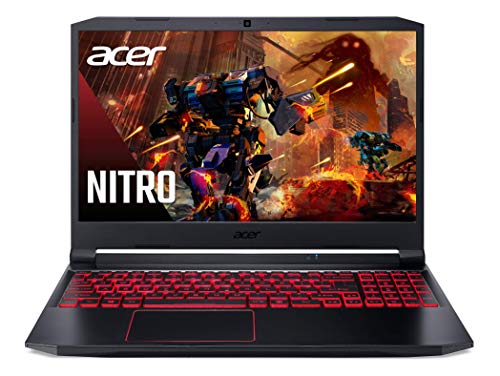
Acer Nitro 5 AN515-55-53E5 Gaming Laptop, RTX 3050, 15.6-inch FHD
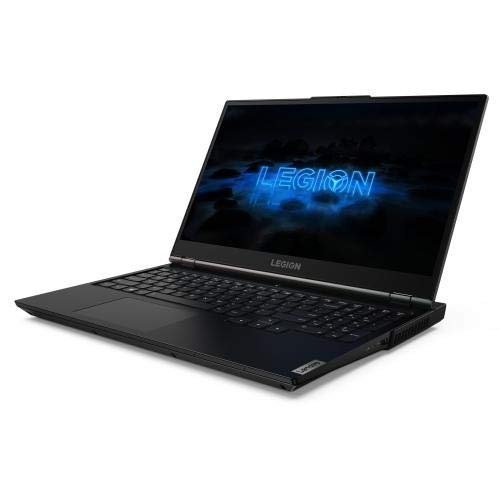
Lenovo Legion 5 Gaming Laptop, RTX 2060, 16GB, 512GB SSD, Renewed

Lenovo Legion LOQ Gaming Laptop, Core i7-13650HX, RTX 5050, 24GB, 1TB

NIMO 15.6 Gaming Laptop, R7-8745HS, 32GB, 1TB

HP OmniStudio 27-inch All-in-One Desktop, Ryzen AI 7 445, 16GB, 512GB, Jet Black

HP OmniStudio 23.8-inch All-in-One Desktop, Ryzen 5, 8GB, 512GB, Cotton White
Why These Options Stand Out
The Acer Nitro 5 brings together a discrete RTX 3050 graphics chip and a 15.6-inch IPS panel, giving it a more convincing gaming foundation than an ordinary office notebook. IPS, or in-plane switching, offers broad viewing angles, while the 144Hz refresh rate can make fast movement appear smoother.
That combination suits a player moving between a home desk and a study space. Unlike the NIMO’s integrated Radeon 780M, the RTX 3050 provides dedicated graphics hardware, though the Acer’s 8GB of memory and 256GB storage are the more significant limitations for a modern gaming library.
Useful Touches
- The RTX 3050 handles graphical workloads without relying solely on integrated graphics.
- Wi-Fi 6 supports faster wireless connections in compatible networks.
- The backlit keyboard remains useful during dim evening sessions.
- HDMI, USB, Ethernet, Wi-Fi, and Bluetooth provide practical connection options.
Practical Considerations
- Eight gigabytes of RAM can become restrictive while games and background applications share memory.
- The 256GB SSD leaves limited room for modern games, so storage expansion deserves attention.
Feature Snapshot
Who It Suits Best
This model fits mainstream gamers who value a discrete GPU, portable screen, and straightforward connectivity more than generous memory and storage.
Where Another Pick Suits Better
The Lenovo Legion LOQ suits players wanting newer graphics hardware, 24GB of memory, and a 1TB SSD in a portable chassis.
The renewed Legion 5 pairs a Ryzen 7 4800H processor with an RTX 2060 carrying 6GB of graphics memory. That older hardware platform still offers dedicated gaming performance, while 16GB of system RAM and a 512GB SSD create a more practical foundation than the Acer Nitro 5’s memory and storage.
For a cost-conscious player seeking a familiar 15.6-inch gaming format, this arrangement makes sense. The renewed status introduces a separate inspection point, and the earlier-generation platform may not suit someone prioritizing recent hardware or longer-term software headroom.
Bright Spots
- Sixteen gigabytes of RAM gives games and multitasking more breathing room.
- A 512GB SSD offers twice the Acer Nitro 5’s listed storage capacity.
- The RTX 2060 includes 6GB of dedicated graphics memory.
- The 144Hz display suits competitive games where visual clarity and motion matter.
Things To Consider
- The renewed condition requires careful attention to cosmetics, screen condition, and included accessories.
- The Ryzen 7 4800H belongs to an older processor generation than the Core i7 in the Legion LOQ.
Made For
This Legion 5 fits budget-conscious gamers who value 16GB of memory, 512GB of storage, and a discrete GPU more than recent component generations.
Consider Something Else When
The Lenovo Legion LOQ better serves players who prefer a newer Core i7 platform, RTX 5050 graphics, 24GB of memory, and a 1TB SSD.
The Legion LOQ carries the most contemporary gaming configuration in this group, combining a Core i7-13650HX processor, RTX 5050 graphics, and 24GB of memory. A 1TB SSD also removes much of the storage pressure visible in the Acer and renewed Legion configurations.
The 15.6-inch FHD IPS panel runs at 144Hz and supports G-Sync, a display synchronization feature that helps align frame output with compatible refresh rates. The hardware is well suited to modern games, although its power-hungry configuration makes current battery runtime a particularly important check for travel use.
Standout Benefits
- Twenty-four gigabytes of RAM supports demanding games alongside heavy multitasking.
- The 1TB SSD provides useful capacity for a substantial game library.
- The RTX 5050 represents newer dedicated graphics hardware than the other laptop options.
- G-Sync support complements the 144Hz display on compatible setups.
Worth Noting
- Performance-focused components can place greater demand on a portable power setup, so current runtime deserves verification.
- Twenty-four gigabytes of memory may exceed the needs of a lighter gaming-and-school workload.
Key Specs
Right Fit For
This LOQ fits gamers with demanding titles who value recent dedicated graphics, generous memory, and ample storage in a portable form.
Look Elsewhere When
The Acer Nitro 5 may suit gamers wanting the same 144Hz display format with a less demanding, lower-memory configuration.
The NIMO takes a different route from the discrete-graphics laptops by pairing the Ryzen 7 8745HS with Radeon 780M integrated graphics. The integrated approach favors a portable, multipurpose machine, while 32GB of DDR5 memory and a 1TB SSD create ample room for coursework, development work, and lighter gaming.
DDR5 is a newer generation of system memory designed to transfer data efficiently while managing power, which matters in a portable computer. The eight-core processor also makes this configuration appealing for software work and multitasking, although graphic-heavy games remain better served by the dedicated GPUs in the Acer and Lenovo models.
Positive Takeaways
- Thirty-two gigabytes of memory gives heavy multitasking considerable headroom.
- The 1TB SSD supports large project files and a broad application library.
- DDR5 memory at 5600MHz suits modern productivity and development workloads.
Trade Offs
- The Radeon 780M is integrated rather than a dedicated gaming GPU, limiting its advantage for graphically demanding titles.
- Heavy games may require reduced settings, while the large memory and storage cannot compensate for weaker graphics hardware.
Best Suited To
This NIMO fits students, developers, and hybrid workers who need abundant memory and storage alongside lighter gaming.
A Better Fit Elsewhere
The Lenovo Legion 5 better suits dedicated gamers who need the RTX 2060’s dedicated graphics hardware rather than integrated Radeon graphics.
The HP OmniStudio 27 shifts the category away from portability entirely, offering a large all-in-one desktop for a permanent gaming station. Its 27-inch FHD display provides more screen space than the 15.6-inch laptops, and the Ryzen AI 7 445, 16GB of RAM, and 512GB SSD support work, streaming, and gaming from one compact central unit.
For a desk with reliable mains power, this arrangement removes the anxiety of watching a battery drain during a match. The Radeon 840M uses integrated graphics, so it does not match the dedicated GPUs in the Legion LOQ or Legion 5 for demanding games, but it offers a cleaner solution for a fixed entertainment setup.
What It Does Well
- The 27-inch FHD display creates an expansive gaming and media surface.
- Sixteen gigabytes of memory supports everyday gaming, streaming, and productivity.
- The all-in-one format reduces the number of separate desktop components.
- Windows 11 Home provides the operating system for standard desktop applications.
Less Ideal Details
- A desktop setup cannot provide the portability offered by the four laptops.
- Radeon 840M integrated graphics place this model behind systems with dedicated RTX graphics for demanding games.
Core Details
Who Will Love This
This OmniStudio suits players with a dedicated desk who prefer a large display and dependable stationary setup over portable gaming.
Another Choice May Suit
The Lenovo Legion LOQ better suits gamers who regularly travel and require dedicated RTX graphics in a portable computer.
The smaller HP OmniStudio brings the all-in-one approach to a 23.8-inch FHD display, making it easier to accommodate on a compact desk than the 27-inch version. Its Ryzen 5 processor, 8GB of memory, and 512GB SSD form a straightforward configuration for home entertainment, general computing, and lighter gaming.
The Cotton White finish also gives this desktop a distinct visual character, unlike the darker Jet Black OmniStudio. For fixed-room use, mains power removes battery considerations entirely, but the integrated Radeon graphics and 8GB of memory make the Legion LOQ more suitable for modern, graphically demanding games.
Notable Upsides
- The 23.8-inch display takes less desk space than a 27-inch model.
- The all-in-one design keeps the main components together within a compact footprint.
- A 512GB SSD provides useful room for games, streaming applications, and files.
Points To Note
- Eight gigabytes of memory is the least generous configuration among the six options.
- Integrated Radeon graphics make this a less convincing choice for demanding 3D games than a laptop with an RTX GPU.
Quick Facts
The Right Fit
This OmniStudio fits casual gamers and home users who value a smaller all-in-one design and a stationary setup for lighter entertainment.
Reach For A Different Pick When
The Lenovo Legion 5 is the better fit for dedicated gaming because it combines 16GB of memory with dedicated RTX 2060 graphics in a portable form.
What Matters Most for Portable Gaming
Battery Runtime Under Real Workloads
Gaming consumes far more power than document editing or video playback, so published runtime figures rarely represent a full gaming session. Screen brightness, display refresh rate, wireless connectivity, and graphics settings all influence the result. I recommend checking current runtime details for the exact configuration and keeping expectations tied to the intended game workload.
Processor and Graphics Balance
A capable processor cannot compensate for weak graphics in a graphically demanding game. The Acer Nitro 5, renewed Legion 5, and Legion LOQ use dedicated RTX graphics, while the NIMO and both OmniStudio desktops rely on integrated Radeon graphics. The distinction matters more for modern 3D titles than for older games or general desktop use.
Memory and Storage Headroom
Games consume storage rapidly, and background applications increase memory pressure. The 16GB in the Acer and renewed Legion 5 represents a useful baseline, while 24GB and 32GB provide additional room for multitasking. Storage ranges from the Acer’s 256GB SSD to the 1TB drives in the Legion LOQ, NIMO, and both OmniStudio desktops.
Two Details That Shape the Decision
Mistakes Worth Dodging
A long spec sheet can hide an obvious mismatch. Choosing a high-refresh display without checking memory, or a powerful graphics chip with minimal storage, can create an frustrating experience later. A 15.6-inch screen also does not guarantee comfortable gaming away from a desk, so display size deserves the same attention as processor specifications.
Where The Extra Money Goes
Higher-tier configurations commonly add newer processors, dedicated graphics, more memory, and larger SSDs. Those upgrades help most with demanding games, heavy multitasking, and growing game libraries. A stationary all-in-one can provide a large screen and dependable power, but it does not replace a portable laptop for travel or gaming away from home.
