
A gaming laptop that feels cheap often struggles with heat, storage, or a display that cannot keep up during long sessions. I focus on the details that affect everyday ownership, including memory, screen quality, battery expectations, connectivity, and practical gaming fit, so a budget-conscious shopper can find a machine that handles the right mix of play, school, and work.
The Lineup, Simplified

jumper 17.6-inch i3-10100Y Laptop
MELIUNA 15.6-inch Laptop

Lenovo V15 G5 15.6-inch FHD Laptop

NIMO 15.6-inch FHD Student Laptop, 8GB RAM, 256GB SSD, Wi-Fi 6, BT5.2
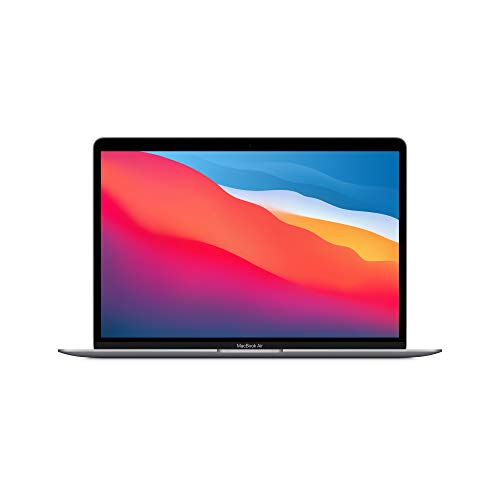
Apple 2020 MacBook Air M1, 13-inch, 8GB RAM, 512GB SSD, Space Gray

Apple MacBook Air M1 13-inch, 256GB Gold
The Strengths Of Each Pick
I like the jumper for shoppers who want a large, colorful screen without moving to a premium machine. Its 17.6-inch 1920×1200 display has a 16:10 shape that suits movies, documents, and strategy games, while the backlit keyboard helps during late-night sessions.
The 16GB of RAM, meaning short-term memory for active apps, gives this model more room for multitasking than many entry-level choices. The 256GB solid-state drive, or SSD, is quick for everyday files, though a large gaming library will need external storage.
Bright Spots
- The roomy 100% sRGB display makes it useful for media and colorful games.
- 16GB of RAM handles several everyday apps without immediate strain.
- The 7000mAh battery supports up to eight hours of mixed daily use.
- Wi-Fi 6, Bluetooth 5.2, HDMI, USB, and Type-C cover common connections.
Practical Considerations
- The 256GB SSD offers limited room for modern game installs.
- The large chassis needs more desk or bag space than a 13-inch model.
Key Specs
Made For
Budget-conscious students and casual players who favor a large display and plenty of memory over extensive game storage.
A Better Fit Elsewhere
The Apple 2020 MacBook Air M1, 13-inch, 8GB RAM, 512GB SSD, Space Gray suits portable gaming with a much larger storage allowance.
The MELIUNA feels more like a flexible school-and-office laptop than a dedicated gaming machine. I would favor it for classes, documents, web work, and casual games, especially since the 180-degree hinge makes the screen easier to share during a presentation.
Its 12GB of memory sits between the lighter configurations here, and the M.2 SSD can be expanded up to 2TB. That storage flexibility is a stronger long-term feature than the built-in AI tools, particularly for a student accumulating coursework and media.
A Few Highlights
- The 1920×1080 IPS panel provides clear text and wide viewing angles.
- Storage expansion offers room to grow without replacing the laptop.
- The 7000mAh battery suits long classes, meetings, and travel.
Small Caveats
- The J4105 processor is better aligned with everyday tasks than demanding 3D games.
- Office 365 access is tied to a subscription, so its long-term cost needs consideration.
Feature Snapshot
Who Will Love This
Students and office workers who value expandable storage, sharing the display, and handling everyday tasks on one machine.
Consider Something Else When
The jumper 17.6-inch i3-10100Y Laptop better fits casual players who want more RAM and a noticeably larger screen.
The Lenovo V15 G5 makes more sense as a work-centered laptop with gaming space than as a dedicated gaming system. The 15.6-inch full HD anti-glare display should be easier on the eyes during office sessions, and the upgraded 16GB of RAM and 512GB PCIe SSD give it useful headroom for multitasking.
I also appreciate the included protection details for accidental damage and breakdowns, subject to plan terms, along with 24/7 technical support. For a work-and-play setup, the 512GB storage is more reassuring than the smaller drive in several neighboring options.
Why It Works Well
- The anti-glare panel reduces visual distraction during long work sessions.
- 16GB of RAM supports office applications, communication tools, and a game running alongside them.
- The 512GB SSD provides room for a larger mix of files and games.
Trade Offs
- High-settings 3D games still require checking the exact graphics configuration.
- The upgraded memory and storage mean the original factory seal has been opened.
Right Fit For
Professionals, developers, and students who need a 15.6-inch Windows machine that balances office work with occasional gaming.
Where Another Pick Shines
The NIMO 15.6-inch FHD Student Laptop, 8GB RAM, 256GB SSD, Wi-Fi 6, BT5.2 adds fingerprint access and a backlit keyboard for mobile students.
The NIMO packs several useful details into a conventional 15.6-inch student laptop. Fingerprint access, a backlit keyboard, and 65W Type-C charging make daily handling more convenient, while Wi-Fi 6 and Bluetooth 5.2 suit a connected campus or home setup.
Its Intel N150 has four cores that can reach 3.6GHz, but that clock speed does not automatically translate into demanding game performance. I see this as a comfortable choice for coursework, browsing, video calls, and lighter games rather than a high-settings gaming machine.
Strong Points
- Fingerprint access provides a quick way into the laptop.
- The backlit keyboard helps during evening study sessions.
- 65W Type-C charging reduces the need to carry a bulky power brick.
- Wi-Fi 6 and Bluetooth 5.2 cover modern wireless accessories.
Details To Watch
- 8GB of memory is adequate for everyday work but modest for heavy multitasking.
- The 256GB SSD may require careful file management for a sizable game library.
Quick Facts
Built With In Mind
First-time laptop owners, students, and commuters who prioritize convenient security, typing comfort, and current wireless connections.
Not Your Match When
The Apple 2020 MacBook Air M1, 13-inch, 8GB RAM, 512GB SSD, Space Gray fits portable gaming and creative workloads that need stronger processing and more storage.
The 13-inch MacBook Air with M1 chip is the most convincing mixed-use machine here for portable play. Its M1 processor has an eight-core central processing unit, and the 512GB SSD provides far more installation room than the smaller configurations in the lineup.
For a commute or study session, the 13.3-inch Retina display and up to 18 hours of stated battery life are compelling. The 8GB of unified memory, which shares capacity between the processor and graphics, remains modest for modern multitasking, so storage and game requirements deserve a close look.
A Favorable Mix
- The eight-core M1 chip balances processing efficiency and everyday responsiveness.
- The 13.3-inch Retina display offers sharp text and strong color reproduction.
- 512GB of storage provides useful room for games, media, and creative files.
- Up to 18 hours of stated battery life supports long sessions away from a charger.
- The backlit keyboard, FaceTime camera, and Touch ID round out a portable setup.
Points To Keep In Mind
- Game-library compatibility and graphics settings need checking before committing.
Core Details
The Right Fit
Portable gamers and creative users who favor efficiency, a sharp display, and abundant storage over a large workstation-style screen.
Another Choice May Suit
The Lenovo V15 G5 15.6-inch FHD Laptop better fits Windows gaming and office work that call for a larger anti-glare display.
This renewed gold MacBook Air brings the compact M1 design to a more restrained storage configuration. I see the main appeal as simple portability: a 13-inch body, Touch ID, and Apple’s efficient M1 chip suit travel, study, and lighter gaming sessions.
Amazon-qualified suppliers professionally inspect and clean the machine, and the listing describes no visible cosmetic flaws when viewed from arm’s length. The battery retains more than 80% of its original capacity, though actual runtime will depend on workload and prior usage.
Positive Points
- Professional inspection and cleaning support a tidy presentation.
- The compact 13-inch design and Touch ID suit mobile use.
Trade-Offs To Consider
- Refurbished or renewed equipment carries a different ownership history from a new unit.
- The battery is rated above 80% capacity rather than matching a new battery.
- The 256GB SSD and 8GB of unified memory are more limited for games and heavy multitasking.
- Included accessories may not be original, so essential cables may need separate planning.
Whose Shelf It Belongs On
Travelers and students who value a compact MacBook, recognizable design, and efficient performance with moderate storage needs.
Swap It Out When
The Apple 2020 MacBook Air M1, 13-inch, 8GB RAM, 512GB SSD, Space Gray suits gamers who need twice the listed storage.
What Matters Before Making the Purchase
Start With the Games, Not the Label
I start with the games actually planned for the machine, because a gaming label alone says little about real performance. The graphics processor, or GPU, matters as much as the main processor for many 3D games, so I check the system requirements and compare them with the exact configuration being considered.
Memory and Storage Set the Limits
RAM keeps active applications and games available at the same time, while an SSD determines how much can be installed and accessed quickly. The 16GB jumper and Lenovo have the most memory here, and the 512GB MacBook Air offers the largest storage allowance, but its unified 8GB memory still needs careful thought for demanding multitasking.
Screen, Battery, and Connections Shape Daily Use
A 17.6-inch display feels more immersive for strategy games and media, while a 13-inch model travels more easily. USB-C, HDMI, fingerprint access, and a backlit keyboard are useful ownership details, but game compatibility, graphics capability, and storage should come first.
Avoiding Costly Laptop Mistakes
Mistakes Worth Dodging
I would avoid judging a laptop solely by its processor speed, since clock speed does not reveal graphics performance. I also check the available storage, physical keyboard comfort, and required ports before choosing, because a machine that cannot handle the intended game library or daily routine is a poor economy.
What The Higher Tier Buys
Higher-tier machines often provide a stronger GPU, more memory, better cooling, and a larger SSD. Those improvements matter for demanding games, heavy creative work, and long editing sessions, but basic browsing, coursework, and lighter games may not justify the added expense.
Frequently Asked Questions
Which Laptop Is Best for Everyday Gaming?
The Apple 2020 MacBook Air M1, 13-inch, 8GB RAM, 512GB SSD, Space Gray offers the strongest balanced mix of processing power, storage, display quality, and battery life here. It fits lighter games and mixed creative work particularly well.
Is 8GB of RAM Enough for Gaming?
Eight gigabytes of RAM is adequate for many lighter games and everyday applications, but heavier games benefit from 16GB. The jumper 17.6-inch i3-10100Y Laptop and Lenovo V15 G5 15.6-inch FHD Laptop provide that higher memory figure.
Is 256GB of Storage Enough for Games?
It works for a modest collection of games and essential files, but larger modern titles can consume substantial room. The 512GB Apple MacBook Air configuration offers more breathing space for games and media.
What Should I Know About a Renewed MacBook Air?
The renewed unit has been professionally inspected and cleaned, with no visible cosmetic flaws described from arm’s length. Its battery exceeds 80% of original capacity, and included accessories may not be original.
How Do I Check Gaming Compatibility?
I compare the exact graphics processor, memory, and storage with each game’s system requirements. Checking the game library and preferred settings before purchase helps prevent an incompatible or disappointing match.
Final Verdict
I would choose the Apple 2020 MacBook Air M1, 13-inch, 8GB RAM, 512GB SSD, Space Gray for the most balanced portable experience. The jumper offers more memory and a larger screen, the Lenovo handles work-first setups well, and the renewed MacBook Air suits a compact budget-conscious route. The right choice comes down to the games, storage needs, and portability each person values most.
