
Minecraft can look simple on paper, yet the right laptop still matters when several people share a room, mods fill the storage drive, or a school project runs beside the game. I built this list for students, families, creators, and dedicated players who need a machine that can handle block-building, multiplayer sessions, and ordinary school or work tasks. Five options are laptops, while the Minecraft Creeper backpack serves a different need: carrying a laptop, cables, and accessories to school or a gaming meetup.
A Closer Look At The Lineup
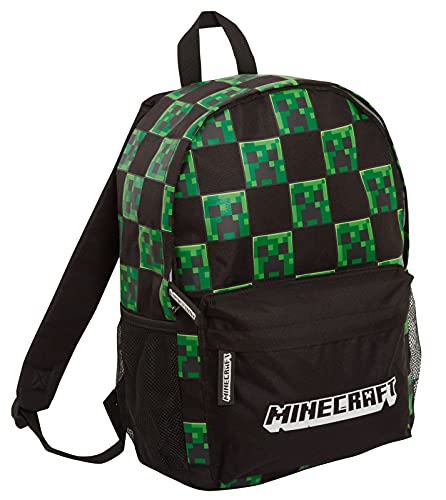
Minecraft Creeper Backpack for Laptops

acer Nitro 5 AN515-54-51M5 Gaming Laptop
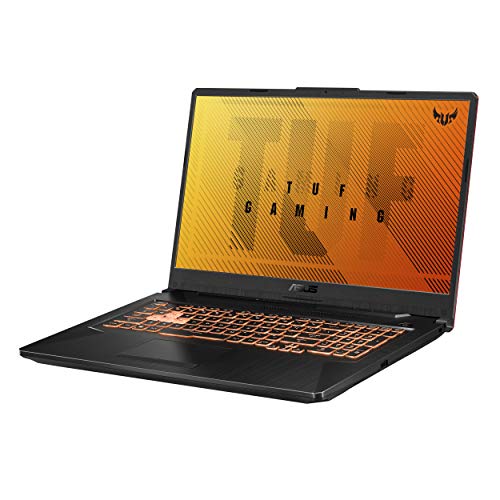
ASUS TUF Gaming F17 FX706LI 17.3-inch 144Hz FHD GTX 1650 Ti

NIMO 15.6 R7-8745HS 32GB Laptop

ASUS TUF Gaming A15 FA506IH 15.6-inch 144Hz FHD GTX 1650

NIMO 15.6 R7-8745HS Creator Laptop
A Deeper Look At The Lineup
Unlike the five computers that follow, this Minecraft Creeper backpack does not run the game. It solves the surrounding problem: getting a laptop, charger, mouse, and drink to school, college, a LAN gathering, or a long day of classes without turning every trip into a balancing act.
The black-and-green Creeper front gives it immediate Minecraft character, but the practical details matter more to me. Its two zippered compartments, padded straps, and top handle make it a more useful everyday carry than a narrow novelty sling. The dimensions also look sensible for A4 folders and a laptop, although I would compare those measurements with the exact computer size before purchasing.
Useful Highlights
- The Creeper graphic and rubber logo badge make the design easy for Minecraft fans to recognize.
- Lightweight canvas offers a practical balance for carrying school materials and gaming accessories.
- Two separate zippered compartments help keep documents apart from cables and controllers.
- A mesh side pocket gives a water bottle or flask a dedicated place to sit.
- Padded shoulder straps, a carry handle, and a padded back improve comfort on a long school day.
Small Caveats
- This is an accessory rather than a Minecraft computer, so it offers no processing power or game performance.
- The listed dimensions should be checked against a larger gaming laptop, especially one with a 17.3-inch screen.
Key Specs
Made For
Students and Minecraft fans who regularly carry a laptop, documents, and accessories between home, school, and gaming meetups.
Another Choice May Suit
The acer Nitro 5 AN515-54-51M5 Gaming Laptop is a better fit for anyone who needs the computer itself rather than a themed carry bag.
The 15.6-inch Nitro 5 puts dedicated NVIDIA graphics in a traditional gaming notebook, which makes it a more direct fit for Minecraft than the Creeper backpack. The GTX 1650 with 8GB of video memory gives the graphics processor dedicated resources instead of relying entirely on the central processor.
Storage is split between a 1TB hard disk drive and a 128GB solid-state drive. A hard disk drive, or HDD, stores data on spinning platters, while a solid-state drive, or SSD, stores data on flash memory and generally responds faster. The combination offers useful capacity, but the speed of everyday tasks will vary according to which drive contains the operating system and game files.
Features That Help
- The dedicated GTX 1650 provides a more suitable foundation for Minecraft than basic integrated graphics.
- The 1TB HDD gives plenty of room for world saves, texture packs, and a broader game library.
- The 15.6-inch display is easier to carry than the 17.3-inch ASUS TUF Gaming F17 FX706LI.
- The listed protection plan covers accidental damage and includes access to technical support around the clock.
Trade Offs
- Keeping Minecraft on the SSD would make loading and updates more responsive than placing it on the HDD.
- The older Core i5-9300H platform should be matched against the demands of heavier mods and simultaneous applications.
Feature Snapshot
Right Fit For
Cost-conscious Minecraft players who mainly want a dedicated graphics card, generous file capacity, and a laptop that is easier to carry than a 17-inch model.
Look Elsewhere When
The NIMO 15.6 R7-8745HS 32GB Laptop fits better for players who routinely run many applications alongside Minecraft and need more memory.
The F17 makes a clear case for players who prefer a large screen to maximum portability. Its 17.3-inch full HD panel, meaning a 1920-by-1080 resolution, gives Minecraft a wide field of view and leaves useful room for chat windows, guides, and video calls beside the game.
Its 144Hz refresh rate means the display can redraw up to 144 times per second, which can make camera movement and menus feel smoother. The GTX 1650 Ti, 8GB of DDR4 memory, and a 512GB PCIe solid-state drive form a more visibly gaming-focused specification than the NIMO models later in the list, although both rely on integrated graphics.
Where It Excels
- The 17.3-inch display creates a comfortable desktop-style view for building, exploring, and multiplayer sessions.
- The 144Hz panel benefits players who notice frame pacing in menus or during fast camera movement.
- The GTX 1650 Ti provides dedicated graphics, which matters more for Minecraft than a high-end processor alone.
- The RGB keyboard adds visible customization for a gaming setup.
Practical Considerations
- The larger chassis will be less convenient than the 15.6-inch Nitro 5 during commuting or study sessions in tight spaces.
- The 8GB memory configuration may become restrictive for heavy modpacks or numerous background applications.
Who Will Love This
Desktop-first players and students who game primarily at home and want a large, high-refresh display with dedicated graphics.
Where A Sibling Pick Shines
The ASUS TUF Gaming A15 FA506IH offers a similar 144Hz panel in a more portable 15.6-inch format for students who regularly carry their computer.
This NIMO takes a different approach from the dedicated-graphics notebooks. Its Ryzen 7 8745HS processor has eight cores, while 32GB of fifth-generation DDR5 memory gives it substantial capacity for Minecraft, browser tabs, Discord, and recording software running at the same time.
The 15.6-inch full HD display keeps the footprint moderate, and the 1TB SSD provides useful room for operating-system files, mods, and multiple worlds. Radeon 780M integrated graphics can handle Minecraft, though a dedicated GPU becomes more important as a player adds demanding texture packs or moves beyond the core game.
The Good Stuff
- Eight processor cores support demanding multitasking alongside a multiplayer session.
- The 32GB memory configuration gives heavy modpack users considerable headroom.
- DDR5 memory is designed for newer platforms and improved bandwidth compared with older DDR4 configurations.
- The 1TB SSD keeps games, mods, and project files together on fast flash storage.
- The 15.6-inch screen is a practical middle ground for home and classroom use.
Less-Strong Areas
- Integrated graphics make this less compelling for demanding games beyond Minecraft.
- The specification emphasizes productivity, so the dedicated graphics found in the ASUS TUF Gaming F17 FX706LI may suit a broader gaming library better.
Technical Sheet
Built With In Mind
Multiplayer players, modpack enthusiasts, and students who routinely keep coursework, communication tools, and Minecraft open together.
Consider Something Else When
The ASUS TUF Gaming A15 FA506IH is the better fit for players who care more about dedicated graphics and a 144Hz display than maximum memory capacity.
The A15 combines the two attributes that matter most to many Minecraft players: a high-refresh display and dedicated NVIDIA graphics. Its 15.6-inch full HD IPS-type panel keeps the machine easier to carry than the 17.3-inch F17, while the 144Hz refresh rate supports smoother menus and camera movement.
Inside, the Ryzen 5 4600H processor, GTX 1650 with 8GB of memory, and 512GB PCIe solid-state drive form a practical gaming setup. Compared with the NIMO 15.6 R7-8745HS 32GB Laptop, this model favors its dedicated GPU and refresh rate over memory capacity, which is the more important trade-off for many purely Minecraft-focused setups.
Well-Handled Touches
- The 144Hz full HD display offers a smooth-feeling view without requiring the larger F17 chassis.
- The dedicated GTX 1650 gives Minecraft access to dedicated graphics resources.
- The 15.6-inch size suits students who divide their time between classes, travel, and gaming.
- The 512GB SSD provides a useful balance of speed and storage capacity.
Factors To Consider
- The 8GB system memory may be less comfortable for very large modpacks or intensive multitasking.
- The Ryzen 5 4600H is an older processor generation, so demanding companion applications deserve a closer compatibility check.
- Wi-Fi 5 supports older wireless networks, while newer routers may offer faster local alternatives.
Best Suited To
Students and frequent travelers who want dedicated graphics, a 144Hz display, and a 15.6-inch footprint for everyday Minecraft sessions.
Reach For A Different Pick When
The NIMO 15.6 R7-8745HS 32GB Laptop is more suitable for heavy multitasking with 32GB of memory and eight modern processor cores.
The creator-oriented positioning makes sense for someone who builds Minecraft worlds as part of a larger creative workflow. The Ryzen 7 8745HS provides eight cores, and 32GB of DDR5 memory allows editing software, reference material, browser tabs, and a local Minecraft server to share the same machine.
Its Radeon 780M integrated graphics can play Minecraft, so the lack of a dedicated gaming GPU is not an immediate obstacle for the core game. Compared with the NIMO 15.6 R7-8745HS 32GB Laptop, though, the core platform is very similar, making the intended creative workload the more meaningful distinction.
Good Reasons To Consider
- Eight processor cores suit code compilation, editing, and other multitasking-heavy tasks.
- The 32GB memory capacity is useful for creative applications and large project files.
- The 1TB SSD keeps Minecraft worlds, project assets, and installed software on fast storage.
Where It May Fall Short
- Integrated graphics are less suitable for demanding games outside Minecraft.
- Players seeking a dedicated GPU should compare this model with the ASUS TUF Gaming A15 FA506IH.
Core Details
The Right Fit
Modders, game developers, and digital creators who want Minecraft to coexist with demanding editing or programming tools.
Swap It Out When
The ASUS TUF Gaming F17 FX706LI is a better fit for players who prioritize a large 144Hz display and dedicated GTX 1650 Ti graphics.
What Matters Before Making a Minecraft Laptop Choice
Start With Graphics
Minecraft benefits from a dedicated GPU such as the GTX 1650, GTX 1650 Ti, or GTX 1650 with 8GB found in three notebooks here. Integrated Radeon 780M graphics can run the core game, but shader packs, high-resolution texture packs, and unrelated games make a dedicated card more valuable. My practical rule is to treat the GPU as the priority for pure gaming, especially when a larger modpack is planned.
Balance Screen Size and Portability
A 17.3-inch display gives Minecraft more room and makes the F17 a natural home on a desk. The 15.6-inch models are less cumbersome for commuting, classrooms, and LAN events. High-refresh screens at 144Hz can also make menus and camera movement appear smoother, although Minecraft’s visual settings and the computer’s frame pacing still influence the overall experience.
Consider Memory and Storage Together
Eight gigabytes of system memory covers the core game comfortably, while 32GB provides more room for heavy mods, servers, and background applications. Storage type also matters: an SSD generally loads content faster, while an HDD contributes useful capacity at the cost of slower file access. The Nitro 5 combines both, so I would place Minecraft and frequently opened applications on its 128GB SSD.
Check the Entire Workload
A gaming laptop often becomes a school computer, communication hub, or creative workstation. I would check the screen size, operating system, wireless standard, and available ports against the complete routine rather than judging only by the Minecraft label. The Creeper backpack deserves the same attention: its dimensions need to match the laptop and the accessories that travel with it.
Practical Traps in the Minecraft Laptop Category
Mistakes Worth Dodging
Ignoring the storage type can make a capable computer feel unnecessarily slow, especially when mods and world saves sit on an HDD. Another common mistake is chasing processor cores while overlooking the graphics card, battery needs, or display size. Minecraft usually needs less processing power than many modern games, so the entire workload deserves a place in the decision.
The Upgrade Payoff
Higher-tier configurations can add dedicated graphics, faster panels, more memory, and quicker solid-state storage. That extra capability matters when playing beyond Minecraft, running demanding mods, or editing alongside the game. A midrange configuration remains sensible for standard Minecraft sessions and everyday schoolwork.
Frequently Asked Questions
Do I need a powerful GPU for Minecraft?
A dedicated GPU provides extra headroom for texture packs, shaders, and high frame rates. Integrated graphics can handle standard Minecraft, but dedicated graphics are preferable for a broader gaming library.
How much RAM is enough for Minecraft?
Eight gigabytes works for ordinary play, while 16GB or more is more comfortable with large modpacks, servers, and several open applications. The NIMO models offer 32GB for heavy multitasking.
Is an SSD important for Minecraft?
An SSD generally provides faster loading, installation, and world access than an HDD. Extra HDD capacity can still be useful for backups and less frequently opened files.
Is a 144Hz display worth considering?
A 144Hz panel can make menus and camera movement feel smoother than a standard display. Minecraft does not require that refresh rate, so the GPU, memory, and portability needs may matter more.
Should I choose a 15.6-inch or 17.3-inch laptop?
A 15.6-inch model is easier to carry between classes and gaming meetups. A 17.3-inch screen offers more space for building, chat, and reference material at a home desk.
Final Verdict
For straightforward Minecraft play, the Nitro 5 and the ASUS TUF Gaming A15 offer the most relevant dedicated-graphics approach. The A15 adds a high-refresh display in a portable format, while the F17 favors screen space. NIMO’s 32GB configurations suit heavier multitasking, and the Creeper backpack completes the setup for people who need to carry their gear.
