
Affordable all-in-one PCs make sense when you want a tidy desk and a screen that handles school work, video calls, streaming, and everyday browsing without a tower taking over the room. You also get a simpler setup, which matters in dorms, home offices, shared family spaces, and front desks. The picks below lean on practical details like screen size, memory, storage, ports, and wireless support, so you can match the machine to the way you actually work.
Some options stay true to the all-in-one format, while others take the same budget-friendly spirit and shrink it into a compact desktop box. That mix helps you compare desk footprint, upgrade room, and performance headroom without sorting through fluff.
Quick Look At Our Top Picks

Lenovo IdeaCentre All-in-One Desktop Computer 8GB RAM 512GB SSD

24-Inch All-in-One Desktop PC with Windows 11

GMKtec Mini PC Ryzen 5 3500U 16GB RAM 512 SSD

Lenovo IdeaCentre Everyday Tasks 24-Inch Full HD All-in-One Desktop Computer

Lenovo IdeaCentre 24-Inch FHD All-in-One Desktop 16GB RAM 512GB SSD

Lenovo 24-Inch FHD All-in-One Desktop Computer 16GB RAM 512GB PCIe SSD
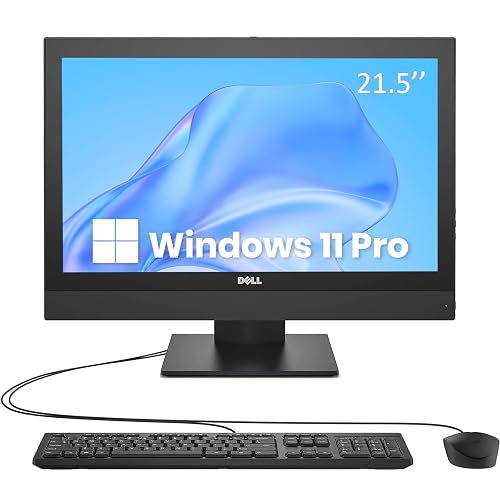
Dell OptiPlex 5250 All-in-One Desktop PC 21.5-Inch

Dell OptiPlex 5250 21.5-Inch FHD All-in-One Desktop PC
More Details On Our Top Picks
Lenovo keeps this one grounded with 8GB of memory and a 512GB solid-state drive, which gives you a comfortable lane for web work, documents, photos, and a fair bit of app switching. The 24-inch full HD panel uses an anti-glare IPS design, so the screen is easier to live with in bright rooms and the viewing angles should feel friendlier from a kitchen counter or shared desk.
The Intel 4-core processor, Wi-Fi 6, and Bluetooth 5.2 round out a build that suits everyday family use better than heavy creative work. Compared with the smaller Dell OptiPlex picks later in this list, this Lenovo feels more like a modern main-room machine, and that wider display matters more than the spec sheet often suggests.
Strong Points
- 24-inch full HD display gives you more room for side-by-side tabs.
- Anti-glare IPS panel helps in bright home offices and common rooms.
- 512GB solid-state storage leaves useful space for files and apps.
- Wi-Fi 6 and Bluetooth 5.2 support current wireless gear without fuss.
- Works well as a family computer for school, bills, and streaming.
Things To Consider
- 8GB memory is fine for routine use, though heavier multitasking will feel tighter.
- The core focus is day-to-day computing, not demanding editing or gaming.
- All-in-one designs keep the desk neat, but replacement flexibility is more limited than with a tower.
Feature Snapshot
Who It Suits Best
Home-office users and families who want a clean, all-in-one desktop with a larger screen will get the most from this Lenovo.
A Better Fit Elsewhere
The Lenovo IdeaCentre 24-Inch FHD All-in-One Desktop 16GB RAM 512GB SSD suits you better if you keep many tabs open at once and want extra memory headroom.
This Core Innovations pick keeps the idea simple: a 24-inch all-in-one that runs Windows 11 and tries to stay out of your way. That straightforward approach suits a second family computer, a basic school station, or a small office desk where you want fewer cables and a familiar layout.
Compared with the Lenovo options above, this one reads as the more bare-bones route, which can be a good thing for uncomplicated needs. The trade-off is obvious too, since a minimalist spec profile usually leaves less room for heavier multitasking or long-term headroom.
What We Like
- 24-inch screen gives you a comfortable workspace for browsing and documents.
- Windows 11 brings a familiar software environment for everyday tasks.
- All-in-one form keeps the desk uncluttered and setup simple.
- Works well for light home, school, or front-desk use.
Worth Noting
- Core hardware details are thin, so the machine fits lighter workloads best.
- Owners who juggle many apps at once may want a roomier spec sheet.
- The simpler build makes sense, though it gives up some flexibility found in mini PCs like the GMKtec.
Core Details
Who It Suits Best
First-time desktop shoppers and light users who want a simple all-in-one should feel comfortable here.
Another Choice May Suit
The Lenovo IdeaCentre Everyday Tasks 24-Inch Full HD All-in-One Desktop Computer gives you a more clearly defined package for a household workspace.
GMKtec changes the equation by shrinking the computer into a mini PC, so your desk gets the performance box without the built-in screen. That makes sense in a living room media setup, a small office, or a bench with an external monitor, and the Ryzen 5 3500U plus 16GB of memory gives it a noticeably stronger multitasking profile than the lightest all-in-ones here.
The 512GB SSD, 2.5GbE LAN, HDMI 2.1, USB-C, DisplayPort, Wi-Fi, and Bluetooth all point to a machine built for people who care about connections as much as raw size. Unlike the Lenovo all-in-ones, this one asks you to supply your own display, but in exchange you get far more placement freedom and triple 4K display support.
Upsides
- Very small footprint makes it easy to tuck behind a monitor.
- 16GB memory gives you more breathing room for work tabs and apps.
- Triple 4K display support suits more demanding desk layouts.
- 2.5GbE LAN is useful for fast wired networks and local transfers.
- USB-C, HDMI 2.1, and DisplayPort improve monitor compatibility.
Small Caveats
- You need a separate monitor, so the total setup is less plug-and-play.
- The mini form factor helps clutter, but cable management still matters.
- Desk-friendly size is great, though it lacks the integrated screen convenience of the all-in-one picks.
Feature Rundown
Built With In Mind
Desk-savvy shoppers who already own a monitor and want a compact machine with better connection options should look here first.
Where A Sibling Pick Shines
The Lenovo IdeaCentre 24-Inch FHD All-in-One Desktop 16GB RAM 512GB SSD fits better for anyone who wants the screen and computer in one piece.
This Lenovo leans into ease of setup, because the bundle includes a keyboard and mouse alongside the 24-inch full HD all-in-one design. That mix is handy in a small apartment, a dorm desk, or a home office that needs to get moving fast without separate accessory shopping.
Office 365 for web also pushes it toward document work, email, and browser-based chores rather than heavy creative tasks. Compared with the first Lenovo in this list, storage is smaller at 256GB SSD, so the fit is better for cloud-heavy routines and lighter local file needs.
Reasons To Buy
- Keyboard and mouse are included, which simplifies setup on day one.
- 24-inch full HD panel gives you enough room for productive browsing.
- Office 365 for web aligns with email, docs, and schoolwork.
- 256GB SSD is enough for lighter local storage needs.
Areas To Watch
- Smaller storage means you may want cloud storage or a tidy file routine.
- The package suits routine work, not a heavy multitasking load.
- Peripherals are included, though that also means less room for personalization.
Details At A Glance
Right Fit For
Households that want a ready-to-use computer for documents, schoolwork, and general browsing will appreciate this setup.
Swap It Out When
The Lenovo IdeaCentre 24-Inch FHD All-in-One Desktop 16GB RAM 512GB SSD makes more sense for heavier local storage and broader multitasking.
This version of the Lenovo IdeaCentre looks like the safer step up for a busy desk, mainly because 16GB of RAM gives you more breathing room than the 8GB models above. The 512GB SSD keeps storage practical, and the 24-inch full HD screen still preserves that comfortable all-in-one footprint.
Intel graphics and Wi-Fi 6 add a sensible modern touch for streaming, office work, and everyday multitasking. The blue finish is a small style note, but the real story is balance, since this model feels better suited to someone who keeps browser tabs, messages, and documents open at the same time.
Standout Traits
- 16GB RAM gives you extra headroom for multitasking.
- 512GB SSD leaves room for work files and media.
- 24-inch full HD display keeps the workspace comfortable.
- Wi-Fi 6 supports current wireless setups without feeling dated.
- Good fit for the main desk in a home office.
Points To Note
- Still built for general computing, not a performance-heavy workload.
- The larger memory helps, though long creative sessions may still want a stronger class of machine.
- The all-in-one form is tidy, but swapping parts later is less flexible than on a tower.
Quick Facts
Whose Shelf It Belongs On
Households that want one desktop for shared work, study, and entertainment should feel comfortable here.
A Better Fit Elsewhere
The GMKtec Mini PC Ryzen 5 3500U 16GB RAM 512 SSD suits you more if a separate monitor and a tiny chassis matter more than an integrated display.
The Lenovo business AIO leans harder into ports and workplace practicality than the more casual models above. You get HDMI, Wi-Fi 6, RJ45 Ethernet, Bluetooth, a keyboard, and a mouse, which makes it a better fit for a desk that needs both wired and wireless options without extra shopping.
The Intel 4-core processor, 16GB RAM, and 512GB PCIe SSD build a more confident day-to-day experience, especially in a small office or front desk environment. The Vent-Hear note suggests an attention to cooling or airflow design, though the exact benefit will depend on the way you place the machine and how hard you push it.
Best Bits
- RJ45 Ethernet adds a useful wired networking option.
- 16GB RAM and 512GB PCIe SSD suit busier workdays.
- HDMI expands display setup choices for office use.
- Keyboard and mouse are included for a more complete package.
- Good match for small business desks and admin stations.
Trade Offs
- Business-leaning features make sense, though the package may feel more serious than some homes need.
- The port mix helps flexibility, but cable routing can get busy behind a desk.
- Cooling-focused design notes are useful, yet the exact thermal payoff depends on your setup.
Feature Card
Best Suited To
Office users who want a tidy all-in-one with stronger connection options will get the most from this Lenovo.
Look Elsewhere When
The Lenovo IdeaCentre 24-Inch FHD All-in-One Desktop 16GB RAM 512GB SSD makes more sense if you care more about style-first home use than a workplace port mix.
This renewed Dell keeps the footprint smaller at 21.5 inches, which can be handy on a narrower desk or in a compact office corner. The Pentium G4560, 8GB of RAM, and 256GB SSD point it toward routine work, email, web browsing, and document editing rather than heavy multitasking.
The no-camera layout may suit privacy-conscious office setups or spaces where a webcam simply isn’t needed. Compared with the more modern Lenovo all-in-ones, this one feels older-school, yet that can be a fair trade for a basic workstation that still comes with Wi-Fi, keyboard, and mouse.
Highlights
- Smaller 21.5-inch size fits tighter desk areas.
- 8GB RAM and 256GB SSD cover basic work well.
- No-camera design suits offices that prefer a simpler setup.
- Keyboard and mouse are included for convenience.
- Good choice for light business or school tasks.
Minor Gripes
- The Pentium processor is fine for routine work, but it leaves little headroom for heavier use.
- The smaller screen can feel cramped beside the 24-inch picks.
- As a renewed machine, cosmetic wear can vary from unit to unit.
Technical Sheet
Made For
Small offices and homes that need a compact desktop for simple work tasks will find this Dell easy to place.
Reach For A Different Pick When
The Lenovo IdeaCentre Everyday Tasks 24-Inch Full HD All-in-One Desktop Computer suits you better if you want a larger screen and a fresher all-in-one layout.
This renewed Dell follows the same 21.5-inch compact idea, but the FHD panel makes the screen a little more appealing for routine work and older-office replacement needs. You still get the Pentium G4560, 8GB RAM, 256GB SSD, Wi-Fi, HDMI, keyboard, and mouse, so it sits squarely in the basic-office lane.
Compared with the other Dell OptiPlex above, this version feels a touch more complete thanks to the FHD note and Windows 11 Pro. That makes it a sensible fit for budget-sensitive desks that need a straightforward machine without a lot of extras.
Standout Traits
- Full HD screen gives you a cleaner everyday viewing experience.
- Windows 11 Pro suits office environments that prefer that edition.
- Keyboard and mouse are included, which keeps setup simple.
- Small footprint works well for compact desks and counters.
Room For Improvement
- 8GB RAM and a Pentium chip keep it in the basic work class.
- Renewed hardware can vary a bit in surface wear and condition.
- The compact screen size is practical, though it is less spacious than the 24-inch Lenovo picks.
Core Details
Who Should Grab It
Budget-conscious offices and simple home setups that want a compact all-in-one with Pro software should take a close look.
Another Choice May Suit
The Lenovo 24-Inch FHD All-in-One Desktop Computer 16GB RAM 512GB PCIe SSD is the better step up for multitasking and a roomier screen.
How To Choose The Right Affordable Alls In One Pc
Screen Size, Space, And Daily Comfort
A 24-inch screen gives you more breathing room for spreadsheets, side-by-side windows, and school assignments. A 21.5-inch model fits tighter desks more easily, though it can feel cramped once you keep several windows open.
Anti-glare and IPS panels matter more than they sound like they should. Anti-glare cuts reflections in bright rooms, while IPS, or in-plane switching, usually keeps colors and angles more consistent when you shift position.
Memory And Storage Matter More Than Glossy Extras
RAM, short for random access memory, affects how comfortably you switch between apps. Eight gigabytes works for browsing, email, and light office tasks, while 16GB gives you a more relaxed feel during busier days.
SSD means solid-state drive, and that matters because it helps the computer feel quicker during startup and app loading. A 256GB drive suits cloud-heavy use, while 512GB gives you more room for downloads, photos, and local files.
All-In-One Convenience Versus Compact Box Flexibility
All-in-one desktops keep the desk cleaner because the computer lives behind the display. That suits shared spaces, reception counters, and home offices where cable clutter gets old fast.
Mini PCs like the GMKtec trade that simplicity for flexibility, since you choose the monitor and place the box where it fits best. That setup takes a little more planning, but it can make sense for small rooms and multi-monitor workstations.
Ports, Wireless, And The Way You Actually Work
Wi-Fi 6, Bluetooth 5.2, HDMI, RJ45 Ethernet, and USB-C each solve a different real-world problem. Newer wireless support helps with current routers and accessories, while wired Ethernet and video outputs matter more for office desks and dual-screen setups.
Think about your routine rather than the spec sheet headlines. A household computer that mostly streams and browses needs different hardware than a desk that stays full of documents, printers, and external drives.
What To Weigh Before You Choose
Mistakes Worth Dodging
A lot of shoppers fixate on screen size and forget memory. That leaves you with a nice-looking desktop that starts feeling slow once tabs, calls, and office apps stack up.
Another common miss is overlooking the total setup. A mini PC needs a monitor, while an all-in-one already includes the screen, so the real cost and desk space picture changes fast.
The Upgrade Payoff
Higher-tier models usually spend more on memory, faster storage interfaces, stronger port sets, and better screen quality. That money goes toward smoother multitasking, easier networking, and a more comfortable daily routine.
Paying up makes sense for a main household desk, a work-from-home station, or any setup that stays busy for hours. For lighter use, a simpler model keeps things sensible without piling on extra hardware you won’t notice much.
Frequently Asked Questions
What size screen works best for a shared desk?
A 24-inch screen usually gives you enough room for documents and browsing side by side. Smaller 21.5-inch models fit tighter spaces better, though they feel less roomy.
Is 8GB of memory enough for everyday use?
It usually handles browsing, email, streaming, and light office work. You’ll feel the limit sooner once many apps stay open at once.
Does a mini PC make sense over an all-in-one?
It does when you already own a monitor or want a tiny chassis with more placement freedom. An all-in-one makes more sense when you want the screen and computer in a single unit.
Why does SSD storage matter so much?
An SSD helps the computer start faster and open apps with less waiting. That makes daily use feel smoother than older drive types.
Should you look for Wi-Fi 6?
Wi-Fi 6 is useful with newer routers and busier home networks. It’s not the only thing that matters, but it does help a modern desk feel more current.
Closing Thoughts
The right Affordable Alls In One Pc depends on your desk, your habits, and how much room you want for multitasking. Lenovo’s 24-inch models make the most sense for a main home setup, while the GMKtec mini PC suits you better when the monitor is already sorted. Dell’s renewed options keep things compact for basic office work, and the Core Innovations pick stays simple for lighter use. Choose the machine that matches your daily routine, not the one with the longest feature list.



