
All-in-one desktops make sense when you want a tidy setup without a tower taking over the desk. For schoolwork, video calls, web browsing, and everyday office chores, the right model can feel like a small workstation instead of a clutter magnet. The eight picks below focus on value, display size, memory, storage, and the little details that matter once you start living with the machine.
The Shortlist At A Glance

HP 23.8 inch All-in-One Desktop PC 24-cr0010

HP 2025 22 FHD All-in-One Desktop Computer

Lenovo IdeaCentre All-in-One Desktop Computer 24 FHD IPS

Lenovo IdeaCentre Everyday Tasks 24 Full HD All-in-One Desktop Computer

Lenovo IdeaCentre 24 FHD All-in-One Desktop 16GB

Lenovo 24 FHD All-in-One Desktop Computer Windows 11 Pro
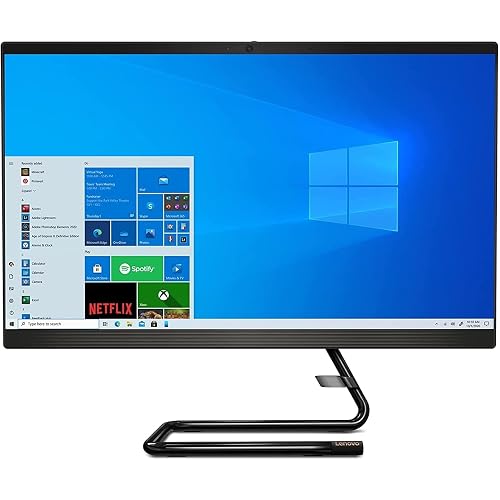
Lenovo IdeaCentre AIO 3i 24 All-in-One Computer
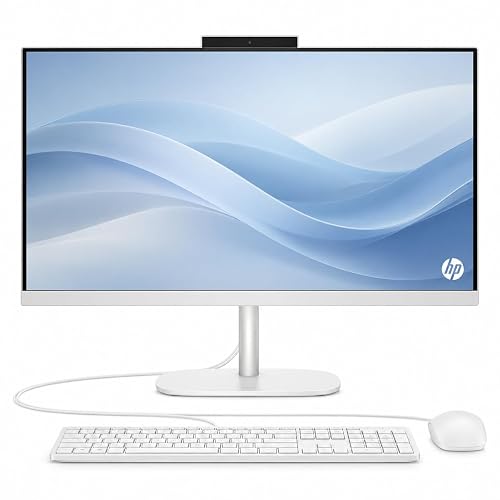
HP OmniStudio 24 Full HD All-in-One Desktop Computer
A 23.8-inch all-in-one like this lands in a sweet spot for family desks and casual home offices. The AMD Athlon Silver 7120U is an entry-level processor, so the real strength here is straightforward everyday use, not heavy multitasking.
The pop-up privacy camera and dual-array microphones make more sense than flashy extras, especially for video calls in a shared room. You get 8 GB of memory and a 256 GB solid-state drive, which should feel fine for documents, streaming, and light browser work, though larger photo libraries will fill it sooner than you may like.
Strong Points
- 23.8-inch display size gives you room for side-by-side windows without taking over the desk.
- The pop-up camera helps keep the screen cleaner in a simple, practical way.
- Dual microphones with noise reduction fit routine calls in a busy home.
- Solid-state storage should open basic apps faster than a hard drive-based budget desktop.
Things To Consider
- The Athlon Silver chip suits light work better than demanding creative tasks.
- 256 GB storage can feel tight once you start keeping many large files locally.
- The glossy all-in-one style needs occasional screen care, especially in bright rooms.
Feature Rundown
Who It Suits Best
Home users who want a tidy desktop for school forms, streaming, email, and light office work will get the most from it.
Where A Sibling Pick Shines
Lenovo IdeaCentre 24 FHD All-in-One Desktop 16GB fits better for you when browser tabs, spreadsheets, and music playback all need to stay open at once.
This HP keeps its footprint small, which is handy on a dorm desk or a narrow home-office nook. The 13th Gen Intel quad-core chip should suit email, web apps, school portals, and video meetings without feeling oversized for the job.
Type-C, HDMI, Wi-Fi, and the HD webcam give you the kind of connection mix that reduces adapter hunting. The trade-off is simple storage space, so it’s a better fit for cloud-first routines than for a local library of large files.
What We Like
- 22-inch class sizing keeps the desk layout neat and easy to arrange.
- Wi-Fi, HDMI, and Type-C cover common plug-in needs without fuss.
- Windows 11 Pro can feel more work-friendly for small office routines.
Points To Note
- 128 GB storage asks you to stay disciplined with downloads and media.
- The smaller screen works well for basics, though it gives less room than the 24-inch Lenovo picks.
- Bright-room placement may call for careful angle adjustment, since compact displays can feel cramped on shallow desks.
Core Details
Made For
Students, apartment dwellers, and home workers with limited desk space will appreciate the compact shape.
Another Choice May Suit
HP 23.8 inch All-in-One Desktop PC 24-cr0010 suits you better once you want a larger screen for split-window work and family use.
This Lenovo leans into comfort, starting with a 24-inch FHD IPS panel that’s anti-glare. IPS, or in-plane switching, usually means better viewing angles, so the screen stays easier to read from the side during shared use.
Compared with the smaller HP 22-inch option, this one gives you more room for spreadsheets, classwork, or a recipe tab beside a document. The 512 GB SSD also gives you much more breathing room than 128 GB models, which matters once your files stop fitting into a tiny folder.
Upsides
- Anti-glare display helps cut reflections in bright rooms or near windows.
- 24-inch size gives you a calmer workspace for side-by-side windows.
- 512 GB solid-state storage gives you more room for apps, photos, and documents.
- Wi-Fi 6 and Bluetooth 5.2 support modern wireless accessories and network gear.
- 8 GB RAM handles ordinary daily use without making the machine feel barebones.
Areas To Watch
- 8 GB memory is fine for basics, though heavy multitasking still pushes the limit.
- The larger screen wants a stable desk, since it can dominate a very small workspace.
Details At A Glance
Best Suited To
Home offices and shared spaces suit this pick well, especially where screen comfort matters more than sheer portability.
A Better Fit Elsewhere
Lenovo IdeaCentre 24 FHD All-in-One Desktop 16GB fits better for you when you keep many tabs open and want extra memory headroom.
Compared with the plain 24-inch Lenovo above, this model leans more directly into setup convenience. The included keyboard and mouse matter more than they sound, because they save you a separate shopping step and get the desk ready faster.
The Office 365 for Web mention points toward people living in documents, calendars, and shared files rather than heavy software. The 256 GB SSD sits in the middle of the pack, so it should feel fine for work files and common apps without turning storage into a daily worry.
Bright Spots
- Keyboard and mouse are included, which makes first setup simpler.
- 24-inch screen size helps with side-by-side windows and long writing sessions.
- 256 GB SSD is a practical middle ground for ordinary home office use.
- Windows 11 gives you a familiar modern desktop base.
Room For Improvement
- The focus on web-based Office use suggests lighter computing rather than specialized tasks.
- Owners who keep many media files locally may fill the storage faster than expected.
- The bundled accessories are handy, though they also leave you with less room to personalize the desk on day one.
Feature Card
Who Will Love This
Home office setups and students who want an all-in-one that feels ready from the start should find this one easy to live with.
Where Another Pick Fits Better
HP OmniStudio 24 Full HD All-in-One Desktop Computer suits you better when you want newer memory and a cleaner accessory package.
This Lenovo pushes memory higher, and that’s the main story. With 16 GB RAM, it should handle more browser tabs, more background apps, and more everyday juggling than the 8 GB systems above.
The 24-inch Full HD panel keeps it familiar, while Wi-Fi 6 and Bluetooth 5.2 help round out a modern desk setup. In most homes, that extra memory feels more useful than a flashy spec sheet, especially for anyone who likes to keep a lot open at once.
Reasons To Buy
- 16 GB RAM gives you more breathing room for multitasking.
- 512 GB SSD leaves ample space for documents, media, and software.
- 24-inch Full HD display feels comfortable for work and streaming.
- Wi-Fi 6 and Bluetooth 5.2 suit newer routers and wireless gear.
Minor Gripes
- The blue finish may not suit every office style, so desk match matters.
- The 4-core processor is fine for general work, though it still has limits for demanding software.
- Regular screen cleaning helps keep the all-in-one look tidy, especially in bright light.
Quick Facts
Built With In Mind
Busy home users and multitaskers who want more headroom without moving into a full desktop tower will like this fit.
Look Elsewhere When
Lenovo 24 FHD All-in-One Desktop Computer Windows 11 Pro suits you better for business-style ports and a more work-focused setup.
This Lenovo feels more business-minded than the earlier home-first picks. HDMI, WiFi 6, RJ45, Bluetooth, keyboard, and mouse together make it easier to build a work desk around one package instead of piecing things together.
The Intel 4-core chip and 16 GB RAM give it a more capable stance for spreadsheets, conferencing, and a pile of browser tabs. The odd “Vent-Hear” label is worth reading carefully on the listing, though the overall feature mix still points toward practical office use.
What We Like
- 16 GB RAM and a 512 GB PCIe SSD give you a responsive-feeling base.
- HDMI, RJ45, WiFi 6, and Bluetooth cover wired and wireless desk setups.
- Keyboard and mouse are included, which helps with a straightforward office start.
- Windows 11 Pro suits workspaces that want a more business-oriented platform.
Worth Noting
- The listing includes unusual wording, so a careful read of the details is smart before you settle on it.
- Business-oriented hardware often favors practicality over polish, which some home setups may notice.
- Keeping the rear ports accessible may require a little desk planning, especially near a wall.
Technical Sheet
Right Fit For
Work-from-home setups and small office desks benefit most from this one.
Swap It Out When
HP OmniStudio 24 Full HD All-in-One Desktop Computer suits you better if you want a cleaner consumer-style package with newer DDR5 memory.
This older Lenovo stands out for having more than one kind of storage, plus a DVD RW drive. A DVD RW drive reads and writes discs, so it still matters in homes with old photo archives, software media, or family files sitting on optical discs.
It gives you 1 TB on the hard drive side and 256 GB on the solid-state side, which is unusual in this group. The trade-off is that the Windows 10 base feels less current than the Windows 11 systems around it, so you’re choosing function and legacy support over freshness.
Best Bits
- Dual storage gives you both a large archive space and quicker SSD access.
- DVD RW support helps with disc libraries that still matter in your home.
- 24-inch Full HD screen is a comfortable size for day-to-day use.
- Core i3-10100T is a known mainstream chip for basic desktop work.
Softer Spots
- Windows 10 feels older than the newer operating systems on the other picks.
- The hard drive portion of storage usually feels slower than SSD-only setups.
- Optical drives add a little extra maintenance, mostly just keeping discs and tray space clear.
Core Details
Whose Shelf It Belongs On
Households with old discs or mixed file storage needs will appreciate this one most.
Where A Sibling Pick Shines
Lenovo IdeaCentre 24 FHD All-in-One Desktop 16GB suits you better for a newer software feel and more memory headroom.
HP’s OmniStudio reads like the cleanest desk setup in the group. The 16 GB DDR5 memory gives it a more modern foundation than the 8 GB machines, and DDR5 is the newer memory class, so the system is better positioned for smooth everyday multitasking.
The 24-inch Full HD panel, keyboard, and mouse make the whole setup feel orderly right out of the box. The 128 GB SSD is the main restraint, though, so this pick fits best when you live in browser tabs, cloud tools, and lighter local storage.
Highlights
- 16 GB DDR5 gives the system a fresher memory platform.
- 24-inch Full HD screen suits work, streaming, and routine browsing.
- Keyboard and mouse are included for a neater start-up process.
- WiFi 6 helps with current wireless networks and shared home connections.
Small Caveats
- 128 GB storage feels tight once you start saving a lot locally.
- The included accessories are useful, though they leave less room for personal desk gear choices.
- Keeping the display surface clean matters more on compact all-in-ones, since everything is packed into one frame.
Feature Snapshot
The Right Fit
Minimal desk setups and cloud-first households will get the most from this HP.
Reach For A Different Pick When
Lenovo IdeaCentre 24 FHD All-in-One Desktop 16GB suits you better once local storage matters as much as clean design.
How To Choose The Right Alls In One Computer On A Budget
Screen Size, Memory, And Storage First
Start with the screen, then memory, then storage. A 22-inch all-in-one saves space, while a 24-inch panel gives you easier reading and better split-window use for spreadsheets, schoolwork, and browsing.
Memory is the next pressure point. Eight gigabytes handles everyday tasks, but 16 GB feels more comfortable once you keep several apps open, and solid-state storage matters because it shortens loading time and reduces the clunky feel of older hard drives.
Ports And Wireless Shape Daily Comfort
HDMI, USB Type-C, Bluetooth, Wi-Fi 6, and RJ45 sound technical, yet they shape the way you actually use the machine. HDMI helps with a second screen, Type-C keeps newer accessories simple, and RJ45 gives wired network stability for work-from-home desks.
Think about the rest of your setup too. A model with keyboard and mouse included saves setup time, while a machine with a pop-up camera makes shared spaces feel neater after calls end.
Match The Machine To Your Routine
Light users can stay comfortable with entry-level processors such as Athlon Silver or an Intel quad-core chip. Home offices and heavier browser habits usually benefit from 16 GB RAM and a larger SSD, because those parts take the strain off daily multitasking.
Legacy needs change the picture as well. A DVD RW drive still matters for disc collections, and older operating systems can fit certain work habits, but newer Windows 11 systems usually feel more current for everyday home use.
Things Worth Knowing First
Mistakes Worth Dodging
Many shoppers get fixated on screen size and forget the memory cap. That’s a problem in this category, because an attractive 24-inch panel still feels cramped once the storage is tiny or the RAM is too low for your workload.
Another common miss is ignoring the port mix. A neat all-in-one can still be awkward on a desk if you need adapters for every monitor, drive, or headset connection.
What The Higher Tier Buys
More money usually goes into memory, storage, and a more flexible port layout. You also tend to get better wireless support, newer memory standards, and extras like included peripherals or a cleaner webcam setup.
That upgrade makes sense for multi-tab work, shared family use, and home offices that stay busy all day. For light email and web use, a simpler model still makes sense and saves desk space.
Frequently Asked Questions
Are all-in-one desktops good for daily home use?
Yes, they fit email, browsing, school tasks, streaming, and video calls very well. Their compact shape also keeps desk clutter down.
How much RAM feels comfortable in a budget all-in-one?
8 GB works for basic use, though 16 GB feels smoother with many tabs or several apps open. That difference becomes noticeable in busy home-office routines.
Is a 128 GB drive enough?
It can work for cloud-first use and light local storage. Large photo folders, downloaded media, and bigger work files fill it faster than you may expect.
Do you need a 24-inch screen?
You do not need it, but it makes side-by-side work easier. A 22-inch screen suits tighter spaces better.
What matters more, processor or storage?
Both matter, but storage shape affects everyday feel more than many shoppers expect. A fast SSD usually makes a modest processor feel less sluggish for basic tasks.
Closing Thoughts
Your best all-in-one on a budget depends on how crowded your desk is and how hard the machine has to work. The HP 23.8-inch model is a sensible starting point, while the Lenovo 24-inch and 16 GB options give you more room to breathe. For tighter spaces, the 22-inch HP stays compact without feeling stripped down. Choose the one that matches your routine, and the desk starts working with you instead of against you.



