
You want a work computer that fits a desk, keeps clutter down, and still handles everyday office tasks without fuss. That usually means balancing screen size, memory, storage, ports, and how much room your setup can spare.
The eight picks below cover compact mini PCs, classic all-in-ones, and a couple of larger displays for people who spend long days on spreadsheets, video calls, and shared workstations. The right choice feels less like a gadget and more like a well-placed tool.
Quick Look At Our Shortlist

GMKtec K16 Mini PC Ryzen 7 7735HS 32GB RAM

HP 2025 22″ FHD All-in-One Desktop Computer

Lenovo IdeaCentre All-in-One Desktop Computer 8GB RAM 512GB SSD

24″ All-in-One Desktop PC with Windows 11

GMKtec Mini PC Ryzen 5 3500U 16GB RAM 512 SSD

Lenovo IdeaCentre 24″ FHD All-in-One Desktop 16GB RAM 512GB SSD

Lenovo 24″ FHD All-in-One Desktop Computer 16GB RAM 512GB PCIe SSD
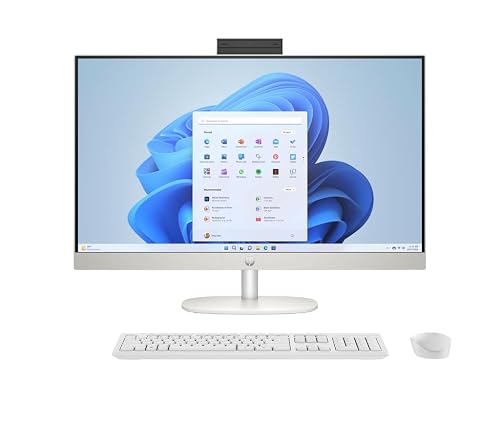
HP 27 inch All-in-One Desktop PC FHD Touchscreen
More Details On Our Top Picks
This mini PC makes sense for a desk that needs desktop-class speed without giving up space. The Ryzen 7 7735HS, LPDDR5 memory, and 512GB SSD point to a snappy setup for spreadsheets, browser-heavy work, and a pile of tabs.
The dual 2.5GbE LAN ports stand out for office networks, and the USB4 plus Oculink ports give you room for fast peripherals or a more involved workstation build. The trade-off is simple, you still need your own monitor and accessories, so it suits an organized desk more than a quick all-in-one setup.
Strong Points
- Ryzen 7 7735HS gives you a strong base for multitasking and heavier office software.
- 32GB of LPDDR5 memory helps the system keep up when your day runs from email to documents to conferencing.
- Two 2.5GbE network ports suit wired office setups and file-heavy workstations.
- USB4 and USB-C make docking and modern peripheral use much simpler.
- Small chassis leaves your desk open for a proper monitor arm, keyboard tray, or notebook space.
Things To Consider
- You need separate display gear, so the total setup takes more planning than a self-contained all-in-one.
- That much connectivity helps, but cable management matters more once you add several accessories.
- Mini PCs can feel cramped in a tucked-away cabinet, so ventilation deserves attention.
Feature Snapshot
Who It Suits Best
Office power users who want a compact box for multitasking, multi-monitor work, and wired networking will get the most from this setup.
A Better Fit Elsewhere
Lenovo IdeaCentre 24″ FHD All-in-One Desktop 16GB RAM 512GB SSD suits you better when you want a simpler, all-in-one desk with less cable planning.
A 22-inch all-in-one usually appeals to reception counters, small offices, and home desks that cannot spare much space. HP’s 13th Gen quad-core processor, 8GB of DDR5 memory, and 128GB of storage point to light business work rather than a loaded multitasking station.
The built-in webcam, HDMI, Type-C, and Wi-Fi make it easy to place, plug in, and get moving. The honest read is that the smaller storage will feel tight faster than the Lenovo and GMKtec picks, so this one fits simple day-to-day tasks more comfortably.
What We Like
- Compact 22-inch footprint helps on shallow desks and shared work areas.
- DDR5 memory gives you a newer memory standard for everyday office tasks.
- HD webcam suits video meetings without adding an extra accessory.
- HDMI and Type-C broaden display and peripheral options.
Minor Gripes
- 128GB of storage leaves less room for large local files and repeated downloads.
- The smaller screen suits tight spaces, though long document sessions may feel cramped compared with 24-inch or 27-inch options.
- Light office use fits best, so heavy multitaskers will want more memory and storage headroom.
Details At A Glance
Right Fit For
Reception desks, part-time workstations, and straightforward home office setups are the strongest match here.
Swap It Out When
Lenovo IdeaCentre 24″ FHD All-in-One Desktop 16GB RAM 512GB SSD makes more sense for heavier multitasking and a roomier everyday screen.
This Lenovo leans into comfort, with a 24-inch FHD IPS panel and anti-glare finish that should feel kinder in bright offices than glossy screens. For long document sessions, video calls, or a shared family desk that doubles as a work spot, that matters more than flashy extras.
Wi-Fi 6 and Bluetooth 5.2 make it easy to connect modern wireless gear, while the 512GB SSD gives you sensible local storage for work files. Compared with the HP 22-inch model, this one feels more relaxed on screen space, though 8GB memory still keeps it in the everyday lane.
Upsides
- 24-inch display gives documents, tabs, and calls more breathing room.
- Anti-glare IPS panel helps cut reflections in bright work areas.
- 512GB SSD leaves practical room for office files and apps.
- Wi-Fi 6 and Bluetooth 5.2 suit modern wireless networks and peripherals.
Areas To Watch
- 8GB memory works for ordinary office use, though power users will want more headroom.
- The all-in-one format keeps things tidy, but repair access can be less convenient than with a separate tower.
- Screen size is generous, yet the system still targets everyday work rather than demanding creative tasks.
Core Details
Whose Shelf It Belongs On
You get the most from this model in a home office, shared desk, or work-from-home setup that needs a clearer screen without jumping to a large chassis.
Where A Sibling Pick Shines
HP 27 inch All-in-One Desktop PC FHD Touchscreen suits you better when a bigger display and touch input matter more than compactness.
This Core Innovations model is the plain-spoken choice in the group, which can be a good thing for a receptionist station or a back-office desk. The 24-inch size gives you a familiar work area without the footprint of a larger 27-inch display.
Because the source details stay light, the main appeal is the all-in-one format itself, not a long list of extras. That keeps expectations sensible, and for basic email, web work, or quick admin tasks, it looks like a straightforward fit.
Bright Spots
- 24-inch all-in-one design keeps the desk uncluttered.
- Windows 11 gives you a familiar modern desktop environment.
- Straightforward format suits shared office spaces and light admin stations.
Points To Note
- Source details are limited, so you should treat it as a basic-use option.
- It makes the most sense for simple office work rather than demanding multitasking.
- Small accessory additions may still be needed depending on your workflow.
Feature Card
Built With In Mind
Front desks, simple admin stations, and offices that want a no-frills all-in-one form factor are the clearest match.
Another Choice May Suit
Lenovo IdeaCentre All-in-One Desktop Computer 8GB RAM 512GB SSD suits you better when you want more confirmed hardware detail and a fuller everyday package.
Compared with the Ryzen 7 model, this GMKtec is the more measured office machine, and that can be enough for admin work, browser sessions, and light media duties. The Ryzen 5 3500U, 16GB memory, and 512GB SSD land in a practical middle ground for a small office.
Triple 4K display support makes it easier to spread out work across more than one screen, which matters for people who live in spreadsheets or keep communication apps open beside documents. The catch is that it still depends on separate displays, so the tidy footprint only pays off once your desk layout is planned.
Positives
- Small footprint helps a crowded desk feel less cluttered.
- 16GB memory and a 512GB SSD offer a workable baseline for office tasks.
- Triple 4K display support suits multi-screen productivity setups.
- 2.5GbE LAN gives wired networks a useful speed bump.
- USB-C, HDMI 2.1, Wi-Fi, and Bluetooth cover common desk needs.
Softer Spots
- Separate monitors are still part of the equation, so setup time is higher than with an all-in-one.
- Ryzen 5 performance is sensible, though it sits below the K16 for heavier workloads.
- Desk owners who want an uncluttered single-unit system may prefer a full all-in-one instead.
Quick Facts
The Right Fit
Small offices and desk workers who want a compact machine with several monitor options will get the best match here.
Look Elsewhere When
HP 2025 22″ FHD All-in-One Desktop Computer suits you better when you want the screen and computer in one unit with less setup work.
This 2026 Lenovo reads like the safer all-in-one bet for a work desk that needs a cleaner finish than a separate tower and monitor. A 24-inch FHD screen, 16GB of memory, and 512GB of storage give you more breathing room than the HP 22-inch model.
Intel Graphics keeps the package straightforward, and Wi-Fi 6 plus Bluetooth 5.2 handle modern connectivity without much fuss. For most home offices, that mix is enough, though users who want stronger graphics hardware or a larger panel may lean toward the HP 27-inch model.
Reasons To Buy
- 16GB memory gives you a more comfortable multitasking baseline.
- 512GB SSD provides useful space for work files and daily software.
- 24-inch FHD screen suits a general-purpose office desk.
- Wi-Fi 6 and Bluetooth 5.2 keep connectivity current.
Room For Improvement
- Intel Graphics is fine for office work, though it is not aimed at heavier creative workloads.
- The design looks focused on utility, so style-conscious setups may want a more distinctive machine.
- People who need a larger display area may be happier with a 27-inch screen.
Technical Sheet
Who Will Love This
You get a strong everyday fit here for a home office, back-office station, or shared work desk.
Skip It When
HP 27 inch All-in-One Desktop PC FHD Touchscreen suits you better when screen size and touch input matter more than a moderate footprint.
This Lenovo has a more complete office bundle feel than the stripped-back Core Innovations option, thanks to the included keyboard and mouse. The 24-inch FHD panel, 16GB memory, and 512GB PCIe SSD make it a comfortable station for admin work and routine multitasking.
HDMI, Wi-Fi 6, RJ45, and Bluetooth give you both wired and wireless paths, which helps in offices that mix old and newer gear. One thing worth considering is the Vent-Hear mention in the listing, since any desktop that needs regular dusting and cable care tends to reward a tidy workspace.
Best Bits
- 16GB memory and 512GB PCIe SSD make everyday work feel more spacious.
- Included keyboard and mouse shorten the setup checklist.
- HDMI, RJ45, Wi-Fi 6, and Bluetooth cover mixed office connections.
- 24-inch display gives you a practical middle ground for desk work.
Small Caveats
- The source listing does not spell out every hardware detail, so some comparisons stay broad.
- Airflow and cable habits matter on any all-in-one, especially in a shared office.
- Workers who want a larger screen may still prefer a 27-inch model.
Feature Rundown
Made For
Office teams and home professionals who want a ready-to-work all-in-one with solid memory and practical connections fit this model well.
Reach For A Different Pick When
Lenovo IdeaCentre 24″ FHD All-in-One Desktop 16GB RAM 512GB SSD suits you better if you want a more fully detailed 2026 model from the same family.
The HP 27-inch all-in-one is the most spacious feel in this group, which makes it attractive for reception counters, desk-based multitaskers, and anyone who likes a larger view. Ryzen 5 7520U, 16GB of memory, and a 1TB SSD give you a roomy everyday spec set.
The touchscreen and built-in speaker add convenience, especially for quick demos, light presentations, or shared workspaces. The trade-off is size, since the larger panel takes more desk depth, but that same footprint can feel easier on the eyes during long office days.
Highlights
- 27-inch FHD touchscreen gives you more room and touch control.
- 1TB SSD leaves generous local storage for work files and apps.
- 16GB memory suits busy office routines and moderate multitasking.
- Built-in speaker keeps the desk simpler for calls and quick demos.
Honest Caveats
- The larger chassis needs more desk depth than the 22-inch and 24-inch models.
- Touch input helps in some workflows, though a mouse and keyboard still do most of the work.
- People with very tight desks may find the extra size harder to place neatly.
Core Details
Perfect Match For
You get the best fit here for reception desks, larger home offices, and any workspace that benefits from a roomy display.
Where A Sibling Pick Shines
Lenovo IdeaCentre 24″ FHD All-in-One Desktop 16GB RAM 512GB SSD suits you better if your desk is narrower and you want a smaller footprint.
How To Choose The Right Alls In One Pc For Business
Screen Size, Memory, And Storage Need To Work Together
A business desktop is not only about speed, because a cramped display can slow you down just as much as weak hardware. A 22-inch panel suits a small counter, a 24-inch screen feels more relaxed for daily office work, and a 27-inch model gives you the most room for split windows and side-by-side documents.
Memory matters in the same way. 8GB works for light office routines, while 16GB gives you a more comfortable cushion for open tabs, calls, and documents, and storage determines how much stays local before you start leaning on cloud tools or external drives.
Think About Desk Layout Before You Think About Specs
All-in-ones win points for simplicity, but they still need the right depth, cable path, and viewing distance. A reception desk benefits from a tidy single unit, while a shared workstation may need HDMI, RJ45, or Wi-Fi 6 so people can connect without hunting for adapters.
Mini PCs change the equation. They free desk space, yet they ask you to choose your own monitor, keyboard, and mouse, so the total setup can feel cleaner or more complicated depending on how organized your workspace already is.
Match the Machine To The Job, Not Just The Label
Light admin work, browser-based software, and video meetings do not need the same hardware as heavier multitasking or multi-monitor dashboards. That is why a Ryzen 7 mini PC like the GMKtec K16 sits in a different lane from the 22-inch HP all-in-one, even though both can handle office life.
You also want to think about who sits at the desk. Reception staff, hybrid workers, small-team managers, and home-office users usually want different mixes of screen size, footprint, and accessory count, so the best match is the one that fits the day you actually live.
Things Worth Knowing First
Common Shopping Slip Ups
A common mistake is focusing on screen size and ignoring memory or storage. A larger display feels nice, but 8GB and 128GB can turn into a tight fit faster than you expect.
Another easy miss is forgetting the full setup. Mini PCs need separate displays and peripherals, while some all-in-ones may still need a keyboard, mouse, or webcam depending on the job.
The Upgrade Payoff
Higher-tier models tend to cost more because they give you more breathing room, not just a prettier shell. You usually get larger displays, more memory, faster storage, stronger processors, and better connection options.
That extra spend makes sense for people who keep many apps open, share a desk, or expect the machine to serve as a main office station for years of ordinary work.
Frequently Asked Questions
What screen size works best for office tasks?
A 24-inch display is the most balanced middle ground for many desks. A 27-inch screen helps when you spend long hours in documents or dashboards.
Is 8GB of memory enough for business use?
It works for light admin work, email, and basic web tasks. For heavier multitasking, 16GB feels more comfortable.
Do mini PCs make sense for office setups?
They do, especially when desk space is tight and you want a cleaner footprint. You just need to account for a separate monitor and accessories.
What storage size feels practical for day-to-day work?
512GB is a comfortable middle ground for many office files and software installs. 128GB suits lighter use and a more cloud-focused workflow.
Should you choose a touchscreen for business use?
A touchscreen helps in reception, presentations, and quick navigation. A standard display still makes more sense for keyboard-heavy office work.
Closing Thoughts
The right Alls In One Pc For Business depends on how much desk room you have, how many apps stay open at once, and whether you want an all-in-one body or a separate mini PC setup. The GMKtec K16 stands out for power, the HP 27-inch model brings the most room to work, and the Lenovo options cover the safer middle ground. Keep your daily routine in mind, and the right choice usually becomes obvious fast.



