
You want a desktop setup that keeps the footprint tight without making the screen feel cramped. That’s the real appeal of an all-in-one, especially in a home office, family room, or shared workspace where cables become clutter fast.
Some of these picks lean toward everyday comfort, while others bring more memory, larger screens, or a stronger processor for heavier multitasking. The short version, you get a clearer path to the right screen size and spec mix without sorting through a cluttered spec sheet.
Quick Look At The Shortlist
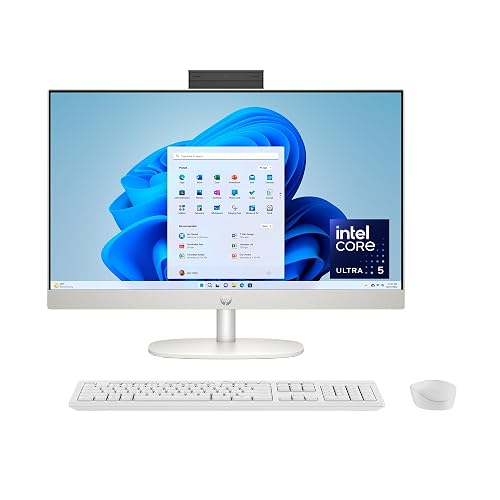
HP 23.8 inch All-in-One Desktop PC, FHD Touchscreen, Core Ultra 5, 8GB RAM, 512GB SSD
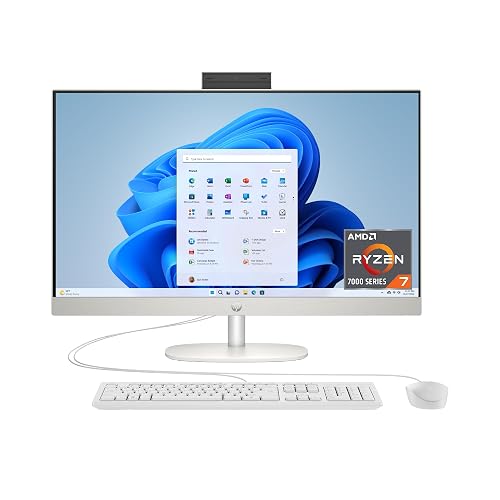
HP 27 inch All-in-One Desktop PC, FHD Display, Ryzen 7 7730U, 32GB RAM, 1TB SSD

Lenovo IdeaCentre All-in-One Desktop Computer, 8GB RAM 512GB SSD, 24 FHD Anti-Glare IPS Display

24 inch All-in-One Desktop PC with Windows 11

GMKtec Mini PC Ryzen 5 3500U 16GB RAM 512 SSD Office Home Business Computer

Dell 27 inch All-in-One Desktop, FHD, Core 5 120U, 16GB DDR5, 512GB SSD

Lenovo 24 FHD All-in-One Desktop Computer, Intel 4-Core Processor, 16GB RAM, 512GB PCIe SSD
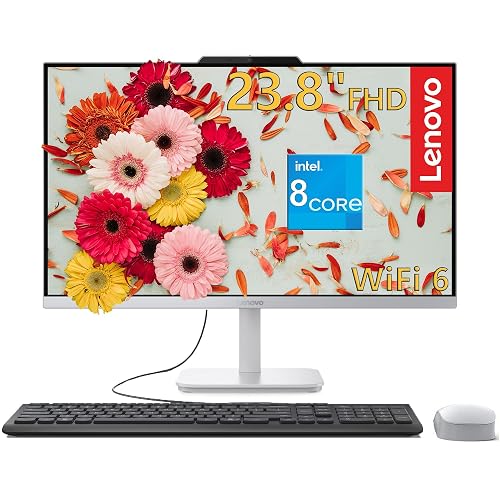
Lenovo IdeaCentre 27 inch All-in-One Desktop PC, Core i7-13620H, 32GB DDR5, 1TB PCIe SSD
More Details On Our Top Picks
The 23.8-inch frame keeps this HP close to a standard desk setup, while the touch panel makes quick taps and menu work feel more direct. In a family room or a compact office, that’s a nicer fit than a bulkier tower plus monitor setup.
The Intel Core Ultra 5 125U, 8GB of memory, and 512GB SSD point to a machine meant for everyday multitasking, web work, and cloud apps. The honest read is that 8GB is fine for lighter mixed use, but heavier tab stacking will feel tighter than on the larger-memory picks below.
Strong Points
- The 23.8-inch size keeps the footprint manageable on narrower desks.
- The touch display helps with quick scrolling, drawing, and menu navigation.
- The three-sided micro-edge design gives the screen a cleaner, less crowded look.
- The Core Ultra 5 class chip suits everyday office work without feeling stripped down.
- The 512GB solid-state drive gives you room for documents, apps, and media without constant tidying.
Things To Consider
- 8GB RAM is workable, yet power users will outgrow it faster than 16GB or 32GB setups.
- The smaller panel suits focused work, though it leaves less room for side-by-side windows.
- Touchscreens can pick up fingerprints, so regular wiping becomes part of ownership.
Feature Snapshot
Who It Suits Best
You suit this model best as a home-office user, student, or family member who wants a neat touchscreen desktop for routine tasks.
Where A Sibling Pick Shines
HP 27 inch All-in-One Desktop PC, FHD Display, Ryzen 7 7730U, 32GB RAM, 1TB SSD fits you better when your day includes lots of open tabs, heavier spreadsheets, or a larger screen.
This HP moves up in size and headroom, so the 27-inch FHD panel feels more relaxed for spreadsheets, side-by-side windows, and long work sessions. That larger canvas matters in a kitchen desk or shared office where you want less zooming and fewer window swaps.
The Ryzen 7 7730U, 32GB RAM, and 1TB SSD make it the strongest everyday multitasker in this group outside the Lenovo IdeaCentre 27. You also get a bit more room to keep apps open without feeling boxed in, though the larger body asks for more desk depth than the 23.8-inch HP.
What We Like
- The 27-inch display gives you noticeably more workspace.
- 32GB of memory suits heavier multitasking and busy browser sessions.
- The 1TB SSD leaves plenty of room for files, apps, and media.
- The Ryzen 7 processor has the kind of headroom that suits long workdays.
- The all-in-one format keeps the desk neater than a separate tower setup.
Worth Noting
- The larger footprint asks for a wider desk, so placement matters.
- FHD on a 27-inch panel is practical, though some people prefer sharper pixel density at that size.
- The bigger chassis can be less easy to reposition than a smaller all-in-one.
Core Details
Who Will Love This
You suit this pick best as a home-based multitasker, spreadsheet-heavy worker, or family organizer who wants more space and more memory.
Look Elsewhere When
Lenovo IdeaCentre 27 inch All-in-One Desktop PC, Core i7-13620H, 32GB DDR5, 1TB PCIe SSD suits you better when processor headroom matters more than a touch-friendly or simpler everyday setup.
Compared with the HP models above, this Lenovo leans into straightforward daily use rather than bigger spec sheets. The 24-inch FHD IPS display, with IPS meaning in-plane switching for wider viewing angles, helps when two people are looking at the screen from different seats.
The anti-glare finish is the useful part here, since it softens reflections in bright rooms or under overhead lighting. Add Wi-Fi 6 and Bluetooth 5.2, and you get a sensible desk machine for browsing, schoolwork, and household admin without extra clutter.
Highlights
- The anti-glare IPS panel is easier on the eyes in bright spaces.
- 24 inches hits a comfortable middle ground between compact and roomy.
- Wi-Fi 6 helps keep connections steadier on modern home networks.
- Bluetooth 5.2 makes it simpler to pair wireless accessories.
- The 512GB SSD gives you enough local storage for daily use.
Softer Spots
- 8GB RAM covers routine work, though multitasking fans may want more.
- The Intel 4-core processor suits daily use more than heavier creative work.
- The setup stays practical, but it does not bring the larger-screen comfort of the 27-inch HP or Dell models.
Feature Rundown
Made For
You fit this Lenovo best as a household user who wants a calm, low-fuss desktop for browsing, homework, and light office work.
Swap It Out When
HP 27 inch All-in-One Desktop PC, FHD Display, Ryzen 7 7730U, 32GB RAM, 1TB SSD suits you better when more screen room and more memory matter every day.
Core Innovations keeps this one plain, and that plainness can help in a guest room, student space, or light-duty home office. The 24-inch size sits in a friendly middle zone, giving you enough display area without swallowing the desk.
Compared with the Lenovo and HP units above, the appeal here is simplicity rather than extra hardware detail. That makes it a sensible fit for email, documents, video calls, and browsing, although the missing spec depth means you should treat it as a basic-use desktop rather than a speed-focused one.
Upsides
- The 24-inch body keeps the desk layout straightforward.
- The all-in-one design cuts down on cable clutter.
- Windows 11 gives you a familiar desktop environment.
- The no-frills setup suits casual computing jobs well.
Small Caveats
- Spec detail is sparse, so you have less clarity before setup.
- The simpler configuration points to lighter workloads rather than heavier multitasking.
- Basic finishes usually reward gentle cleaning and careful placement near moisture or dust.
Details At A Glance
Best Suited To
You fit this pick best as a casual home user who wants a straightforward desktop for light daily routines.
A Better Fit Elsewhere
Lenovo IdeaCentre All-in-One Desktop Computer, 8GB RAM 512GB SSD, 24 FHD Anti-Glare IPS Display suits you better when you want clearer display specs and a more polished everyday screen.
This GMKtec breaks from the all-in-one screens above by shrinking the footprint down to a mini PC, which suits a desk with separate monitor choices or a TV-based office corner. The 2.5GbE LAN, meaning a faster wired network port than standard gigabit, adds appeal for file sharing and stable home networking.
Triple 4K display support, HDMI 2.1, USB-C, DisplayPort, Wi-Fi, and Bluetooth give you broad hookup flexibility, which is handy in a workspace with multiple screens or a living-room media setup. The trade-off is simple, you need your own monitor, keyboard, and mouse, so this is less plug-and-play than the all-in-one units above.
Best Bits
- The tiny chassis leaves more room on the desk.
- 16GB RAM gives it more breathing room than the 8GB models.
- Triple 4K output support suits multi-monitor setups.
- The wired network port adds a useful stability option.
- HDMI, USB-C, and DisplayPort make setup planning easier.
Areas To Watch
- You need separate peripherals and a display, which raises setup effort.
- The Ryzen 5 3500U is serviceable, though it sits below the more current-feeling Core Ultra and Core i7 options.
- Cable management depends on the monitor stack you build around it.
Feature Card
Whose Shelf It Belongs On
You fit this model best as a practical desk builder, home office user, or media setup fan who already knows which monitor and peripherals you want.
Where Another Pick Suits Better
Lenovo IdeaCentre All-in-One Desktop Computer, 8GB RAM 512GB SSD, 24 FHD Anti-Glare IPS Display suits you better when you want an all-in-one screen with less setup work.
The Dell lands in a useful middle zone, with a 27-inch FHD display that feels comfortable for shared use and a Core 5 120U that aims at steady everyday performance. In a family workstation or a small business corner, that mix tends to feel more versatile than the bare-bones 24-inch option from Core Innovations.
DDR5 memory, which is a newer generation of system memory, gives this model a current feel alongside Wi-Fi 6E, Bluetooth, keyboard, and mouse in the box. The caveat is that FHD on 27 inches still favors practical work more than fine-detail display purists, though most desk jobs will be perfectly happy here.
Plus Points
- The 27-inch screen gives you room for multitasking.
- 16GB DDR5 supports smoother daily workflows than 8GB setups.
- Wi-Fi 6E and Bluetooth make it easy to join modern wireless gear.
- Keyboard and mouse included means a cleaner first setup.
- The desktop feels suited to work, school, and shared household use.
Points To Note
- FHD at 27 inches is practical, though not especially dense.
- The larger body needs more desk room than a 24-inch all-in-one.
- Owners often keep microfiber cloths nearby to manage fingerprints on big screens.
Core Details
Built With In Mind
You fit this Dell best as a home office user, family helper, or office-at-home shopper who wants a roomy desktop with a tidy setup.
Another Choice May Suit
HP 27 inch All-in-One Desktop PC, FHD Display, Ryzen 7 7730U, 32GB RAM, 1TB SSD suits you better when memory and storage headroom matter more than included accessories.
This Lenovo reads like a steadier work machine than the simpler Core Innovations option, especially with 16GB RAM and a 512GB PCIe SSD onboard. PCIe SSD means the storage connects over a fast interface, which helps the machine feel responsive in routine work and boot-up.
HDMI, Wi-Fi 6, RJ45 wired networking, Bluetooth, and the included keyboard and mouse make it easy to slot into an office nook or small business desk. The built-in 24-inch format keeps it friendly for daily admin work, though the 4-core processor limits how ambitious you should get with heavier workloads.
Reasons To Buy
- 16GB RAM gives it more breathing room than 8GB desktops.
- The PCIe SSD supports quick response for everyday tasks.
- RJ45 gives you a wired network option, which helps in less stable wireless spots.
- The 24-inch size suits desks that do not have room for a 27-inch unit.
- Included keyboard and mouse reduce the number of extras you need to sort out.
Trade Offs
- The 4-core processor is fine for admin work, though not a heavy creative engine.
- The display size stays practical, not expansive.
- Business setups with lots of peripherals may still want extra cable planning.
Technical Sheet
Right Fit For
You suit this Lenovo best as a business user, remote admin worker, or home office shopper who values straightforward setup and steady everyday speed.
Reach For A Different Pick When
Lenovo IdeaCentre 27 inch All-in-One Desktop PC, Core i7-13620H, 32GB DDR5, 1TB PCIe SSD suits you better when you want more horsepower and more storage in the same family.
This Lenovo sits at the high end of the list with a Core i7-13620H, 32GB DDR5 RAM, and a 1TB PCIe SSD, so the emphasis lands on speed and room to grow. The 27-inch screen, 5MP webcam, Harman Audio, and Windows 11 Pro make it feel ready for a serious desk setup rather than a casual corner machine.
For video calls, heavier multitasking, and long workdays with many apps open, this pick carries the most headroom in the roundup. It also feels like the kind of all-in-one that saves you from adding a separate webcam and speakers, though the premium spec mix is most useful when you’ll actually push it.
Positives
- The Core i7-13620H brings the strongest processor class in this group.
- 32GB DDR5 gives you generous multitasking headroom.
- 1TB PCIe SSD leaves plenty of local storage space.
- The 5MP webcam helps with sharper video meetings.
- Harman Audio gives the setup a more complete desk feel.
Minor Gripes
- The stronger hardware only pays off fully for heavier daily loads.
- 27-inch all-in-ones need a roomy desk and sensible cable placement.
- Owners who like a simpler setup may not need this much spec headroom.
Quick Facts
Who Should Grab It
You suit this Lenovo best as a power user, frequent video caller, or home-office worker who wants a polished all-in-one with more headroom than the rest.
Skip It When
HP 23.8 inch All-in-One Desktop PC, FHD Touchscreen, Core Ultra 5, 8GB RAM, 512GB SSD suits you better when your desk is smaller and your workload stays lighter.
How To Choose The Right Alls In One Touch Pc
Screen Size Sets The Tone
A 24-inch all-in-one fits a tighter desk and keeps your setup feeling compact. A 27-inch model gives you more room for documents, browser tabs, and side-by-side windows, which matters during long work stretches.
Touch support changes the feel too, especially for casual browsing, note-taking, or quick menu taps. The trade-off is simple, touchscreens collect fingerprints and usually need a little more wiping.
Memory And Storage Decide How Long It Feels Fresh
8GB RAM works for lighter home use, school tasks, and routine office jobs. Once you keep many tabs open or run several apps at once, 16GB or 32GB feels calmer and less cramped.
Storage matters in a different way. A 512GB SSD suits most everyday setups, while 1TB gives you more elbow room for photos, project files, and local media libraries.
Processor Class Should Match The Workload
Core Ultra, Core i7, and Ryzen 7 class chips point to stronger headroom than basic four-core systems. That extra speed shows up most clearly in busy workdays, large spreadsheets, and video calls with other apps open.
For simple browsing and documents, a modest processor can still do the job well. The trick is not paying for power you won’t use, because a lighter machine often makes more sense for family duty or guest-room use.
Connections And Accessories Shape Daily Convenience
Wi-Fi 6, Wi-Fi 6E, Bluetooth, HDMI, and RJ45 all change how easily the desktop fits your space. Wired networking helps in stable office spots, while Bluetooth saves desk clutter when you use wireless accessories.
Included keyboard and mouse bundles make first setup easier, though they are not always essential. In a small apartment or shared room, the cleaner cable picture can matter almost as much as the screen itself.
Things Worth Knowing First
Wrong Turns To Avoid
Do not chase screen size alone. A 27-inch display sounds appealing, yet it can feel awkward on a shallow desk or in a tight corner.
Another common miss is ignoring memory. An 8GB machine can be fine for light use, but heavier multitasking needs more breathing room.
The Upgrade Payoff
Higher-tier models usually cost more because you get better processors, more RAM, larger SSDs, and often a more complete accessory or camera package. Those parts matter most in busy workspaces, shared family stations, and remote work setups that stay open all day.
Paying up makes sense when you want fewer slowdowns and less urge to replace the machine soon. For routine browsing or email, the extra spend can feel unnecessary, so the right level depends on how hard you push the desktop.
Frequently Asked Questions
What Size All-In-One Works Best For A Small Desk?
A 23.8-inch or 24-inch model usually fits best in tight spaces. You still get a usable screen without crowding the work surface.
Does 8GB RAM Still Make Sense In 2026?
Yes, for light everyday use, school tasks, and simple office work. For heavier multitasking, 16GB or more feels more comfortable.
Is A Touchscreen Worth It On An All-In-One?
It helps with quick tapping, scrolling, and casual navigation. The trade-off is more fingerprint cleanup on the glass.
What Matters More, The Processor Or The Storage?
The processor affects speed during active work, while storage affects how much you can keep on the machine. For busy multitaskers, processor and memory usually matter first.
Do I Need A 27-Inch Model For Home Office Work?
Not always, but it helps when you keep several windows open at once. A 24-inch model is often enough for simpler desk jobs.
Closing Thoughts
Your best all-in-one comes down to how much space you have and how hard you plan to push the machine. For lighter daily use, the 24-inch Lenovo and HP options keep things simple and tidy. For heavier multitasking, the 27-inch HP and Lenovo models give you more room to work without spreading your desk into chaos. Pick the spec level that matches your routine now, and the desktop will feel useful for longer.



