
Cheap all-in-one desktops make sense when you want a tidy desk and a simple setup without piecing together a tower, monitor, and extras. You get a single screen-based workstation that suits homework, email, streaming, web work, and light office chores. The trick is separating true value from under-specced machines that only look appealing on paper.
That’s where this roundup helps. You’ll see which models feel more comfortable for daily use, which ones give you more breathing room for multitasking, and which renewed options make sense for a tighter budget. The trade-offs matter here, especially around screen size, memory, storage, and older processors.
Quick Look At Our Top Picks

Lenovo IdeaCentre All-in-One Desktop Computer 8GB RAM 512GB SSD

Lenovo IdeaCentre 24″ FHD All-in-One Desktop 16GB RAM 512GB SSD
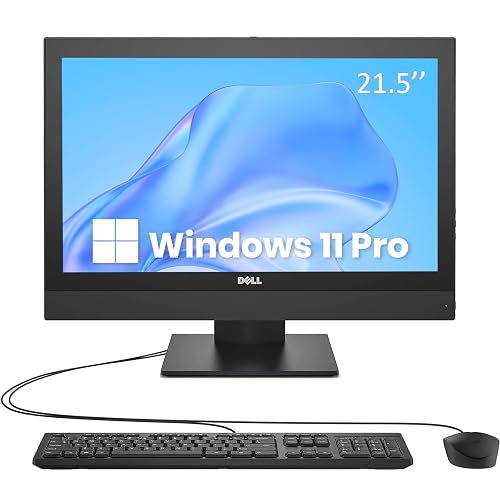
Dell OptiPlex 5250 All in One Desktop PC 21.5-inch AIO Computer

Dell OptiPlex 5250 21.5-Inch FHD All-in-One Desktop PC
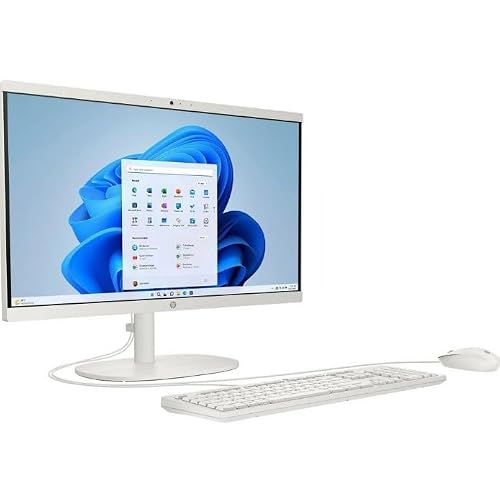
HP 22-DG00 21.45″ FHD All-in-One Desktop White
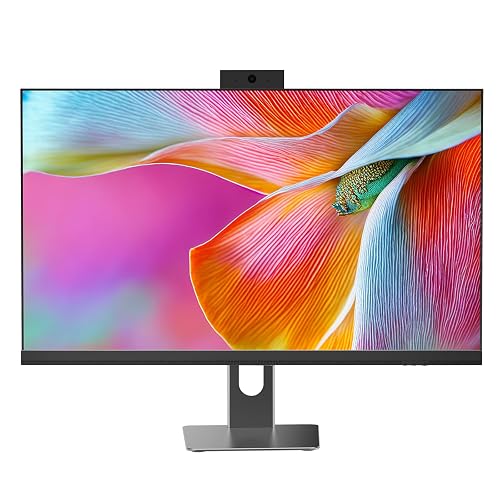
All in One Desktop Computer 24″ Display i5 CPU
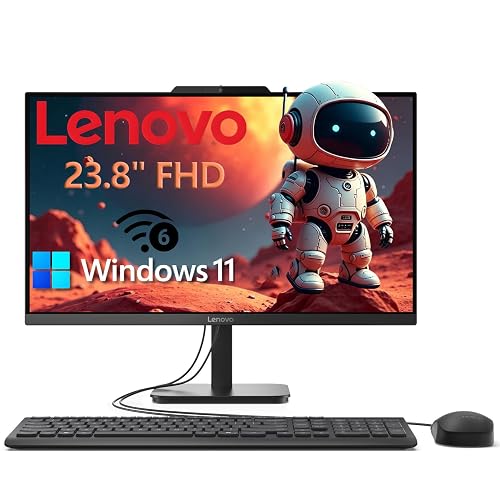
Lenovo 23.8″ Intel 4-Core 8GB 256GB SSD All-in-One Desktop Computer
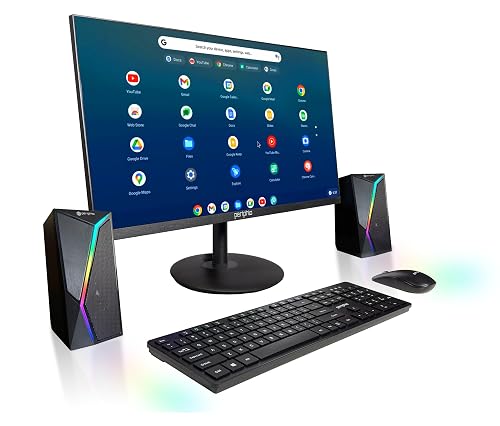
BlairTech Google ChromeOS Flex All-in-One Desktop PC 24″ Monitor
More Details On Our Top Picks
Lenovo keeps this one straightforward, and that suits desk setups where you want less clutter and fewer decisions. The 24-inch FHD IPS panel gives you a comfortable workspace for spreadsheets, streaming, and side-by-side tabs, while the 512GB SSD should feel roomy for everyday files and apps.
The 8GB memory is the part to watch, since it’s fine for normal use but less forgiving with heavier multitasking. For a family desk, student room, or spare office corner, that balance feels sensible rather than flashy.
Strong Points
- 24-inch full HD IPS display suits long sessions, and anti-glare glass helps in bright rooms.
- 512GB solid-state storage gives you more breathing room for documents, photos, and installed apps.
- Wi-Fi 6 and Bluetooth 5.2 cover modern wireless gear with less cable clutter.
- All-in-one design keeps the desk cleaner than a separate tower and monitor setup.
Things To Consider
- 8GB RAM can feel tight once you keep many browser tabs open at once.
- The Intel 4-core processor suits routine work better than heavy creative jobs.
- Cleaning around an all-in-one stand still takes a little care, especially in a busy family space.
Feature Snapshot
Who It Suits Best
Home users who want a tidy everyday desktop for browsing, schoolwork, and media will get the most from this Lenovo.
Where A Sibling Pick Shines
Lenovo IdeaCentre 24″ FHD All-in-One Desktop 16GB RAM 512GB SSD suits you better when you keep many apps open and want extra headroom.
This Lenovo follows the same tidy desktop idea as the first model, but the 16GB of RAM changes the feel right away. More memory matters most when your day looks like browser tabs, video calls, and office apps all living together on one screen.
The 24-inch FHD display and 512GB SSD make it a calmer fit for shared spaces too, since you get a roomy workspace without adding a tower under the desk. In most home offices, that extra headroom is the reason to step up.
What We Like
- 16GB RAM gives you more comfort with multitasking than the 8GB Lenovo above.
- 512GB SSD keeps boot times quick and leaves useful room for everyday files.
- Intel Graphics can support routine visual work and smooth general desktop use.
- Wi-Fi 6 and Bluetooth 5.2 help the setup feel current and less fussy.
- The 24-inch screen suits split windows, school work, and home administration.
Worth Noting
- The Intel 4-core processor is still aimed at everyday tasks, not demanding creative work.
- Glossy space savings come with the trade-off of fewer upgrade paths than a tower PC.
Details At A Glance
Perfect Match For
You’ll like this Lenovo most if your desk time includes multitasking and you want a cleaner all-in-one layout without moving into a larger workstation.
Look Elsewhere When
Lenovo IdeaCentre All-in-One Desktop Computer 8GB RAM 512GB SSD makes more sense for lighter use and a smaller upfront commitment.
The OptiPlex 5250 has the feel of a straightforward office holdover, which is useful for basic desk work, school paperwork, or a reception spot. The 21.5-inch screen keeps the footprint modest, and the included keyboard and mouse help you get set up without hunting for extras.
The no-camera design is worth noting for privacy-minded setups or spaces where video calls are handled elsewhere. Compared with the Lenovo options above, this Dell is more about covering the essentials than giving you extra screen room or memory headroom.
Positives
- 21.5-inch size fits compact desks and tighter office corners.
- 256GB SSD should feel responsive for everyday documents and browser-based tasks.
- Keyboard and mouse are included, which trims the number of extras you need to source.
- No built-in camera suits privacy-focused workspaces.
Points To Note
- Pentium-level performance suits routine work better than heavier multitasking.
- 21.5 inches feels smaller than the 24-inch Lenovo displays for split-screen work.
- Renewed units can vary in cosmetic wear, so a quick inspection habit helps with long-term satisfaction.
Core Details
Made For
You’ll get the most from this Dell in a basic office, school desk, or front-desk setup where simple tasks matter more than raw speed.
Another Choice May Suit
Lenovo IdeaCentre 24″ FHD All-in-One Desktop 16GB RAM 512GB SSD suits you better when the same kind of work needs more memory and a larger screen.
This Dell keeps the same compact 21.5-inch formula as the previous OptiPlex, but the FHD panel gives the image a crisper feel for text-heavy work. HDMI support adds a useful bit of flexibility, especially in rooms where you may want to connect a second display or change how the desk is arranged.
The 3.5GHz Pentium listing helps you judge it as a practical office machine rather than a speed machine. For basic workspaces, that honesty is useful, and the included keyboard and mouse keep setup simple.
Highlights
- FHD screen is easier on text than a lower-resolution display.
- HDMI gives you a straightforward way to connect external displays.
- Windows 11 Pro fits office-style environments better than home-only software on some desks.
- Included keyboard and mouse shorten the setup process.
Small Caveats
- 21.5-inch sizing can feel tight for side-by-side documents.
- Pentium G4560 performance works best for daily basics, not demanding creative tasks.
- Renewed gear deserves a little attention on port placement and accessory condition after unboxing.
Feature Rundown
Built With In Mind
This Dell makes sense for office corners, student desks, and shared rooms where the work is routine and the space is limited.
Swap It Out When
BlairTech Google ChromeOS Flex All-in-One Desktop PC with 24″ Monitor suits you better when you want a wider screen and a lighter browser-first setup.
HP trims the footprint a little further with a 21.45-inch display and a white finish that can look cleaner in a bright room. The Core N200 is aimed at lighter work, so this machine fits email, browser use, and school assignments more naturally than heavy multitasking.
The 128GB SSD keeps the setup lean, which is fine for cloud-based work but less generous for people who like to store everything locally. Compared with the Dell OptiPlex models above, this HP feels more like a simple household terminal than a broad office workhorse.
Upsides
- Compact 21.45-inch screen works well on smaller desks.
- Core N200 suits low-drama everyday use and tends to keep things straightforward.
- Windows 11 Home fits general household use.
- White finish blends into lighter rooms and shared spaces.
Areas To Watch
- 128GB SSD fills up quickly once you store many photos or offline files.
- The lighter processor class is not the match for demanding multitasking.
- White surfaces can show dust sooner, so routine wiping helps keep it looking neat.
At A Glance
Right Fit For
You’ll appreciate this HP most in a compact bedroom desk, study nook, or casual family computer spot.
Reach For A Different Pick When
Lenovo IdeaCentre All-in-One Desktop Computer 8GB RAM 512GB SSD gives you much more storage room for the same sort of everyday use.
Cybrimax takes a more feature-forward approach than the Lenovo and Dell entries, and that shows in the privacy webcam and the current wireless mix. A 24-inch panel, 16GB RAM, and a 256GB SSD give it a balanced feel for home office work, especially when video calls and browser tabs tend to pile up.
The i5 processor climbing up to 3.3GHz gives you a bit more confidence than the Pentium-based renewed models, though it still stays in the everyday productivity lane. For most home offices, that extra polish matters more than sheer muscle.
Bright Spots
- Privacy-focused webcam adds a useful layer for shared rooms and work desks.
- 16GB RAM helps the machine stay calmer under routine multitasking.
- 24-inch display gives you a larger workspace than the 21.5-inch budget models.
- Wi-Fi 6 and Bluetooth 5.3 keep the wireless side current.
- i5 class processor should feel more comfortable for daily office use than entry Pentium systems.
Room For Improvement
- 256GB SSD is useful, though less spacious than the 512GB Lenovo picks.
- The black finish can show fingerprints in a bright workspace.
Technical Sheet
Whose Shelf It Belongs On
This Cybrimax fits home-office workers who want a larger screen, stronger memory, and a couple of thoughtful extras in one clean setup.
Skip It When
HP 22-DG00 21.45″ FHD All-in-One Desktop White suits you better when the desk is smaller and the workload stays light.
This Lenovo sits in a nice middle zone between the smaller 21.5-inch renewed desktops and the more feature-heavy Cybrimax. The 23.8-inch FHD screen gives you a little more room without feeling oversized, which suits kitchen counters, family desks, and smaller home offices.
The 8GB RAM and 256GB SSD combination keeps the price-minded story intact, while Wi-Fi 6 and Windows 11 round out a modern everyday setup. You may find it especially comfortable when the goal is a tidy machine for common household work, not a workstation.
Best Bits
- 23.8-inch display lands in a useful middle size for everyday desktop use.
- FHD resolution keeps text clearer than smaller, softer panels.
- Wi-Fi 6 supports current home network gear.
- 8GB RAM and 256GB SSD create a sensible starter balance for routine tasks.
- The all-in-one layout cuts down on cable clutter.
Honest Caveats
- 8GB RAM still asks for some restraint with multitasking.
- 256GB storage can feel narrow once you save many large files locally.
Quick Facts
The Right Fit
You’ll like this Lenovo most if you want a simple family desktop that feels a little roomier than the smallest renewed options.
Where A Sibling Pick Shines
Lenovo IdeaCentre 24″ FHD All-in-One Desktop 16GB RAM 512GB SSD is the better step-up for multitaskers who want more memory and storage.
BlairTech takes a different path from the Windows machines above by pairing ChromeOS Flex with a 24-inch monitor and bundled wireless accessories. That setup feels especially natural for browsing, school portals, email, and cloud-first work, where you want things to stay simple and quick to get moving.
The RGB speakers are the most distinctive flourish here, though the practical story is the Intel Core i5, 8GB RAM, and 128GB SSD trio. You may prefer this pick for a lighter, keyboard-and-mouse-friendly desk that doesn’t need much maintenance or software fuss.
Reasons To Buy
- ChromeOS Flex keeps the interface straightforward for basic tasks.
- 24-inch monitor gives you a generous screen area for web use.
- Wireless keyboard and mouse reduce cable clutter on the desk.
- i5 processor gives it more day-to-day confidence than very basic entry models.
- RGB speakers add a small visual touch that some setups will enjoy.
Trade Offs
- 128GB SSD is modest, so local storage habits need to stay restrained.
- ChromeOS Flex fits cloud-based workflows better than software-heavy desktops.
- The colorful speaker style may feel a little playful for formal office spaces.
Spec Overview
Who Should Grab It
This BlairTech suits a household or small workspace that leans on browser-based work and wants the system to stay simple.
Another Choice May Suit
Lenovo IdeaCentre 24″ FHD All-in-One Desktop 16GB RAM 512GB SSD is the better fit when you want Windows and more room for local files.
How To Choose The Right Cheap Alls In One Computer
Screen Size, Memory, And Desk Space
The display size changes the way an all-in-one feels every day. A 21.5-inch panel fits tighter desks and secondary rooms, while 23.8-inch or 24-inch screens give you more space for split windows, schoolwork, and side-by-side tabs.
Memory matters just as much. 8GB works for browsing, streaming, and basic office tasks, but 16GB gives you more comfort when multiple apps stay open.
Storage And Processor Balance
SSD storage, or solid-state storage, keeps startup and app loading snappy compared with older mechanical drives. In this category, 256GB is fine for lighter local storage, while 512GB gives you more breathing room for photos, downloads, and documents.
Processor names also tell a story. Pentium and Core N200 machines fit simpler use, while i5-based picks suit heavier multitasking and busier homes or offices.
Ports, Wireless, And Setup Style
Wi-Fi 6 and newer Bluetooth versions help the system feel more current with routers, mice, headsets, and keyboards. HDMI also matters, because it lets you attach another display or adapt the desk later without replacing the whole machine.
Renewed machines can stretch your budget, but they work best when you’re comfortable with a little variation in cosmetic condition. A fresh all-in-one usually suits someone who wants fewer unknowns and a cleaner first setup.
Things Worth Knowing First
Common Shopping Slip Ups
Many people focus on screen size and miss memory or storage. That can leave you with a nice-looking desktop that feels cramped after a few browser tabs and app windows.
Another common misstep is treating a renewed model like a new one in every respect. Renewed gear can be a smart value move, but the condition story is rarely identical across every unit.
What The Higher Tier Buys
More money usually goes toward extra RAM, bigger SSDs, and a stronger processor. Those upgrades matter most when you work from one machine all day, juggle video calls, or keep lots of browser tabs open.
Higher-tier models also tend to add nicer screens, better wireless support, and more thoughtful extras like privacy-focused webcams or bundled accessories. That pays off most in a busy home office, where setup friction gets annoying fast.
Frequently Asked Questions
Are Cheap All-In-One Computers Good For Everyday Work?
Yes, they work well for browsing, email, documents, and streaming. A model with 16GB RAM feels more comfortable once your tasks start stacking up.
Is 8GB RAM Enough In This Category?
8GB is fine for simple use, especially with a lighter workload. You’ll notice its limits sooner on multitask-heavy days.
What Storage Size Makes Sense?
256GB is workable for lighter use and cloud storage habits. 512GB gives you much more room for local files and app installs.
Should You Consider A Renewed Model?
Yes, especially for office basics and budget-minded setups. The trade-off is less certainty about cosmetic condition and prior use history.
Which Screen Size Feels Best For Most Desks?
For many homes, 23.8-inch or 24-inch screens strike the nicest balance. Smaller rooms still benefit from 21.5-inch models when desk space is tight.
Closing Thoughts
The smartest cheap all-in-one is the one that matches your desk space and workload instead of chasing the longest spec list. The Lenovo 24-inch models stand out for everyday comfort, while the renewed Dell and HP options keep the budget story leaner. A 16GB machine makes sense once your day gets busier, but a simpler 8GB setup still covers plenty of ordinary work. Choose the screen size and storage that fit your habits, and the whole setup feels easier to live with.



