
A creator’s setup has to handle two demanding jobs: editing media on a capable computer and capturing sharp footage with a dependable camera. I keep coming back to the Lenovo LOQ for heavier editing, the iMac for a tidy desk-based workflow, and the YOLOLIV cameras for live production. The smaller Lenovo laptop and YoloCam S3 suit lighter mobile work, while the two YoloCam S7 models serve creators who want more control over lenses and framing.
A Quick View Of The Lineup

Lenovo 15.6-inch N355 8GB Laptop

YOLOLIV YoloCam S7 4K60 Camera
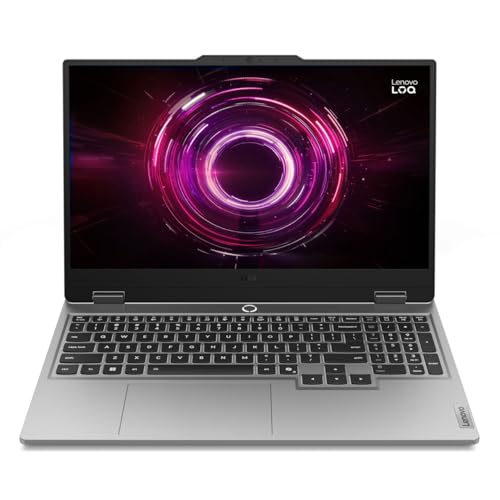
Lenovo LOQ 15.6-inch RTX 5060 16GB Laptop

Apple iMac 24-inch M4 16GB 512GB Silver

YOLOLIV YoloCam S3 4K Webcam

YOLOLIV YoloCam S7 18mm F1.4 Camera
A Deeper Look At The Lineup
The Lenovo 15.6-inch N355 8GB Laptop makes sense for creators who mostly write scripts, manage files in the cloud, and handle routine edits away from a fixed desk. Its 1.55 kg weight and 17.9 mm profile reduce the burden of carrying a full workstation between meetings, classes, or coffee shops.
Compared with the RTX-equipped LOQ, this model prioritizes mobility over graphics headroom. The 15.6-inch anti-glare FHD display handles office work comfortably, while the port selection leaves room for an external monitor, storage drive, and wired peripherals.
The Helpful Details
- Eight LPDDR5 cores support browsing, document work, and several light applications at once.
- USB-C power delivery, HDMI, and two USB-A ports simplify a mobile desk setup.
- The camera privacy shutter adds a simple physical barrier during sensitive calls.
Points to Note
- The 128GB UFS 2.2 flash storage leaves little room for large project files and footage.
- The 8GB soldered memory cannot be expanded, which matters for intensive editing.
Key Specs
Made For
Students, writers, and mobile professionals handling scripts, browser-based editing, and cloud-managed assets benefit most from this Lenovo configuration.
Consider Something Else When
The Lenovo LOQ 15.6-inch RTX 5060 16GB Laptop better serves editors who need dedicated graphics memory and greater local storage.
A single fixed webcam lens rarely serves every kind of live production. The YOLOLIV YoloCam S7 4K60 Camera changes that equation with interchangeable Micro Four Thirds lenses, giving creators a wider choice of framing and depth than a typical built-in webcam.
Its 4/3-inch sensor, 10.71 effective megapixels, and 4K60 capability suit product demonstrations, interviews, and vertical broadcasts. Time-of-flight autofocus, a technology that measures distance to help focus, adds another layer of control for creators who move around during a stream.
A Favorable Mix
- Interchangeable MFT lenses let creators tailor the field of view for different formats.
- The aluminum body helps dissipate heat during extended live sessions.
- Real-time color correction reduces the need for manual adjustments during a broadcast.
- One USB Type-C connection simplifies connection to a streaming computer.
Small Caveats
- The camera body does not include a lens, so the complete shooting cost extends beyond this purchase.
- Attaching the YoloLiv 18mm lens requires the latest firmware before use.
- Vertical streaming support still depends on the computer, platform, and software setup.
Right Fit For
Livestreamers and studio-style presenters benefit most from the ability to change lenses as camera positions and production needs evolve.
A Better Fit Elsewhere
The YOLOLIV YoloCam S7 18mm F1.4 Camera offers a more immediate setup for creators who want the included lens rather than selecting one separately.
The Lenovo LOQ 15.6-inch RTX 5060 16GB Laptop takes the creator role in a more demanding direction. Its Ryzen 7 250 processor and RTX 5060 graphics provide a substantially stronger foundation for video editing, 3D work, and other GPU-dependent tasks than the N355 configuration reviewed earlier.
The 144Hz IPS display, 300-nit brightness, and support for G-SYNC suit a creator who also games between sessions. For a dedicated editing desk, the larger 512GB drive and expandable 16GB memory offer more practical breathing room than the smaller Lenovo model.
Real-World Strengths
- Eight GB of dedicated RTX 5060 graphics memory supports demanding visual workloads.
- Sixteen GB of DDR5 memory gives editing applications more room to operate.
- HDMI 2.1, USB-C, and multiple USB ports support a flexible desk.
- The 144Hz panel keeps motion smooth during previews and gaming.
- A 512GB drive reduces the need to move every project file to external storage.
Practical Considerations
- The included 245W charger makes this setup more demanding to carry than a compact productivity laptop.
Feature Snapshot
Who Should Grab It
Video editors, motion designers, and 3D creators who need dedicated graphics performance benefit most from this Lenovo LOQ.
Another Choice May Suit
The Apple iMac 24-inch M4 16GB 512GB Silver suits creators who prefer a stationary, streamlined workstation over a portable gaming system.
A studio desk often has room for one display, one keyboard, and a small pile of cables, not a tower and a separate monitor. The Apple iMac 24-inch M4 16GB 512GB Silver puts the computer and Retina display in one thin enclosure, creating a clean workspace for editing, motion work, and client presentations.
The M4 chip combines a 10-core CPU with a 10-core GPU, while 16GB of unified memory gives the system and applications access to the same memory pool. That shared architecture can feel convenient in an Apple-based workflow, particularly for media applications built around the platform.
Well-Handled Touches
- The 24-inch Retina display removes the need for a separate desktop monitor.
- Unified memory simplifies the relationship between processor, graphics, and application memory.
- The 512GB SSD provides useful local capacity for active project files.
Trade Offs
- The all-in-one design stays tied to a desk, so it does not serve mobile editing.
- The silver finish is restrained, but creators wanting a more colorful workspace may prefer another finish.
Core Details
Built With In Mind
Apple-based creators, educators, and studio professionals who work primarily at a fixed desk benefit most from this integrated design.
Not Your Match When
The Lenovo LOQ 15.6-inch RTX 5060 16GB Laptop fits creators who need a portable machine with a dedicated gaming-oriented graphics system.
The YOLOLIV YoloCam S3 4K Webcam fits a creator who wants a straightforward camera for calls, demonstrations, and regular livestreams. Unlike the interchangeable S7 body, it avoids the extra decisions associated with choosing and mounting separate lenses.
Its 1/1.3-inch sensor records uncompressed 4K at 30 frames per second or 1080p at 60 frames per second. That combination gives mobile creators a higher-resolution option for detailed demonstrations while retaining a smoother frame rate for fast movement.
What Helps Most
- Phase-detection autofocus, which uses contrasting edges to correct focus, keeps close subjects clear.
- AI-assisted imaging improves facial detail and low-light visibility.
Details To Watch
- Its maximum 4K frame rate is 30 fps rather than the 60 fps offered by the S7 models.
- The fixed lens offers less framing flexibility than a Micro Four Thirds system.
- Image enhancement cannot replace deliberate lighting for a polished production.
Who Will Love This
PC and Mac streamers who value simple setup, 4K detail, and automatic focus benefit most from the YoloCam S3.
Swap It Out When
The YOLOLIV YoloCam S7 18mm F1.4 Camera better serves creators who want 4K60 capture and a dedicated lens for subject separation.
The YOLOLIV YoloCam S7 18mm F1.4 Camera lands somewhere between the simple YoloCam S3 and the modular S7 body. Its included 18mm lens removes the need to assemble a separate camera-and-lens combination, making the setup more approachable for a creator starting a livestream production.
The large 4/3-inch sensor records 4K60, while the F1.4 maximum aperture can create background separation that gives the subject more visual emphasis. Fast autofocus and AI image processing add support for demonstrations, talk shows, and desktop broadcasts where framing must remain stable.
Key Advantages
- The included 18mm MFT lens provides a wide, practical starting point for streaming.
- The F1.4 aperture helps separate the subject from the background.
- 4K60 capture offers smoother motion than a 4K30 webcam.
- USB-C connectivity keeps the computer connection direct and uncomplicated.
Factors To Consider
- The bundled lens is fixed, so creators who prefer a different focal length need the separate S7 body option.
At A Glance
The Right Fit
Livestreamers and presenters who want a complete 4K60 camera package with strong background separation benefit most from this bundle.
Where A Sibling Pick Shines
The YOLOLIV YoloCam S3 4K Webcam is easier for mobile creators to carry and requires no separate lens purchase.
Matching Hardware to the Work
Match The Workload First
I start with the software and the footage. Browser-based editing and social video preparation differ from 4K timelines, 3D rendering, and demanding effects. The Lenovo LOQ fits the latter category through its RTX 5060 graphics, while the smaller N355 Lenovo handles lighter mobile tasks.
Memory And Storage Set The Limits
Editing benefits from more working memory, and local footage quickly consumes limited storage. The LOQ combines 16GB of memory with a 512GB drive, while the iMac similarly pairs 16GB with 512GB. The compact Lenovo’s 8GB and 128GB combination leaves considerably less room for substantial local projects.
Check The Capture Side
A computer cannot improve the source image. The YoloCam S3 provides a simple 4K webcam, while the S7 models add larger sensors, 4K60 capture, and lens control. The included 18mm F1.4 bundle offers the most direct path from purchase to a differentiated setup.
Two Decisions That Prevent Regret
Mistakes Worth Dodging
Chasing display size or frame rate before checking the actual workload can lead to an oversized setup. I would also avoid treating expandable memory as equivalent to memory already installed, since the Lenovo LOQ’s 16GB configuration can grow to 32GB while the smaller Lenovo model cannot be upgraded.
Where The Extra Money Goes
A higher tier can shift resources toward dedicated graphics, larger storage, faster sensors, and better lenses. Those additions matter most for intensive editing and polished live production, while routine writing and standard video calls rarely require the same hardware budget.
Frequently Asked Questions
Which computer handles video editing most comfortably?
The Lenovo LOQ 15.6-inch RTX 5060 16GB Laptop offers the strongest dedicated graphics configuration in this group. The Apple iMac 24-inch M4 16GB 512GB Silver provides an alternative for creators centered on a fixed Apple-based desk.
Is 16GB of memory enough for content creation?
Sixteen GB handles substantial multitasking and many creator applications without crowding the working memory. Large 4K projects, 3D scenes, and numerous browser-based tools create a stronger case for 32GB.
Does a 4K webcam improve a creator’s video?
A 4K camera can capture finer detail than a 1080p device when lighting, focus, and framing support the shot. Resolution alone does not replace a stable connection or controlled lighting.
Which YOLOLIV camera is easier to start with?
The YOLOLIV YoloCam S3 4K Webcam has the simplest fixed-lens arrangement. The YOLOLIV YoloCam S7 18mm F1.4 Camera adds 4K60 capture and a wide-aperture lens for creators wanting more visual separation.
Should a creator choose a laptop or desktop?
A laptop supports mobile editing, gaming, and location-based work. A desktop such as the iMac reduces desk clutter and suits creators whose tools remain in one studio.
Final Verdict
I would choose the Lenovo LOQ for demanding video or 3D work, the iMac for a streamlined studio, and the compact Lenovo for mobile productivity. For live production, the YoloCam S3 keeps the setup simple, the 18mm F1.4 bundle offers the strongest ready-made visual package, and the lens-only S7 body gives experienced creators the most control. The right combination depends less on the category label than on the footage, workflow, and desk where the equipment will live.
