
A small business rarely needs a single computer that suits every task. Reception staff may need a compact touchscreen, office administrators may value storage and memory, and mobile teams may need a laptop that can handle several applications away from a fixed desk. I focus on those practical differences, including screen size, portability, Windows edition, memory, and storage, to help small teams choose equipment that fits their actual work.
A Snapshot Of The Selections
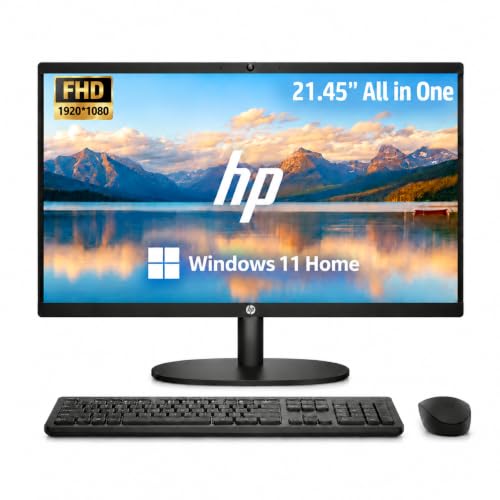
HP Touchscreen 8GB 512GB

HP Touchscreen 16GB 1TB

HP Touchscreen 16GB 512GB
HP Touchscreen 32GB 1TB

Lenovo ThinkCentre neo 50q Gen 5 i5-13420H Tiny PC

NIMO Copilot+ PC 17.3 Ryzen AI 9 HX 370 64GB 1TB
The Picks, Examined More Closely
A compact reception counter often has room for a display but little space for a separate tower. The HP Touchscreen 8GB 512GB combines the computer and 23.8-inch screen in one enclosure, which keeps the cable arrangement and desktop footprint relatively simple.
Its 1920-by-1080 panel provides useful touch input for shared menus and schedules. IPS means In-Plane Switching, a display approach that supports broad viewing angles, while the anti-glare finish suits brightly lit workspaces.
Everyday Advantages
- The integrated webcam, speakers, and display reduce the number of separate desk components.
- Touch navigation makes menus, forms, and shared information easier to operate directly.
- 8GB of random-access memory, or RAM, supports standard office applications and browser-based work.
- The included keyboard and mouse make the all-in-one format approachable for a first office setup.
Things To Consider
- The 8GB memory configuration leaves less headroom for intensive multitasking than the 16GB and 32GB variants.
- A fixed all-in-one design is less flexible for staff who alternate between desks, meeting rooms, and client locations.
Quick Facts
Made For
This configuration suits reception areas, home offices, and study spaces handling standard documents, messaging, and video calls.
Another Choice May Suit
The HP Touchscreen 16GB 1TB offers more memory and storage for teams that regularly keep several applications and large project folders open.
Document-heavy offices need more room for active files, and the HP Touchscreen 16GB 1TB adds that capacity without changing the familiar all-in-one layout. I find this version more balanced for daily administration than the 8GB model, especially once spreadsheets, browser tabs, and communication tools are open together.
The 23.8-inch Full HD touchscreen still provides a large, anti-glare workspace. Its integrated infrared, or IR, camera supports facial recognition and video calls, while AI Noise Removal is intended to reduce distracting background sound during meetings.
The Upside
- 16GB of RAM gives standard office work more multitasking headroom.
- A 1TB solid-state drive, or SSD, provides substantial local file capacity.
- The touchscreen works well for shared calendars, service menus, and interactive information.
- Windows 11 Pro supports familiar business, security, and networking tools.
- Wi-Fi 6 and Bluetooth 5.3 cover common wireless connections.
Minor Gripes
- The same fixed enclosure that saves desk space also makes the computer less adaptable across multiple work locations.
Right Fit For
Administrators, office managers, and hybrid teams needing a large screen, generous storage, and a straightforward setup will appreciate this configuration.
Reach For A Different Pick When
The HP Touchscreen 32GB 1TB is a better match for teams that keep unusually many applications open or maintain several demanding workflows.
The HP Touchscreen 16GB 512GB lands between the lighter 8GB configuration and the roomier 1TB model. I see the appeal in a familiar touchscreen all-in-one paired with 16GB of RAM, particularly for a small office that handles communication, billing, and customer records throughout the day.
Compared with the HP Touchscreen 16GB 1TB, the main difference is storage capacity rather than screen size or everyday feature set. That distinction matters most where a business retains a moderate number of local files but does not need a large media or project archive.
Useful Touches
- 16GB of RAM provides comfortable room for standard browser and office multitasking.
- The 23.8-inch anti-glare touchscreen reduces glare and supports hands-on navigation.
- Windows 11 Pro adds business-oriented management features in a familiar interface.
Points To Note
- The 512GB SSD requires regular file organization for businesses accumulating customer documents, media, or large software libraries.
- Touch input adds value only when the workflow genuinely benefits from interacting directly with the screen.
- The built-in display makes the system less convenient for mobile work than a laptop.
Feature Snapshot
Who It Suits Best
Small administrative teams with moderate storage needs and a shared reception or back-office computer will find this a practical fit.
Look Elsewhere When
The HP Touchscreen 16GB 1TB better serves a business that expects to retain substantial local media, records, or project data.
Multitasking becomes the deciding factor for workstations that keep accounting tools, customer databases, browser sessions, and communication apps active together. The HP Touchscreen 32GB 1TB provides the highest memory capacity among these all-in-one configurations, with 32GB of RAM and a 1TB SSD in the same compact enclosure.
The Intel Core i3-N300 processor still places this system within the everyday productivity category rather than a specialized workstation class. For general office demand, the extra memory is the notable upgrade, while the 23.8-inch touch display preserves the convenient one-piece setup.
Reasons It Performs
- 32GB of RAM gives heavily multitasked applications more working capacity.
- A 1TB SSD combines generous file capacity with compact local storage.
- The touchscreen provides direct access to schedules, forms, and shared business information.
- The integrated camera, speakers, display, keyboard, and mouse keep the setup compact.
Trade Offs
- More memory does not change the basic nature of the Intel Core i3-N300 processor for specialized or sustained heavy workloads.
- The all-in-one construction is less suitable for a team that needs separate monitors or frequent relocation.
Who Will Love This
Busy administrative offices that prioritize memory capacity, local storage, and a large touchscreen without a separate tower will find this model practical.
Where Another Pick Shines
The NIMO Copilot+ PC 17.3 Ryzen AI 9 HX 370 64GB 1TB suits mobile staff who need far more memory and a laptop form factor.
A cramped office desk does not require a large computer tower. The Lenovo ThinkCentre neo 50q Gen 5 i5-13420H Tiny PC measures about 7.05 by 7.20 by 1.42 inches, so I can picture it tucked behind a monitor, beneath a reception counter, or placed on a small media shelf.
Its 13th-generation Intel Core i5-13420H processor has eight cores and 12 threads, with boost speeds reaching 4.6GHz. Alongside 16GB of DDR5 memory, a 512GB PCIe SSD, Wi-Fi 6, and Windows 11 Pro, it offers a more conventional office workstation foundation than the HP touch models.
Notable Upsides
- The tiny enclosure leaves substantially more desk space than a standard tower.
- The eight-core processor supports business applications, conferencing, and multitasking.
- 16GB of DDR5 memory handles standard office workloads with useful headroom.
- A 512GB PCIe SSD provides fast local storage in a compact unit.
- Windows 11 Pro suits managed business environments and compatible peripherals.
Small Caveats
- A separate display and input devices provide the most practical setup, adding to the total desk footprint.
Technical Highlights
Built With In Mind
This mini desktop is well suited to a fixed office workstation that already uses a separate monitor and where desk space carries a premium.
A Better Fit Elsewhere
The HP Touchscreen 16GB 1TB is easier for a shared counter because it combines the display and computer in one unit.
Client meetings and remote office days make portability a practical requirement rather than a luxury. The NIMO Copilot+ PC 17.3 Ryzen AI 9 HX 370 64GB 1TB combines a large laptop display with 64GB of DDR5 memory and a 1TB SSD, giving mobile workers a generous technical base.
The Ryzen AI 9 HX 370 includes a neural processing unit, or NPU, rated at 50 TOPS, meaning trillion operations per second. Radeon 890M graphics, a 144Hz display, Wi-Fi 6E, and a 100W USB-C 4.0 connection further distinguish it from the fixed-screen HP models.
Practical Pluses
- 64GB of RAM gives demanding multitaskers substantial working capacity.
- The 1TB SSD provides room for extensive local project files and applications.
- The 17.3-inch display supports side-by-side business documents and communication windows.
- 100W USB-C charging offers a practical connection for compatible docks and everyday power.
Factors To Consider
- The 17.3-inch screen is less compact than the Lenovo mini desktop for transport or confined workspaces.
- The 144Hz refresh rate offers limited practical value for standard document work.
- The high-end internal specifications may be unnecessary for basic office tasks.
Quick Technical Notes
Made For
Mobile consultants, developers, and operations staff who regularly travel while running several complex applications will appreciate this configuration.
Consider Something Else When
The Lenovo ThinkCentre neo 50q Gen 5 i5-13420H Tiny PC is a better fit for a permanent desk where portability and a large laptop display are unnecessary.
What Actually Matters For A Small Business Computer
Start With The Workload
I would begin with the applications a staff member keeps open, rather than with processor labels or screen size. Browsing, email, spreadsheets, and video calls place different demands on a system than intensive development, design, or large local media libraries. Memory, storage, and graphics deserve attention in that order for most general office work.
Match The Form Factor To The Workday
A reception desk benefits from an all-in-one touchscreen because staff can operate a shared display without reaching for a separate tower. A fixed workstation behind an existing monitor may suit a tiny desktop better, while frequent travel points toward a laptop. I consider desk space, screen-sharing, and equipment relocation before settling on a format.
Check The Software And Connection Requirements
Windows 11 Pro covers a broad range of standard business software, but specialized applications may have their own operating-system or hardware needs. Peripheral compatibility also matters, especially for a tiny PC that relies on a separate monitor, keyboard, and mouse. A laptop with USB-C 4.0 and Wi-Fi 6E may serve a mobile team more easily than a fixed installation.
Practical Traps Before Purchase
Mistakes Worth Dodging
The most common mistake is treating memory, storage, and processing power as interchangeable. More RAM keeps more applications active, while more SSD capacity holds more files; neither automatically creates a faster processor. Another trap is buying a large touchscreen without confirming that touch input improves the task rather than simply adding a feature nobody uses.
What The Higher Tier Buys
Higher-tier configurations generally add memory, storage, processor capability, or display flexibility. Those upgrades matter for heavy multitasking, large local archives, and mobile work, but they can be unnecessary for basic office functions. I would spend on the constraint most likely to interrupt daily work, whether that is limited RAM, insufficient storage, or an unsuitable form factor.
Frequently Asked Questions
Is 16GB Of RAM Enough For A Small Business?
Yes, 16GB of RAM handles most standard office applications and several simultaneous workflows. A business running specialized software or keeping unusually many applications open may benefit from 32GB or 64GB.
Is A 512GB SSD Enough For Business Files?
A 512GB SSD can hold standard documents, applications, and active project files. Businesses retaining large media, historical records, or extensive software libraries may prefer 1TB for more local capacity.
Should A Small Business Choose An All-In-One Computer?
An all-in-one is convenient for shared desks and reception areas because the display and computer form one unit. A tiny desktop or laptop may suit fixed offices better when separate monitor flexibility or portability matters more.
Is A Mini Desktop Better Than A Laptop?
A mini desktop works well for a permanent workstation with separate peripherals and limited desk space. A laptop is more useful for staff who travel, move between locations, or work outside the office.
Do Small Businesses Need Windows 11 Pro?
Windows 11 Pro provides useful business management, security, and networking features for many organizations. Windows Home may be sufficient for very simple personal use, but centralized administration and business software can make Pro a more sensible fit.
Final Verdict
I would choose the HP Touchscreen 16GB 1TB for a conventional office seeking a balanced all-in-one system, the Lenovo ThinkCentre neo 50q for a compact fixed workstation, and the NIMO Copilot+ PC for mobile work with unusually high memory needs. Matching the hardware to the actual desk, software, and travel pattern matters far more than chasing a specification that may never be used.
