
A rough cut often looks manageable until the timeline fills with effects, high-resolution footage, and several applications competing for memory. I built this guide for students, working editors, and creators who need a machine that can handle demanding timelines without turning every export into a waiting game. The six options cover portable laptops, compact desktops, and roomy editing workstations, with clear distinctions for storage, graphics, memory, and everyday flexibility.
A Snapshot Of The Selections

HP 15.6-inch FHD Touch Laptop 32GB
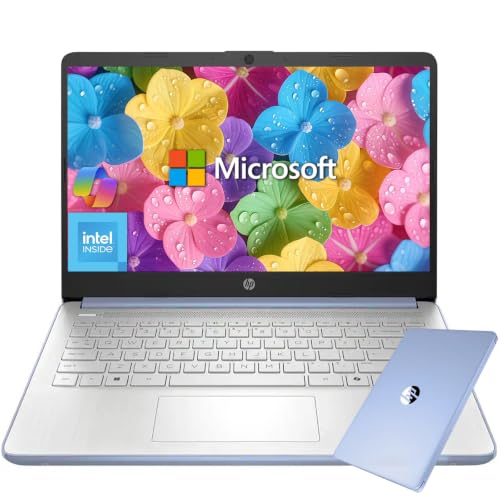
HP 14-inch N150 Laptop 4GB 384GB

Apple 2024 Mac mini M4 10-core CPU 10-core GPU 16GB Unified Memory 256GB SSD

Apple 2025 MacBook Air 15-inch M4 15.3-inch Liquid Retina 24GB 512GB Touch ID Midnight

HP OmniDesk Ryzen 5 Radeon 740M 64GB DDR5 3TB Storage Wireless Keyboard and Mouse

HP OmniDesk Ryzen 5 Radeon 740M 32GB DDR5 3TB Storage Wireless Keyboard and Mouse
More Details On Our Top Picks
I can picture this HP handling a college presentation in the morning and a modest editing session after class. The 15.6-inch full high-definition (FHD) touch panel uses in-plane switching (IPS), a display technology that provides broad viewing angles for timeline inspection and presentations.
Unlike the lightweight HP 14-inch model later in this list, this machine gives me 32GB of memory, a Ryzen 5 7530U processor, and a roomier screen. That combination feels more appropriate for browser tabs, editing software, and coursework sharing one system.
Noteworthy Benefits
- 32GB of RAM gives editing applications and background tasks more room to coexist.
- The 1TB SSD provides useful space for footage, project files, and software.
- Touch input makes timeline navigation, scrubbing, and on-screen controls more direct.
- The backlit keyboard and numeric keypad support typing and spreadsheet-heavy study.
Practical Considerations
- The Ryzen 5 7530U is suitable for moderate editing rather than every demanding workstation workload.
- Windows 11 Pro and the bundled assistive features may matter more to a student than a professional editor.
Key Product Details
Made For
This laptop fits students and beginners managing shorter clips alongside coursework, documents, and communication apps.
Consider Something Else When
Apple MacBook Air 15-inch suits mobile creators who place greater importance on battery life and a large built-in display.
At 3.24 pounds and 0.71 inches thick, this HP looks more at home in a lecture hall or shared workspace than at a permanent editing desk. Its Intel N150 processor and 4GB of memory support browsing, online classes, documents, calls, and streaming.
Compared with the HP 15.6-inch FHD Touch Laptop, this model saves space and weight but gives editing far less room to breathe. I would treat it as a school computer that can perform light clip preparation, not as a serious timeline machine.
Bright Spots
- The anti-glare HD screen remains practical in bright classrooms.
- USB-C, USB-A, HDMI, and an SD card reader cover common accessory needs.
- Wi-Fi 6 and Bluetooth 5.4 support modern wireless connections.
Some Limits To Know
- 4GB of memory is the main limitation for editing software and several open applications.
- The 1366 by 768 resolution provides less timeline space than the FHD and Retina displays elsewhere.
- Its 128GB UFS storage, a type of embedded flash memory, is supplemented by a removable 256GB SD card.
Right Fit For
This model fits students handling classes, research, and basic media tasks on a strict portability budget.
A Better Fit Elsewhere
HP 15.6-inch FHD Touch Laptop 32GB is the stronger choice for students who intend to edit more than brief classroom clips.
A Mac mini can reclaim a surprising amount of desk space, which makes the five-by-five-inch footprint appealing beside a larger display. The M4 configuration combines a 10-core CPU with a 10-core GPU, giving this small desktop a more focused creative profile than the N150 laptop.
Its 16GB of unified memory, meaning memory shared by the processor and graphics system, can support a dedicated Apple editing workflow in a compact space. Compared with the HP OmniDesk models, it takes up less room but offers only 256GB of SSD storage.
Benefits That Matter
- The 10-core CPU supports multitasking across editing and supporting applications.
- A 10-core GPU provides dedicated graphics resources within the M4 system.
- Unified memory allows the CPU and GPU to access a shared memory pool.
- Front and rear ports keep connections accessible in a tight workspace.
- The compact enclosure leaves room for a larger monitor.
A Few Limitations
- A display, keyboard, and mouse are separate considerations for this desktop setup.
At A Glance
Who Will Love This
This Mac mini fits Apple-focused creators who want a dedicated editing desk with minimal desk clutter.
Reach For A Different Pick When
HP OmniDesk 64GB Ryzen 5 Desktop suits editors who need more memory, larger storage, and multiple screens.
Editing away from a home desk changes the equation, and this MacBook Air keeps the required screen, keyboard, and computer together. The 15.3-inch Liquid Retina display gives me a generous editing area without moving into the bulkier desktop category.
The M4 chip and 24GB of unified memory make this a more substantial creative tool than the compact Mac mini, while the 512GB SSD offers more internal space. Its advertised battery life reaches up to 18 hours of video playback, which is useful during travel or a long project session away from an outlet.
What Earns Its Place
- The M4 chip supports demanding application switching and video editing workflows.
- The 15.3-inch Liquid Retina display provides a spacious built-in workspace.
- Touch ID supports quick authenticated access to the machine.
Worth Noting
- Editing on a laptop generally means accepting a smaller working area than a desktop with a separate monitor.
- The Midnight finish may not suit every workspace, particularly where fingerprints or light reflections are concerns.
Built With In Mind
This laptop fits traveling editors and students who need one device for classes, presentations, and moderate creative work.
Where A Sibling Pick Shines
Apple 2024 Mac mini M4 is the better desktop fit for an editing room built around a large external display.
A busy edit suite often accumulates reference footage, audio, project files, and several applications at once. This HP OmniDesk addresses that crowding with 64GB of fifth-generation double data rate (DDR5) memory and a three-terabyte storage combination divided between a 2TB SSD and a 1TB hard drive.
The Ryzen 5 8500G processor and Radeon 740M integrated graphics suit a Windows-based editing setup, while support for four monitors makes a multi-screen workspace possible. Compared with the HP 15.6-inch FHD Touch Laptop, the desktop trades portability for memory, storage, and display flexibility.
Notable Gains
- 64GB of memory gives demanding applications and background processes ample room.
- The 2TB SSD keeps active project files and media on fast flash storage.
- A separate 1TB hard drive provides space for footage, backups, and archives.
- Quad-monitor support suits timeline, preview, and reference windows.
- Wireless keyboard and mouse provide a convenient starting point for the desk.
Factors To Consider
- The desktop needs a display, and the listed configuration does not include one.
- The Radeon 740M uses integrated graphics, so a studio already equipped with a stronger discrete graphics card may prioritize that component differently.
Feature Snapshot
Best Suited To
This desktop fits working editors managing large media libraries in a fixed studio or home office.
Look Elsewhere When
HP OmniDesk 32GB Ryzen 5 Desktop suits creators who need the same storage layout with less memory capacity.
The 32GB version of the HP OmniDesk preserves the parts of the larger configuration that matter most to an active editor: fast solid-state storage, a separate archive drive, and a multi-monitor workspace. I see it as a practical middle ground for a creator who regularly edits but rarely runs several heavyweight applications at once.
The Ryzen 5 8500G processor, Radeon 740M graphics, Wi-Fi 6, and Windows 11 Home create a familiar desktop foundation. Compared with the 64GB OmniDesk, the main sacrifice is memory capacity, while storage remains equally generous.
The Case For It
- 32GB of DDR5 memory supports common editing applications and multitasking.
- The 2TB SSD supports active project files and quicker everyday access.
- Quad-monitor support creates a practical multi-window editing layout.
- Wireless keyboard and mouse simplify the initial desk setup.
Things That May Matter
- Large projects with many open applications may reach the limits of 32GB sooner than the 64GB model.
- A separate display is required for the full multi-monitor arrangement.
- The Radeon 740M is integrated, so a separate graphics card may matter for graphics-intensive editing.
Core Details
Whose Shelf It Belongs On
This desktop fits amateur editors, freelancers, and students building a capable home editing station.
Another Choice May Suit
Apple 2024 Mac mini M4 suits Apple-focused creators who prefer a compact Mac workflow over a Windows desktop.
What Matters Before Buying an Editing Computer
Memory for busy timelines
Memory is one of the first details I check because editing software, preview playback, browsers, and file utilities can all need memory at once. A 16GB configuration suits lighter projects, while 32GB provides more breathing room for longer timelines, and 64GB becomes relevant for demanding timelines, large projects, or several applications running together.
Processor and graphics performance
The processor coordinates general computing tasks, while the graphics system handles much of the visual workload. Integrated graphics can work for modest editing, but creators using demanding effects, high-resolution footage, or complex color work may benefit from a system with stronger dedicated graphics. I would also consider the editing application and its supported hardware before choosing either component.
Storage that matches the workflow
NVMe and other flash SSDs handle active files more responsively, while a hard drive can provide inexpensive room for footage and archives. The HP OmniDesk models separate 2TB SSDs from 1TB hard drives neatly. Portable editors should also balance local capacity against the inconvenience of moving media between devices.
Screen space and mobility
A large display makes timeline navigation and detailed work easier, but portability matters when editing happens on trains, in classrooms, or during client visits. A 15.3-inch laptop screen offers a practical compromise, while a compact desktop paired with a large monitor creates the roomiest editing workspace.
Practical Traps Before Checkout
Common Shopping Slip Ups
I would avoid choosing on processor naming alone, since memory, graphics, storage speed, and display quality all affect editing. Reviewing the full system configuration matters, particularly for desktop listings where the monitor may not be included.
What The Higher Tier Buys
Additional memory lets more applications and project data remain active at once. More storage can reduce the need to move footage between drives, while a larger display creates more room for timeline and preview windows. The upgrade earns its place when the workload regularly pushes a smaller configuration.
Frequently Asked Questions
How much RAM is enough for video editing?
16GB handles lighter projects, while 32GB is more comfortable for longer timelines and multitasking. I would choose 64GB for demanding work, large media libraries, or several editing applications running simultaneously.
Is a dedicated graphics card necessary for video editing?
Integrated graphics can support basic editing, though effects and high-resolution timelines benefit from stronger graphics. I would prioritize dedicated graphics for demanding color work, complex effects, and sustained high-resolution playback.
Is a Mac mini better than a laptop for editing?
A Mac mini suits a permanent desk with a large external monitor, while a laptop offers portability and a built-in display. I would choose based on where most editing happens and how often the computer must travel.
How much storage should an editing computer have?
Active project files benefit from a fast SSD, while archives and source footage can occupy a secondary drive. I would allow ample room for original media, working files, previews, and exports rather than treating storage as an afterthought.
Should an editing laptop have a touchscreen?
A touchscreen adds direct control over timelines, scrubbing, and other on-screen functions, but it does not replace processor or graphics capability. I would treat it as a workflow advantage rather than a reason to overlook memory and sustained performance.
Wrap Up
The right editing computer depends on where the work happens and how demanding the timeline becomes. I would favor the HP OmniDesk 64GB Ryzen 5 Desktop for a busy fixed studio, the MacBook Air 15-inch for mobile work, and the HP 15.6-inch FHD Touch Laptop for balanced student use. The Mac mini M4 offers the cleanest compact Apple setup, while the N150 model remains better suited to ordinary schoolwork than serious editing.
