
A keyboard can look tidy while dust still settles beneath the keycaps, and a fingerprint-covered screen makes even a careful video call feel distracting. I focus on compact cleaning kits that handle keyboards, screens, ports, earbuds, and camera gear without turning the desk into a repair workshop. These options suit remote workers, gamers, photographers, and anyone who travels with a laptop and wants a controlled way to handle routine electronic dust and grime.
The Leading Options At A Glance

Ordilend Keyboard Cleaner Kit, SkyBlue
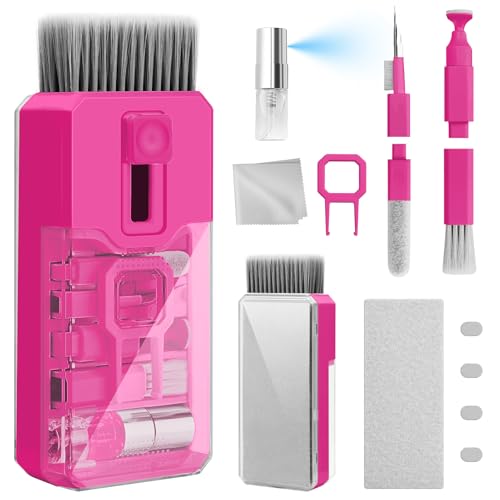
Ordilend Keyboard Cleaner Kit, HotPink

Ordilend Screen Cleaner Refill Kit

Ordilend 2Oz Multi-Function Keyboard Cleaning Kit

Ordilend Keyboard Cleaner Kit, Black

Ordilend All-in-1 Keyboard Cleaner Kit
Meet The Standout Selections
Dark crumbs and dust rarely sit in a keyboard’s most visible layer. I value a kit that reaches the narrow gaps between keys, removes detachable mechanical keycaps, and still handles screens and smaller accessories. The SkyBlue kit combines those functions in a flat case measuring about 3 cm thick.
For a shared home office, the retractable brush and narrow crevice tool can handle routine buildup without demanding a full disassembling. The keycap puller gives mechanical-keyboard owners a deeper cleaning route, while the metal pen tip addresses residue around ports and controllers.
A Strong Showing
- Combines six useful tool types in one portable case.
- Handles mechanical keycaps, flat laptop keys, ports, screens, and earbuds.
- Right-angle 2 mm cloths reach screen corners and lift visible marks.
- The approximately 3 cm profile fits easily into a laptop bag or desk drawer.
- Five replacement cloths support continued use as the working cloths wear.
Trade Offs
- Cherry MX-style keycaps suit the puller; membrane laptop keyboards require the crevice brush.
- Liquid bottles are available separately, so the core kit focuses on manual tools and cloths.
Feature Snapshot
Built With In Mind
This kit fits remote workers and gamers who regularly move between a mechanical keyboard, laptop, monitor, and camera equipment.
Where A Sibling Pick Shines
The Ordilend Keyboard Cleaner Kit, HotPink suits a colorful workspace where the matching desk accessories are part of the appeal.
The HotPink version turns a maintenance tool into a visible part of the desk. Compared with the SkyBlue kit, the functional contents remain the same, but the brighter finish is easier to spot in a crowded drawer or beside a matching laptop setup.
I would favor it for a creative workspace where accessories form part of the visual design. Its approximately 3 cm case remains portable, and the retractable brush, polishing cloths, keycap puller, metal pen, flocking sponge, and lens pen cover several common cleaning jobs.
Practical Advantages
- Combines keyboard, screen, port, earbud, and camera-cleaning accessories.
- The slim case travels easily between a home office and a conference room.
- Screen cloths are thickened to 2 mm and shaped for corners.
Small Caveats
- Color takes priority over neutrality, so the black version may suit a more restrained desk better.
- The puller is intended for Cherry MX-style caps rather than fixed laptop keys.
- Cleaning liquid is not included with the core tool assortment.
Right Fit For
Design-conscious remote workers and students benefit most from a colorful kit that remains useful beyond the keyboard.
Consider Something Else When
Screen-only maintenance is better served by the more compact Ordilend Screen Cleaner Refill Kit.
Most screen marks need a liquid and a cloth, not a drawer full of tiny implements. I see the Ordilend refill kit as a focused solution for someone who already handles dust with another brush and wants screen care in a smaller format.
The bottles work across computers, phones, tablets, car touchscreens, monitors, MacBooks, and iPads. That range makes the refill practical for a car console or travel pouch, while the microfiber cloth provides the controlled wiping surface needed for fingerprint removal.
A Favorable Mix
- Includes two 30 ml bottles for repeated screen maintenance.
- The small package measures 2 by 1 by 0.4 inches.
Practical Considerations
- The set focuses on liquid and a cloth, with no keyboard brush or keycap puller included.
- Two 30 ml bottles require more storage space than a single small bottle.
- Screen-care guidance should be checked before applying liquid to an unfamiliar display.
Quick Facts
Who Will Love This
Mobile office workers and drivers benefit from a compact way to maintain touchscreens and monitors without carrying a full electronics toolkit.
A Better Fit Elsewhere
The Ordilend 2Oz Multi-Function Keyboard Cleaning Kit is the stronger choice for mechanical keyboards, ports, earbuds, and camera accessories.
This larger assortment makes sense for a desk that doubles as a camera, computer, and mobile-device station. Compared with the refill-focused Ordilend Screen Cleaner Refill Kit, it adds brushes, a keycap puller, fine tools, multiple cloths, and two 30 ml bottles of screen solution.
I would choose it for a mechanical keyboard owner who also handles a MacBook, tablet, earbuds, or camera. The retractable brush handles general dust, the high-density brush reaches tighter spaces, and the metal pen tip is intended for residue around ports and keys.
Points In Its Favor
- Two large and small brushes cover different gap widths.
- Two 30 ml bottles support screen cleaning across several devices.
- Seven cloths provide wiping and replacement material.
- The puller supports removable gaming and mechanical keyboard caps.
- Flocking sponge and lens pen cover earbud cases and camera equipment.
Points To Note
- The extensive inventory may require a dedicated drawer or compartment.
- The keycap puller is not appropriate for fixed membrane keys.
Core Details
Best Suited To
Creators, gamers, and office professionals benefit from one organized kit covering keyboards, displays, audio gear, and cameras.
Look Elsewhere When
The Ordilend All-in-1 Keyboard Cleaner Kit suits those who want the manual tool set without a bundled screen-solution emphasis.
Black gives this version the most understated appearance in a category filled with brightly colored desk accessories. I would keep it in a home office where the tool should remain visually quiet beside a monitor, laptop, or mechanical keyboard.
The core assortment includes a retractable nylon-bristle brush, 2 mm polishing cloths, and a keycap puller. That combination covers visible dust, screen wiping, and deeper access beneath removable mechanical-keyboard caps without requiring a large collection of separate implements.
What Makes Sense
- The neutral finish suits restrained office and gaming setups.
- The retractable nylon brush targets dust around keys and narrow gaps.
- Thickened polishing cloths support routine screen maintenance.
Where It May Fall Short
- The keycap puller suits removable mechanical caps rather than fixed laptop keys.
- The color choice is the main distinction for shoppers comparing the SkyBlue and HotPink versions.
The Right Fit
Minimalist workspaces and mechanical-keyboard owners benefit from a functional kit that avoids drawing attention to itself.
Reach For A Different Pick When
The Ordilend 2Oz Multi-Function Keyboard Cleaning Kit is the better fit for an extensive collection of brushes, cloths, bottles, and specialty tools.
The manual tools here feel more relevant to a professional desk than a basic brush-and-cloth set. I see the retractable large brush and thin soft brush as useful for different key gaps, while the keycap puller opens access to debris beneath compatible mechanical caps.
Unlike the more expansive Ordilend 2Oz Multi-Function Keyboard Cleaning Kit, this set centers on brushes, cloths, and fine manual implements. The metal pen tip, flocking sponge, and soft-plastic lens pen also make it relevant to camera equipment and earbud cases.
Practical Pluses
- Two brush sizes address different keyboard and electronics gaps.
- Two polishing cloths support regular screen wiping.
- Five replacement cloths and a large microfiber cloth add useful material.
- The keycap puller supports deeper cleaning of removable caps.
Details To Watch
- Several small accessories need a dedicated place to remain easy to find.
- Anyone expecting bundled screen liquid should confirm the final package contents before purchase.
Key Product Details
Made For
Mechanical-keyboard enthusiasts and photographers benefit from a varied manual kit for several types of delicate equipment.
Another Choice May Suit
The Ordilend Screen Cleaner Refill Kit is simpler and more portable for someone whose only need is wiping screens.
What Matters Before a Computer Keyboard Cleaner Purchase
Match the Keyboard Type
A keycap puller only helps with removable mechanical caps, and the listed Cherry MX-style compatibility should be checked before pulling anything. Flat laptop and membrane keyboards need a narrow crevice brush because their keys remain attached. Mechanical-keyboard owners gain more from the puller, while laptop-focused shoppers should prioritize brush reach and cloth quality.
Separate Screen Care From Key Care
Screen solution and microfiber cloth handle smudges, but neither reaches the dust lodged beneath a key. A full electronics kit includes brushes, fine tools, cloths, and sometimes liquid. A refill kit offers a simpler package for monitors, phones, tablets, and car touchscreens, so the actual number of devices matters more than the word “all-in-one.”
Plan for Storage and Refills
A flat case around 3 cm thick fits a laptop bag or desk drawer without creating much bulk. Larger assortments may need a drawer compartment because their brushes, bottles, cloths, and specialty tools are easier to misplace. Refill-based options also suit people who already own a brush and need replacement screen-care supplies.
Practical Lessons Before Cleaning Day
Common Shopping Slip Ups
The easiest mistake is treating every keyboard like a mechanical model. I would confirm the keycap design, screen material, and device-care instructions before applying liquid. Buying a large kit for one screen is another common waste; a refill set handles that narrow task with less clutter.
What Separates Premium From Basic
The larger kits add more brushes, replacement cloths, specialty tools, and sometimes screen solution. That extra inventory makes sense for mixed electronics or mechanical keyboards. A simple refill kit remains the more sensible choice for one monitor, tablet, or car touchscreen.
Frequently Asked Questions
Are these computer keyboard cleaner kits suitable for laptop screens?
I would follow each device’s screen-care instructions and avoid assuming one formula suits every display. The listed cloths and non-corrosive solution are designed for routine electronic-screen care, including common matte and glossy finishes.
Do I need a keycap puller for every keyboard?
I do not, because membrane and many laptop keyboards have fixed keys. A keycap puller matters most for compatible mechanical keyboards with removable caps.
Which option is best for a small travel pouch?
The Ordilend Screen Cleaner Refill Kit has the smallest stated footprint at 2 by 1 by 0.4 inches. The SkyBlue and HotPink kits also have flat cases, although they carry more individual accessories.
Can the screen solution be used on car touchscreens?
The screen-cleaning refill is listed for car touchscreens as well as computers, phones, tablets, and monitors. I would still check the vehicle’s care guidance before treating a coated display.
How often should keyboards and screens be cleaned?
I would clean visible marks promptly and use the narrow brush whenever dust begins affecting key movement or visibility. Regular light maintenance usually keeps a routine workspace easier to maintain than waiting for heavy buildup.
