
Keeping a laptop or monitor anchored matters most in shared offices, classrooms, labs, and busy home setups. The right cable lock depends on the slot type, cable length, and whether you want keys or a resettable code. Some picks fit standard Kensington-style slots, while others are built for Dell slots or broader hardware anchors. This roundup helps you match the lock to the device, not the other way around.
Quick Look At Our Top Picks

Sendt Black Notebook/Laptop Combination Lock Security Cable

Kensington N17 Dell Laptop Computer Lock (K68008WW)
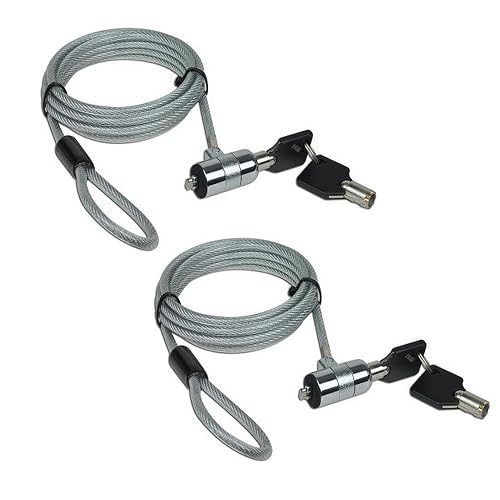
AOMGD 2Pcs 6 feet Laptop Lock Notebook Security Cable Lock
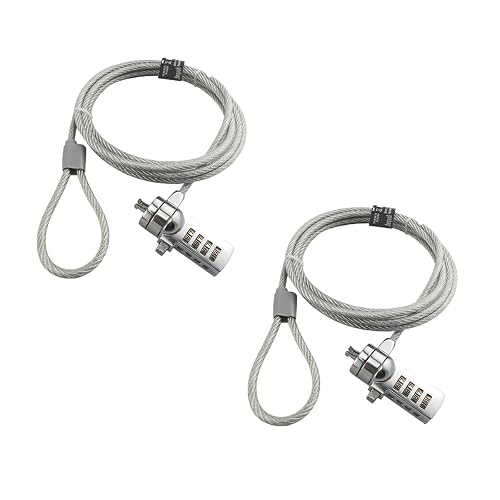
AOMGD 2 Pcs Laptop Lock Notebook Combination Lock Security Cable

Laptop Cable Lock, Hardware Security Cable Lock with Keys
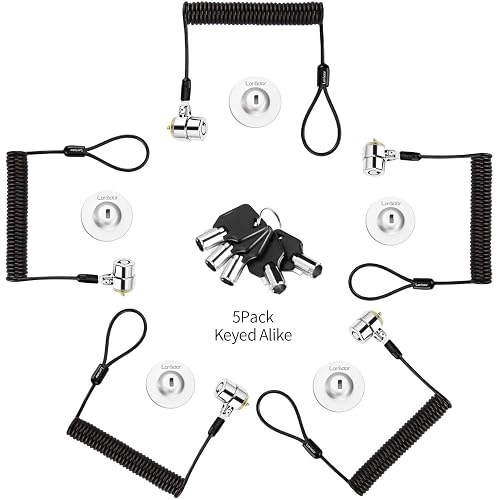
Keyed Alike 5Pack Security Hardware Cable Lock Kit
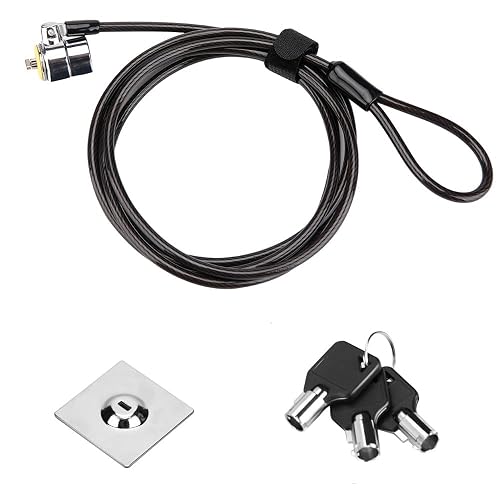
Laptop Cable Lock 6.7Ft Security Cable with Adhesive Anchors

Kensington Slim Combination T-Bar Standard Lock Slot for Laptops, K60600WW
More Details On Our Top Picks
Start here for a standard Kensington-slot laptop that needs a simple, no-nonsense cable lock. The combination setup keeps you from tracking a key, which helps in shared offices and classroom carts where small parts disappear fast. One trade-off is compatibility, since it does not fit Dell laptops or Nano and Noble wedge slots.
That narrower fit makes this a sensible choice for basic notebook security, not a universal pick. In a busy desk setup, the plain black cable keeps the look low-key, and the lock style suits anyone who wants fewer moving parts in daily use. The honest read is that the device match matters more here than the finish.
Strong Points
- Combination lock means no key to carry.
- Fits standard Kensington security slots.
- Simple setup suits everyday desk use.
- Low-profile black cable blends into workspaces.
Things To Consider
- Doesn’t fit Dell or Nano-style slots.
- Not a universal lock for every laptop.
- Best kept as a fixed-desk accessory, not a mixed-device solution.
Feature Snapshot
Who It Suits Best
Office users with a standard Kensington slot and a fixed desk setup get the cleanest fit.
Where A Sibling Pick Shines
Kensington N17 Dell Laptop Computer Lock (K68008WW) suits Dell laptop owners better because it matches that slot style directly.
This one is the obvious fit for Dell machines that need a security cable keyed to the right slot shape. The combination lock keeps access simple for daily office use, and it avoids the shuffle of keeping track of a tiny key on a lanyard or in a drawer. For most Dell laptop owners, that slot match is the real selling point.
Compared with the Sendt lock, this is more targeted and less adaptable, which is exactly why some shoppers will prefer it. In a shared workspace, that tighter fit can matter more than broad compatibility, especially on machines that stay parked at a desk. You may find it a little specialized, but that specialization is the point.
Highlights
- Built for Dell laptop security slots.
- Combination access keeps desk use simple.
- Made for steady, everyday placement.
- Helps avoid carrying a separate key.
Points To Note
- Best treated as a Dell-specific solution.
- Less flexible than a broader hardware kit.
- Not the right fit for non-Dell slot types.
Core Details
Made For
Dell laptop owners who want a straightforward lock for a fixed workstation will get the cleanest fit here.
Another Choice May Suit
Sendt Black Notebook/Laptop Combination Lock Security Cable fits better for anyone using a standard Kensington slot instead of a Dell-specific one.
Two locks in one package gives this AOMGD set a clear role in multi-device spaces. The 6-foot cable reach makes sense for desks where the anchor point sits a little away from the laptop, and the included two keys reduce the annoyance of hunting for a backup. For home offices or small teams, that extra set can be handy.
Compatibility centers on 3x7mm keyholes, so the fit is specific rather than broad. That is the trade-off for the value-minded bundle, and it matters more here than on the first two picks because you are getting quantity plus a defined slot match. The practical upside is obvious, though, for anyone securing more than one device.
Upsides
- Two locks make it useful for multiple devices.
- Six-foot cable gives decent placement flexibility.
- Includes two keys for backup convenience.
- Good match for shared desks or home offices.
- Clear fit for 3x7mm keyholes.
Softer Spots
- Slot compatibility is quite specific.
- Key storage still needs a steady habit.
- Not as broadly adaptable as a hardware-anchor kit.
Quick Facts
Right Fit For
People securing two compatible laptops, or a laptop plus a backup device, get the best value from this set.
Look Elsewhere When
Kensington Slim Combination T-Bar Standard Lock Slot for Laptops, K60600WW is a smarter fit for anyone who wants a resettable code instead of keys.
Code-based access is the big draw here, and that changes the feel of daily use in a good way. You can park the lock at a desk and stop thinking about a spare key, which suits classrooms, team workbenches, and home offices where several people may need access. The 6-foot cable gives enough slack for most standard desk layouts.
Like the keyed AOMGD set before it, this one works best around 3x7mm keyholes, so the fit still matters. The difference is the 4-digit code, which is a cleaner routine for anyone who prefers a memorized number over a physical key. That convenience does come with the usual responsibility of remembering your code.
Bright Spots
- 4-digit code avoids carrying a key.
- Two-piece set helps cover more than one station.
- Six-foot length suits common desk setups.
- Good choice for routine access during the day.
Room For Improvement
- Needs compatible 3x7mm keyholes.
- Code memory becomes part of ownership.
- Not as versatile as an anchor-plate system.
Details At A Glance
Whose Shelf It Belongs On
Anyone who prefers a memorized code and works with compatible devices in the same spot each day will get the most from it.
Swap It Out When
AOMGD 2Pcs 6 feet Laptop Lock Notebook Security Cable Lock fits better for you if a keyed lock feels simpler than remembering a combination.
This hardware-style lock reaches beyond laptops, which is useful in work areas that mix tablets, monitors, and projectors. The anchor plate is the key detail, since it gives you a fastening point where a built-in slot may not exist. That makes the lock useful in conference rooms or at a shared media desk.
Compared with the earlier slot-specific models, this one is more adaptable, but the trade-off is a little more setup planning. You will need to think about where the anchor plate sits and how the cable routes around the device, especially on crowded desks. The upside is broader coverage across device types.
Reasons To Buy
- Anchor plate expands device compatibility.
- Works with laptops, monitors, tablets, and projectors.
- Keyed access is straightforward for regular use.
- Good fit for mixed-device workstations.
Small Caveats
- Anchor plate setup adds an extra step.
- Not as plug-and-play as slot-only locks.
- Cable routing matters more on crowded desks.
Feature Rundown
Best Suited To
Office spaces with a mix of monitors, tablets, and laptops suit this cable better than slot-only locks.
Reach For A Different Pick When
Sendt Black Notebook/Laptop Combination Lock Security Cable is the easier route for anyone who only needs a simple Kensington-slot fit.
Five locks in one kit changes the math for a team, lab, or equipment room. The keyed-alike setup means the same key opens each lock, which saves time when you manage several devices and do not want a different key ring for each one. The 6.2-foot length and retractable cable design add a tidy, workspace-friendly feel.
That bundle size is also the reason this sits above the smaller single-lock options in practical scale. The flip side is simple: you are paying for a group solution, so it makes the most sense where several compatible machines need the same security routine. For a solo home setup, it can be more lock than you need.
Best Bits
- Five-lock kit suits multi-device environments.
- Keyed-alike setup simplifies access management.
- Retractable cable keeps desks tidier.
- 6.2-foot reach helps with placement.
- Works across several device categories.
Areas To Watch
- Better suited to shared spaces than solo use.
- Kit size raises the commitment level.
- Storage matters more because you are handling several locks.
Technical Sheet
Built With In Mind
Small IT teams, shared labs, and office managers who handle several compatible devices will get the most value here.
Where A Sibling Pick Shines
AOMGD 2Pcs 6 feet Laptop Lock Notebook Security Cable Lock is the calmer choice for a home office that only needs two locks.
Adhesive anchors shift this lock into a different category, because you are not relying on a built-in slot. That helps in cases where a tablet, iMac, or other device needs a fixed point and a cleaner look than a bulky hardware mount. The 6.7-foot cable gives a little extra reach for positioning.
Compared with the hardware-anchor model from I3C, this one leans into adhesive installation instead of a plate-style mount. That can be a cleaner fit on some surfaces, though surface prep matters and the anchor should sit on a stable, well-chosen spot. In most work areas, it feels more adaptable than a slot-only lock and less involved than a full hardware kit.
Positives
- Adhesive anchors expand placement options.
- Works across tablets, laptops, and iMac setups.
- 6.7-foot cable gives helpful reach.
- Good for devices without a built-in slot.
Minor Gripes
- Adhesive placement needs careful planning.
- Surface prep matters for the anchor point.
- Not as simple as a direct slot fit.
Feature Card
The Right Fit
People securing tablets or all-in-one desktops on smooth surfaces will get the best match from this style.
Skip It When
Kensington Slim Combination T-Bar Standard Lock Slot for Laptops, K60600WW suits you better when you want a built-in combo lock instead of adhesive anchors.
The resettable 4-wheel code gives this Kensington a familiar, low-fuss routine for daily desk use. A T-bar lock uses a rotating bar that slots into the device opening, so the cable stays tied to a standard lock slot rather than an adhesive anchor or hardware plate. That makes it a tidy fit for laptops that stay in one workspace.
Compared with the Sendt pick, this one leans into the Kensington ecosystem with a combination layout and a 6-foot cable. The honest read is that it works best where the lock slot is already standard and the number code suits your routine. It is less flexible than the hardware-kit options, but simpler for a straightforward laptop desk setup.
Standout Traits
- Resettable 4-wheel code keeps access key-free.
- T-bar design fits standard lock slots.
- 6-foot cable works for common desk setups.
- Clean choice for a fixed workstation.
Worth Noting
- Only suits devices with the right slot.
- Not as broad as anchor-plate options.
- Code handling still depends on memory habits.
Spec Overview
Who Should Grab It
Desk-bound laptop owners who want a straightforward, code-based lock for a standard slot are the best match.
Where Another Pick Fits Better
Laptop Cable Lock, Hardware Security Cable Lock with Keys is the smarter route for mixed-device workstations that need an anchor plate instead of a T-bar slot fit.
How To Choose The Right Computer Lock Cables
Match The Lock To The Slot First
Slot compatibility comes before almost everything else. Kensington standard slots, Dell-specific openings, and 3x7mm keyholes are not interchangeable, so the wrong style can turn a neat setup into dead hardware in a drawer.
Hardware-anchor and adhesive-anchor options widen the field, but they also change how you mount the lock. That matters in classrooms, conference rooms, and shared desks where the device itself may not have the slot you expected.
Pick The Access Style You’ll Actually Live With
Keys feel simple, but they add one more object to keep track of. Combination locks remove that small hassle and work well for desks that stay in one place, though you do need a code you can remember.
Retractable cable kits and keyed-alike bundles suit people managing several machines. A single office laptop does fine with a basic lock, while a lab or team space often benefits from the cleaner key setup of a multi-pack.
Think About Cable Length And Desk Layout
Six feet is common here, and it usually covers a desk, cart, or nearby anchor point without feeling cramped. Longer reach helps when the lock point sits off to the side, especially with monitors, tablets, or projectors.
Still, extra length is not always better. A shorter, tidier cable can feel easier to manage in a compact office, while a longer one helps in open work areas or rooms with flexible layouts.
What To Weigh Before You Choose
Mistakes Worth Dodging
Slot mismatch is the biggest miss in this category, followed closely by buying a keyed lock when a combination model would suit the day-to-day routine better. Cable length can trip people up too, especially on deep desks or equipment carts.
Another common slip is overlooking how the lock will live on the surface. Adhesive anchors need thoughtful placement, and hardware kits ask for a little more setup time than a slot-only option.
The Upgrade Payoff
Higher-tier locks usually cost more because they solve more than one problem at once. You pay for broader compatibility, extra keys, retractable hardware, or a bundle that secures several devices with one access pattern.
That extra spend makes sense for shared offices, labs, and managers who handle several endpoints each day. For a single laptop at a home desk, a simpler lock often does the job with less fuss.
Frequently Asked Questions
What makes a computer lock cable fit my laptop?
The lock has to match your device’s slot style or anchor method. Kensington standard slots, Dell slots, and 3x7mm keyholes all call for different fits.
Are combination locks easier than keyed locks?
Combination locks remove the need to carry a key, which helps in daily desk use. Keyed locks can feel faster for some people, especially in shared spaces where a spare key stays nearby.
How long should the cable be?
Six feet works well for many desks and carts, while slightly longer cables help with wider setups. The right length depends on where your anchor point sits.
Can one lock work on laptops and tablets?
Some hardware-anchor and adhesive-anchor models are built for that broader mix. Slot-only laptop locks usually stay tied to the device style they were made for.
What matters most for daily use?
Fit and access style matter most, because those determine whether the lock is easy to use every day. A lock that matches your routine gets used more consistently.
Closing Thoughts
The best computer lock cable for your setup is the one that matches your device, your desk, and your routine without extra friction. Dell owners have a clear path with the Kensington N17, standard-slot users can stay simple with Sendt or the Kensington Slim Combination T-Bar, and mixed-device spaces get more from the hardware and adhesive-anchor options. For a single laptop, keep it simple. For several machines, choose the lock that makes daily access easiest.



