
A crowded desk can make choosing a computer pen pad surprisingly difficult. I created this guide for illustrators, students, and creative professionals who need either a dedicated drawing surface or a portable tablet that works without a computer. The six options cover different needs, from color-focused 4K displays to compact standalone models and pressure-sensitive pen screens.
The Essentials At A Glance
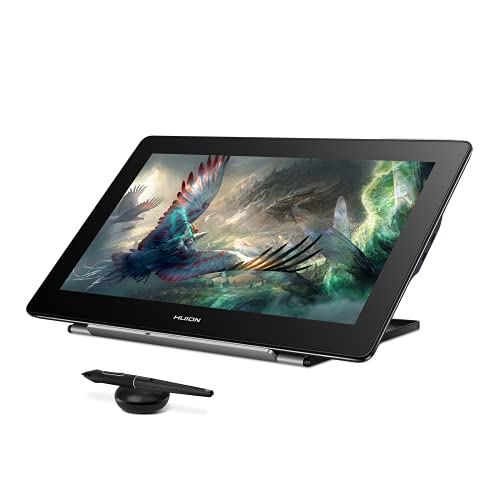
HUION KAMVAS Pro 16 Plus 4K
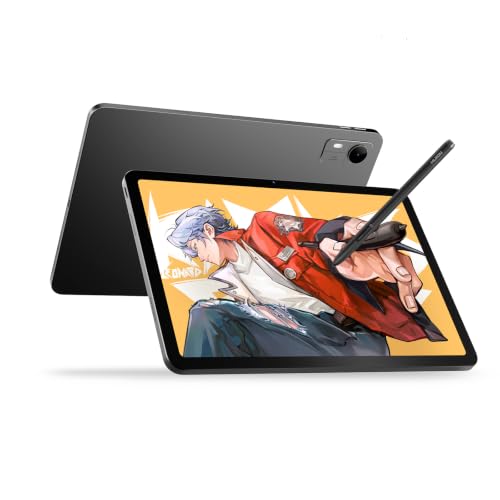
HUION KAMVAS Pad 12 2K+
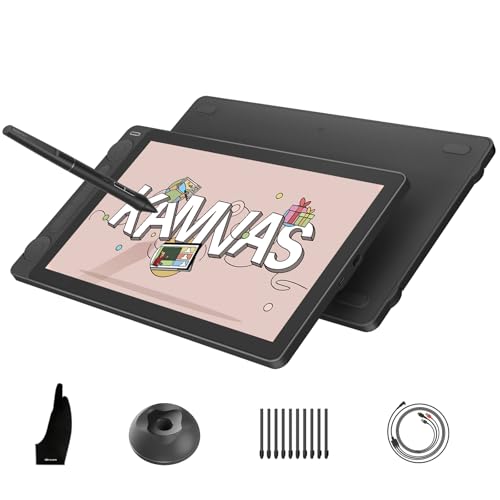
HUION Kamvas 13 (Gen 3)

HUION KAMVAS Pro 19 4K

HUION KAMVAS Slate 11 Tablet
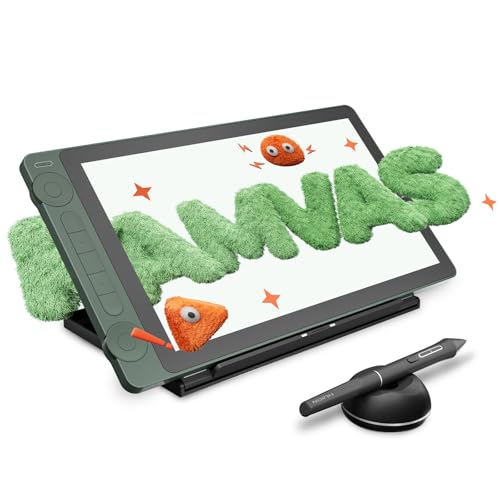
HUION KAMVAS 13 (Gen 3) SE
The Strengths Of Each Pick
The 15.6-inch HUION KAMVAS Pro 16 Plus 4K puts a detailed canvas directly in front of the artist. Its 4K resolution, etched glass, and 145% sRGB color coverage suit illustration, photo editing, and design work where screen area and color accuracy both matter.
Unlike the portable HUION KAMVAS Pad 12 2K+, this model depends on a linked computer and offers a much larger drawing field. Full lamination bonds the glass closely to the display layer, reducing the loose visual separation often found on pen screens. The included cables and USB-C connectivity also make desk setup comparatively tidy.
A Favorable Mix
- The 4K panel preserves fine linework and small interface details.
- Quantum Dot color, 145% sRGB coverage, and 1200:1 contrast suit visual professionals.
- The battery-free PW517 pen provides 8,192 pressure levels and 60-degree tilt recognition.
- Etched glass adds texture that may feel more familiar during long drawing sessions.
- USB-C and HDMI options support Windows, Mac, Linux, and compatible Android devices.
Worth Noting
- This is a computer-linked display, not a self-contained drawing tablet.
- The 15.6-inch footprint requires more desk space than the compact alternatives.
Key Specs
Made For
Color-focused illustrators, retouchers, and designers benefit most from the combination of 4K detail and a broad color gamut.
A Better Fit Elsewhere
HUION KAMVAS Pad 12 2K+ suits mobile artists and students who need independent operation away from a desk.
The HUION KAMVAS Pad 12 2K+ removes the usual computer requirement, making it a practical choice for commuting artists, students, and sketchers. Android 16 runs the device independently, with HiPaint, Clip Studio Paint, ibisPaint X, MediBang Paint, and Huion Note included for immediate creative work.
Its 12.2-inch 3:2 screen offers more vertical room than a typical widescreen tablet, which helps with portrait pages and reading. The 90Hz refresh rate, meaning the display can update 90 times per second, keeps strokes and motion visually fluid. At 1.47 pounds and 0.31 inches thick, the device also looks easier to carry than the larger pen displays.
Everyday Perks
- Standalone Android operation supports drawing in classrooms, cafés, and transit.
- PenTech 4.0 provides 16,384 pressure levels and 60-degree tilt recognition.
- The 2K+ screen offers 236 PPI, giving a sharp image at 12.2 inches.
- An 8,000mAh battery and low-power processor suit extended mobile work.
Small Caveats
- Android app workflows may not match the shortcuts and precision controls of desktop software.
Quick Facts
The Right Fit
Mobile illustrators, language students, and people who sketch during long commutes gain the most from independent operation.
Another Choice May Suit
HUION KAMVAS Pro 16 Plus 4K better serves desktop professionals who prioritize a larger 4K canvas and extensive computer compatibility.
HUION Kamvas 13 (Gen 3) focuses on the part of a pen display that artists notice during the stroke: the contact between nib and surface. Its Canvas Glass 2.0 uses nano-etching, a microscopic texture that reduces glare and sparkle while adding a paper-like feel. Full lamination keeps that glass close to the image layer.
The 16K pressure levels in PenTech 4.0 provide fine control over line weight and shading, and this model depends on a connected computer or laptop. Compared with the HUION KAMVAS Pad 12 2K+, it suits an established desktop workflow rather than mobile sketching. Depending on the selected application, the textured surface may also change the way pencil-style brushes respond.
Strengths Worth Knowing
- Nano-etched Canvas Glass 2.0 provides a controlled, paper-like drawing texture.
- Full lamination creates a more unified view between pen and displayed linework.
- PenTech 4.0 offers 16,384 pressure levels for detailed digital line variation.
Trade-Offs To Consider
- Computer connection is required, so the tablet cannot begin drawing independently.
- Software and driver compatibility should be checked against the selected computer before setup.
Who Will Love This
Desktop illustrators who work regularly in pressure-sensitive creative software benefit most from the direct pen-to-screen feel.
Where A Sibling Pick Shines
HUION KAMVAS Slate 11 Tablet better fits people who need a lightweight, self-contained tablet for notes and quick sketches away from a computer.
An 18.4-inch panel turns the HUION KAMVAS Pro 19 4K into a substantial digital work surface. Its 3840-by-2160 resolution gives artists, retouchers, and animators a wide field for detailed compositions. For studios with enough desk space, the larger canvas can reduce constant zooming during layout work.
The etched Canvas Glass 2.0 adds surface friction for a more tactile nib experience, while full lamination and an anti-sparkle treatment support steady viewing. PenTech 4.0 supplies the pen technology, and the touchscreen adds direct manipulation for tasks that call for it. Compared with the HUION KAMVAS Pro 16 Plus 4K, this model prioritizes workspace size rather than portability.
Useful Highlights
- The 18.4-inch 4K screen presents artwork, timelines, and reference images together.
- Etched glass provides added friction for more controlled pen movement.
- Anti-sparkle construction keeps the display visually steady in bright rooms.
- Touch input supports direct gestures alongside pen-based work.
Practical Considerations
- The large display needs a deep, stable desk and careful cable placement.
- Smaller artwork may appear less prominent than it would on a compact tablet.
- Touch and pen inputs require software that handles both input methods comfortably.
Feature Snapshot
Built With In Mind
Professional illustrators, animators, and retouchers with a spacious workstation benefit from the large digital canvas.
Reach For A Different Pick When
HUION KAMVAS Pad 12 2K+ is a better fit for portable sketches, lighter travel, and work away from a desk.
The HUION KAMVAS Slate 11 Tablet turns a compact screen into an independent note-taking and sketching device. Its 10.95-inch full HD panel resolves at 1920 by 1200 pixels, giving enough room for annotations, rough layouts, and handwritten study material. The aluminum back also gives the tablet a more substantial feel than an ordinary tablet screen.
Because it operates without a linked computer, it suits short trips, waiting rooms, and busy classrooms where setup time matters. The direct pen surface is more focused than a general-purpose tablet, although the exact app experience depends on the software available on the device. Compared with the HUION KAMVAS Pad 12 2K+, this model takes a simpler, smaller-screen approach.
What Helps Most
- Independent operation allows drawing and note-taking without a nearby computer.
- The 10.95-inch display balances a portable footprint with a usable writing area.
Details To Watch
- The smaller canvas may feel restrictive for detailed character drawing and complex layouts.
- App availability should be reviewed before relying on the tablet for a specialized desktop-style workflow.
Right Fit For
Travelers, students, and meeting-note users benefit most from a compact tablet that can begin working immediately.
Swap It Out When
HUION KAMVAS Pad 12 2K+ offers a larger 3:2 canvas and a fuller set of preloaded creative applications for more intensive mobile work.
The HUION KAMVAS 13 (Gen 3) SE balances a conventional pen-display format with detailed pen control. Its 13.3-inch screen offers a practical middle ground between compact tablets and large studio monitors. For illustrators and note takers, the three side keys can reduce dependence on menus when an application supports customizable shortcuts.
PenTech 4.0 supplies 16,384 pressure levels, while the 2g initial activation force allows light marks with less pressure. A thinner nib and tilt auto-alignment support more exact line placement. Upgraded Canvas Glass 2.0 continues the etched-surface approach seen in the standard Kamvas 13 (Gen 3), but the SE model places it in a more streamlined package.
A Few Strong Suits
- The 13.3-inch display provides a familiar balance of canvas area and desk footprint.
- 16,384 pressure levels support controlled shading and line-weight changes.
- Three customizable side keys streamline repeated pen-display commands in compatible software.
Worth Bearing In Mind
- The value of the side keys depends on shortcut support within the selected application.
Core Details
Whose Shelf It Belongs On
Everyday illustrators and note takers benefit most from a compact pen screen with detailed pressure control and shortcut keys.
Consider Something Else When
HUION KAMVAS Pro 16 Plus 4K better serves color-focused professionals who need a larger 4K area and broader computer compatibility.
What Matters Before Choosing A Pen Display
Standalone Or Computer-Linked
A standalone tablet removes cables and external-computer requirements, making it convenient for travel, classes, and quick sketches. The HUION KAMVAS Pad 12 2K+ and HUION KAMVAS Slate 11 Tablet operate independently, while the other pen displays rely on a linked machine. My advice is simple: mobility belongs in the decision only when drawing away from a desk happens regularly.
Screen Size And Workflow
Screen size affects both the available canvas and the amount of desk space consumed. The 18.4-inch HUION KAMVAS Pro 19 4K suits expansive artwork and reference-heavy work, while the 10.95-inch HUION KAMVAS Slate 11 Tablet favors portability. A 3:2 format, such as the 12.2-inch screen on the HUION KAMVAS Pad 12 2K+, also provides more vertical room than a typical 16:9 display.
Pen Control And Glass
Pressure sensitivity determines how many distinct pressure levels the pen can register, giving artists finer control over line weight. Tilt recognition adds another dimension for broad shading and brush-like strokes. Etched or nano-textured glass adds friction, which may help keep strokes controlled, although the feel can change according to nib hardness and application settings.
Color, Connectivity, And Software
Color-critical work calls for attention to gamut and contrast rather than resolution alone. The HUION KAMVAS Pro 16 Plus 4K combines 4K detail with 145% sRGB coverage, while the HUION KAMVAS Pad 12 2K+ offers factory color calibration and an sRGB preset. Computer-linked models also require operating-system and application compatibility checks, especially before switching among Windows, macOS, Linux, and Android workflows.
Two Pen Display Decisions To Get Right
Mistakes Worth Dodging
Choosing by screen size alone can hide an important connection requirement, so the linked-versus-standalone distinction deserves attention first. Another common mistake is assuming high resolution replaces accurate color or responsive pressure control. Each setting affects a different part of the drawing process, and a balanced specification usually serves creative work better than one oversized feature.
What Separates Premium From Basic
Higher-tier displays tend to add resolution, broader color coverage, larger working areas, or more refined pen technology. Those upgrades matter most for professional illustration, retouching, animation, and detailed color work. Basic models remain sensible for notes, learning, and occasional sketches, where a more modest screen and simpler setup may be enough.
Frequently Asked Questions for Computer Pen Pad
Do I need a computer for a computer pen pad?
A standalone pen pad can run its own operating system and drawing applications, while a pen display needs a linked computer. The HUION KAMVAS Pad 12 2K+ and HUION KAMVAS Slate 11 Tablet suit the first approach, whereas the other models require a desktop or laptop.
Is a larger pen display better for drawing?
A larger screen provides more canvas area and makes detailed compositions easier to navigate. The 18.4-inch HUION KAMVAS Pro 19 4K also needs more desk space, so portability matters as much as drawing room.
Does 16K pressure sensitivity improve line control?
Higher pressure-level counts allow finer changes between light and heavy marks, although the application and nib also affect the result. The HUION KAMVAS Pad 12 2K+, HUION Kamvas 13 (Gen 3), and HUION KAMVAS 13 (Gen 3) SE all support 16,384 pressure levels.
Which option is best for color-sensitive illustration?
The HUION KAMVAS Pro 16 Plus 4K stands apart with 145% sRGB coverage and a 1200:1 contrast ratio. The HUION KAMVAS Pad 12 2K+ is a solid alternative for creators who value factory calibration and a more portable standalone format.
Can these tablets work with Mac and Windows computers?
The HUION KAMVAS Pro 16 Plus 4K supports Windows, macOS, Linux, and compatible Android devices through its wired connections. I would confirm the computer and chosen creative application before setup, particularly for a particular workflow or operating-system version.
Final Verdict
I would choose the HUION KAMVAS Pro 16 Plus 4K for a large, color-focused desk, the HUION KAMVAS Pad 12 2K+ for mobile creative work, and the HUION KAMVAS Slate 11 Tablet for compact note-taking. The remaining models serve people who want a more conventional pen-to-screen experience, with screen size and connection needs making the final distinction.
