
A computer tower has to fit the work, not merely fill a desk. I compare six practical options for office tasks, home offices, small workspaces, and compact setups, with particular attention to processor capability, memory, storage, dimensions, and connectivity. The right choice depends on whether desk space, expandability, or ready-made accessories matter most.
The six computers below span full-size business towers, a compact microtower, and Lenovo mini desktops. Some models arrive with the memory and storage already specified, while others put the emphasis on processor performance and a very small footprint. That makes careful attention to the configuration more important than simply choosing the smallest or most powerful-looking option.
The Choices Worth Comparing

HP Business Tower i5 32GB 1TB

HP EliteDesk 800 G3 i5 16GB 250GB SSD
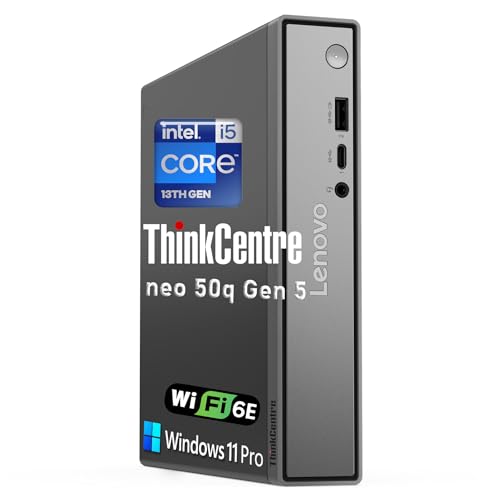
Lenovo ThinkCentre neo 50q Gen 5 Desktop

Lenovo ThinkCentre neo 50q Gen 5 i5 16GB 512GB SSD

ThinkCentre neo 50q 1L Mini PC
HP Pro Tower 290 G9 i5 1TB SSD
More Details On Our Top Picks
This HP microtower suits a shared office or home desk where documents, spreadsheets, and browser tabs need room to coexist. Its 32GB of DDR4 memory gives multitasking more headroom, while the included keyboard and mouse reduce the number of extra items needed for a basic setup.
Storage is handled by a 1TB PCIe NVMe drive, a solid-state connection designed for quick access to applications and files. The 15.5 by 30.3 by 33.7 cm chassis is still compact enough for under-desk placement, though it occupies more room than the Lenovo mini desktops later in the list.
Notable Gains
- 32GB of memory supports demanding office multitasking.
- The 1TB NVMe drive combines quick access with generous file capacity.
- HDMI, DVI-I, and VGA outputs accommodate several types of monitors.
- Front USB-C and USB-A ports simplify everyday peripheral connections.
Trade Offs
- The 2GB GeForce GT 610 is intended for basic display work rather than modern graphics.
- A microtower needs more floor or desk space than a 1-liter mini desktop.
Key Specs
Who It Suits Best
Office workers and home users who want substantial memory, storage, and included input accessories in a conventional desktop format.
Where Another Pick Suits Better
The Lenovo ThinkCentre neo 50q Gen 5 Desktop suits setups where desk space is too limited for a microtower.
Renewed status makes the EliteDesk 800 G3 a practical option for a home office that mainly handles email, documents, browsing, and routine applications. The quad-core Intel i5 operates at up to 3.8GHz, giving it a straightforward foundation for concurrent office programs.
Unlike the first HP tower, this model emphasizes wireless convenience with Wi-Fi and Bluetooth rather than a broad set of front-facing ports. The black chassis and compact tower shape also fit neatly beneath many desks, although I would confirm its exact dimensions before planning a tight installation.
Features That Help
- Quad-core processing supports common office applications and multitasking.
- 16GB of DDR4 memory handles typical productivity workloads.
- Solid-state storage gives quicker access than a conventional hard drive.
- Wi-Fi and Bluetooth reduce dependence on wired network connections.
Honest Caveats
- The renewed condition deserves careful visual and functional inspection.
- A 250GB SSD offers less local space than the 1TB drives in Items 1 and 6.
Made For
Cost-conscious office users who value basic performance, wireless access, and a conventional tower over maximum storage.
Another Choice May Suit
The HP Business Tower i5 32GB 1TB serves multitasking offices that need more memory and storage than this renewed model provides.
Physical desk space becomes scarce in a crowded home office, and this Lenovo mini desktop makes a strong case on size alone. Its 7.05 by 7.20 by 1.42-inch chassis can sit beside a monitor, under a desk, or behind compatible display hardware.
The Intel Core i5-13420H processor provides eight cores and 12 threads, reaching up to 4.6GHz with 12MB of cache. Those details suit business applications, communication, and busy multitasking sessions, while the compact housing gives up the open internal space found in a traditional tower.
Real-World Strengths
- Eight cores and 12 threads support demanding productivity sessions.
- The 1.42-inch thickness preserves valuable desk space.
- A 12MB cache assists frequently accessed data during complex workloads.
Small Caveats
- The 1-liter housing offers less physical room for expansion than a full tower.
- Peripheral requirements deserve checking before a permanent mounting decision.
Feature Facts
Right Fit For
Minimal-space workspaces needing an eight-core processor for business applications, conferencing, and multitasking.
Look Elsewhere When
The HP Pro Tower 290 G9 i5 1TB SSD is a better fit for a large desk, extensive local storage, and 32GB of memory.
This fully specified version of the neo 50q Gen 5 answers one of the awkward questions around compact desktops: what happens when the memory and storage details matter? Its 16GB of DDR5 RAM and 512GB PCIe SSD provide a balanced foundation for office work without occupying a large tower footprint.
Compared with the similarly shaped Lenovo mini desktop in Item 3, this model makes the core configuration easier to judge from the listing. Wi-Fi 6 supports faster local wireless transfer on compatible networks, and Windows 11 Pro provides a business-oriented platform for everyday administration and productivity.
Points In Its Favor
- 16GB of DDR5 memory supports responsive everyday multitasking.
- A 512GB PCIe SSD leaves useful room for active work files.
- Wi-Fi 6 benefits compatible office and home networks.
- The tiny chassis suits compact, professional workspaces.
Practical Considerations
- Its 512GB drive holds less than the 1TB storage in the HP towers.
- Wi-Fi 6 performance depends on a compatible router and network.
Best Suited To
Small-office and home-studio users who want a complete compact configuration with modern memory and wireless connectivity.
Consider Something Else When
The ThinkCentre neo 50q 1L Mini PC appeals to workloads that place greater emphasis on hybrid processor performance.
The 1-liter ThinkCentre neo 50q targets compact work areas that still need a processor able to handle varied office demands. Its Core 5 210H uses a hybrid eight-core design, dividing the work between four performance cores and four efficiency cores for a more adaptable approach to mixed tasks.
That processor reaches up to 4.8GHz and includes 12MB of cache, putting it in a favorable position for short bursts of demanding work. Compared with the i5-13420H model, the distinction is less about a simple core count and more about how performance and efficiency cores divide the workload.
What Pays Off
- Four performance cores support demanding foreground applications.
- Four efficiency cores handle lighter background tasks.
- The 1-liter format preserves valuable desk space.
Possible Compromises
- The compact chassis leaves less physical room for internal additions.
- Exact memory and storage fit should be confirmed for the selected configuration.
Technical Highlights
Built With In Mind
Mixed-workload users who want a compact desktop with strong short-task performance and a flexible core design.
Reach For A Different Pick When
The Lenovo ThinkCentre neo 50q Gen 5 i5 16GB 512GB SSD is a better fit when a defined memory and storage configuration matters more than the latest hybrid core design.
The Pro Tower 290 G9 is the most conventional option here, and that works in its favor for busy offices that prioritize processor details, memory, and storage over desk-saving dimensions. The Intel Core i5-12500 is a six-core processor with up to 4.6GHz turbo speed and 18MB of cache.
Its 32GB of DDR4 memory and 1TB PCIe NVMe drive closely match the HP Business Tower configuration, but the documented six-core processor makes this model easier to compare for heavier productivity and content-creation work. The tower format also offers more physical room than the 1-liter Lenovo systems.
Well-Handled Touches
- Six cores and 12 threads support demanding concurrent work.
- 32GB of memory gives office applications ample working room.
- The 1TB NVMe drive combines speed with substantial capacity.
- 18MB of cache supports demanding processor workloads.
Details To Watch
- The full tower format consumes more space than a mini desktop.
- Monitor, keyboard, and mouse compatibility should be checked before installation.
Core Details
Whose Shelf It Belongs On
Busy offices and power users who prefer a full tower with detailed six-core performance, 32GB memory, and 1TB storage.
Swap It Out When
The HP EliteDesk 800 G3 i5 16GB 250GB SSD is a better fit for a value-focused office that can work with less local storage.
Desktop Decisions That Matter
Match Form Factor to Workspace
A full tower offers roomy hardware and familiar placement beneath a desk. A microtower reduces visual clutter, while a 1-liter mini desktop can reclaim substantial desk space. Measure the available area, check the computer’s dimensions, and consider whether a compact model leaves enough room for cables and peripherals.
Match Memory and Storage to the Workday
RAM supports the number of open applications, while storage determines how much local data fits. A 250GB drive suits a lighter document-based setup, 512GB gives a compact office more breathing room, and 1TB is useful for extensive project files. The key is avoiding storage that feels ample at checkout but quickly fills with active work.
Check Display and Peripheral Connections
Display outputs, USB ports, networking, and wireless standards decide how smoothly a computer joins the existing workspace. A system with multiple video outputs may suit a multi-monitor arrangement, while a compact model may require closer attention to an adapter or mounting arrangement. Checking the desk setup first prevents a basic compatibility problem.
Buying Lessons Before Checkout
Common Shopping Slip Ups
A compact size can hide an incomplete configuration, so memory and storage need checking before checkout. Processor generation also matters less than the actual workload when a smaller model already handles documents, calls, and browsing comfortably.
The Upgrade Payoff
More memory helps crowded application environments, while more storage benefits large project libraries. A faster processor makes sense for sustained editing or advanced business work, but a compact basic model can be the wiser choice for ordinary office tasks.
Frequently Asked Questions
Is a mini desktop better than a full computer tower?
A mini desktop is better when desk space and a discreet appearance matter most. A full tower is better when expandability, larger storage options, and a conventional under-desk footprint take priority.
How much RAM does an office computer need?
16GB is a practical starting point for browser tabs, documents, and routine office programs. Busy application environments benefit from the additional breathing room offered by 32GB.
Is 512GB of SSD storage enough for work?
512GB is sufficient for many office setups that keep active files on external or cloud storage. Large video libraries, design archives, and extensive local project collections benefit from 1TB.
Does a compact desktop need special mounting?
Compact desktops may support behind-monitor or under-desk placement, depending on the hardware and included mounting parts. VESA compatibility and cable access should be confirmed before installation.
Should a renewed office computer be avoided?
A renewed computer can provide a practical configuration for straightforward work. Physical condition, included accessories, storage capacity, and operating-system details deserve inspection before purchase.
Final Verdict
The HP Business Tower i5 32GB 1TB offers the most complete ready-made office configuration, while the Pro Tower 290 G9 provides the clearest six-core performance details. For compact workspaces, the specified ThinkCentre neo 50q configuration offers the most balanced combination of memory, storage, and desk-saving size, with the other mini models serving narrower processor-focused preferences.
