
A busy workshop can turn a simple prototype into a queue of prints, color changes, and material swaps. I built this guide around CoreXY machines that reduce manual intervention, automate bed setup, and handle demanding materials, with special attention to multi-color work. It should help hobbyists, educators, and small studios find the right balance of speed, capacity, and automation.
A Closer Look At The Lineup
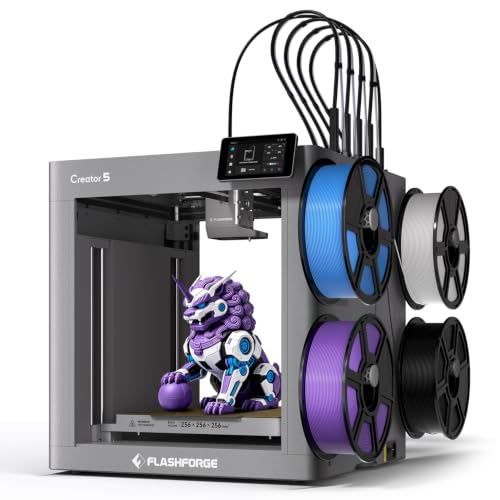
FLASHFORGE Creator 5 3D Printer, 4 Toolheads, CoreXY Multi-Material Printing
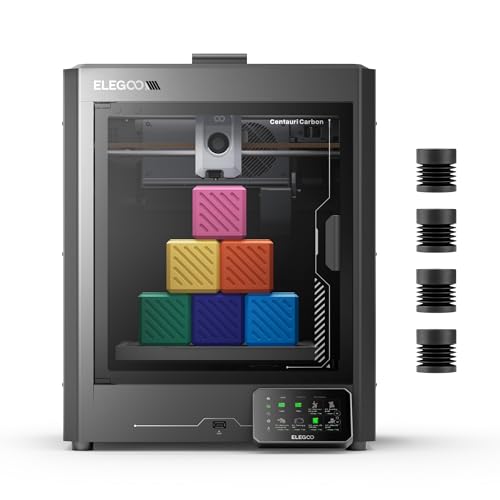
ELEGOO Centauri Carbon 3D Printer, 500mm/s, 256mm Cube with Camera

FLASHFORGE Creator 5 Pro 3D Printer, 4 Toolheads, Enclosed CoreXY

FLASHFORGE AD5X Multi-Material 3D Printer, 4-Color, 600mm/s Auto Calibration

FLASHFORGE AD5M 3D Printer, CoreXY, 600mm/s, 220mm Cube, Quick-Swap Nozzle

FLASHFORGE AD5X Multi-Color 3D Printer, 4 Colors, 600mm/s, 300°C Nozzle
Meet The Standout Selections
Four toolheads make this the most flexible Creator 5 model for projects that change color or material between sections. The 7-second toolchanger approach reduces the familiar pause for loading, unloading, and purging filament, while CoreXY motion supports a listed 600mm/s peak speed. I see the strongest fit in small studios producing decorative pieces, assembly aids, or mixed-material prototypes.
The automatic bed-leveling system and smart extrusion features lower the setup burden compared with the simpler AD5M. Unlike the Centauri Carbon’s emphasis on a large single build area, this machine prioritizes workflow flexibility. In a busy workspace, that distinction matters because fewer manual material changes can mean more continuous production time.
What Makes Sense
- Four toolheads support several filaments without repeated manual swaps.
- The rapid changer reduces waste associated with conventional filament-changing systems.
- CoreXY motion and a 600mm/s listed speed suit short production runs.
- Automatic bed leveling reduces a common early-stage adjustment.
Things To Consider
- Four toolheads add hardware and require space for filament routing.
- The 600mm/s figure represents peak motion speed rather than a guaranteed completion rate.
Feature Snapshot
Made For
This fits multi-material hobbyists and small studios that value color changes more than a large build cube.
Where Another Pick Suits Better
The ELEGOO Centauri Carbon offers a better fit for larger models and straightforward single-material projects.
A full-size enclosure and a 256mm cube give this CoreXY machine room for models that would crowd the AD5M and AD5X. It arrives assembled and calibrated, which makes sense for someone moving into desktop fabrication without a long setup routine. The touchscreen and built-in camera also give beginners useful ways to manage and observe a print.
Its listed 500mm/s speed and 320°C nozzle broaden the machine’s everyday range, though the speed sits below the 600mm/s figures advertised by several FLASHFORGE models. Compared with the Creator 5’s four-tool system, the Centauri Carbon centers on capacity and convenience rather than elaborate material changing. That makes it a calmer first high-speed printer for classrooms and home studios.
Benefits That Matter
- The 256mm cube accommodates more generous projects than 220mm models.
- Factory assembly and calibration remove several early setup tasks.
- The built-in camera adds remote visual monitoring during long jobs.
Practical Considerations
- The larger cube requires more room than the compact AD5M.
- Multi-material creators may find the Creator 5 more suitable for frequent tool changes.
Quick Technical Notes
Who Will Love This
First-time printer owners, educators, and makers working on larger single-material models will appreciate the simple setup and roomy cube.
Consider Something Else When
The FLASHFORGE AD5X suits color-rich work that needs four filament inputs and automatic calibration.
A heated chamber changes the character of this machine. The enclosed CoreXY frame and active heating to 65°C create a more stable environment for technical materials that benefit from controlled temperature. I would pay closer attention to that enclosure than raw speed when choosing a printer for engineering prototypes or repeated functional parts.
The four preloaded, preheated toolheads preserve the Creator 5 family’s rapid material-change concept. Compared with the original Creator 5, the Pro model places greater emphasis on mixed-material engineering work, while the Centauri Carbon offers a larger build cube but no comparable multi-tool arrangement. For a dedicated studio, that combination can justify the larger, more specialized footprint.
What It Does Well
- The 65°C actively heated chamber supports temperature-sensitive materials.
- Four prepared toolheads reduce repeated filament loading and purging.
- The full enclosure helps isolate the printing environment.
- CoreXY motion remains well suited to rapid, precise layer placement.
Honest Caveats
- The enclosed frame and chamber hardware need a substantial work area.
- Managing four filament paths adds setup compared with a single-material printer.
Right Fit For
This is a practical fit for technical creators who regularly combine materials and need chamber temperature control.
A Better Fit Elsewhere
The ELEGOO Centauri Carbon offers a simpler route for beginners who prioritize a large build area over multi-material capability.
Four-color output makes this AD5X particularly interesting for decorative pieces, labeled parts, and models that benefit from contrasting details. The IFS multi-material system allows several colors to participate in one job, while automatic bed leveling removes a frequent early adjustment. For a hobby studio, that combination turns color planning into part of the design process rather than a series of separate prints.
The listed 600mm/s speed and 20,000mm/s² acceleration make rapid layer placement possible, though detailed geometry and print settings still determine actual timing. Compared with the Creator 5 Pro, this model concentrates on four-color accessibility rather than a 65°C heated chamber. The filament backup function adds another layer of workflow protection for long color-rich jobs.
Strengths Worth Knowing
- Four colors can appear within a single model.
- The IFS arrangement simplifies multi-material planning.
- Automatic leveling improves setup consistency.
- Filament backup supports unattended multi-color production.
- High listed motion speed suits short creative runs.
Minor Gripes
- Four-color printing calls for more filament organization than single-color work.
- Color changes can add time even with rapid motion.
Core Details
Best Suited To
Artists, designers, and hobbyists producing color-rich models will get the most from this configuration.
Another Choice May Suit
The FLASHFORGE AD5M fits makers who print one material at a time and prefer a simpler daily workflow.
The AD5M focuses on the essentials that matter during repeated work: CoreXY motion, automatic calibration, and rapid nozzle changes. Its 220mm cube handles a useful range of household and hobby projects without taking up the space demanded by a larger enclosed machine. I see it as a practical daily driver for single-material printing and quick maintenance changes.
A three-second nozzle swap is useful when moving between nozzle sizes, though the operation still requires the print to pause. Compared with the four-color AD5X, the AD5M offers a simpler workflow and a smaller build cube. Against the Centauri Carbon, it trades away 36mm of cube width for a stronger emphasis on quick component changes.
Where It Delivers
- Automatic calibration keeps routine setup manageable.
- CoreXY motion supports precise, high-speed layer placement.
- The quick-swapping nozzle reduces maintenance downtime.
- The customizable enclosure gives the setup some flexibility.
Worth Noting
- The 220mm cube is smaller than the Centauri Carbon’s 256mm space.
- Enclosure customization adds another decision during setup.
Built With In Mind
Frequent hobbyists, classrooms, and small workshops benefit from the AD5M’s compact cube and low-fuss calibration.
Look Elsewhere When
The FLASHFORGE AD5X is the stronger option for projects requiring several colors within one model.
This AD5X configuration combines four-color IFS printing with a nozzle rated up to 300°C. That extra thermal range matters for creators using certain engineering polymers, while the color system handles decorative details within the same job. Automatic leveling and a listed 600mm/s speed round out a setup aimed at capable, high-output desktop printing.
Compared with the earlier AD5X listing in this lineup, this version clearly emphasizes the hotter nozzle, while the other includes filament backup. Both rely on four-color printing and CoreXY-family speed. The 220mm build cube remains smaller than the Centauri Carbon’s, so model dimensions deserve attention before committing to unusually large designs.
Everyday Perks
- Four-color output expands decorative possibilities.
- The 300°C nozzle supports a broader material range.
- Automatic leveling reduces setup steps.
- CoreXY motion handles rapid XY positioning.
Potential Drawbacks
- The 220mm cube limits unusually large models.
- Four-color work requires organized filament supplies.
Feature Breakdown
The Right Fit
Color-focused makers working with specialty filaments need a printer that can combine several colors with a higher nozzle temperature.
Swap It Out When
The ELEGOO Centauri Carbon is the better option for larger models and a less complex single-material setup.
What Matters Before Buying a CoreXY Printer
Start with the motion system
CoreXY coordinates the print head along both horizontal axes, producing fast and precise movement with a compact carriage design. That foundation benefits detailed layers, but speed figures represent peak capability rather than a promise that every job finishes quickly.
Compare tool-changing systems
A single-extruder setup handles straightforward work with less maintenance. Four toolheads or an IFS system make color and mixed-material jobs more convenient, though filament routing, preparation, and storage become more involved. I would add tool-changing capability only after confirming a recurring need for multiple colors or materials.
Match the build volume to the work
A 220mm cube suits many hobby parts, while the Centauri Carbon’s 256mm cube adds useful room for oversized assemblies. I would measure the longest finished part before considering a larger machine, because the enclosure and filament path also affect desk or workshop space.
Account for enclosure and thermal needs
An enclosed, actively heated chamber helps maintain a consistent temperature around demanding materials. For general PLA projects, a customizable or open-style setup may remain simpler. The useful question is whether temperature control solves a material problem that actually appears in my workflow.
Avoiding Common Category Traps
Mistakes Worth Dodging
I would avoid treating peak speed as the only performance measure, since acceleration, travel moves, and layer complexity affect actual job time. It is also easy to underestimate the desk space and filament storage required by enclosed or multi-tool systems. Checking the build cube, enclosure, and material paths before ordering keeps the setup manageable.
The Upgrade Payoff
Higher-tier machines add features such as rapid tool changes, four-color systems, larger cubes, or heated chambers. Those extras pay off when I produce repeated mixed-material parts or need steadier conditions for technical materials. For basic single-color objects, a simpler CoreXY model may deliver the relevant workflow with less upkeep.
Frequently Asked Questions
What is a CoreXY 3D printer?
A CoreXY 3D printer moves its head across the X and Y axes with a coordinated motion system. That arrangement supports fast positioning and precise layer placement.
Is a CoreXY printer suitable for beginners?
Yes, especially models with automatic bed leveling and straightforward touchscreen controls. The ELEGOO Centauri Carbon is the most approachable option in this lineup because it arrives assembled and calibrated.
Which printer has the largest build volume?
The ELEGOO Centauri Carbon has the largest listed build volume at 256 x 256 x 256mm. The FLASHFORGE AD5M and this AD5X configuration use a 220mm cube.
Which model handles four colors?
The FLASHFORGE AD5X options use an IFS system for four-color printing. The AD5X with filament backup emphasizes production continuity, while the hotter-nozzle version supports higher-temperature materials.
Are enclosed printers better for every material?
No, an enclosure helps maintain temperature and can benefit technical materials, but it adds size and may be unnecessary for standard hobby filament. I would choose it based on the materials and environmental needs involved.
Final Verdict
The FLASHFORGE Creator 5 stands out for rapid four-tool changes, while the Creator 5 Pro adds a heated chamber for technical work. The Centauri Carbon offers the simplest entry and largest cube, while the AD5X models serve color-focused work. I would choose by material workflow first, then build volume and available space. The right printer is the one that handles the actual jobs without unnecessary complexity.
