
Your processor needs consistent heat control during gaming, rendering, streaming, and long work sessions. The right Cpu Tims can also make installation easier, reduce cable clutter, or avoid the radiator-clearance concerns that come with liquid cooling. This shortlist covers 360mm all-in-one coolers and large dual-tower air designs, so you can match cooling hardware to your case, processor socket, noise preferences, and comfort with maintenance.
The Shortlist At A Glance

Thermalright Frozen Notte 360 Black ARGB V2 CPU Cooler

Thermalright FW360 SE ARGB V2 360mm AIO Liquid CPU Cooler
Thermalright FW360 Black ARGB CPU Water Cooler 2.4in LCD

Thermalright Aqua Elite 360 ARGB CPU Water Cooler
Thermalright Peerless Assassin 140 Black CPU Air Cooler

Thermalright Peerless Assassin 120 Vision MAX ARGB White CPU Air Cooler
More Details On Our Top Picks
A 360mm radiator gives you a broad aluminum fin area for moving processor heat into the liquid loop, while the 397 × 120 × 27mm radiator format suits cases with a compatible top or front mount. The full-copper contact base sits over the processor, and the 450mm tubing gives you useful routing room in a larger gaming chassis.
Three 120mm PWM fans use pulse-width modulation, a control method that adjusts fan speed from the motherboard. You may find this combination well suited to long gaming sessions and demanding desktop work, though a 360mm radiator asks more from your case layout than the Peerless Assassin 140.
Strong Points
- The 360mm radiator spreads heat across a substantial fin area for high-load desktop use.
- Three 120mm fans simplify a familiar radiator configuration and support motherboard-based speed control.
- The 450mm tubes offer practical flexibility during front or top installation.
- S-FDB bearings, a fluid-dynamic bearing design, are intended to support smooth fan rotation over extended use.
- The black finish works neatly with dark cases and restrained ARGB lighting.
Things To Consider
- Radiator placement and tube direction need careful planning, especially in compact cases.
- Liquid cooling adds pump and tubing components that require more installation attention than an air tower.
Key Specs
Who It Suits Best
You’ll get the most from this cooler in a spacious gaming or creator case with a 360mm radiator mount and a processor that runs hot during sustained workloads.
Where Another Pick Suits Better
Thermalright Peerless Assassin 140 Black CPU Air Cooler suits you better when you prefer a pump-free design and easier long-term dust cleaning.
Your case becomes more informative with the 2-inch LCD screen, which can show system information, custom images, or animated GIFs through Thermalright software. That display gives this cooler a more personalized role than the straightforward Frozen Notte 360, particularly in a glass-sided gaming build.
The 397 × 120 × 27mm aluminum radiator pairs with a 3000RPM pump and three TL-M12Q 120mm fans. Daisy-chain fan wiring can reduce cable clutter behind the motherboard, although the screen, software, pump, and lighting introduce more setup steps than a conventional air cooler.
What We Like
- The 2-inch display gives you at-a-glance system information without opening monitoring software.
- Custom images and animated GIF support help you coordinate the cooler with a themed build.
- Daisy-chain fan connections can make cable routing cleaner during installation.
- The 68.9 CFM airflow rating and 2.21mmH2O pressure rating describe useful fan movement and radiator-driving capability for demanding desktops.
Trade Offs
- Software and screen configuration add another layer to setup and troubleshooting.
- The 360mm format needs suitable radiator clearance, and dust removal still requires access to three fans.
- Liquid cooling places more components in your case than the Peerless Assassin 120 Vision MAX.
At A Glance
Made For
This suits you as a gaming or content-creation enthusiast who values system monitoring and a coordinated case interior as much as radiator cooling.
Consider Something Else When
Thermalright Aqua Elite 360 ARGB CPU Water Cooler fits you more closely when you want a simpler 360mm liquid setup without a display-focused feature set.
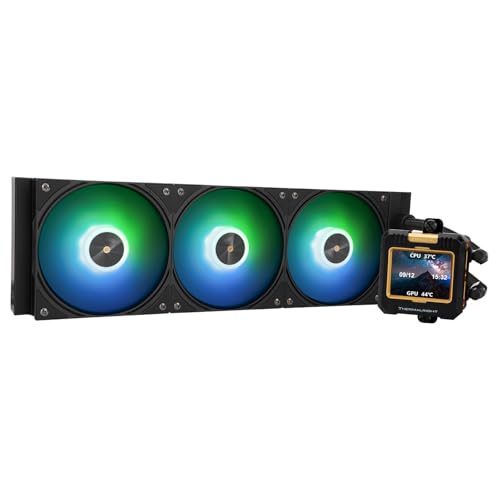
Visual customization takes a different shape here, with a detachable 2.4-inch LCD screen set into a 360mm liquid cooler. The 320 × 240 resolution gives you a defined monitoring panel, while the black radiator and ARGB fans keep the rest of the build visually consistent.
For a streaming desk or showcase computer, the display can make temperature information easier to see through a side panel. You may find the detachable design convenient during installation, but the 397 × 120 × 52mm stated radiator assembly is deeper than Item 2’s listed radiator, so your case clearance deserves a careful check.
Highlights
- The detachable LCD screen gives you more flexibility while positioning the pump head.
- The 320 × 240 display resolution supports clear system information and custom visual content.
- Three PWM fans provide a familiar 120mm radiator arrangement for compatible cases.
Minor Gripes
- The larger 52mm stated radiator assembly can make front or top clearance more demanding.
- Screen software and ARGB connections add configuration work during setup.
Feature Snapshot
Right Fit For
This is a strong match for you when a visible system display and black ARGB styling matter in a gaming, streaming, or showcase computer.
Not Your Match When
Thermalright Peerless Assassin 140 Black CPU Air Cooler is a better fit for you when basic maintenance and a straightforward installation matter more than screen hardware.
Socket coverage is the main reason to consider the Aqua Elite 360. Its platform list spans AMD AM4 and AM5 plus Intel LGA1851, 1700, 1200, 115x-series sockets, and several older mounts, giving you more room for a future platform change than Item 1.
The cooler uses a copper contact base, a black 360-size aluminum fin radiator, three PWM fans, and a 1550RPM fan speed. In most spacious gaming cases, that layout offers a sensible route to liquid cooling without paying for an LCD screen, though you’ll still need to plan radiator access and tubing placement.
Upsides
- Broad listed socket support helps you reuse the cooler across several AMD and Intel desktop platforms.
- The 360mm radiator gives heat more fin area to spread across during sustained loads.
- A copper base transfers processor heat into the cooling loop at the contact point.
- The illuminated pump head and ARGB fans suit a coordinated case interior.
Points To Note
- The 1550RPM fan speed is lower than several other liquid options here, so fit depends on your workload and noise priorities.
- A 360mm radiator still demands a compatible case mount and routine dust removal from the fan area.
- The supplied listing includes an unavailable-image notice, so inspect the product page carefully for current visual details.
Technical Sheet
Best Suited To
You’ll appreciate this option in a multi-platform household or upgrade path where broad socket coverage and a screenless 360mm design keep the build practical.
Look Elsewhere When
Thermalright FW360 SE ARGB V2 360mm AIO Liquid CPU Cooler suits you more when a display, faster pump, and daisy-chain fans are worth the added setup complexity.
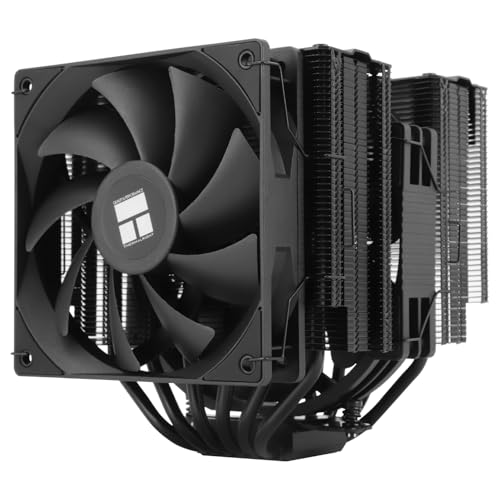
Air cooling keeps the hardware path straightforward: six copper heat pipes carry heat from the processor base into two fin towers, and dual PWM fans move air through that stack. The 158mm height is the figure to check first, since a mid-tower case with limited side-panel room may not accept a cooler this tall.
Compared with the 360mm liquid models above, the Peerless Assassin 140 avoids a pump, radiator, and tubing. That makes it appealing for a first desktop build or a work computer that you want to clean with familiar compressed-air maintenance, though its twin towers can cover nearby memory slots depending on your motherboard and memory height.
Bright Spots
- Six heat pipes provide multiple paths for transferring processor heat into the aluminum fin towers.
- Dual fans spread airflow through the two-tower structure during gaming and productivity loads.
- The air-only design avoids liquid-loop components and simplifies long-term ownership.
- AM4, AM5, and several Intel sockets make the cooler useful across multiple desktop generations.
- The black finish pairs naturally with understated or dark component themes.
- At 158mm tall, the dimensions are easier to assess than a radiator placement plan.
Room For Improvement
- The 158mm tower height and wide dual-fin layout require careful case and memory-clearance checks.
- Dust can collect between the two fin stacks, so regular cleaning access matters.
Quick Facts
Who Will Love This
This fits you as a practical desktop builder who wants strong dual-tower air cooling, broad socket coverage, and no liquid-loop maintenance.
A Better Fit Elsewhere
Thermalright Peerless Assassin 120 Vision MAX ARGB White CPU Air Cooler suits you more when a built-in display and white showcase styling matter in your case.
Large air coolers rarely include a built-in information panel, which gives the Vision MAX its clear identity. The magnetic top cover houses a 5-inch IPS screen, a type of LCD known for wide viewing angles, with 480 × 854 resolution for system readings and custom themes.
Under that display, a twin-tower radiator and dual-fan layout keep the design pump-free. The white finish suits a bright case build, while the 2150RPM stated fan speed gives you more headroom on paper than the Peerless Assassin 140’s 1500RPM setting; you may still find the large structure less convenient in a compact chassis.
Reasons To Buy
- The 5-inch IPS display gives you a prominent way to view system information through a case window.
- Magnetic top-cover attachment can make access and repositioning more convenient during installation.
- The twin-tower air layout avoids liquid tubing and pump placement.
- TRCC software supports custom background themes for a more individual case interior.
- AM4, AM5, LGA1851, LGA1700, and LGA115x support covers several mainstream desktop platforms.
Honest Caveats
- The 5-inch screen and twin-tower structure take substantial space around the CPU socket.
- Software adds another setup step beyond the usual fan and lighting connections.
- White fin surfaces can make accumulated dust more visible, so cleaning needs to stay on your routine.
Details At A Glance
Whose Shelf It Belongs On
This is made for you as a showcase-builder who wants the lower-maintenance character of air cooling with a large visual display and bright white styling.
Swap It Out When
Thermalright Frozen Notte 360 Black ARGB V2 CPU Cooler is better suited to you when your case supports a 360mm radiator but has limited room around the CPU socket.
How To Choose The Right Cpu Tims
Match Cooling Type To Your Case
A 360mm all-in-one cooler needs a compatible radiator mount, enough clearance around the top or front panel, and a sensible path for its tubing. Measure the case before choosing Thermalright Frozen Notte 360 Black ARGB V2 CPU Cooler or Thermalright Aqua Elite 360 ARGB CPU Water Cooler. Radiator thickness, tube reach, graphics-card position, and memory clearance can all affect installation.
Air coolers take a different approach. Thermalright Peerless Assassin 140 Black CPU Air Cooler needs 158mm of vertical room, while a twin-tower design can sit close to memory slots. Check your case’s CPU-cooler height limit and your motherboard layout first.
Consider Your Workload
Gaming, video editing, compiling, and 3D work can hold your processor under load for longer than everyday browsing. A 360mm liquid cooler gives you a large radiator surface and may suit a high-load desktop, while a large air tower keeps the component count lower.
Your comfort with maintenance also matters. Air coolers generally give you direct access for dust removal, whereas liquid models add a pump, radiator, tubing, and software on display-equipped versions.
Separate Cooling From Extras
PWM fans let your motherboard adjust fan speed according to processor temperature. ARGB means addressable RGB lighting, which allows individually controlled lighting zones through compatible hardware. Those features affect appearance and control, not just heat management.
An LCD screen adds system information or custom artwork, but it also adds software and another cable path. Thermalright FW360 SE ARGB V2 360mm AIO Liquid CPU Cooler suits you when those extras matter, while Thermalright Peerless Assassin 140 Black CPU Air Cooler keeps attention on cooling fundamentals.
Confirm Socket Support
Socket compatibility determines whether the included mounting hardware fits your processor platform. AM4 and AM5 identify AMD desktop sockets, while LGA1851 and LGA1700 identify Intel socket families used by newer desktop processors. Older Intel sockets also appear on several models here, which helps with existing builds.
Match the exact processor socket and inspect the case clearance before placing your choice in a cart. Broad compatibility helps, but it doesn’t replace a physical fit check.
Things Worth Knowing First
Mistakes Worth Dodging
A 360mm radiator can look attractive on a specification sheet, yet it won’t help your build when the case lacks a suitable mount. Measure radiator length, thickness, fan space, tubing reach, and motherboard clearance together rather than checking only the word “360mm.”
Large air towers bring a different oversight. Confirm the 158mm height of the Peerless Assassin 140 and account for memory clearance around the front fan. Display-equipped models also need room for the screen, software connections, and lighting cables.
Where The Extra Money Goes
Higher-tier choices usually add a display, faster fan or pump specifications, broader customization, or more elaborate case styling. Those extras make more sense in a showcase gaming computer than in a closed office tower where the screen stays hidden.
Spending more suits you when you’ll use system monitoring or custom themes regularly and your case has the required clearance. A simpler air cooler can be the more sensible choice for quiet ownership and easy dust access.
Final Verdict
You have two clear paths across this shortlist: choose a 360mm liquid model for radiator-based cooling and visual features, or choose a Peerless Assassin tower for simpler air cooling. Thermalright FW360 SE ARGB V2 360mm AIO Liquid CPU Cooler adds the most display and cable-control features, while Peerless Assassin 140 Black CPU Air Cooler keeps ownership straightforward. Check your socket, case clearance, workload, and maintenance preference before choosing. The right cooler is the one that fits your build without creating a new installation problem.
