
Choosing a CPU for the Radeon RX 6800 XT can feel confusing because the graphics card still has plenty of capability for high-refresh 1440p gaming. You need enough processor headroom for smooth frame pacing, streaming, multitasking, and future upgrades without paying for performance you won’t use. This roundup includes compatible AMD processors, plus several graphics cards that help you compare alternatives when your real need is a complete GPU upgrade. From AM4 value to AM5 productivity power, you’ll find clear fits for gaming desktops, content workstations, and practical builds.
The Shortlist At A Glance

Gigabyte Radeon RX 7600 XT Gaming OC 16GB Graphics Card

AMD Ryzen 9 7900X ASUS ROG Strix B650-A Gaming WiFi 6E Motherboard

AMD Ryzen 9 5900XT 16-Core 32-Thread Desktop Processor

PowerColor Red Devil AMD Radeon RX 6800 XT Graphics Card
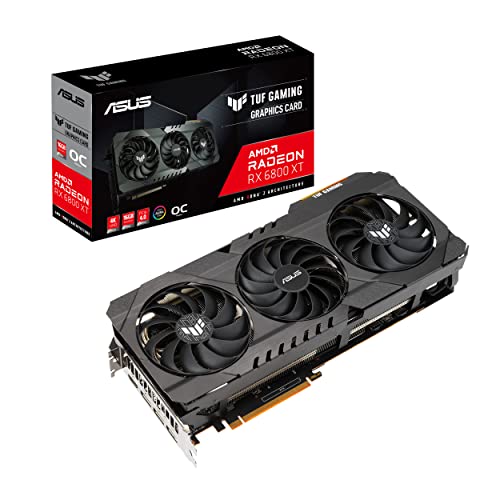
ASUS TUF Gaming AMD Radeon RX 6800 XT OC Edition Graphics Card

ASRock Radeon RX 7700 XT Challenger 12GB OC Graphics Card
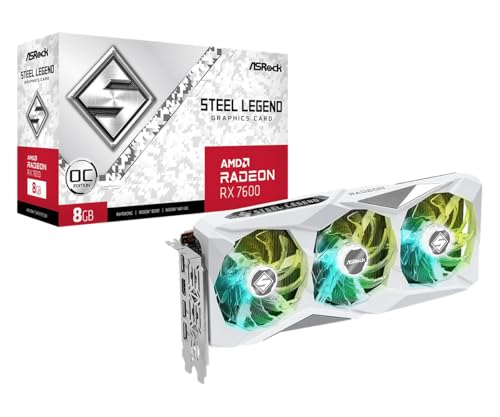
ASRock Radeon RX 7600 Challenger 8GB OC Graphics Card
More Details On Our Top Picks
The 16GB memory allocation gives you breathing room for texture-heavy games, though this is a graphics card rather than a CPU for the 6800 XT. The 2,810 MHz core specification and PCIe 4.0 interface suit a modern 1440p system, while two DisplayPort 1.4 outputs and two HDMI 2.1a ports support flexible monitor layouts.
That combination makes sense for a midrange graphics refresh or a second gaming PC. You may find the 128-bit memory bus less comfortable than the wider memory design found on the RX 6800 XT cards here, and the RGB Fusion lighting adds style without improving frame rates.
Strong Points
- 16GB of GDDR6 memory supports larger game textures and creative workloads.
- Four listed display outputs make multi-monitor setups easier to arrange.
- The 2,810 MHz core figure gives the card a clear performance focus.
Things To Consider
- The 128-bit memory interface may limit appeal for especially demanding high-resolution use.
- Routine dust removal around the fans remains sensible in a carpeted office.
Key Specs
Who It Suits Best
You benefit most from this card in a new 1440p gaming desktop that needs extra video memory without a large physical platform.
Consider Something Else When
Choose PowerColor Red Devil RX 6800 XT for higher-end gaming workloads and a card built around the 6800 XT class.
For a CPU-led 6800 XT build, this bundle gives you the Ryzen 9 7900X alongside an ASUS ROG Strix B650-A motherboard. Twelve cores and 24 threads suit gaming while streaming, compiling software, or rendering video, and the AM5 socket moves you onto a newer DDR5 platform.
The motherboard adds three M.2 slots, PCIe 4.0 storage support, 2.5G LAN, and WiFi 6E connectivity. You may find this platform more than a dedicated gaming PC needs, but its 12+2 power-stage layout is a useful foundation for sustained processor workloads.
What We Like
- 12 cores and 24 threads give multitasking applications substantial processing capacity.
- The included B650-A board reduces platform-matching work for a fresh build.
- Three M.2 slots leave room for separate game, project, and backup drives.
- 2.5G LAN and WiFi 6E cover wired and wireless network setups.
Trade Offs
- AM5 and DDR5 parts can make a rebuild more involved than an AM4 upgrade.
- A high-core-count processor deserves careful cooler selection and case airflow planning.
Feature Snapshot
Made For
You get the strongest fit for a new workstation-gaming desktop where the RX 6800 XT shares time with streaming, editing, or heavy multitasking.
Not Your Match When
AMD Ryzen 9 5900XT suits you better when your existing system already uses AM4 and DDR4 memory.
Sixteen cores and 32 threads make this AM4 processor especially attractive for an older desktop that already has a compatible board and DDR4 memory. The Zen 3 architecture remains a practical match for the RX 6800 XT, particularly across gaming, recording, browser-heavy work, and rendering.
The 4.8 GHz maximum boost and unlocked design leave room for tuning, though overclocking raises the importance of cooling and firmware settings. A cooler isn’t included, so your existing AM4 setup needs enough thermal capacity for long sessions.
Highlights
- 16 cores and 32 threads support demanding multitasking.
- AM4 compatibility can turn a processor-only upgrade into a simpler rebuild.
Room For Improvement
- No cooler is supplied, adding another installation decision.
- AM4 offers less forward platform flexibility than the Ryzen 9 7900X bundle.
- Older boards may need a firmware update before installation, depending on the model.
Quick Facts
Right Fit For
You get the best match as an AM4 desktop owner seeking more processing capacity without replacing the motherboard and memory together.
Look Elsewhere When
Pick AMD Ryzen 9 7900X with ASUS ROG Strix B650-A when you want a new AM5 foundation and DDR5 support.
PowerColor’s Red Devil is the direct graphics-card choice in this list, built around the RX 6800 XT rather than a CPU pairing. Its 16GB GDDR6 memory, RDNA 2 design, ray tracing support, and Infinity Cache target high-detail 1440p gaming, while the listed 7,680 by 4,320 digital maximum supports advanced display setups.
The 16.0 Gbps memory speed and 4,608 stream processors give you a substantial graphics foundation. Its large 14 by 12 by 2 inch package dimensions deserve careful case measurement, and the honest trade-off is straightforward: this card can demand more room than the smaller ASRock options.
Upsides
- 16GB memory helps with high-resolution textures and demanding game settings.
- Ray tracing adds support for more detailed lighting effects.
- The high listed digital resolution suits advanced monitor or television setups.
- Two clock profiles, 2,090 MHz OC and 2,015 MHz Silent, give you a choice between tuning emphasis and quieter operation.
- Its 6800 XT identity makes it a natural graphics match for this topic.
Minor Gripes
- The 14-inch package length can complicate installation in compact cases.
- Large graphics cards need careful support and regular dust cleaning around their cooling area.
Technical Sheet
Best Suited To
You benefit most from this card in a spacious gaming tower aimed at high-detail 1440p or advanced display output.
A Better Fit Elsewhere
ASRock Radeon RX 7600 Challenger suits you more when a compact two-slot card matters above 6800 XT-class capacity.
ASUS takes a more construction-focused approach with this RX 6800 XT OC Edition. The all-aluminum shroud and reinforced frame are meaningful details for a desktop that gets moved occasionally, while dual ball fan bearings are designed for long-running cooling duty.
Compared with PowerColor Red Devil, this option emphasizes the housing and support structure more than alternate clock profiles. You may find the GPU Tweak II software useful for monitoring and adjustments, although its size and power needs still call for a well-planned case installation.
Bright Spots
- 16GB GDDR6 memory suits detailed 1440p gaming.
- Aluminum exterior construction gives the card a sturdy physical feel.
- Dual ball fan bearings are a sensible choice for frequent gaming sessions.
- HDMI 2.1 and DisplayPort 1.4a cover current display arrangements.
Points To Note
- The reinforced design can make the card less appealing for compact cases.
- Large graphics cards benefit from a careful support bracket and accessible dusting path.
At A Glance
Who Will Love This
You get the right fit for a long-running gaming desktop where reinforced construction and 6800 XT graphics matter.
Skip It When
Choose AMD Ryzen 9 7900X with the ASUS B650-A board when your main upgrade need is CPU multitasking rather than graphics.
With 12GB of GDDR6 and a 2,584 MHz boost clock, this ASRock card sits between the smaller RX 7600 choices and the larger 6800 XT designs. The RDNA 3 architecture and three DisplayPort 2.1 outputs make it appealing for a current 1440p setup that may grow into a multi-display workspace.
The dual-fan cooler keeps the design familiar and relatively straightforward to maintain. Compared with Gigabyte RX 7600 XT, you get a newer graphics tier but less listed memory, so the fit depends on whether display features or texture capacity matters more to you.
Reasons To Buy
- 12GB GDDR6 offers useful headroom for 1440p game settings.
- Three DisplayPort 2.1 connections suit multi-monitor desks.
- Dual-fan cooling keeps maintenance familiar for typical desktop owners.
Small Caveats
- The 12GB allocation gives less texture headroom than the 16GB cards.
- Dual-fan designs may need more frequent dust removal in busy workspaces.
- Check your case and power connections before installation.
Feature Rundown
Who Should Grab It
You get the strongest fit for 1440p gaming and productivity systems that need several newer DisplayPort connections.
Another Choice May Suit
Gigabyte Radeon RX 7600 XT suits you more when 16GB graphics memory matters more than the newer output configuration.
Small gaming cases and quiet home offices give this two-slot RX 7600 a clear purpose. The 8GB GDDR6 layout, 2,695 MHz boost clock, dual fans, metal backplate, and 0dB silent cooling create a sensible graphics package for everyday 1080p or moderate 1440p play.
The 269.2 by 131.8 by 40.3 mm board dimensions simplify case planning compared with the PowerColor Red Devil. You may find the 8GB memory ceiling restrictive in newer texture-heavy games, but the single eight-pin connection and quiet idle behavior suit a compact build.
Best Bits
- Two-slot dimensions make installation easier in smaller cases.
- 0dB cooling can keep fan noise down during light desktop use.
- The metal backplate adds structure to the card.
- Three DisplayPort 1.4 outputs and HDMI 2.1 support varied screens.
Areas To Watch
- 8GB of memory leaves less room for demanding texture packs.
- The compact dual-fan cooler still needs clear airflow and periodic dust cleaning.
Core Details
Built With In Mind
You get the best fit for a compact gaming PC, dorm-room desktop, or quiet office system using a single modern graphics card.
Reach For A Different Pick
ASUS TUF Gaming RX 6800 XT suits you more for heavier 1440p workloads and a reinforced full-size graphics design.
How To Choose The Right Cpus For 6800 Xt
Match The CPU To Your Resolution
At 1440p, the RX 6800 XT often carries more of the gaming workload than the processor, so a balanced six- or eight-core desktop can make sense for typical play. CPU limits become more visible at 1080p with a high-refresh monitor, especially in competitive games where frame rates climb well beyond the graphics card’s usual workload.
For a 4K setup, graphics demand usually dominates, while a CPU with more threads still helps background recording and multitasking. You benefit from the Ryzen 9 7900X when your desktop handles gaming plus production tasks rather than gaming alone.
Check The Platform Before Choosing
AM4 and AM5 are different processor platforms, meaning the socket, motherboard, and memory generation must line up. The Ryzen 9 5900XT uses AM4 and DDR4-3200, making it a logical upgrade for an existing compatible desktop, while the Ryzen 9 7900X bundle uses AM5 and DDR5.
A processor swap may also require firmware support and a suitable cooler. Check your motherboard model, socket, memory type, cooler mounting hardware, and case airflow before ordering parts.
Give Streaming And Workloads Enough Threads
Cores are physical processing units, while threads are task lanes that help a processor handle parallel work. Twelve cores and 24 threads on the Ryzen 9 7900X suit streaming, editing, code compilation, and gaming at the same time.
The 16-core Ryzen 9 5900XT offers even more parallel capacity on AM4, though its older platform limits future motherboard upgrades. For gaming-only use, you may gain more from sensible platform balance than from chasing the highest core count.
Keep The Graphics Card In The Picture
The CPU cannot compensate for a graphics card that lacks the memory or output layout your display requires. Compare the 6800 XT cards with the RX 7700 XT and RX 7600 options based on resolution, texture settings, case size, and monitor connections.
A spacious case can accommodate PowerColor Red Devil, while a compact enclosure points toward ASRock RX 7600 Challenger. That practical fit matters just as much as processor selection.
Things Worth Knowing First
Mistakes Worth Dodging
A common mistake is treating every item here as a CPU. Only the two Ryzen products are processors, while the five Radeon products are graphics cards. Start by checking whether you need a processor for an existing RX 6800 XT or a replacement graphics card.
Socket confusion causes another avoidable problem. AM4 processors need an AM4 motherboard and DDR4 memory, while the Ryzen 9 7900X bundle uses AM5 and DDR5, so mixing those platforms won’t work.
Where The Extra Money Goes
Higher-tier parts generally add cores, memory capacity, stronger cooling hardware, newer display connections, or a broader platform. The Ryzen 9 7900X earns its place for simultaneous gaming and production, while 16GB graphics cards give texture-heavy games more room than 8GB designs.
Spending up makes sense for long sessions, creative software, high-resolution monitors, or a system you plan to keep for several years. A smaller card or AM4 processor remains more sensible for a focused upgrade with clear platform limits.
Final Verdict
You get the clearest CPU choices from AMD Ryzen 9 7900X for a new AM5 desktop or Ryzen 9 5900XT for an existing AM4 system. PowerColor Red Devil and ASUS TUF Gaming RX 6800 XT are graphics options, not processors, while ASRock and Gigabyte offer smaller alternatives across newer Radeon tiers. Match the processor to your motherboard first, then compare graphics memory, case clearance, and display outputs. A balanced build should give your RX 6800 XT enough CPU support without turning every upgrade into a full system replacement.
