
Finding compatible AM3 hardware can feel harder than choosing parts for a newer platform. You need to match the socket, cooler mount, processor power needs, case clearance, and the condition of your existing motherboard. This shortlist covers the AMD FX-8300 processor, replacement brackets, compact air coolers, a water block, and flexible cooling choices for home builds, repairs, and older gaming PCs. You’ll see which items suit daily multitasking, tight cases, custom loops, or a straightforward hardware fix.
The Shortlist At A Glance



More Details On Our Top Picks
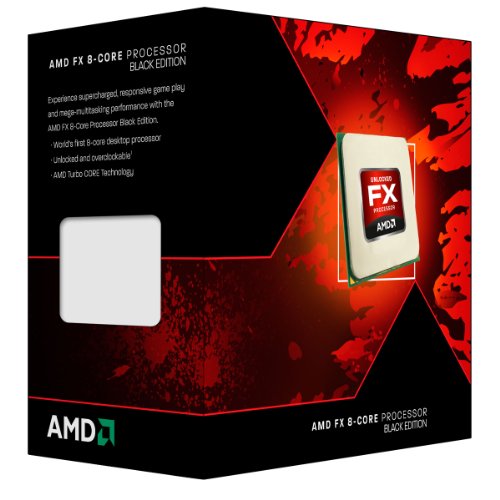
For an older AM3+ desktop that needs more room for simultaneous tasks, the FX-8300 remains the processor to examine first. Its eight cores and 3.3GHz operating frequency suit file work, browser-heavy routines, and older games that can spread activity across several threads.
The unlocked design gives experienced PC owners tuning flexibility, though the 95W thermal design calls for a suitable cooler and sensible airflow. You may find it a practical way to extend an existing system, but it won’t make an AM3+ platform behave like a current-generation desktop.
Strong Points
- Eight processing cores help keep multiple desktop applications responsive.
- The AM3+ socket matches the intended generation of older AMD motherboards.
- A 3.3GHz base operating frequency supports familiar everyday workloads.
- Unlocked operation gives experienced builders more control over tuning.
- The 95W design provides a clear starting point for cooler selection.
Things To Consider
- Older platform compatibility requires careful motherboard and firmware checking.
- Owners commonly need to keep dust away from the cooler and maintain steady case airflow around a 95W processor.
Key Specs
Who It Suits Best
You’ll get the clearest fit as an experienced owner of an AM3+ desktop who wants more multitasking capacity without replacing the full system.
Where Another Pick Suits Better
Choose SilverStone KR01 instead for a compact AM3 setup where cooler height matters more than processor replacement.
Cooling hardware often matters more than a small specification difference, especially during long gaming sessions or sustained desktop work. This Prism-style assembly combines an aluminum fin stack with a copper base, letting heat move from the processor into the larger surface area above it.
The 95mm fan uses a four-pin PWM connection, a control method that lets a compatible motherboard adjust fan speed. Broad AM2, AM3, AM4, and AM5 support makes it useful across several AMD builds, although the standard motherboard retention hardware needs to be present.
What We Like
- Copper at the base helps transfer heat into the aluminum heatsink.
- Four 6mm direct-contact heat pipes spread heat through the fin structure.
- Pre-applied thermal paste reduces preparation during installation.
- Four-pin PWM control can make everyday desktop use quieter than fixed-speed operation.
Worth Noting
- The cooler doesn’t include the motherboard’s standard mounting bracket.
- At 95mm, the fan may need careful clearance checking around tall memory modules.
- Thermal paste can become less convenient to reuse after removal.
Feature Snapshot
Made For
This suits you as a home builder who needs one AMD cooler for several AM2-through-AM5 systems and already has the required retention bracket.
Consider Something Else When
Pick SilverStone KR01 for a low-clearance case, or choose the upHere dual-tower cooler for a larger high-load desktop.
A missing cooler back plate can stop an otherwise usable AM2 or AM3 motherboard from returning to service. This DGZZI bracket provides the plastic mounting base that secures a compatible heatsink, so it addresses a very specific repair rather than replacing the cooler itself.
The ABS construction keeps the part light and easy to store with spare PC hardware. You may find installation straightforward on a matching board, but socket layout and screw alignment deserve a careful check before disassembling your machine.
Highlights
- Purpose-built replacement hardware can restore a motherboard with a missing mounting base.
- ABS plastic keeps the bracket light and less cumbersome inside a cramped case.
- The 11 x 8 x 2.2cm form factor is easy to keep in a repair drawer.
Trade Offs
- The CPU fan and heatsink are not included.
- Plastic mounting hardware needs careful tightening to avoid stressing the part.
- Compatibility is limited to AM2 and AM3 boards rather than newer AM4 layouts.
At A Glance
Right Fit For
This belongs in your toolkit as a repair part for an AM2 or AM3 desktop with damaged, missing, or misplaced cooler mounting hardware.
Not Your Match When
Choose RLECS four-piece brackets for a multi-board repair kit, while this DGZZI part suits a single AM2 or AM3 restoration.
Large desktop cases give you room to use a more substantial air cooler, and the upHere design takes that route with two towers, six heat pipes, and a 120mm PWM fan. Heat pipes are sealed tubes that carry heat away from the processor, while the twin towers provide more fin area than the compact options above.
That combination makes sense for sustained workloads on a compatible AM3, AM4, or AM5 system. The catch is physical clearance: you’ll need room for the dual-tower body and fan, so this isn’t the natural choice for a small-form-factor case.
Upsides
- Dual towers give the cooler a broad aluminum heat-dissipation structure.
- Six heat pipes help distribute processor heat across both fin assemblies.
- The 120mm PWM fan offers adjustable control through a compatible motherboard.
- Wide socket coverage makes the cooler useful across several AMD and Intel builds.
- The black finish blends into many gaming and workstation interiors.
Room For Improvement
- The larger assembly may interfere with tall RAM or narrow case panels.
- Dust buildup between two fin towers can make routine cleaning more involved.
Technical Sheet
Best Suited To
You’ll appreciate this option in a roomy desktop used for gaming, rendering, or extended multitasking where cooler size isn’t a concern.
Look Elsewhere When
SilverStone KR01 is a better fit for you when a 54mm cooler height matters more than the upHere unit’s larger cooling structure.
Custom liquid cooling calls for different hardware, and this FOSA block is designed for that role rather than for a standalone air-cooled PC. Its red-copper base sits over the CPU, while the 0.3 microchannel design creates narrow internal paths for coolant movement.
The acrylic top lets you see the block’s interior, and the stainless-steel mounting buckle adds a durable-looking structural element. One thing worth considering for a home loop is the extra work: you’ll need compatible tubing, a pump, a radiator, fittings, and careful leak checks.
Bright Spots
- The copper contact base is suited to direct CPU water-block installation.
- Microchannels give coolant more contact area inside the block.
- AM2, AM3, AM3+, AM4, and FM2+ support covers several AMD generations.
- The transparent acrylic top suits visible custom-loop builds.
Points To Note
- This block forms only part of a liquid-cooling loop.
- Acrylic needs careful handling during installation and cleaning.
- Custom tubing and fitting compatibility require planning before assembly.
Feature Rundown
Who Will Love This
This fits you as an enthusiast building a custom AMD liquid loop and seeking a copper-base block for an older or AM4 platform.
A Better Fit Elsewhere
Choose upHere’s dual-tower air cooler for a simpler installation without pumps, tubing, or liquid-loop maintenance.
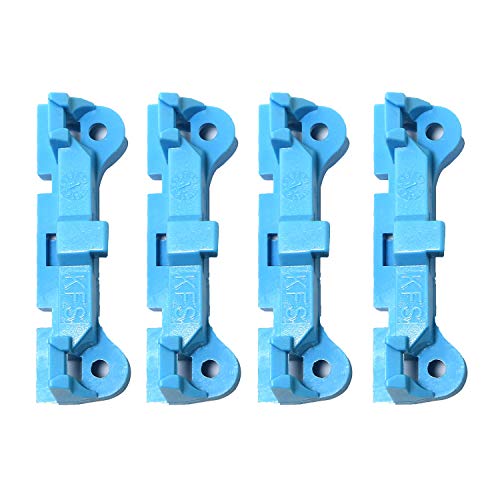
Four replacement bracket bases make the RLECS set more useful for a small repair bench than a single-piece mount. The plastic parts secure compatible AMD heatsinks, and the 48 x 96mm hole spacing gives you a concrete measurement to compare against the board in front of you.
The important detail is the socket boundary: this set supports AM2, AM3, FM1, FM2, FM2+, and FM3, but not AM4. You may find the spares handy for several older machines, though the separate CPU bracket and heatsink still need to be available.
Plus Points
- Four pieces give you spares for multiple older AMD repairs.
- Plastic construction keeps replacement hardware light and easy to store.
- Defined hole spacing simplifies a visual compatibility check before installation.
Small Caveats
- The CPU bracket itself isn’t included.
- AM4 boards aren’t supported, so socket identification matters.
- Plastic parts benefit from gentle handling during repeated cooler removal.
- The blue color may stand out in a color-matched interior.
Quick Facts
Who Should Grab It
This suits you as a repair hobbyist or technician handling several AM2, AM3, FM1, or FM2 systems.
Reach For A Different Pick When
DGZZI’s single AM2 and AM3 bracket is a cleaner match for you when one motherboard needs a direct replacement part.
Small cases narrow your cooler choices quickly, which makes the KR01’s 54mm total height its defining advantage. Two 6mm copper heat pipes connect the AMD mounting base to the heatsink, while the 80mm PWM fan keeps the assembly short enough for many low-clearance builds.
Its stated 95W cooling capacity aligns neatly with processors such as the FX-8300, provided your case has sensible airflow. For most compact AM3 desktops, this is a more realistic fit than the upHere dual tower, though heavier sustained loads may call for a roomier cooling solution.
Best Bits
- The 54mm height helps preserve clearance in slim desktop cases.
- Two copper heat pipes carry heat from the base into the fin area.
- The 80mm dual-ball-bearing PWM fan supports adjustable motherboard control.
- AM2, AM3, AM4, FM1, and FM2 compatibility covers several AMD generations.
- The 95W rating gives you a useful matching point for processor selection.
Areas To Watch
- Processors above 95W call for strong case airflow and careful thermal planning.
- An 80mm fan may move less air at a comparable speed than the 120mm unit in the upHere cooler.
Core Details
Whose Shelf It Belongs On
This is made for you as a small-form-factor PC owner who needs an AMD cooler under a tight 54mm height limit.
Swap It Out When
Pick the Wraith Cooler Prism for you when broader socket coverage and a larger 95mm fan matter more than the KR01’s low profile.
How To Choose The Right Cpus For Am3 Socket
Start With The Socket
AM3 and AM3+ describe the physical processor interface, but they aren’t interchangeable in every motherboard. Check the board model, firmware support, and processor list before choosing the FX-8300 or a replacement cooler. A correct socket match prevents a frustrating installation that stops before the system can start.
Match Heat To The Case
Thermal design power, or TDP, is a planning figure that helps you match a processor with cooling capacity. The FX-8300 and SilverStone KR01 both reference 95W, while the upHere dual-tower design offers a larger physical cooling structure for sustained workloads. Compact cases benefit from the 54mm KR01, whereas roomy towers can accommodate a dual-tower cooler more comfortably.
Choose Air Or Liquid
Air coolers keep your setup straightforward: attach the heatsink, connect the fan, and keep dust from restricting airflow. A water block only makes sense alongside a complete loop with a pump, radiator, tubing, and compatible fittings. Custom-loop builders gain flexibility, while everyday desktop owners usually benefit from the simpler maintenance of air cooling.
Check Mounting Hardware
A cooler can be compatible by socket and still fail to install because the motherboard bracket is missing. DGZZI gives you a single AM2 or AM3 mounting base, while RLECS supplies four older AMD base parts but excludes AM4 support. Confirm hole spacing, included hardware, cooler height, and memory clearance before opening the case.
Things Worth Knowing First
Mistakes Worth Dodging
Socket names aren’t enough. AM3, AM3+, and AM4 use different platform details, so match the exact board and processor rather than relying on a similar-looking retention frame. Also check whether a replacement bracket includes the fan, heatsink, screws, or only the base.
Cooling capacity needs context from your case. A 95W processor in a dusty, poorly ventilated enclosure can place more demand on the cooler than the same chip in a roomy tower with clear intake and exhaust paths.
Where The Extra Money Goes
Higher-tier cooling hardware generally adds more heat-transfer area, more heat pipes, a larger fan, or a liquid loop. The upHere dual tower takes the large-air-cooler route, while the FOSA water block supports a custom system with more components and more maintenance.
Spending more makes sense for sustained workloads, a carefully planned loop, or a case that needs better thermal headroom. A compact office PC may gain more from SilverStone KR01’s 54mm height than from a larger assembly that cannot fit.
Closing Remarks
You can still build or repair a capable AM3-era desktop by matching the processor, socket, mounting hardware, and cooler to the actual system around you. The FX-8300 suits AM3+ multitasking, SilverStone KR01 handles tight spaces, and the upHere cooler gives roomy cases a larger air-cooling option. DGZZI and RLECS focus on replacement mounts, while the FOSA block belongs in a planned liquid loop. Start with your motherboard model and case clearance, then choose the part that fits your build rather than chasing unused capacity.
