
You need the right processing approach for artificial intelligence work, whether you’re building a desktop for model development, running local inference, or adding vision processing to a small project. A conventional desktop CPU can suit general workloads, while a compact AI system or neural accelerator makes more sense for specialized tasks. This shortlist covers enthusiast desktop processors, Grace Blackwell systems, and a USB development stick, so you can match hardware to your software, workspace, and technical comfort level.
The Shortlist At A Glance


More Details On Your Top Picks
For a new AI-capable desktop that also handles editing, compiling, and demanding multitasking, the 270K Plus offers a sensible middle ground. Its hybrid layout combines Performance-cores, designed for heavy active work, with Efficiency-cores for background tasks, which suits a busy workstation that stays productive across several applications.
Support for DDR5 memory, PCIe 5.0 and PCIe 4.0, plus an LGA1851 socket gives you a modern platform, though a compatible Intel 800 Series motherboard is required. You may find the 125W base power calls for a thoughtful cooler and airflow plan during long sessions. Compared with the Core Ultra 5 250K Plus, this model gives you more cores for parallel workloads.
Strong Points
- 24-core design gives you useful headroom for compiling, rendering, and multitasking.
- DDR5 support helps you build around current high-speed memory.
- PCIe 5.0 connectivity leaves room for newer storage and expansion hardware.
- Up to 5.5 GHz suits responsive desktop work and burst-heavy applications.
Things To Consider
- The LGA1851 socket means an older motherboard may need replacement.
- A 125W base power rating makes cooling and case airflow part of installation planning.
Key Specs
Who It Suits Best
You’ll appreciate this processor most as an enthusiast building a flexible desktop for local development, creative work, and heavy multitasking.
Consider Something Else When
Choose the Intel Core Ultra 5 Processor 250K Plus instead for a more restrained everyday desktop focused on productivity and lighter AI workloads.
A compact AI desktop makes more sense than a conventional CPU for local model work, and the DGX Spark is built around that distinction. The GB10 Grace Blackwell chip targets fine-tuning, inference, and analytics, while the integrated NVIDIA software environment can reduce the setup friction that often comes with assembling a development stack yourself.
Up to 1 petaflop of AI performance is a stated figure, but your actual results will depend on model size, software support, and workload design. For most home offices, the compact energy-conscious form suits a dedicated workstation better than a large tower. The trade-off is specialization, since general desktop expansion details are less central here than with Intel’s socketed processors.
What We Like
- GB10 Grace Blackwell architecture targets serious local AI workloads.
- Compact desktop format fits a development desk without a full tower build.
- Local inference helps you work with models directly on your own system.
- NVIDIA’s software stack gives experienced developers a more unified starting point.
- Up to 1 petaflop of stated AI performance supports demanding experimentation.
Worth Noting
- Specialized software and model compatibility still require technical setup knowledge.
- Compact systems can offer less upgrade flexibility than a conventional desktop platform.
- Long AI sessions may make ventilation and desk placement worth careful attention.
At A Glance
Made For
You’re the right fit for this system as an AI developer, researcher, or data scientist who wants a focused local development machine.
Not Your Match When
The Intel Core Ultra 7 Processor 270K Plus suits you more when general desktop work, expansion, and conventional PC building matter as much as AI.
Built around the NVIDIA GB10 Superchip, the ASUS Ascent GX10 takes the same compact AI workstation idea and adds a clearly stated memory and storage configuration. You get 128GB of LPDDR5x memory, where LPDDR5x is a power-conscious memory standard, alongside a 1TB PCIe Gen4 NVMe SSD for local files, tools, and model assets.
Wi-Fi 7 and Bluetooth 5.4 make wireless placement easier in a modern office, while the stackable chassis suits multi-system setups. You may find the integrated design more convenient than assembling a tower, though proprietary compact hardware usually gives you fewer component-swapping options. Compared with the single DGX Spark, this ASUS option puts more emphasis on clearly defined storage, memory, and connectivity.
Highlights
- 128GB of LPDDR5x memory gives you room for substantial local development tasks.
- 1TB NVMe storage provides a practical starting point for software and project files.
- Wi-Fi 7 supports fast wireless networking in compatible environments.
- Bluetooth 5.4 helps connect nearby peripherals without adding cable clutter.
- Stackable chassis design suits a multi-unit lab or shared workstation.
Trade Offs
- Compact integrated hardware may leave less room for future component upgrades.
- Wireless features depend on compatible network equipment for their full value.
Technical Sheet
Right Fit For
You’ll benefit most as a developer or technical team setting up a compact, connected AI workstation with substantial memory.
Look Elsewhere When
NVIDIA DGX Spark GB10 Grace Blackwell Desktop is a better fit for you when a single focused system and NVIDIA’s integrated software environment take priority.
For a small computer-vision prototype, a USB accelerator can be more useful than replacing your whole desktop. The Movidius Neural Compute Stick uses a vision processing unit, or VPU, a chip designed to handle visual workloads, in a portable development format.
Real-time on-device inference means your application can process supported neural-network tasks without cloud connectivity. You may find the narrow focus limiting for modern general-purpose AI, especially beside the GB10 systems above. Still, its small footprint makes storage, transport, and connection to a development machine straightforward.
Upsides
- USB stick design keeps a prototype kit small and easy to store.
- On-device inference suits projects that need local processing.
- VPU hardware targets deep neural-network vision tasks.
Minor Gripes
- Its specialized vision focus does not replace a general desktop processor.
- Software compatibility deserves careful checking before you design a project around it.
- USB placement can become awkward beside crowded ports or thick cables.
Feature Snapshot
Who Will Love This
You’ll find the strongest fit as a student, maker, or developer prototyping computer-vision applications on a small budget and a standard desktop.
A Better Fit Elsewhere
ASUS Ascent GX10 AI Supercomputer 128GB 1TB suits you more for current large-model work, local experimentation, and built-in storage.
High-frequency desktop work is where the Core Ultra 9 285K makes its case. You get 24 cores in an 8 Performance-core and 16 Efficiency-core arrangement, plus boost speeds reaching 5.7 GHz, a combination that suits rendering, code compilation, and several demanding applications running together.
The 36MB Level 3 cache, a fast memory area for frequently reused instructions and data, helps keep active work close to the processor. The honest trade-off is platform planning: you need an LGA1851 motherboard with a compatible Z890 setup, and the 125W base power rating makes cooling selection important. Compared with the Ultra 7 270K Plus, this is the more aggressive desktop choice for sustained multitasking.
Reasons To Buy
- 24-core hybrid design handles parallel desktop workloads effectively.
- Up to 5.7 GHz boost supports fast response during demanding bursts.
- 36MB Level 3 cache keeps heavily reused data readily accessible.
- Unlocked design gives experienced builders more tuning flexibility.
- 125W base power fits a serious desktop workstation plan.
Room For Improvement
- LGA1851 and Z890 compatibility can make an upgrade more involved than a drop-in swap.
- A capable cooler and well-ventilated case should be part of your build budget.
- The listing includes a Mavark accessory bundle, so check the exact package contents.
Quick Facts
Best Suited To
You’ll get the most from this chip as an experienced desktop builder handling heavy creative, development, and multitasking workloads.
Swap It Out When
Intel NCSM2450.DK1 Movidius Neural Compute Stick is better for you when your project centers on compact vision prototyping rather than a full workstation.
The Core Ultra 5 250K Plus gives you a modern starting point for a general-purpose desktop that also supports AI-oriented software. Its 18-core layout, split between 6 Performance-cores and 12 Efficiency-cores, handles office work, coding, content creation, and background processes without pushing you toward the larger Ultra 9 platform.
Up to 5.3 GHz keeps everyday interaction brisk, while DDR5 and PCIe 5.0 support give your build current expansion options. Depending on your model size and workflow, you may still need a dedicated accelerator for serious local inference. Compared with the Ultra 7 270K Plus, this processor is easier to justify for a balanced home or productivity desktop.
Bright Spots
- 18 cores provide useful multitasking capacity for everyday desktop work.
- Up to 5.3 GHz suits responsive applications and short intensive tasks.
- DDR5 support keeps your new build on a current memory platform.
- PCIe 5.0 and PCIe 4.0 support leave room for modern storage and expansion.
Points To Note
- The LGA1851 socket requires a compatible Intel 800 Series motherboard.
- 125W base power means you still need sensible cooling for long workloads.
Feature Rundown
Who Should Grab It
You’ll find this a strong fit as a home user, student, or creator building a flexible desktop for productivity and moderate AI work.
Reach For A Different Pick When
Intel Core Ultra 9 285K Arrow Lake 24-Core LGA 1851 fits you better for heavier parallel workloads and higher boost-clock demands.
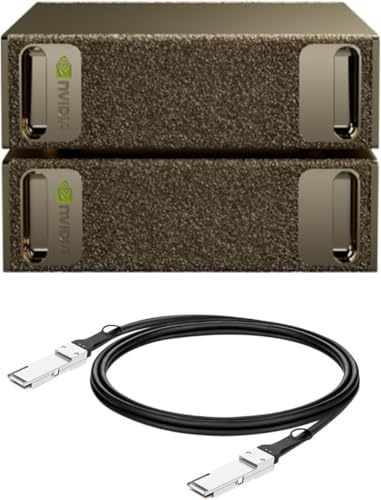
A two-unit DGX Spark bundle gives you a different path from a single local AI workstation. You can dedicate one system to development and another to a separate task, or create a more collaborative setup for a small technical team, with the included cable bundle helping simplify the initial arrangement.
Each unit uses the GB10 Grace Blackwell chip and targets local model work, inference, and analytics. You may find two compact systems easier to place than a single large workstation, but the bundle also demands more desk space, power planning, and software coordination. For a solo developer, the single NVIDIA DGX Spark is likely the cleaner starting point.
Plus Points
- Two GB10-based systems support parallel or shared AI workflows.
- Local processing keeps development tasks close to your workstation.
- Included cables make a multi-system setup more straightforward to organize.
- Compact desktop hardware can suit a small lab or collaborative office.
Small Caveats
- Two systems require more careful placement, ventilation, and cable management.
- Software coordination may take extra time for a first multi-system setup.
- A solo user may not need the second unit for a basic local workflow.
Core Details
Whose Shelf It Belongs On
You’ll benefit most as a research group, small development team, or advanced home lab managing more than one local AI workload.
Where A Sibling Pick Shines
NVIDIA DGX Spark GB10 Grace Blackwell Desktop suits you more for a solo setup that needs one compact AI workstation.
How To Choose The Right Cpus For Artificial Intelligence
Start With The Workload
Your first decision is the kind of AI work you plan to run. CPU cores matter for data preparation, compiling, multitasking, and applications that do not hand every task to a graphics processor. A desktop chip such as the Core Ultra 5 250K Plus can suit local development and general productivity, while a GB10 system is more directly aimed at model inference and fine-tuning.
Computer vision creates another path. The Movidius Neural Compute Stick is a specialized accelerator for supported deep neural-network vision tasks, not a replacement for a full desktop processor.
Match The Platform
Socket and chipset compatibility should come before memory or clock speed. The Intel processors here use the LGA1851 platform and require an Intel 800 Series motherboard, so an upgrade may involve a new board, cooler installation, and memory planning.
DDR5 is a newer memory standard that can support current desktop builds, while PCIe describes the connection standard used by expansion cards and storage. PCIe 5.0 offers a newer path for compatible hardware, but the benefit depends on the devices you install.
Think About Local Use
Local AI work keeps models and processing on your own computer, which can suit a home lab, private development environment, or office workstation. Compact systems reduce the need to assemble a traditional tower, but they may give you fewer options for replacing individual components.
Your software stack matters just as much as the hardware. Check framework support, model compatibility, operating-system requirements, and the memory needs of your preferred tools before choosing between a socketed CPU and a purpose-built AI desktop.
Plan For Heat And Expansion
A 125W desktop processor needs suitable cooling and case airflow, especially during long compilation or rendering sessions. Compact AI systems call for sensible ventilation and uncluttered placement. Leave room for storage, networking, and cable management rather than treating the processor as the only part that affects ownership.
Things Worth Knowing First
Mistakes Worth Dodging
Choosing by core count alone can lead you toward the wrong platform. A CPU with many cores may suit preprocessing and multitasking, while a specialized AI system may handle supported inference tasks more directly. Match the hardware to your models and software before comparing headline frequencies.
Socket mistakes also create avoidable build problems. Confirm the motherboard platform, memory type, cooling arrangement, and available expansion space before placing an order.
Where The Extra Money Goes
Higher-tier hardware generally pays for more cores, higher boost frequencies, larger cache, specialized AI architecture, or a more complete memory and storage setup. The upgrade makes sense for long model sessions, frequent rendering, large development projects, or shared technical work.
A mainstream processor remains the sensible route for coding, office use, and moderate experimentation. A compact GB10 system or two-unit bundle earns its place when local AI work is the main purpose rather than an occasional feature.
Closing Remarks
Your best choice depends on whether AI is the main workload or one part of a broader desktop routine. Choose the Core Ultra 5 250K Plus for a balanced starting point, the Ultra 7 or Ultra 9 for demanding desktop work, and a GB10 system for a focused local AI environment. The ASUS GX10 adds substantial memory and storage, while the Movidius stick keeps vision prototyping compact. Start with software compatibility and platform requirements, then select the hardware that fits your actual workspace.
