
CAD work can expose weak hardware quickly, especially during 3D modeling, rendering, simulation, or large assemblies. You need more than a processor alone, though: cooling, memory, graphics support, storage, and case organization all shape your daily experience. This shortlist covers complete workstations, modern CPUs, compact coolers, a liquid cooling option, and practical accessories for storing older Intel chips. You’ll find choices for first-time builders, professional workloads, and anyone trying to keep a tower accessible in a busy workspace.
The Shortlist At A Glance

VIVO ATX Computer Tower Steel Rolling Stand CART-PC01L

Intel Core Ultra 7 Processor 270K Plus
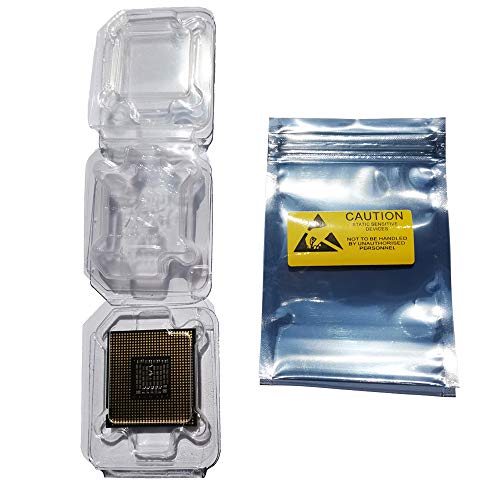
Daarcin Intel CPU Protective Clamshell Case Trays 10pcs

Thermalright Assassin X 90 SE V2 CPU Cooler

ID-COOLING SE-903-XT V2 Black CPU Air Cooler

Thermalright Trofeo Vision 360 ARGB Black CPU Liquid Cooler

PCSP ThinkStation P920 Tower Workstation Dual Xeon 8160
More Details On Our Top Picks
A floor-level tower can collect dust and become awkward to reach during cable work. This steel rolling stand gives you an adjustable 7.8-to-14-inch support range, so you can position a compatible ATX case beside or beneath a desk and move it for cleaning.
Four casters make repositioning easier during a crowded CAD session, while two locking wheels help hold the cart in place. You may appreciate that control in a shared office, although the case-width measurement deserves attention before setup.
Strong Points
- Steel construction suits the weight and shape of a desktop tower.
- Adjustable width accommodates many ATX cases without a fixed-size cradle.
- Rolling access makes rear ports and cable connections easier to reach.
Things To Consider
- Measure your case carefully, since towers wider than 14 inches won’t fit.
- Dust and floor debris can collect around the casters, so periodic cleaning is sensible.
Key Specs
Who It Suits Best
You’ll get the most from this stand in a home office or workshop using a standard ATX tower.
Where Another Pick Suits Better
Choose the ID-COOLING SE-903-XT V2 for a builder focused on processor cooling rather than tower mobility.
CAD workloads often switch between responsive modeling and heavier background tasks. With 24 cores, split into 8 performance cores and 16 efficiency cores, this processor gives you a strong foundation for multitasking, rendering support, and demanding creator software.
A peak clock speed up to 5.5 GHz favors quick interactive work, while DDR5 memory support and PCIe 5.0 and 4.0 connectivity keep the platform current. The catch is platform planning: you need an LGA1851 motherboard built around an Intel 800 Series chipset, plus suitable cooling for its 125W base power.
What We Like
- 24-core layout suits simultaneous CAD, reference, browser, and rendering tasks.
- Up-to-5.5 GHz operation supports responsive viewport and modeling work.
- DDR5 and PCIe 5.0 support leave room for a modern storage and graphics setup.
- LGA1851 compatibility gives you a clearly defined upgrade platform.
Trade Offs
- You must budget for an LGA1851 motherboard and DDR5 memory.
- A 125W base-power processor needs a cooler selected for sustained workloads.
- Installation requires careful socket and firmware compatibility checks.
Technical Sheet
Made For
This chip suits experienced builders creating a current CAD workstation for mixed modeling, rendering, and multitasking.
Consider Something Else When
Reach for the PCSP ThinkStation P920 for a turnkey workstation and extensive memory already installed.
Spare processors are easy to misplace in a repair drawer, especially across a classroom, service bench, or small lab. These thick plastic clamshell trays are shaped for Intel 775, 1155, 1151, 1150, and 1156 CPUs, giving you a dedicated place for compatible chips.
The set also includes antistatic bags and labels, which helps separate models and simplify inventory. You may find the format especially useful during a parts-room cleanup, though it won’t help with newer socket families and it doesn’t include a processor.
Highlights
- Ten trays provide organized storage for a collection of compatible Intel CPUs.
- Antistatic bags add a layer of handling protection during storage and transport.
- Included labels make chip identification easier after a system upgrade.
Minor Gripes
- Socket coverage is limited to the listed older Intel platforms.
- Plastic trays still need a clean, dry storage drawer to avoid dust buildup.
Quick Facts
Right Fit For
You’ll find this set most useful in a repair shop, training room, or home lab managing older Intel processors.
Not Your Match When
Choose the VIVO CART-PC01L for a home-office setup that needs physical tower support instead of component storage.
Small CAD towers often leave little room around the socket, making a compact air cooler easier to install than a larger tower design. The Assassin X 90 SE V2 uses a 92mm PWM fan, where PWM means motherboard-controlled speed adjustment, and supports several Intel and AMD sockets.
That combination suits office workstations and moderate modeling loads where straightforward air cooling matters more than display effects. Compared with the ID-COOLING SE-903-XT V2, this Thermalright choice covers a broad set of named legacy and current sockets, though the smaller fan may offer less airflow headroom for sustained high-load work.
Upsides
- 92mm fan sizing helps preserve clearance in compact cases.
- PWM control can reduce unnecessary fan noise during light CAD sessions.
- Support spans Intel LGA1700, 1150, 1151, and 1200, plus AMD AM4 and AM5.
- Air cooling avoids the pump and radiator installation involved with liquid systems.
Room For Improvement
- Compact cooling hardware may be a less comfortable fit for extended heavy rendering.
- Socket and case-clearance checks still matter during installation.
- Dust on the fan and fins can gradually restrict airflow, so routine cleaning helps.
Feature Snapshot
Best Suited To
This cooler fits compact PC builders using a compatible processor for everyday CAD, drafting, and moderate 3D work.
Look Elsewhere When
Pick the Thermalright Trofeo Vision 360 for a large case and sustained high-load cooling with an integrated display.
For a quieter home workstation, the SE-903-XT V2 takes a compact air-cooling route with a 100mm PWM fan and direct-touch heatpipes. Heatpipes are sealed tubes that move heat from the processor into the fin stack, while direct contact shortens that transfer path.
The revised fin-locking structure and reinforced fan clips are intended to reduce movement during transport, a useful detail for a PC that travels between rooms. You may prefer this design over the Thermalright Assassin X 90 SE V2 when the larger 100mm fan better matches your case space, but socket and clearance checks remain part of installation.
Bright Spots
- 100mm PWM fan sizing offers a useful middle ground between compactness and airflow.
- Direct-touch heatpipes support efficient heat movement from the CPU area.
- Reinforced clips and fin locking should help keep the assembly settled during transport.
- Black styling works neatly in understated workstation builds.
- Air cooling keeps maintenance focused on dust removal rather than pump care.
Points To Note
- The larger fan still needs adequate case clearance around the socket.
- Direct-touch designs can require careful thermal paste application during setup.
Feature Rundown
Who Will Love This
This option suits home builders seeking a compact, low-noise cooler for Intel or AMD CAD systems.
Swap It Out When
Choose Intel Core Ultra 7 270K Plus when your priority is processor throughput rather than a replacement cooling unit.
A showcase workstation can treat cooling as part of the visual design, and the Trofeo Vision 360 adds a 6.86-inch magnetic IPS LCD screen to its liquid-cooling assembly. The screen’s 1280-by-480 resolution and customizable themes give you more room for system art or monitoring visuals than either compact air cooler here.
Three pre-installed 120mm fans form a 360mm radiator arrangement, with 2150 RPM speed, 69 CFM airflow, and 27 dBA stated noise. That hardware suits large cases and demanding processors, though liquid installation brings radiator placement, tubing, pump, and long-term maintenance considerations that don’t apply to the simpler air designs.
Reasons To Buy
- 360mm radiator format gives large workstation builds substantial cooling hardware.
- Three fans arrive arranged for radiator use, reducing assembly steps.
- Magnetic LCD display adds customizable visual information to a showcase chassis.
- AM4, AM5, LGA1700, and LGA1851 support covers several current platforms.
Honest Caveats
- You need a case with suitable 360mm radiator mounting space.
- Liquid systems require more installation planning than the Assassin X 90 SE V2.
- Owners commonly need to keep radiator fins and fans clear of dust for steady airflow.
- The display adds visual appeal but isn’t necessary for CAD performance.
At A Glance
Whose Shelf It Belongs On
This cooler is aimed at experienced PC builders with spacious cases, high-load processors, and a genuine interest in screen customization.
A Better Fit Elsewhere
Select the ID-COOLING SE-903-XT V2 for a smaller workstation where easy air-cooler installation matters more than display features.
A prebuilt workstation can save you the socket, memory, storage, and operating-system decisions that come with a fresh build. This renewed ThinkStation P920 pairs two Intel Xeon Platinum 8160 processors for 48 total cores, 128GB of DDR4 memory, a 1TB NVMe SSD, and an NVIDIA Quadro P2000 graphics card with 5GB of GDDR5 memory.
That mix is aimed at substantial multitasking, rendering, simulation, and professional CAD workflows rather than a casual drafting desk. The honest trade-off is age and scale: the dual-Xeon platform is physically substantial and less straightforward to upgrade than the Intel Core Ultra 7 route, while the Quadro P2000 may not suit every newer visualization workload.
Best Bits
- Dual Xeon processors provide 48 total cores for parallel workloads.
- 128GB of DDR4 memory gives large projects room to remain active alongside other software.
- The 1TB NVMe SSD supports quick system and project loading.
- Quadro P2000 graphics target professional CAD and 3D applications.
- Windows 11 Pro arrives installed, reducing initial setup work.
Areas To Watch
- The renewed condition means you should inspect the unit and confirm the supplied configuration on arrival.
- Dual-processor hardware can draw more space and planning than a newer single-socket build.
- Older DDR4 and Xeon technology may offer less platform flexibility than Intel Core Ultra 7 270K Plus.
Core Details
Who Should Grab It
This workstation suits professional CAD users, engineers, and studios handling large parallel workloads without assembling every component.
Reach For A Different Pick When
Choose Intel Core Ultra 7 270K Plus for a newer single-processor build with DDR5 and PCIe 5.0 support.
How To Choose The Right Cpus For Cad
Match Core Layout To Your Work
CAD modeling often benefits from quick single-thread response, meaning one processing core handles an active task with minimal delay. Rendering, simulation, and batch exports can spread work across many cores, so the 24-core Intel Core Ultra 7 and 48-core dual-Xeon workstation serve different priorities.
You’ll want a fast, modern chip for interactive design, while engineering teams running long calculations may value the P920’s larger core count. A high core count won’t automatically improve every CAD command, so match the processor to the software tasks you run most.
Treat Cooling As Part Of The Build
A CPU cooler removes heat from the processor and transfers it into fins or a radiator before fans move that heat away. Compact air coolers such as the Assassin X 90 SE V2 and SE-903-XT V2 simplify installation and suit moderate workloads.
Long rendering sessions place more sustained demand on cooling than short drafting sessions. The Trofeo Vision 360 makes more sense in a spacious case with radiator mounting, while air cooling usually keeps cleaning and installation more straightforward.
Check The Platform Before Ordering
Socket compatibility is non-negotiable. The Intel Core Ultra 7 270K Plus requires LGA1851 and an Intel 800 Series chipset, while the listed Thermalright air coolers cover different Intel and AMD generations.
Memory and expansion support matter too. DDR5 and PCIe 5.0 give a newer build more current connectivity, whereas the P920 arrives with 128GB of DDR4 and a Quadro P2000. You should also confirm graphics-card support in the CAD applications you use, particularly for viewport-heavy 3D work.
Plan Around Your Workspace
A rolling tower stand can make a heavy desktop easier to access, but you still need to measure the chassis width. The VIVO CART-PC01L adjusts from 7.8 to 14 inches, making the case measurement a practical first step.
Home users may prefer a compact cooler and movable tower, while a studio handling simulation may accept a larger workstation footprint. Storage accessories such as the Daarcin trays help service teams keep older processors identified and separated from active parts.
Things Worth Knowing First
Mistakes Worth Dodging
A common mistake is choosing a high core count without checking how your CAD software uses threads. You can also overlook the motherboard socket, memory generation, cooler clearance, or graphics compatibility, turning a promising processor into an inconvenient build.
Measure your case before choosing a cooler or rolling stand. For a renewed workstation, confirm the stated memory, storage, graphics, and operating-system configuration so your setup matches the work you plan to run.
What Separates Premium From Basic
Higher-tier hardware usually adds more cores, faster memory support, stronger expansion standards, larger cooling systems, or workstation graphics. Those additions matter most during rendering, simulation, large assemblies, and multi-application sessions.
A compact air cooler can be enough for drafting and moderate modeling, so paying more for a 360mm liquid cooler makes sense only with a suitable case and sustained heat load. Likewise, the P920 earns its larger footprint through preinstalled memory and dual processors, while a newer CPU platform gives you a cleaner path for a custom build.
The Takeaway
Your best choice depends on the entire CAD workstation, not a processor label alone. Choose Intel Core Ultra 7 270K Plus for a current custom build, the P920 for extensive multi-core workloads, or a compact Thermalright or ID-COOLING cooler for a practical upgrade. The Trofeo Vision 360 suits spacious showcase systems, while the VIVO stand and Daarcin trays solve useful workspace and storage problems. Match socket, case dimensions, cooling, memory, and graphics support to your daily projects, and your setup will feel far easier to live with.
