
Choosing hardware for a mining rig takes more than matching a processor to a socket. You also need a motherboard with enough expansion space, cooling that suits sustained workloads, and storage that keeps spare processors organized. This shortlist covers dedicated mining boards, AMD processors, air coolers, and a protective tray set for different stages of your setup. You’ll find choices for multi-GPU builds, AM4 desktops, compact upgrades, and hardware storage, with clear trade-offs for each use case.
The Shortlist At A Glance

ASRock H110 Pro BTC+ 13GPU Mining Motherboard

AMD Ryzen 9 5900XT 16-Core, 32-Thread Processor
be quiet! Pure Rock 3 Black CPU Air Cooler

AMD Ryzen 7 5700 8-Core, 16-Thread Processor
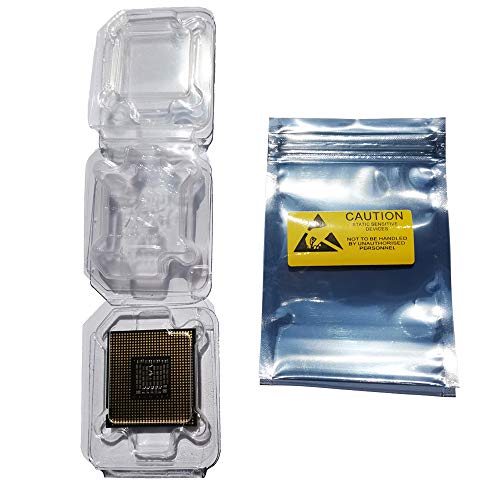
CPU Protective Plastic Clamshell Case Trays 10pcs

CPU Wraith Cooler Prism Aluminum Heat Sink
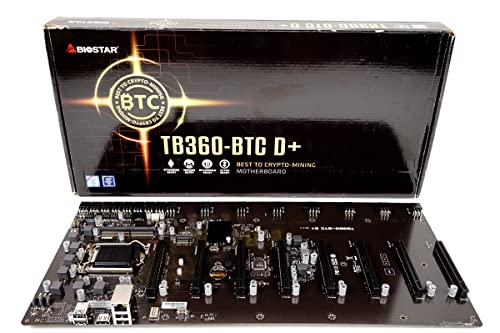
Biostar TB360-BTC D+ LGA1151 Mining Motherboard
More Details On Our Top Picks
Large GPU builds need expansion room first, and this ASRock board is designed around that problem. It provides one full-length PCIe 3.0 x16 slot plus twelve PCIe 2.0 x1 slots, giving you substantially more connection points than a conventional desktop board.
The H110 platform supports sixth- and seventh-generation Intel Core processors, Pentium chips, and Celeron processors, while four SATA3 ports and an M.2 SATA3 slot help with system storage. You may find the older platform limiting for a new general-purpose PC, but dedicated rig builders gain a clear layout advantage.
Strong Points
- Thirteen PCIe slots provide room for multi-GPU configurations.
- Processor support covers several Intel generations and entry-level chips.
- Four SATA3 connections simplify storage expansion in a rig chassis.
- The M.2 SATA3 slot can keep the operating system drive compact.
- Large builds benefit from fewer expansion compromises.
Things To Consider
- The H110 platform is older, so you need a compatible sixth- or seventh-generation Intel processor.
- Managing airflow, riser cables, and power wiring becomes more involved as the GPU count grows.
Key Specs
Who It Suits Best
You’ll get the most from this board as an experienced rig builder planning a large Intel-based multi-GPU system.
Where Another Pick Suits Better
Choose the Biostar TB360-BTC D+ for a smaller eight-GPU Intel setup that uses eighth- or ninth-generation processors.
For a desktop that handles mining-related background work alongside content creation or gaming, the Ryzen 9 5900XT brings sixteen cores and thirty-two processing threads. A thread is a stream of scheduled work, so the high count helps with heavily parallel tasks and busy multitasking sessions.
Zen 3 architecture, a 4.8 GHz maximum boost, 72 MB of cache, DDR4-3200 support, and PCIe 4.0 support give this AM4 processor a broad desktop role. The honest trade-off is platform age and the lack of an included cooler, which makes your cooling plan part of the build.
What We Like
- Sixteen cores suit demanding multitasking and parallel workloads.
- Thirty-two threads help maintain responsiveness during simultaneous desktop tasks.
- Unlocked operation gives experienced users tuning flexibility.
- PCIe 4.0 support works well with compatible modern expansion hardware.
Worth Noting
- A cooler is not included, so you need to budget space and hardware for CPU cooling.
- AM4 compatibility makes this a platform-specific upgrade rather than a drop-in option for newer socket designs.
- Overclocking adds setup complexity and makes careful thermal management more important.
Feature Snapshot
Made For
This processor fits experienced AM4 users who need high parallel capacity for a busy workstation or mixed-use desktop.
Consider Something Else When
The AMD Ryzen 7 5700 suits you better when a lower-power eight-core AM4 configuration matters more than maximum thread capacity.
Sustained processor workloads place steady demands on a cooler, and the Pure Rock 3 Black answers with four 6 mm heat pipes. Heat pipes move heat from the processor contact area into the fin stack, while the 120 mm PWM fan adjusts its speed through the motherboard.
The compact design and stated high RAM and VRM clearance make it easier to plan around nearby components than a bulky tower cooler. You may find its single-fan layout better suited to mainstream desktops than extreme heat loads, but it pairs naturally with processors such as the Ryzen 7 5700.
Highlights
- Four heat pipes spread processor heat through the fin array.
- A 120 mm PWM fan supports automatic speed control.
- Clearance around memory and power-delivery components simplifies installation planning.
- The black finish works neatly in restrained desktop builds.
- Air cooling avoids the pump and radiator maintenance associated with liquid systems.
Trade Offs
- Large, high-output processors may need a more substantial cooling arrangement.
- Dust removal from the fins and fan remains part of normal ownership.
Technical Sheet
Right Fit For
You’ll appreciate this cooler in a mainstream or gaming desktop where compact clearance and straightforward air cooling matter.
Not Your Match When
The CPU Wraith Cooler Prism Aluminum Heat Sink better suits you when you need a cooler listed for a wider range of older AMD sockets.
Eight cores and sixteen threads give you a capable middle ground for an AM4 desktop that handles mining software, browsing, and everyday applications. Its 65W TDP, meaning the processor’s rated thermal design power, supports a more manageable cooling plan than the higher-output Ryzen 9 5900XT.
A boost speed up to 4.6 GHz and 20 MB of combined L2 and L3 cache keep the specification practical for general desktop use. The included Wraith Stealth cooler helps simplify installation, although you may want a stronger cooler for sustained tuning or a tightly packed case.
Upsides
- Eight cores and sixteen threads cover multitasking without the larger Ryzen 9 footprint.
- The 65W rating makes cooling and case airflow easier to plan.
- The included cooler reduces the number of parts needed for a basic build.
Room For Improvement
- Its eight-core layout gives you less parallel capacity than the Ryzen 9 5900XT.
- The bundled cooler may feel limiting during extended heavy workloads or aggressive tuning.
- AM4 socket requirements narrow compatibility with newer motherboard platforms.
Quick Facts
Best Suited To
This processor fits you best as an AM4 upgrader seeking balanced multitasking and moderate cooling demands.
A Better Fit Elsewhere
The AMD Ryzen 9 5900XT is better for you when sixteen cores and thirty-two threads justify a more demanding cooling setup.
Spare processors are easy to misplace in a busy workshop, especially alongside cables, memory, and risers. This Daarcin set gives you ten plastic clamshell trays, ten antistatic bags, and ten labels for separating compatible Intel processors.
The listed socket families include Intel 775, 1155, 1151, 1150, and 1156. Antistatic packaging helps you organize sensitive components during storage, though you still need careful handling and a dry, clean storage area for long-term hardware keeping.
Plus Points
- Ten trays create a straightforward system for sorting spare CPUs.
- Antistatic bags add a practical layer between processors and workshop clutter.
- Labels make socket and part identification faster during repairs.
- The clamshell format keeps each stored processor separated from nearby hardware.
- A useful accessory for refurbishing desks and multi-system projects.
Minor Gripes
- The set is intended for storage, not processor installation or operation.
- Compatibility focuses on listed Intel sockets, so newer AMD and Intel parts need another storage approach.
Details At A Glance
Who Will Love This
You’ll find this set useful as a refurbisher, parts organizer, or collector managing multiple compatible Intel CPUs.
Reach For A Different Pick When
The ASRock H110 Pro BTC+ board suits you more when your priority is installing hardware in a large multi-GPU platform rather than storing it.
A replacement cooler can rescue an older AMD desktop or help you assemble a spare system without choosing a large tower. This model combines an aluminum heatsink, copper-core base, four copper heat pipes, and a 95 mm fan controlled through a 4-pin PWM connection.
Its listed socket range includes AM5, AM4, AM3, and AM2, along with several additional AMD platforms, and thermal paste comes pre-applied. You may appreciate that broad coverage during mixed-generation repairs, but the standard motherboard bracket needs to be present because it isn’t included with the cooler.
Best Bits
- Supports both AM4 and AM5 along with several older AMD sockets.
- The copper base and heat pipes provide a direct path for moving heat away from the processor.
- Pre-applied thermal paste shortens the installation process.
- A 4-pin PWM lead allows motherboard-based fan control.
Points To Note
- You need the compatible standard mounting bracket already installed on the motherboard.
- The 95 mm fan has a smaller footprint than the 120 mm fan on the Pure Rock 3 Black.
- Socket coverage still needs to be checked against your exact processor and board.
Feature Rundown
Built With In Mind
This cooler is suited to you as an AMD desktop owner handling an AM4 or AM5 replacement, repair, or compact upgrade.
Swap It Out When
The be quiet! Pure Rock 3 Black better fits you when a 120 mm fan and stated RAM and VRM clearance matter more than broad older-socket coverage.
Eight GPU connections make the Biostar TB360-BTC D+ a more focused choice than the thirteen-slot ASRock board. The LGA1151 socket supports Intel eighth- and ninth-generation processors, while the SODIMM DDR4 design keeps the memory format compact for a dedicated rig.
There are two setup details you can’t overlook: the processor needs integrated graphics, and the board requires a server power supply. For a first rig, those requirements add planning work; for a careful builder with matching parts, the eight-GPU layout can make the system easier to size.
Bright Spots
- Eight-GPU support suits a medium-sized dedicated mining frame.
- Intel eighth- and ninth-generation compatibility gives you a newer platform than the H110 Pro BTC+.
- SODIMM DDR4 helps keep the board layout compact.
- Integrated graphics support can provide onboard display output during setup.
Small Caveats
- You need a processor with integrated graphics for onboard video output.
- A server power supply is required, which can complicate parts selection.
- The narrower eight-GPU layout offers less expansion room than the ASRock board.
Core Details
Whose Shelf It Belongs On
This board suits you as a hands-on builder planning an eight-GPU Intel rig with the required integrated-graphics CPU and server power supply.
Another Choice May Suit
The ASRock H110 Pro BTC+ 13GPU Mining Motherboard is better for you when expansion beyond eight GPUs is central to the build.
How To Choose The Right Cpus For Cpu Mining
Start With The Platform
Socket compatibility comes first. AM4 processors such as the AMD Ryzen 9 5900XT and Ryzen 7 5700 need an AM4 motherboard, while Intel processors for the ASRock H110 Pro BTC+ and Biostar TB360-BTC D+ belong to different generations and board families.
Check the motherboard chipset, memory format, firmware support, and graphics requirements together. A processor that fits physically can still create a poor match through incompatible memory or missing integrated graphics.
Match Cores To Your Workload
Core count refers to the number of independent processing units inside the CPU. Thread count indicates how many software work streams the processor can manage, so the Ryzen 9 5900XT’s 16-core, 32-thread design suits busy multitasking better than the Ryzen 7 5700’s 8-core, 16-thread layout.
Mining performance also depends on the algorithm, software settings, memory, operating cost, and the graphics hardware in the rig. Treat the CPU as part of the system rather than assuming a larger core count automatically improves every workload.
Plan Cooling Before Assembly
Thermal design power gives you a starting point for cooler planning, not a complete description of every operating condition. The Ryzen 7 5700 lists a 65W TDP and includes a Wraith Stealth cooler, while the Ryzen 9 5900XT does not include a cooler.
A 120 mm air cooler such as the Pure Rock 3 Black provides a different installation and airflow profile from the 95 mm Wraith-style option. Leave room for dust cleaning, fan access, and memory clearance, particularly in a crowded mining frame.
Count Slots, Power, And Storage
Multi-GPU boards solve a connection problem, but they don’t remove the need for riser cables, suitable power distribution, airflow, and a chassis that can hold the cards. The ASRock board offers thirteen PCIe slots, while the Biostar board supports eight GPUs and requires a server power supply.
Storage needs are modest for many basic systems, yet SATA and M.2 connections affect cable management. You’ll also benefit from labeled antistatic storage such as the Daarcin tray set when spare processors and components accumulate around your workspace.
Things Worth Knowing First
Mistakes Worth Dodging
Socket names alone don’t provide enough information. Match the CPU generation, chipset, memory type, graphics output, cooler mount, and power arrangement before assembling anything.
You also need to separate a processor from the rest of the rig. A high-thread-count desktop CPU won’t replace a motherboard with adequate GPU expansion, and a mining board won’t solve cooling or power planning by itself.
Where The Extra Money Goes
Higher-tier processors generally provide more cores, threads, cache, or boost headroom, while larger coolers add heat-transfer capacity and clearance planning. Those upgrades matter most during sustained multitasking, intensive workstation use, or a build that already has compatible supporting parts.
Spending more on expansion can make sense for a large rig, but a smaller system may gain more from balanced cooling and reliable compatibility. The Ryzen 7 5700 is a sensible fit for moderate AM4 systems, while the Ryzen 9 5900XT suits you when parallel capacity is the main priority.
Final Verdict
Your right choice depends on the entire rig, not a single specification. The ASRock H110 Pro BTC+ suits large multi-GPU builds, while the Biostar TB360-BTC D+ gives you a more compact eight-GPU Intel path with stricter power and graphics requirements. For AM4 desktops, the Ryzen 9 5900XT brings substantial thread capacity, and the Ryzen 7 5700 keeps cooling demands more manageable. Add the Pure Rock 3 Black or Wraith-style cooler according to socket and clearance needs, then use the Daarcin trays to keep spare CPUs protected and organized.
