
Choosing a desktop for gaming and video editing gets complicated fast, especially when a gaming-focused system, a compact mini PC, and a workstation processor all appear in the same search. You need enough CPU muscle for timelines, exports, multitasking, and creative software, plus graphics hardware that can keep modern games moving smoothly. These six options cover practical office setups, compact editing stations, high-core-count workstations, and full-size gaming desktops.
The Shortlist At A Glance

ASUS ROG GM700 (2025) Gaming Desktop PC, Ryzen 7 9800X3D, Radeon RX 9070 XT

GEEKOM A9 Max Superior AI Mini PC, Ryzen AI9 HX370, 1TB SSD+32GB DDR5 RAM
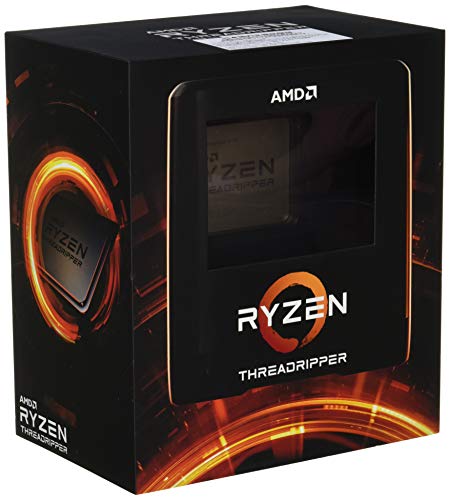
AMD Ryzen Threadripper 3970X 32-Core, 64-Thread Unlocked Processor

BOSGAME P6 Ryzen 9 6900HX Mini PC, 24GB RAM, 1TB PCIe4.0 SSD

Dell Pro Tower Plus Core Ultra 7 265, 32GB DDR5, 1TB SSD Desktop

Alienware Aurora Gaming Desktop, RTX 5080, Intel Core Ultra 9 285
More Details On Our Top Picks
The GM700 makes sense for you when gaming performance matters just as much as editing speed. Its Ryzen 7 9800X3D processor is paired with a Radeon RX 9070 XT graphics card, giving you a ready-built system for demanding games, timeline previews, and GPU-assisted creative work.
Inside, 32GB of DDR5 memory and a 2TB PCIe 4 solid-state drive give you useful room for active projects and game installs. The dual-glass chassis with customizable lighting suits a visible desk setup, though its larger footprint and illuminated styling won’t appeal to every quiet office.
Strong Points
- The Ryzen 7 9800X3D and Radeon RX 9070 XT create a well-matched foundation for high-refresh gaming and editing workloads.
- 32GB DDR5 RAM helps you keep an editor, browser tabs, and communication tools open together.
- The 2TB NVMe SSD, a fast solid-state storage format, reduces the need to manage project files immediately.
- Dual glass panels and customizable lighting give your gaming desk a visible centerpiece.
- Owners commonly value the prebuilt convenience, since you avoid sourcing a compatible processor, graphics card, memory kit, and storage drive separately.
Things To Consider
- The glass-heavy chassis can show dust and fingerprints, so regular exterior cleaning becomes part of ownership.
- The gaming-focused design may feel too expressive for a restrained workplace.
Key Specs
Who It Suits Best
You’ll get the most from this desktop as a gaming-focused editor who wants strong graphics and substantial local storage without assembling a system.
Consider Something Else When
Choose the GEEKOM A9 Max Superior AI Mini PC instead for a compact desk, quieter visual profile, and connectivity-first editing station.
Desk space changes the decision here. The A9 Max puts an AMD Ryzen AI 9 HX 370 processor, 32GB of DDR5 RAM, and a 1TB SSD into a mini PC format, so you can build an editing or gaming station around a small footprint rather than a tower.
Its dual 2.5G LAN ports, Wi-Fi 7, Bluetooth 5.4, USB4, and HDMI 2.1 suit fast networks, modern displays, and external drives. You may find the 1TB internal drive fills quickly with high-resolution footage, and the compact enclosure offers less room for future hardware changes than the ASUS ROG GM700.
What We Like
- 32GB DDR5 memory supports editing applications, office tools, and many browser tabs.
- USB4 provides a high-bandwidth connection for compatible external storage and accessories.
- Dual 2.5G LAN ports are useful for network-heavy workspaces and fast local file transfers.
- Wi-Fi 7 and Bluetooth 5.4 keep the compact setup current for wireless peripherals and networking.
- The small chassis works well in apartments, shared offices, and travel-oriented work areas.
Trade Offs
- Compact hardware generally gives you less internal expansion room than a full desktop tower.
- Owners commonly note that sustained editing workloads make cooling and clear ventilation important for mini PCs.
- Gaming performance depends more heavily on the system’s integrated graphics than on a dedicated card such as the Alienware RTX 5080.
Feature Snapshot
Made For
This mini PC suits you as a space-conscious editor, developer, or office professional who values modern connections over internal expansion.
Not Your Match When
The ASUS ROG GM700 (2025) Gaming Desktop PC fits you better for dedicated high-end gaming graphics and larger built-in storage.
Large creative workloads benefit from many processing lanes, and the Threadripper 3970X brings 32 cores with 64 threads to that job. A core handles a stream of processor work, while threads help the chip manage multiple tasks, making this CPU a natural fit for rendering, simulation, encoding, and professional multitasking.
The unlocked design allows tuning, and automatic overclocking can adjust performance within a suitable platform. The honest trade-off is substantial system planning: this is a CPU-only purchase without a cooler, so you need a compatible workstation motherboard, cooling solution, memory, graphics card, and power supply.
Highlights
- 32 cores and 64 threads provide strong parallel capacity for rendering and encoding.
- A 4.5GHz maximum boost frequency supports responsive bursts of lightly threaded work.
- The 144MB cache can help keep frequently used data close to the processor.
- An unlocked design gives experienced system builders more control over tuning.
Room For Improvement
- The cooler isn’t included, adding a separate compatibility and installation task.
- This workstation-class platform is excessive for casual gaming and basic timeline edits.
- Heat management deserves careful planning for long rendering sessions.
Technical Sheet
Right Fit For
You should choose this processor as an experienced workstation builder handling frequent 3D rendering, heavy encoding, or design production.
Look Elsewhere When
The Dell Pro Tower Plus Core Ultra 7 265 suits you more for a complete office desktop with Windows 11 Pro and three 4K display outputs.
For a home office that also handles light gaming, the BOSGAME P6 keeps the setup uncomplicated. Its Ryzen 9 6900HX, 24GB of memory, and 1TB PCIe 4 SSD give you a responsive base for documents, browser-heavy work, photo projects, and occasional editing.
Triple-display 4K support makes this mini PC especially useful for a desk with several screens. You may find it less comfortable with demanding game graphics or long professional exports than the full-size ASUS and Alienware systems, but its small chassis is easier to place beside a monitor or carry between rooms.
Upsides
- 24GB RAM gives everyday multitasking more breathing room than a basic office configuration.
- The 1TB PCIe 4 SSD keeps applications and active files readily accessible.
- Triple 4K display support suits spreadsheets, editing panels, and reference windows across several monitors.
- Dual LAN and Wi-Fi 6E provide flexible networking for a home or business desk.
Minor Gripes
- Integrated graphics make this a light-gaming choice rather than a dedicated gaming rig.
- Mini PC ventilation should stay clear of dust and cramped shelving during sustained workloads.
Quick Facts
Best Suited To
This option fits you as a home-office professional who wants multiple displays, modest gaming, and a compact workstation.
A Better Fit Elsewhere
The GEEKOM A9 Max Superior AI Mini PC is a stronger match for you when newer wireless standards and AI-oriented workflows matter more.
A business desktop can still serve creative work, and Dell’s tower takes that route with an Intel Core Ultra 7 265 processor, 32GB DDR5 RAM, and a 1TB SSD. You get Windows 11 Pro, an optical DVD-RW drive, and three DisplayPort outputs, which is a practical combination for office deployment and multi-screen production.
The integrated Intel graphics suit office applications and lighter editing rather than serious gaming. In most workrooms, the familiar tower format makes maintenance and cable access easier than a mini PC, while the absence of a dedicated graphics card limits this system beside the ASUS ROG GM700 or Alienware Aurora for GPU-heavy projects.
Bright Spots
- Twenty processor cores and a maximum 5.3GHz speed support demanding multitasking.
- Three DisplayPort 1.4a connections can drive three 4K monitors for a broad work surface.
- Front and rear USB-C ports simplify access to current peripherals and storage.
- The DVD-RW drive remains useful for archiving or opening older optical media.
- Windows 11 Pro fits business environments that need a professional operating system edition.
Points To Note
- Integrated graphics aren’t aimed at high-end gaming or graphics-intensive editing.
- The 1TB SSD can feel limited beside the 2TB capacity in the ASUS desktop.
- Owners commonly find that a tower’s ports and optical drive add convenience, but also consume more desk and floor space.
Feature Rundown
Who Will Love This
You’ll appreciate this tower as an office professional who needs three 4K screens, Windows 11 Pro, and occasional creative work without a dedicated gaming GPU.
Where A Sibling Pick Shines
The AMD Ryzen Threadripper 3970X suits you more for a custom workstation built around heavy rendering and encoding.
High-end gaming and video editing call for more than a capable processor, and the Aurora pairs an Intel Core Ultra 9 285 with an RTX 5080 graphics card. That dedicated GPU gives you a stronger foundation for demanding games, effects-heavy timelines, and visual applications than the integrated graphics in the Dell tower.
The 32GB DDR5 memory and 1TB SSD create a sensible starting point for active projects, while 2.5Gb Ethernet and Wi-Fi 7 suit fast home networks. Depending on your library size, you may want external storage sooner than expected, and the premium hardware is difficult to justify for office tasks alone.
Reasons To Buy
- The RTX 5080 is built for demanding gaming graphics and GPU-assisted creative workloads.
- Intel Core Ultra 9 285 provides substantial processor capacity for multitasking and editing.
- 32GB DDR5 RAM supports modern games alongside creative applications.
- Wi-Fi 7 and 2.5Gb Ethernet suit fast wired and wireless networks.
- The wired keyboard lets you begin with a basic control setup rather than sourcing every accessory separately.
Honest Caveats
- 1TB of storage may require an external drive for a large video archive.
- Premium graphics hardware is unnecessary for spreadsheets, documents, and simple media edits.
At A Glance
Perfect Match For
This desktop suits you as an enthusiast who wants a complete gaming and editing system with a powerful dedicated graphics card.
Swap It Out When
The Dell Pro Tower Plus Core Ultra 7 265 is a better fit for you when office deployment, three 4K displays, and Windows 11 Pro matter more than gaming graphics.
How To Choose The Right Cpus For Gaming And Video Editing
Start With The Workload
Gaming usually benefits from strong per-core speed and a capable graphics card, while video editing often rewards more cores, more memory, and fast storage. A core is an individual processing unit, and threads let a processor manage several streams of work; that distinction matters during exports, encoding, and multitasking.
You’ll notice the difference most during real sessions: scrubbing a 4K timeline while keeping a browser open, exporting a project while another application runs, or switching from a game to a recording tool. The Threadripper 3970X favors heavily threaded production, while the ASUS and Alienware systems balance processor speed with dedicated graphics.
Match Memory And Storage
For editing, 32GB RAM gives you a more comfortable starting point than a smaller memory configuration, especially with high-resolution footage and several applications open. The BOSGAME P6’s 24GB remains practical for office work and light creation, but heavier projects may push you toward the GEEKOM, ASUS, Dell, or Alienware options.
Storage affects daily friction. A 1TB SSD works for active projects and a moderate game library, while the ASUS system’s 2TB drive gives you more space before external storage becomes part of your routine.
Choose Graphics With Care
Dedicated graphics means the computer has a separate graphics processor with its own processing resources. That matters for modern games, effects, color work, and software that can use GPU acceleration. The RTX 5080 in the Alienware Aurora and Radeon RX 9070 XT in the ASUS ROG GM700 are aimed at demanding visual workloads, whereas the Dell Pro Tower Plus and smaller mini PCs are better suited to lighter graphics demands.
Think About The Whole System
A complete desktop saves setup work, but a CPU-only choice such as the Threadripper requires careful component matching. You need compatible cooling, a suitable motherboard, memory, storage, graphics, and power hardware before the workstation can run.
Mini PCs reduce desk clutter and simplify placement, yet their compact designs usually leave less room for upgrades. A full tower takes more space but generally makes cable access, cooling, and future expansion easier.
What To Weigh Before You Buy
Mistakes Worth Dodging
Avoid choosing by core count alone. A high-core CPU can be excellent for rendering yet unnecessary for casual gaming, while a strong gaming chip may serve you better for high-refresh play and short editing sessions.
Check the complete configuration, not just the processor name. A desktop with integrated graphics, 1TB storage, or no included cooler may need extra planning for your software, game library, and workflow.
Where The Extra Money Goes
Higher-tier systems cost more because they combine stronger CPUs, dedicated graphics, faster networking, larger memory configurations, or more complete cooling and chassis designs. The Alienware Aurora and ASUS ROG GM700 justify their position for demanding gaming and editing, while the Dell and BOSGAME options make more sense for office-first use.
Paying more becomes worthwhile when you regularly export video, work with complex effects, play demanding games, or need several screens and fast file movement. Basic office work rarely benefits from that added hardware.
Closing Remarks
You can narrow this list by deciding which task dominates your week. Choose the ASUS ROG GM700 for a balanced gaming and editing desktop, the Alienware Aurora for higher-end graphics, or the Threadripper 3970X for a carefully built rendering workstation. The GEEKOM and BOSGAME mini PCs preserve desk space, while the Dell tower keeps office work and multi-display productivity in focus. Your best fit is the system whose graphics, memory, storage, and upgrade demands match the way you actually work.
