
You can still extend the life of an older LGA 775 desktop for retro gaming, basic office work, media playback, or a repair project. The challenge comes from matching the processor, cooler, mounting hardware, motherboard support, and thermal needs without assuming every Socket T board accepts every chip. This shortlist covers actual LGA 775 processors alongside compatible cooling and backplate accessories, so you can solve the part of the upgrade that is holding your system back. Check your motherboard model, BIOS support, cooler clearance, and mounting pattern before choosing.
The Shortlist At A Glance

GENNEL Adjustable Backplate for Intel LGA 775

Intel Core 2 Quad Q6600 Quad-Core Processor
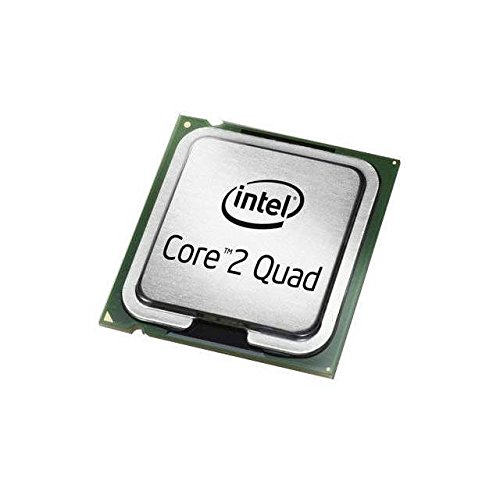
Intel Core 2 Quad Q9550 Processor
DS leddess 120MM CPU Fan 1500RPM Fixed RGB
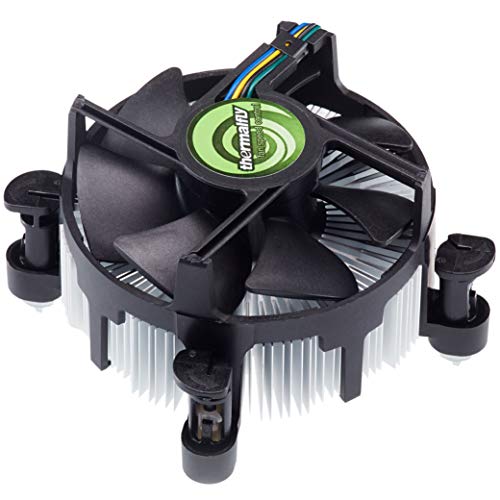
thermalfly Delta 6 CPU Cooler for Intel Sockets

QINIZX Adjustable Motherboard Backplate Kit

Intel HH80557PH0674M Core 2 Duo E6700 Processor
More Details On Our Top Picks
Older LGA 775 boards often need a fresh mounting solution rather than a new processor. This GENNEL plate uses a non-conductive plastic body with adjustable mounting positions, helping you align a compatible cooler across several Intel socket patterns.
That flexibility suits a repair bench or a restored desktop where the original bracket has cracked. You may find installation straightforward, though the mounting screws aren’t included, so your existing hardware needs to match the M3 thread requirement.
Strong Points
- Supports LGA 775 alongside several later Intel socket patterns.
- Adjustable hole positions help accommodate different motherboard layouts.
- Non-conductive plastic reduces concern about the plate touching board traces.
- Useful for replacing a damaged cooler mounting base without changing the processor.
- The black and yellow finish makes the small hardware easier to locate during assembly.
Things To Consider
- Mounting screws aren’t supplied, so installation may require hardware from the existing cooler.
- Fit depends on accurate hole alignment and the cooler’s own bracket design.
Key Specs
Who It Suits Best
Choose it for hands-on repair work involving an LGA 775 board and a cooler that needs a replacement rear support.
Where Another Pick Suits Better
QINIZX Adjustable Motherboard Backplate Kit suits you more when the original Intel plastic retention hardware is part of your mounting plan.
Four processing cores give the Q6600 a meaningful step up from older dual-core systems, especially for multitasking across office software, browser tabs, and background utilities. Its 2.40 GHz clock and 8 MB L2 cache make it a sensible match for a restored general-purpose desktop.
For a machine that spends its day handling several modest tasks, that extra core count can feel more useful than chasing a higher clock alone. In our view, the catch is platform age: you need a compatible BIOS, suitable cooling, and realistic expectations for modern software.
What We Like
- Quad-core design supports heavier multitasking than the E6700.
- 8 MB of L2 cache gives workloads more on-chip data space.
- Works within the familiar LGA 775 upgrade path.
- Useful for home office systems, older games, and media playback.
Trade Offs
- Its 2.40 GHz frequency trails the Q9550’s 2.83 GHz figure.
- A used or older processor may require careful cleaning of the contact area and fresh thermal compound during installation.
- Motherboard BIOS support remains essential before changing from a dual-core chip.
At A Glance
Made For
It fits you best as a practical quad-core replacement for a home or office desktop that still uses LGA 775.
Consider Something Else When
Intel Core 2 Quad Q9550 suits you more for heavier legacy workloads and a higher 2.83 GHz operating frequency.
The Q9550 brings a higher 2.83 GHz clock, a 1333 MHz front-side bus, and 12 MB of L2 cache to the LGA 775 platform. A front-side bus is the pathway linking the processor and chipset, so the listed speed matters most on a motherboard designed to support it.
Compared with the Q6600, this chip makes more sense for demanding legacy games, compression tasks, and a well-equipped older workstation. You may find the 95 W thermal design power calls for a capable cooler, making the thermalfly Delta 6 a more natural pairing than a tired stock heatsink.
Highlights
- 2.83 GHz clock speed offers a clear step above the Q6600.
- 12 MB cache supports workloads that repeatedly access data.
- 1333 MHz front-side bus suits compatible performance-oriented boards.
- Four cores remain useful for multitasking on an older desktop.
- 45 nm process design is specified for this processor generation.
Room For Improvement
- OEM packaging may mean you need to source a suitable cooler separately.
- Compatibility depends on BIOS support and the motherboard’s bus specification.
- Dust removal and fresh thermal compound deserve attention in a long-unused system.
Technical Sheet
Right Fit For
Pick it for a technically confident hobbyist restoring an LGA 775 tower for heavier legacy computing.
Not Your Match When
Intel Core 2 Duo E6700 suits you more for a basic repair where low complexity matters more than extra cores.
Cooling becomes part of the upgrade equation once you move to a quad-core chip. This DS leddess unit combines a 120 mm fan, a 1500 RPM speed, an aluminum fin heatsink, and fixed RGB lighting for compatible LGA 775 systems.
The larger fan diameter may suit a restored tower where you want broad airflow and visible lighting, although case clearance deserves a careful look. For most basic LGA 775 builds, the appeal is a mixture of cooling hardware and appearance rather than advanced fan control.
Upsides
- 120 mm fan size can move air across the aluminum heatsink area.
- 1500 RPM operating speed is clearly stated.
- Fixed RGB adds a visible accent to a windowed case.
Minor Gripes
- Fixed lighting gives you less control than adjustable lighting systems.
- Large cooler dimensions may complicate installation in a compact case.
- Fin cleaning matters because dust buildup can restrict airflow over time.
- Entry-level positioning makes it less compelling for an aggressively tuned Q9550 system.
Feature Snapshot
Who Will Love This
Choose it for an entry-level LGA 775 desktop where visible fixed lighting and a 120 mm cooler both fit the case.
Look Elsewhere When
thermalfly Delta 6 suits you more for a 4-pin PWM fan and a stated 100 W cooling capacity.
For a Q9550 or Q6600 restoration, the Delta 6 offers a more structured cooling setup than a basic replacement fan. Its 90 mm 4-pin PWM fan can adjust speed through a compatible motherboard header, while the 120-fin heatsink provides a dense heat-transfer surface.
The stated cooling capacity reaches 100 W, which aligns neatly with the Q9550’s 95 W thermal design power on paper. You may find the 90 mm format easier to place than the DS leddess 120 mm option, but BTX motherboards aren’t supported and case airflow still matters.
Bright Spots
- 4-pin PWM connection supports motherboard-controlled fan adjustment.
- 90 mm format may fit more older desktop cases than a 120 mm cooler.
- High-density fin layout creates substantial aluminum surface area.
- Pre-applied thermal grease simplifies the initial installation.
- LGA 775 support is joined by several later Intel sockets.
Points To Note
- BTX motherboard layouts aren’t supported.
- Pre-applied compound is convenient for one installation but less flexible during repeated servicing.
- Dust can collect between dense fins, so periodic cleaning is practical in an older tower.
Quick Facts
Best Suited To
It suits you as a home restorer pairing a higher-output LGA 775 processor with a compact PWM-controlled cooler.
A Better Fit Elsewhere
DS leddess 120MM CPU Fan suits you more when fixed RGB lighting and a larger fan format matter most.
Mounting hardware can be the overlooked obstacle in a Socket T repair. The QINIZX kit uses an adjustable backplate approach for Intel LGA 775, 115x, and 1366 layouts, with snap-fix screw bolts intended for compatible cooler arrangements.
Its strongest fit is a replacement project using original Intel plastic retention hardware or a similar spring-screw radiator. One thing worth considering is the narrower mounting context, because a third-party cooler with a different bracket may not line up as expected.
Plus Points
- Adjustable positioning accommodates multiple listed hole spacings.
- Supports LGA 775, 115x, and 1366 motherboard patterns.
- Snap-fix bolts can simplify a mounting repair with compatible hardware.
- Small parts are easier to store alongside a spare cooler or restored board.
Small Caveats
- Compatibility is tied to original Intel plastic retention parts and similar spring-screw radiator designs.
- Measure the motherboard holes before installation rather than relying on socket name alone.
- Small bolts can be easy to misplace during a workbench repair.
Details At A Glance
Whose Shelf It Belongs On
It belongs with a DIY repair kit for you when an Intel-style cooler retention system needs a replacement backplate.
Swap It Out When
GENNEL Adjustable Backplate for Intel LGA 775 suits you more when broader socket coverage through LGA 1700 and M3 mounting is useful.
A dual-core replacement can still make sense for a basic LGA 775 repair, especially when the existing chip has failed and the system handles email, documents, music, or older software. The E6700 runs at 2.66 GHz, uses a 1066 MHz front-side bus, and includes 4 MB of L2 cache.
Compared with the Q6600 and Q9550, it gives you fewer cores but keeps the installation straightforward for a modest desktop. You may find it adequate for single-task use, while heavier multitasking will expose the gap between two cores and four.
Best Bits
- 2.66 GHz clock speed suits everyday legacy desktop tasks.
- 1066 MHz bus matches many LGA 775 motherboard configurations.
- Dual-core design keeps the replacement focused on basic computing.
Areas To Watch
- Two cores provide less multitasking capacity than either quad-core option.
- OEM processor listings may require a separate compatible cooler.
- Clean the socket area and refresh thermal compound during installation on an older system.
Core Details
Who Should Grab It
It suits you as a replacement processor for a simple LGA 775 office, music, or retro-software computer.
Another Choice May Suit
Intel Core 2 Quad Q6600 suits you more when several applications run together or your older desktop handles heavier workloads.
How To Choose The Right Cpus For Lga 775
Start With the Motherboard
Your motherboard model matters more than the socket label alone. LGA 775 boards can differ in chipset support, BIOS compatibility, front-side bus limits, and power delivery, so confirm the processor list before choosing between the Q6600, Q9550, and E6700. A chip that physically fits may still need a BIOS update or may not run at its listed bus speed.
Match Cores to Your Workload
Two cores can handle documents, older operating systems, music playback, and lightweight browsing. Four cores make more sense for multitasking, older video work, compression, and legacy games that can distribute tasks across multiple threads. The Q6600 offers four cores at 2.40 GHz, while the Q9550 adds a 2.83 GHz clock, 1333 MHz bus, and 12 MB cache for a more demanding restoration.
Plan the Cooling
Thermal design power, or TDP, is a reference for the heat a cooling system needs to manage under a defined workload. The Q9550 lists 95 W, while the Delta 6 lists cooling support up to 100 W, making the pair look sensible on paper. Case airflow, dust, mounting pressure, and thermal compound still affect real ownership, so an old cooler deserves inspection rather than automatic reuse.
Check the Mounting Pattern
A replacement cooler or backplate must match the motherboard holes and the cooler’s fasteners. GENNEL covers a wider range of Intel sockets, while QINIZX focuses on Intel-style retention arrangements and specific hole spacings. Measure before assembly, particularly in a compact case or a repaired board with missing hardware. The DS leddess cooler also needs room for its 120 mm format, whereas the Delta 6 uses a 90 mm fan.
Things To Weigh Before You Choose
Mistakes Worth Dodging
A common mistake is treating every LGA 775 processor as interchangeable. Check the BIOS, chipset, bus speed, and processor support list before removing the existing chip. You also need to distinguish a CPU from a cooler or backplate, since the GENNEL and QINIZX items solve mounting problems rather than adding processing power.
Old thermal compound can be dry and difficult to spread, while packed dust can restrict heatsink airflow. Keep the socket protected during installation and confirm that the cooler sits evenly against the processor.
The Upgrade Payoff
Higher-tier legacy choices usually cost more because they combine additional cores, larger cache, higher bus speeds, or better thermal support. The Q9550’s four cores, 2.83 GHz clock, 1333 MHz bus, and 12 MB cache justify its stronger position for demanding older software.
You don’t need that level of hardware for a quiet document machine or a basic repair. The E6700 can cover lighter use, while the Q6600 offers a sensible middle ground for multitasking. Spend more on the Q9550 and a capable cooler when the motherboard supports it and the workload will benefit from the extra headroom.
Final Verdict
You can approach an LGA 775 restoration in two parts: choose the processor that matches your motherboard and workload, then give it mounting hardware and cooling that fit the actual board. The Q9550 suits demanding legacy systems, the Q6600 balances multitasking, and the E6700 keeps a basic repair uncomplicated. GENNEL and QINIZX address backplate problems, while the Delta 6 and DS leddess options cover different cooling priorities. Check compatibility carefully, and your older desktop can remain useful for the tasks it still handles well.
