
Running a Minecraft server from your home office, gaming room, or spare bedroom calls for more than a high clock speed. You need enough processor headroom for several players, reliable storage for world files, and memory that won’t choke during backups or background tasks. These seven desktops cover compact business machines, gaming hardware, and newer mini PCs, so you can match your server setup to your space and player count. You’ll also find practical trade-offs, because a small refurbished desktop can be sensible for a private server, while a dedicated graphics card is unnecessary for most server-only builds.
The Shortlist At A Glance
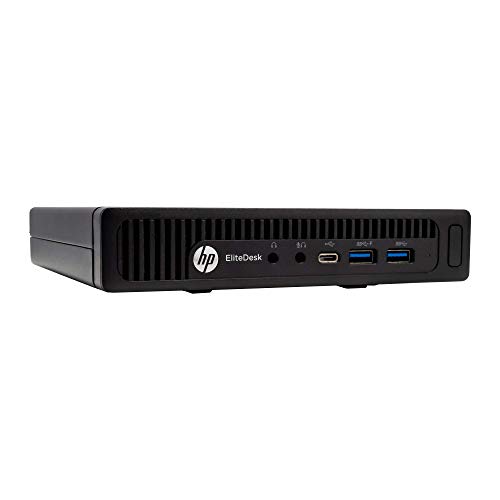
HP EliteDesk 800 G2 Mini Business PC

Dell OptiPlex 7050 Micro Computer
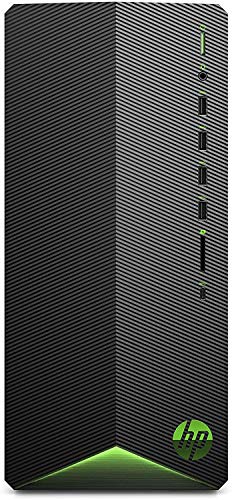
2021 HP Pavilion Gaming Desktop
HP EliteDesk 800 G2 Mini Business Desktop PC

Dell Optiplex 3050 SFF Desktop Computer PC

KAMRUI GK3Plus Mini PC 11 Pro
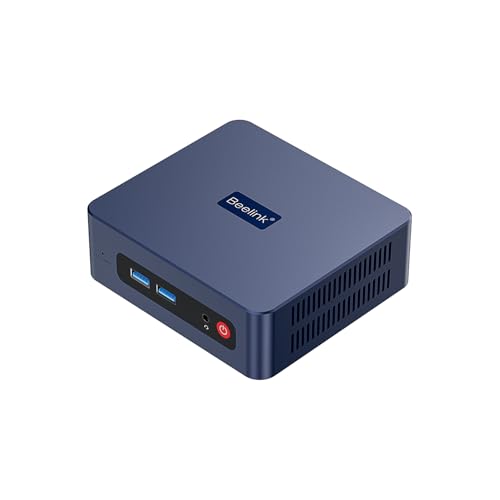
Beelink Mini PC SER3 AMD Ryzen 3 3200U
More Details On Our Top Picks
A private Minecraft server often benefits more from a compact four-core desktop than from gaming hardware. The HP EliteDesk 800 G2 uses an Intel Core i5-6500T, a low-power desktop processor reaching 3.1GHz, and its mini chassis fits neatly beside a router or beneath a monitor.
With 16GB of DDR4 memory, you have useful room for the server, backups, and a few background services. The 240GB SSD should make world loading and routine file access feel responsive, though the capacity leaves less room for large mod collections than the Dell OptiPlex 7050 Micro. The honest trade-off is age, so careful dust removal and clear ventilation around the small enclosure matter.
Strong Points
- Four processing cores and a 3.1GHz peak support small multiplayer worlds.
- 16GB of DDR4 memory leaves headroom for server software and light multitasking.
- The 240GB SSD helps world files and operating-system tasks load promptly.
- DisplayPort and VGA give you two confirmed ways to attach a setup screen.
Things To Consider
- The older processor platform has less headroom for very large modded communities.
- The compact enclosure benefits from regular dust clearing and unobstructed airflow.
Key Specs
Who It Suits Best
You’ll get the best fit as a home host for a small group, especially where desk space and modest power use matter.
Where Another Pick Suits Better
The Dell Optiplex 3050 SFF suits you better for Wi-Fi, HDMI, 4K display support, and a roomier small-form-factor layout.
The Dell OptiPlex 7050 Micro follows the same small-business desktop idea as the HP, but its 256GB SSD gives you a little more space for worlds, logs, and local backups. Its Intel i5-6500T reaches 3.1GHz, making it a sensible match for a private server running beside everyday office tasks.
That extra storage is modest rather than dramatic, yet it can keep routine cleanup less frequent. You may find the micro enclosure especially convenient in a network cabinet or crowded desk area, provided ventilation stays clear. Compared with the HP EliteDesk 800 G2, the main decision comes down to storage preference and the specific condition of the renewed unit.
What We Like
- 256GB of SSD capacity gives server files more breathing room.
- The micro form keeps the host easy to place near networking equipment.
- 16GB of DDR4 memory supports a server alongside browser or office use.
Trade Offs
- The four-core i5-6500T is better suited to smaller communities than demanding mod packs.
- A compact business chassis can make internal cleaning and component access less convenient.
- The setup has no dedicated graphics hardware listed, so it makes more sense as a server than a gaming desktop.
At A Glance
Made For
You’ll find the right fit here as a space-conscious host for friends, family, and routine server administration.
Consider Something Else When
The KAMRUI GK3Plus Mini PC 11 Pro is a better fit for you when a newer processor and 512GB M.2 SSD matter more than a refurbished business chassis.
Large mod packs, several simultaneous players, and occasional local gaming push you toward the HP Pavilion Gaming Desktop. Its Ryzen 5 3500 has six cores and twelve threads, with speeds listed up to 4.1GHz, so you have substantially more processing capacity than the older four-core business minis.
The GeForce GTX 1650 Super with 4GB of dedicated memory is unnecessary for a server-only machine, but it gives you a useful local gaming option. Eight gigabytes of RAM is the weak point, especially beside the 16GB systems in this roundup, and the 256GB NVMe SSD, a fast compact solid-state drive, can fill quickly with multiple worlds. Depending on your player count, this is the more capable foundation, though memory expansion deserves attention.
Highlights
- Six CPU cores and twelve threads provide stronger multitasking headroom.
- Up to 4.1GHz helps with responsive local use and busy server activity.
- The dedicated GTX 1650 Super supports local gaming alongside server hosting.
- NVMe storage can make operating-system and world-file access feel quick.
- The tower format should offer a more comfortable maintenance experience than a micro desktop.
Room For Improvement
- 8GB of RAM leaves less room for larger modded servers and background applications.
- The graphics card adds capability but also makes this a less focused server-only choice.
Technical Sheet
Right Fit For
You’ll benefit most as a player who wants one desktop for a more demanding server, local gaming, and content creation tasks.
Look Elsewhere When
The KAMRUI GK3Plus Mini PC 11 Pro suits you more when compact size, 16GB RAM, and 512GB storage matter more than graphics power.
Desk space takes priority with this HP EliteDesk configuration. The i5-6500T runs at 2.5GHz and can reach 3.1GHz, while the mini enclosure and 240GB SSD create a tidy foundation for a small private world.
VGA and DisplayPort cover older and newer monitor connections, which helps during setup in a spare room or office. The listing specifies 8GB of DDR4 memory, enough for a basic server but noticeably less flexible than the 16GB HP EliteDesk 800 G2 above. You may find the English and Spanish multi-language setup useful in a shared household, although Windows 10 makes this older platform less future-facing.
Upsides
- Mini dimensions leave more room for networking gear and accessories.
- The SSD should keep routine booting and world access reasonably responsive.
Minor Gripes
- 8GB RAM limits comfortable use with larger mod collections.
- The older Windows 10 setup may require more attention to software support over time.
- Small enclosures tend to collect dust around ventilation openings, so periodic cleaning is sensible.
Feature Snapshot
Best Suited To
You’ll find this choice most suitable for a small private server where minimal desk clutter matters more than expansion headroom.
A Better Fit Elsewhere
The HP Pavilion Gaming Desktop suits you better for larger modded groups and local gaming because its Ryzen processor and dedicated graphics provide more capacity.
The Dell Optiplex 3050 SFF takes up more room than a micro desktop, but that small-form-factor enclosure gives you a practical middle ground. Its Intel i5-6500 reaches 3.6GHz, paired with 16GB of DDR4 and a 256GB SSD, so routine server administration should feel less constrained than on the 8GB HP mini.
Wi-Fi, DisplayPort, HDMI, and stated 4K support make this a flexible office-and-server machine. For a host in a living room, those connections simplify local display setup and network placement, though wireless hosting still depends on the quality of your home network. Compared with the Dell OptiPlex 7050 Micro, this model gives you broader listed connectivity but a larger footprint.
Bright Spots
- 16GB of DDR4 suits moderate server workloads and desktop multitasking.
- Wi-Fi can simplify placement where a network cable is inconvenient.
- HDMI and DisplayPort support flexible monitor arrangements.
- 4K support helps during local administration on a high-resolution screen.
Points To Note
- The SFF chassis needs more desk or shelf space than the micro systems.
- The older four-core platform has a sensible ceiling for heavily modded communities.
- Wireless hosting can introduce connection variables compared with a direct wired link.
Quick Facts
Who Will Love This
You’ll appreciate this desktop as a home-office host that also needs flexible display connections and wireless networking.
Swap It Out When
The Beelink Mini PC SER3 suits you better when a smaller chassis, 500GB SSD, and dual HDMI setup matter more than the Dell’s business-desktop format.
Newer hardware changes the feel of this shortlist. The KAMRUI GK3Plus uses a 12th-generation Alder Lake N97 processor with four cores, speeds up to 3.6GHz, and 16GB of RAM, giving you a modern compact platform for a private server, file duties, and everyday browsing.
The 512GB M.2 SSD, a slim solid-state storage format, provides considerably more room than the refurbished 240GB and 256GB desktops. Dual-display 4K support, USB 3.2, Wi-Fi, Bluetooth, and LAN make the tiny computer adaptable in a home office or entertainment area. You may find the lower-power mini format appealing, but the HP Pavilion remains a better choice for local gaming because this KAMRUI configuration does not list dedicated graphics.
Reasons To Buy
- A newer N97 processor offers a more current platform than the older business desktops.
- 16GB RAM and 512GB storage reduce the need for immediate file management.
- LAN and Wi-Fi give you wired or wireless placement options.
- Dual 4K display support helps you run a server beside a work setup.
- USB 3.2 provides a useful connection for external storage and peripherals.
Honest Caveats
- The integrated graphics focus the system on server and desktop work rather than demanding gaming.
- Mini hardware usually rewards clear airflow and careful dust control around its vents.
Feature Rundown
Built With In Mind
You’ll get the strongest fit as a space-conscious host who wants newer hardware, substantial storage, and a tidy multi-use desktop.
Reach For A Different Pick When
The HP Pavilion Gaming Desktop suits you more for local gaming or heavier creative work because its Ryzen chip and GTX 1650 Super add dedicated graphics.
The Beelink SER3 keeps the compact-server idea but pairs it with 16GB of DDR4 memory and a 500GB SSD. Its AMD Ryzen 3 3200U has two cores and four threads, reaching 3.5GHz, so it suits a light private world more naturally than a heavily modded community.
Dual HDMI outputs with stated 4K at 60Hz support make this a convenient living-room or desk companion, while Wi-Fi 6 and Bluetooth 5.2 add modern connectivity. Compared with the KAMRUI GK3Plus, the Beelink offers more graphics-oriented display detail and a proven compact layout, but its two-core processor gives you less server headroom. For most small groups, that trade-off can be reasonable, especially with the roomy SSD.
Best Bits
- 16GB of memory supports the server alongside ordinary desktop tasks.
- 500GB SSD capacity leaves room for several worlds and backups.
- Two HDMI outputs simplify a dual-screen administration setup.
- Wi-Fi 6 and Bluetooth 5.2 suit a modern home network and accessory set.
Areas To Watch
- Two CPU cores and four threads limit comfortable use with large mod collections.
- Compact cooling areas need clear surroundings and occasional dust removal.
- The listing includes multiple SER configurations, so you’ll need to confirm the selected variant before placing it in your setup.
Core Details
Whose Shelf It Belongs On
You’ll find this a good match as a beginner host running a small vanilla server in a bedroom, apartment, or shared office.
Another Choice May Suit
The Dell OptiPlex 7050 Micro suits you better for a business-style chassis and four-core processing in a compact server station.
How To Choose The Right Cpus For Minecraft Server
Match CPU Threads To Your Player Load
A CPU’s cores are physical processing units, while threads are task lanes that help the processor handle simultaneous work. A small vanilla world for a few friends can fit comfortably on a four-core desktop such as the HP EliteDesk 800 G2 or Dell OptiPlex 7050 Micro. Larger mod packs, several worlds, or active background services make the six-core HP Pavilion more appealing.
Clock speed matters too, but a higher number alone doesn’t settle the choice. The Ryzen 5 3500 combines six cores with speeds up to 4.1GHz, while the compact N97 in the KAMRUI reaches 3.6GHz on a newer platform. Your likely player count and server software should guide the decision.
Give Memory And Storage Room
RAM holds active game data, so 8GB can work for a basic server but leaves less room for mods, backups, and desktop use. The 16GB options give you a more comfortable starting point, especially during local file transfers or map management.
Storage affects how much space you have for worlds and how quickly files load. SSD means solid-state drive, which stores data without spinning platters and generally suits quick booting and world access. A 512GB or 500GB drive gives you more breathing room than a 240GB drive.
Consider The Physical Setup
A micro or mini PC fits neatly beside a router, but its compact enclosure gives you less room around internal components. Keep vents clear, avoid cramped shelves, and make sure the power and network cables can reach comfortably. The Dell Optiplex 3050 SFF takes more space but offers Wi-Fi, HDMI, and DisplayPort.
Dedicated graphics are not a priority for a server-only role. The HP Pavilion’s GTX 1650 Super matters mainly when you also want local gaming or graphics-heavy desktop work. For a headless server, compact dimensions, memory, storage, and dependable network access deserve more attention.
Think About Network And Maintenance
A direct wired connection usually makes server placement easier to reason about than wireless, especially across a busy household network. Wi-Fi remains convenient for the Dell Optiplex 3050 and newer Beelink, while LAN on the KAMRUI gives you a direct connection option.
Refurbished business desktops can offer sensible hardware in small shells, but you should inspect the listing details, included accessories, operating system, and return terms before setup. Newer mini hardware may reduce platform age concerns, though every compact PC still benefits from dust control and clear airflow.
What To Weigh Before You Choose
Mistakes Worth Dodging
Choosing a graphics card first can lead you toward a larger desktop than your server needs. Minecraft server work usually rewards CPU capacity, adequate RAM, SSD space, and stable networking before dedicated graphics.
You’ll also want to avoid treating every four-core processor as equal. The i5-6500T systems share a broad class of hardware, while the newer N97 KAMRUI offers a more current platform and the Ryzen 5 3500 brings six cores.
Where The Extra Money Goes
Higher-tier desktop choices generally buy you more processing headroom, larger storage, newer connectivity, or a dedicated graphics card. The HP Pavilion demonstrates the graphics and core advantage, while the KAMRUI adds newer-generation processing and a 512GB SSD in a small chassis.
Spending up makes sense for larger groups, heavy mod collections, or a second use such as local gaming. A basic four-core mini remains sensible for a private vanilla world, particularly when lower space demands matter more than future expansion.
Final Verdict
You can match this shortlist to your actual server rather than chasing a single specification. The HP EliteDesk and Dell OptiPlex micro systems suit small private worlds, the HP Pavilion gives you the most processing and local gaming flexibility, and the KAMRUI brings newer hardware with generous storage. The Beelink works well for lighter hosting, while the Dell Optiplex 3050 adds useful connectivity. Choose the smallest machine that still leaves comfortable room for your player count, mods, backups, and everyday tasks.
