
Building a mining setup means matching the processor, motherboard, frame, power supply, and graphics cards rather than choosing one component in isolation. You may be assembling a first rig at home, expanding an existing open-air frame, or replacing an aging board that limits GPU connections. The choices below cover core components and ready-made foundations, so you can focus on compatibility, airflow, power delivery, and maintenance before committing to a build. Pay close attention to socket type, CPU graphics requirements, power-supply input, and the number of GPU connections your setup needs.
Your Mining Hardware Shortlist

ASRock H110 Pro BTC+ 13GPU Mining Motherboard
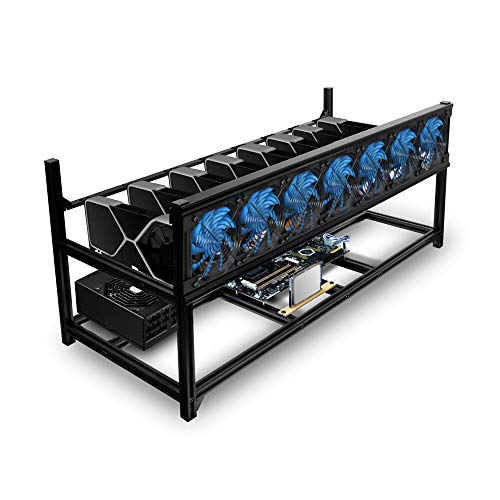
Kingwin 8 GPU Miner Rig Case Frame

AMD Ryzen 9 5900XT Desktop Processor

Mining Rig Frame for 12GPU, Steel Open Air

HVVH 1600W Power Supply
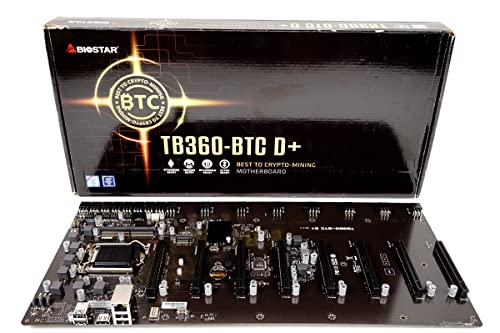
Biostar TB360-BTC D+ 8 GPU Mining Motherboard

8GPU Mining Rig Complete Crypto Miner
More Details On Our Top Picks
Large GPU builds need a motherboard that treats expansion as the main job, and this ASRock board is built around that idea. You get one PCIe 3.0 x16 slot plus twelve PCIe 2.0 x1 slots, where PCIe describes the motherboard connection used by expansion hardware.
That layout suits a dedicated open-air rig in a garage, workshop, or mining room, especially alongside the Kingwin frame. You may find the older processor platform less appealing for a new general-purpose desktop, but its broad GPU capacity remains the reason to consider it.
Strong Points
- Thirteen PCIe slots give you substantial room for a multi-GPU configuration.
- Four SATA3 connections and an M.2 SATA3 slot help you attach storage without adding unnecessary adapters.
- DDR4 memory support keeps the platform familiar for many DIY system builds.
- The expansion-first layout can reduce the need to replace the motherboard during a staged GPU build.
- 24/7 setup and troubleshooting assistance is included with the listed service plan.
Things To Consider
- The board uses an older Intel processor generation, so platform age matters for a fresh build.
- Open PCIe slot layouts still require careful riser, cable, and airflow planning.
- Dust removal around a long-running open-air rig becomes part of regular ownership.
Key Specs
Who It Suits Best
You’ll get the most from this board as an experienced builder planning a large GPU-focused rig with careful riser and airflow management.
Consider Something Else When
Choose the Biostar TB360-BTC D+ instead for a smaller eight-GPU Intel build with a compatible integrated-graphics CPU.
For a tidy eight-GPU arrangement, the Kingwin frame offers an aluminum open-air structure rather than a closed computer case. Aluminum keeps the frame relatively easy to handle and helps spread heat away from mounting areas, though the open design leaves components exposed to room dust.
That makes it a sensible match for a ventilated workspace where you can reach every card and cable. Compared with the steel Bomeiqee frame, this option places more emphasis on lighter handling and stackable organization, but you may prefer steel for a more anchored installation.
What We Like
- Eight-GPU capacity matches many mid-sized mining layouts.
- Aluminum construction makes repositioning and cable access easier during assembly.
- Open spacing encourages direct airflow around graphics cards.
Trade Offs
- Exposed components need routine dusting and a clean installation area.
- The frame-only format leaves the motherboard, power supply, and GPUs for you to source.
- Stacking requires a stable surface and careful cable routing.
- Assembly may take longer than a preassembled rig.
Feature Snapshot
Made For
This frame fits hands-on builders who want an accessible eight-GPU structure for a ventilated home workshop or dedicated equipment area.
Not Your Match When
The VTRETU MINING complete rig suits you better when you want the core case, power supply, processor, storage, and memory bundled together.
CPU-focused workloads benefit from the Ryzen 9 5900XT’s 16 cores and 32 threads. A core handles an independent processing stream, while threads let the processor manage more simultaneous tasks, which helps with multitasking, content creation, and workloads that lean on the CPU rather than the graphics cards.
The AM4 socket and DDR4-3200 support make this a practical choice for a compatible desktop or mixed-use workstation. Compared with the older Intel platforms paired with the ASRock and Biostar boards, it offers a newer-feeling performance base, though the cooler comes separately and the CPU alone doesn’t create a mining rig.
Highlights
- Sixteen cores and thirty-two threads provide substantial parallel processing capacity.
- A maximum boost speed of 4.8 GHz helps responsive desktop work and bursty tasks.
- Unlocked operation gives experienced users more tuning flexibility.
- PCIe 4.0 support suits compatible modern expansion hardware.
Room For Improvement
- A separate cooler adds another selection and installation step.
- AM4 compatibility narrows your motherboard choices compared with newer platforms.
- For a GPU-led rig, this level of CPU capacity may exceed your actual workload.
Technical Sheet
Right Fit For
This processor suits you as a content creator, workstation owner, or advanced builder whose setup needs strong CPU multitasking alongside graphics hardware.
Look Elsewhere When
The ASRock H110 Pro BTC+ makes more sense for you when GPU-slot quantity matters more than CPU performance.
Steel construction gives this open-air frame a more substantial foundation for a twelve-GPU arrangement. The listed motherboard limit is 305 by 245 millimeters, and the design accommodates two ATX power supplies shorter than 24 centimeters, details that matter before you start mounting hardware.
That extra capacity makes sense for an expanding rig in a dedicated room rather than a compact desk. You may appreciate the room for one SSD and one hard drive, while the frame-only design means fans, graphics cards, and the rest of the system remain your responsibility.
Upsides
- Twelve-GPU support leaves more expansion headroom than the Kingwin eight-card frame.
- Dual ATX power-supply space helps divide power planning across a larger build.
- The open structure gives you direct access for cable routing and component cleaning.
Minor Gripes
- Steel can make relocation less convenient than an aluminum frame.
- Manual measurements include a possible 1 to 3 centimeter deviation, so fit checks matter.
- Fans and GPUs aren’t included, increasing the number of parts you must coordinate.
- Exposed hardware needs a low-dust environment and regular maintenance.
Quick Facts
Who Will Love This
You’ll value this frame as an experienced builder planning a twelve-GPU installation with two compatible ATX power supplies.
A Better Fit Elsewhere
The Kingwin 8 GPU Miner Rig Case Frame suits you more for a lighter, smaller aluminum structure with eight-card capacity.
Power planning becomes a central task once several GPUs share one rig, and this H VVH unit is designed around a 1600-watt capacity with a 20+4-pin ATX connector. Active PFC, or power factor correction, helps the supply manage incoming electrical power more effectively, while the listed efficiency reaches 87% at 110V and 90% at 220V.
The 135-millimeter fan is intended to move cooling air with less noise than a smaller fan may produce, though subjective noise depends on load and room acoustics. This supply pairs naturally with the Bomeiqee frame, but you still need to check connector quantity, circuit capacity, and total system draw before installation.
Bright Spots
- 1600 watts gives a high-capacity foundation for a multi-GPU build.
- The listing identifies support for up to eight graphics cards.
- Full-voltage operation covers 100 to 240V input ranges.
- The larger 135 mm fan is suited to sustained system cooling duties.
- The included 1.5-meter US plug adapter cable can simplify placement.
Points To Note
- Eight-card support doesn’t replace careful calculation of actual GPU and system draw.
- Long-term dust buildup around the fan can reduce airflow, so accessible mounting helps maintenance.
Feature Rundown
Built With In Mind
This supply is aimed at experienced rig builders who need high-capacity power delivery for up to eight GPUs in a properly planned installation.
Swap It Out When
The VTRETU MINING complete rig fits you better when you want a bundled 2000W supply rather than a standalone power component.
Eight-GPU builds often need a narrower target than the ASRock board’s thirteen-slot layout, and the Biostar TB360-BTC D+ provides that more focused route. It uses the LGA1151 socket for Intel eighth- and ninth-generation processors, plus SODIMM DDR4 memory, a compact memory format commonly found in small systems.
The important setup detail is the integrated-graphics requirement, meaning your CPU must include built-in display hardware for initial video output through the motherboard HDMI connection. You may find the server power-supply requirement adds complexity, but the Intel 300-series chipset platform suits a carefully matched mining build.
Reasons To Buy
- Eight-GPU capacity fits a moderate expansion plan without paying for unused slot space.
- Intel eighth- and ninth-generation compatibility gives you a defined CPU range.
- Integrated HDMI output can simplify initial setup with a suitable CPU.
Small Caveats
- You need a processor with integrated graphics for the specified startup arrangement.
- A server power supply requirement narrows the easiest component combinations.
- SODIMM DDR4 memory differs from the desktop memory used by many standard boards.
Details At A Glance
Whose Shelf It Belongs On
This board suits you as an intermediate or advanced builder who already understands CPU graphics output, SODIMM memory, and server power connections.
Reach For A Different Pick When
The ASRock H110 Pro BTC+ is a better fit for you when your build needs more than eight GPU connections.
A preassembled core can remove several early decisions from your setup, and this VTRETU MINING unit combines an eight-GPU motherboard, 2000W power supply, CPU, SSD, 4GB RAM, and case. GPUs remain separate, so you still control the graphics hardware that determines the final configuration.
The included Windows 10 installation is described as unactivated, with HiveOS and Linux also listed as compatible operating-system options. You may find this approach convenient for a first rig, although checking driver support, storage setup, and the included components before assembly remains worthwhile.
Plus Points
- Bundled core hardware reduces the number of separate components to coordinate.
- A 2000W full-voltage power supply is included for a substantial eight-GPU foundation.
- Windows 10, HiveOS, and Linux compatibility gives you several software paths.
- The case provides a starting structure instead of requiring a frame selection first.
Areas To Watch
- The graphics cards are excluded, so the complete system still needs a major hardware addition.
- An unactivated Windows installation may require extra setup before everyday use.
- Bundled hardware can make individual component replacement less straightforward than a self-selected build.
Core Details
Who Should Grab It
This bundle suits you as a first-time builder who wants the main rig platform assembled before adding GPUs and configuring software.
Where A Sibling Pick Shines
The Kingwin 8 GPU Miner Rig Case Frame is better for you when you already own the components and only need an open-air enclosure.
How To Choose The Right Cpus For Mining
Start With The Workload
A CPU, or central processing unit, handles general calculations and system coordination. GPU-focused mining often places greater emphasis on graphics-card count, riser compatibility, and power delivery, while CPU-focused algorithms need more cores, threads, cache, and sustained cooling capacity. The Ryzen 9 5900XT makes sense for heavier CPU work, but a modest compatible processor may be enough for a rig where graphics cards handle the main workload.
Match The Motherboard Platform
Socket compatibility comes first. LGA1151, AM4, and other sockets accept specific processor families, so a CPU choice must match the motherboard before memory or storage enters the conversation. You also need to check memory type, integrated graphics requirements, PCIe slot count, and operating-system support.
Plan GPU Capacity Early
A board with eight GPU connections serves a different purpose from the ASRock H110 Pro BTC+ with thirteen listed PCIe slots. More slots create expansion room, but they also increase demands on risers, cables, airflow, storage placement, and power distribution. Choose the capacity you can realistically populate and maintain rather than treating unused slots as automatic value.
Treat Power And Airflow As One Decision
A 1600W supply may suit an eight-card plan, while the VTRETU MINING system lists a 2000W unit for its bundled platform. Your actual graphics-card draw, CPU demand, storage, fans, and electrical circuit all matter, so leave sensible headroom rather than operating at the limit. Open-air frames improve access and airflow potential, but they also expose components to dust and accidental contact, making placement and cleaning part of ownership.
Things Worth Knowing First
Mistakes Worth Dodging
A common mistake is pairing a motherboard and CPU by brand alone. Check the socket, processor generation, integrated-graphics requirement, memory format, and power-supply type before you commit. You can also overlook the difference between a frame and a complete platform, especially with the Bomeiqee and Kingwin options, which don’t include the full set of rig components.
Another easy miss is assuming a listed GPU capacity includes graphics cards. The VTRETU MINING package still excludes GPUs, while the standalone frames require you to provide nearly everything else. Make a parts checklist covering risers, storage, memory, cooling, power connectors, and software.
Where The Extra Money Goes
Higher-tier hardware usually buys expansion room, stronger power capacity, more processing resources, or less assembly work. A thirteen-slot motherboard can serve a larger staged build, while a sixteen-core processor adds value for CPU-heavy workloads and mixed desktop use.
Paying more makes sense when you’ll use the added capacity soon and have the electrical, cooling, and physical space to support it. A smaller eight-GPU board or frame is the more sensible route for a compact setup that won’t grow beyond a moderate card count.
Final Verdict
Your right choice depends on the role each component must play. The ASRock H110 Pro BTC+ suits large GPU expansion, the Kingwin frame keeps an eight-card build accessible, and the Ryzen 9 5900XT brings strong CPU resources to compatible desktops. The Bomeiqee frame and HVVH supply address larger hardware planning, while the Biostar board targets a specific Intel platform. For a simpler starting point, the VTRETU MINING bundle reduces early assembly decisions, leaving you to select GPUs and configure the software.
