
Photo editing puts different demands on your computer than gaming or basic web browsing. You need enough processing power for RAW files, layered projects, batch exports, and a responsive workspace that doesn’t interrupt your creative flow. This roundup covers complete desktops, compact mini PCs, and standalone processors, so you can match your choice to your current setup, available desk space, and editing habits. You’ll find practical options for home studios, busy offices, and advanced workflows that involve large libraries or demanding multitasking.
The Shortlist At A Glance

HP ProDesk 600G4 Tower Desktop Computer Intel i7-8700 32GB DDR4 1TB SSD
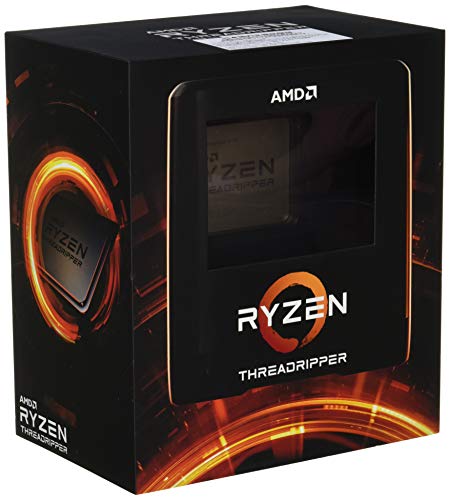
AMD Ryzen Threadripper 3970X 32-Core 64-Thread Unlocked Desktop Processor

GMKtec EVO-X1 Pro AI Mini PC Ryzen AI 9 HX 470 64GB RAM 1TB SSD

BOSGAME P6 Ryzen 9 6900HX Mini PC 24GB RAM 1TB PCIe4.0 SSD

Intel Core Ultra 7 Processor 270K Plus 24 Cores 5.5 GHz

Dell Pro Tower Plus Core Ultra 7 256 32GB DDR5 1TB SSD

HP Pavilion Desktop Computer Intel Core i5-10400 32GB DDR4 1TB PCIe SSD
More Details On These Top Picks
Daily editing at home calls for a steady desktop more than a flashy workstation. The HP ProDesk 600G4 Tower pairs an Intel Core i7-8700 with 32GB of DDR4 memory, so you have useful headroom for an editor, browser tabs, and file management at the same time.
The 1TB solid-state drive keeps project access and system startup responsive, while Wi-Fi and Bluetooth reduce cable clutter around a home office. You may find the older platform less appealing for ambitious future upgrades, but its tower format is easier to service than the compact mini PCs below.
Strong Points
- 32GB RAM supports layered projects and multitasking.
- 1TB SSD gives you room for an active photo library.
- Tower construction makes desk placement and internal servicing more practical.
- Windows 11, Wi-Fi, and Bluetooth create a ready-to-use workstation.
Things To Consider
- The renewed format can bring cosmetic variation, so inspect the listing details carefully.
- The older processor platform offers less upgrade runway than newer Core Ultra systems.
Key Specs
Who It Suits Best
You’ll get the most value from this tower for home editing, family photo organization, and moderate creative work.
Where Another Pick Suits Better
Choose the Dell Pro Tower Plus Core Ultra 7 256 for a newer office workstation with DDR5 memory and three 4K display outputs.
Large RAW batches, panorama stitching, and several creative applications at once are where this processor makes sense. Its 32 cores and 64 threads give heavily threaded software far more parallel capacity than the six-core HP tower.
The 4.5GHz boost ceiling and 144MB cache, a fast-access pool for frequently used data, suit demanding workstation builds. The honest trade-off is installation: you need a compatible Threadripper platform, substantial cooling, and separate graphics hardware, so this isn’t a casual drop-in upgrade.
What We Like
- 32 cores and 64 threads support serious batch-processing workloads.
- Large cache can help complex projects keep frequently used data close to the processor.
- Unlocked design gives experienced builders tuning flexibility.
- Quad-channel DDR4 support suits high-capacity workstation memory layouts.
- Its broad PCIe 4.0 lane allocation leaves room for fast storage and expansion cards.
Trade Offs
- The processor arrives without a cooler, adding a major installation decision.
- A 280W thermal design requires a case, board, and power setup built for sustained workloads.
- Its platform is excessive for basic single-image adjustments.
Feature Snapshot
Made For
You’ll appreciate this chip most as an experienced workstation builder handling frequent batch exports and large creative files.
Consider Something Else When
Reach for the GMKtec EVO-X1 Pro AI Mini PC for a complete compact system that already includes memory, storage, and a small desk footprint.
Desk space matters in a small studio, and this mini PC packs a 12-core, 24-thread Ryzen AI 9 HX 470 into a much smaller footprint than the HP towers. You get 64GB of LPDDR5 memory, a type of fast low-power system memory, plus a 1TB SSD for active catalogs and editing software.
The Radeon 890M graphics, 55 TOPS NPU, and USB4 connection give this compact system a modern creative profile. You may find the integrated graphics less suitable for specialized GPU-heavy work than a full tower with expansion room, yet the Wi-Fi 7, dual 2.5G LAN, and triple-display support are handy in a connected home studio.
Highlights
- 64GB LPDDR5 memory is well suited to large catalogs and multitasking.
- 12 cores and 24 threads provide strong capacity in a compact chassis.
- USB4 and OCuLink support create useful high-speed connection options.
- Triple display support can give you room for a canvas, tools, and file browser.
- A one-year limited manufacturer warranty adds support coverage for design and workmanship defects.
Room For Improvement
- Compact hardware can make internal cleaning and component access less convenient than tower ownership.
- Integrated Radeon graphics won’t suit every specialized 3D or GPU-accelerated workflow.
Technical Sheet
Right Fit For
You’ll find this a strong match for apartment studios, mobile workstations, and creators who want high memory capacity without a tower.
Look Elsewhere When
The AMD Ryzen Threadripper 3970X suits you better for a custom workstation built around extreme multi-core export workloads.
For a compact home office, the BOSGAME P6 keeps the core setup straightforward: Ryzen 9 6900HX processing, 24GB of 4800MT/s memory, and a 1TB PCIe 4.0 SSD. PCIe describes the high-speed connection used by modern expansion and storage hardware, while the Gen 4 drive standard suits quick project access.
Dual LAN, Wi-Fi 6E, Bluetooth 5.3, and three 4K display outputs make it more flexible than its size suggests. Compared with the GMKtec, you get less memory and a less advanced processor, so the P6 fits moderate editing better than massive batch work.
Upsides
- 24GB RAM is comfortable for everyday editing and office multitasking.
- PCIe 4.0 SSD technology supports quick application and file loading.
- Three 4K outputs suit a multi-screen desk.
- Dual LAN helps home offices with wired networking needs.
Minor Gripes
- The smaller enclosure may leave fewer convenient upgrade paths than a tower.
- 24GB memory gives you less headroom than the GMKtec’s 64GB configuration.
- Long export sessions may make compact-system cooling more noticeable in a quiet room.
At A Glance
Best Suited To
You’ll likely prefer this mini PC for moderate photo editing, remote work, and a multi-monitor office with limited desk space.
Not Your Match When
The GMKtec EVO-X1 Pro makes more sense for you when 64GB memory and newer AI-focused hardware matter to your workflow.
Custom PC builders get a modern foundation here, with 24 total cores split between 8 performance cores and 16 efficiency cores. That hybrid layout assigns demanding work to the stronger cores while handling background activity more economically, a useful arrangement for editing beside browser, storage, and communication apps.
Support for DDR5 memory and PCIe 5.0 and 4.0 gives you a current platform for a new build. The catch is compatibility: you need an Intel 800-series motherboard with an LGA1851 socket, plus a cooler, memory, storage, and graphics solution, so the complete system cost and setup effort rise quickly.
Standout Traits
- 24-core hybrid design supports both creative workloads and background tasks.
- Up to 5.5GHz boost speed favors responsive interactive work.
- DDR5 support gives a new build access to current memory technology.
- PCIe 5.0 connectivity leaves room for newer expansion hardware.
Points To Note
- This is a processor only, so you must plan the full system around it.
- The 125W base power calls for thoughtful cooling and case airflow.
Core Details
Who Will Love This
You’re the right fit for this processor when you enjoy building a desktop and need a current platform for serious creative multitasking.
A Better Fit Elsewhere
Pick the Dell Pro Tower Plus Core Ultra 7 256 for a complete desktop that avoids the separate assembly and compatibility work.
Three 4K DisplayPort outputs make the Dell Pro Tower Plus especially practical for a desk where your image canvas, tool panels, and reference material need separate screens. Its Core Ultra 7 256 processor has 20 cores and reaches 5.3GHz, while the 13 TOPS NPU adds a dedicated unit for supported artificial-intelligence tasks.
With 32GB of DDR5 RAM, a 1TB PCIe NVMe SSD, Windows 11 Pro, and a DVD-RW drive, it feels more complete than the standalone Intel chip. Depending on your desk layout, the integrated graphics may be enough for photo work, but specialized GPU-heavy applications could call for a different expansion plan.
Bright Spots
- Three DisplayPort outputs simplify a three-screen editing station.
- 32GB DDR5 memory supports layered work and office multitasking.
- The 1TB NVMe SSD provides quick access to applications and projects.
- Windows 11 Pro suits professional home-office environments.
- Front and rear USB-C ports make modern peripherals easier to arrange.
Honest Caveats
- Integrated graphics limit the upgrade path for demanding GPU-centered work.
- The tower needs more desk or floor space than either compact mini PC.
Feature Rundown
Built With In Mind
You’ll suit this desktop best when you want a finished office tower for photo editing, multiple displays, and everyday professional tasks.
Reach For A Different Pick When
The Intel Core Ultra 7 Processor 270K Plus is better for you when you want to customize every part of a newer enthusiast desktop.
For a first home editing desktop, the HP Pavilion keeps the setup approachable with an Intel Core i5-10400, 32GB of DDR4 memory, and a 1TB PCIe SSD. That combination gives you enough working room for photo software, web browsing, and household documents without forcing you into a custom build.
The included wired keyboard and mouse help you get started at a desk without shopping for basic accessories separately. You may find its six-core processor less comfortable during large batch exports than the Dell or GMKtec, but its familiar tower format remains easy to place and maintain.
Plus Points
- 32GB RAM gives a beginner-friendly editing setup useful multitasking room.
- 1TB PCIe SSD supports quick startup and file access.
- Keyboard and mouse are included for a simpler first setup.
Small Caveats
- The i5 processor has less multi-core capacity than the higher-tier choices here.
- DDR4 memory belongs to an older platform than the Dell’s DDR5 configuration.
- Large RAW libraries may eventually require separate storage management.
Quick Facts
Whose Shelf It Belongs On
You’ll find this tower well suited to beginner editors, family photo organization, and home offices that need a complete desktop setup.
Swap It Out When
The HP ProDesk 600G4 Tower makes more sense for you when you prefer an i7-based renewed desktop with the same 32GB memory capacity.
How To Choose The Right Cpus For Photo Editing
Match Core Count to Your Editing Rhythm
Core count describes how many processing units can handle work at the same time. More cores help with batch exports, previews, panorama stitching, and multitasking, while a high boost frequency helps interactive actions such as brush movement and filter adjustments feel responsive. The Threadripper 3970X suits sustained heavy workloads, whereas the HP Pavilion is more sensible for occasional home projects.
Memory Prevents Workflow Bottlenecks
RAM holds the files and applications you’re actively using. For editing, 32GB gives you comfortable room for layered images, a catalog, and browser tabs, while 64GB provides extra space for very large files or several creative apps. The GMKtec stands out here with 64GB, while the BOSGAME’s 24GB remains adequate for moderate work.
Storage Affects Daily Comfort
An SSD, or solid-state drive, stores data on flash memory rather than spinning disks. That design generally supports quicker startup and faster access to catalogs, previews, and applications. A 1TB drive works well as an active workspace, though extensive RAW collections may still call for a separate archive drive.
Check the Whole Platform
Standalone processors require a compatible motherboard, cooling system, memory, storage, case, power supply, and often a graphics card. The Intel Core Ultra 7 Processor 270K Plus requires an LGA1851 motherboard using an Intel 800-series chipset, so compatibility must come before assembly. Complete desktops such as the Dell and HP Pavilion reduce that planning burden, while mini PCs trade expansion space for a smaller footprint.
Things Worth Knowing First
Mistakes Worth Dodging
Choosing a processor without considering your editing software can leave you with unused performance or an awkward setup. Check whether your main tools benefit more from high single-core speed, many cores, GPU acceleration, or abundant RAM. You also need to reserve storage for previews, cache files, and current projects instead of filling the drive with your entire archive.
Another common mistake is treating a standalone chip like a complete computer. Threadripper and Intel’s Core Ultra 7 270K Plus both require platform planning, cooling, and supporting hardware, while a Dell tower arrives as a more direct path to work.
Where The Extra Money Goes
Higher-tier options cost more because they combine additional cores, newer memory standards, stronger connectivity, or room for sustained workloads. You’ll notice the upgrade most during large exports, high-resolution panoramas, and multitasking across several demanding applications.
Spending more makes sense for a working photographer, studio, or advanced hobbyist whose time matters during repeated exports. For occasional family albums and modest adjustments, 32GB and a 1TB SSD can provide a more balanced experience without paying for workstation-level capacity.
The Takeaway
You can choose a complete tower, a compact mini PC, or a processor for a custom build, depending on how much setup work and expansion room you want. The Dell Pro Tower Plus suits a multi-monitor office, the GMKtec gives you substantial memory in a small enclosure, and the Threadripper serves demanding workstation tasks. For straightforward home editing, the HP ProDesk and HP Pavilion keep the decision simpler. Match the processor, memory, storage, and platform to the files you handle most often, and your editing desk should feel responsive rather than overbuilt.
