
Photoshop rewards a computer that can handle large layered files, quick previews, batch exports, and other apps running together. You need more than a fast processor alone, especially for demanding image work, 3D tools, or high-resolution displays. This shortlist covers compact desktops, full-size towers, and a portable laptop, plus one tower stand that helps organize an existing setup. Daily editors may prefer the ASUS or Acer, while home-office users can keep costs and desk space lower with GMKtec or GEEKOM.
The Shortlist At A Glance



More Details On Our Top Picks
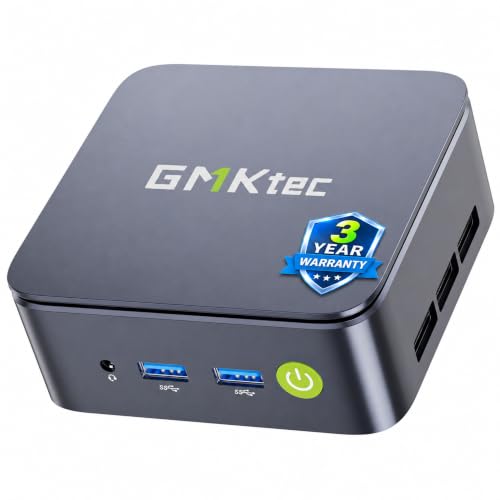
A small desk doesn’t rule out a capable Photoshop station. The four-core, eight-thread Ryzen 5 3500U pairs with Radeon Vega 8 graphics, 16GB of memory, and a 512GB solid-state drive, so you can work on layered files while keeping email or reference material open.
Triple 4K display support gives a home office plenty of screen room, while HDMI 2.1, DisplayPort, USB-C, Wi-Fi, Bluetooth, and 2.5GbE networking make placement flexible. You may find the older processor less comfortable with very large composites and heavy batch work, but its compact chassis suits beginners and casual editors well.
Strong Points
- 16GB RAM supports everyday multitasking without forcing an immediate memory upgrade.
- The 512GB SSD should make application launches and file access feel more responsive than a mechanical drive.
- Three 4K display outputs suit a multi-panel editing desk.
- Mini-PC dimensions leave room for notebooks, drawing tablets, or a second monitor stand.
Things To Consider
- The Ryzen 5 3500U has less headroom than the newer Ryzen 7 and desktop processors here.
- A 512GB drive can fill quickly after Photoshop files, catalogs, and creative applications accumulate.
Key Specs
Who It Suits Best
You get the best fit as a beginner, student, or home-office editor who values a small computer for moderate Photoshop projects.
Where Another Pick Suits Better
GEEKOM A8 Max suits you more when newer processing, expandable storage, and creative connectivity matter.
Large Photoshop canvases, frequent exports, and gaming after work call for desktop-class resources. Intel’s Core i7-13700KF supplies a high core count, while 32GB of DDR5 memory, a fast 2TB NVMe drive, and an RTX 4070 Ti give this tower room for demanding creative sessions.
DDR5 is a newer memory standard designed for higher data throughput, and NVMe is a compact storage interface that connects through PCIe for quick file access. The AIO liquid cooler, meaning a sealed all-in-one cooling loop, should help manage sustained workloads, although cooler maintenance and a larger desk footprint are part of the ownership equation.
What We Like
- 32GB DDR5 leaves useful space for large documents and several active applications.
- Two terabytes of NVMe storage give you more room for scratch files, assets, and project archives.
- The RTX 4070 Ti adds substantial graphics capability for GPU-assisted creative features and gaming.
- Liquid cooling suits long editing or rendering periods better than a basic compact cooler.
- Wi-Fi keeps placement flexible for a studio without a nearby network cable.
Worth Noting
- AIO cooling adds pumps, tubing, and radiator hardware that deserve periodic dust cleaning.
- The desktop is less convenient for small rooms or frequent moves than GMKtec G10.
- The KF processor does not include integrated graphics, so the discrete graphics card remains central to display output.
Feature Snapshot
Made For
You get the strongest match as a serious hobbyist or professional who edits at a fixed desk and also wants capable gaming hardware.
Consider Something Else When
ASUS ROG Strix G16 suits you more when the same kind of high-end capability must travel between home, studio, and classroom.
GEEKOM A8 Max takes the small-computer idea further than GMKtec G10 with a Ryzen 7 8745HS, Radeon 780M graphics, 16GB DDR5, and a 1TB SSD. That combination makes sense for compact creative desks, office editing, and video work where desk space matters almost as much as processing speed.
USB4 supports fast peripheral connections, while dual LAN ports suit specialized office networks or a workstation with separate network duties. The SD card reader is handy for camera workflows, though 16GB memory may feel limiting beside Thermaltake’s 32GB configuration during very large projects.
Highlights
- The newer Ryzen 7 processor offers a stronger starting point for creative multitasking than the Ryzen 5 3500U.
- DDR5 memory provides a current platform for office and editing work.
- Expandable 1TB storage leaves a clearer path for growing project libraries.
- USB4 and an SD reader reduce adapter dependence at a compact workstation.
Trade Offs
- 16GB RAM may call for a memory upgrade as layered documents and background applications grow.
- Integrated Radeon 780M graphics are convenient, but a desktop with a discrete RTX card offers more graphics headroom.
Technical Sheet
Right Fit For
You get a strong match as a compact-workstation user who edits photos or video and values card-reader access.
Not Your Match When
Thermaltake LCGS Avalanche i477T suits you more for sustained heavy workloads, larger memory capacity, and discrete graphics.
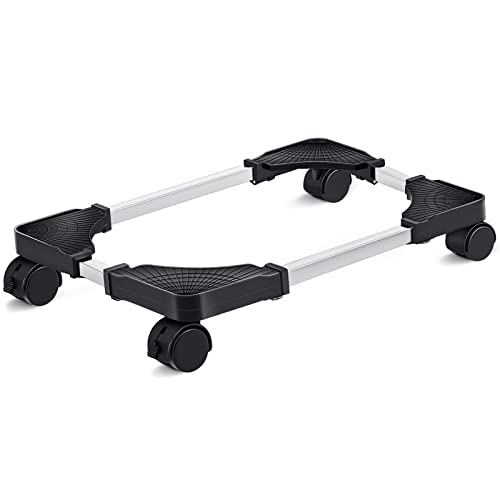
Liitrton doesn’t add processing power, but it solves a real desktop problem: keeping a tower off the floor while making rear ports easier to reach. Its adjustable length and width accommodate many computer cases, and four swiveling casters help you move the chassis during cable work or cleaning.
The steel-pipe construction should feel more substantial than a lightweight plastic tray, though fit still depends on your tower’s dimensions and center of gravity. Compared with the compact GMKtec and GEEKOM computers, this stand makes sense for a full-size desktop that needs better floor organization.
Upsides
- Adjustable length and width provide broader case compatibility than a fixed platform.
- Four 360-degree casters make rear-panel access and floor cleaning easier.
Minor Gripes
- Measure your case before assembly because oversized or unusually shaped towers may not sit securely.
- Rolling hardware can collect dust on carpet, so periodic cleaning keeps movement smoother.
- A stand adds another object beneath the desk rather than reducing total equipment.
At A Glance
Who Will Love This
You get the right fit as a desktop owner with a carpeted office, tight cable access, or a tower that needs regular repositioning.
Look Elsewhere When
ASUS ROG Strix G16 suits you more when portability and built-in computing matter more than tower organization.
A 16-inch laptop gives you serious Photoshop capability without tying your work to one desk. The Core Ultra 9 275HX, RTX 5080 Laptop GPU, 32GB DDR5, and 1TB SSD suit large creative files, while the 2.5K 16:10 panel gives you more vertical workspace for tools and palettes.
The 240Hz refresh rate describes how often the display redraws each second, while the 3ms response specification points toward smooth motion. You may find the high-refresh panel more useful for gaming than still-image editing, and the portable chassis will usually demand more attention to heat, noise, charging, and storage than a desktop.
Bright Spots
- 32GB DDR5 supports sizable documents and simultaneous creative applications.
- The RTX 5080 Laptop GPU gives Photoshop and related visual workloads substantial graphics headroom.
- The 16:10 2.5K display offers useful vertical room for panels and canvas work.
- Wi-Fi 7 provides a current wireless platform for compatible networks.
- A single portable system can move from studio desk to travel workspace.
Room For Improvement
- A 1TB SSD may feel tight for extensive image libraries and video projects.
- High-performance laptop hardware can bring more fan activity and heat during long sessions.
- The 240Hz panel adds gaming value but doesn’t directly improve a static photograph.
Quick Facts
Best Suited To
You get the strongest match as a mobile editor, digital artist, or student who needs substantial hardware away from a permanent workstation.
A Better Fit Elsewhere
Acer Predator Orion 6000 suits you more for a fixed studio where desktop cooling and large-scale workloads take priority.
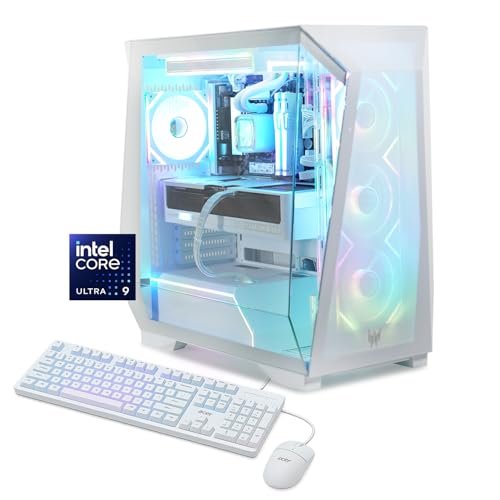
For a dedicated studio computer, Acer pairs the Core Ultra 9 285K with an RTX 5080, 32GB DDR5, and a 1TB Gen 4 SSD. That mix targets demanding Photoshop projects, high-resolution assets, and other creative applications that benefit from strong CPU and GPU resources.
The liquid cooler and advanced cooling system are aimed at sustained heavy use, which is useful during long exports or extensive batch work. The honest trade-off is a larger fixed installation, and 1TB can disappear quickly beside a sizable catalog, especially compared with Thermaltake’s 2TB drive.
Reasons To Buy
- Core Ultra 9 285K provides a powerful desktop foundation for complex creative work.
- RTX 5080 graphics suit demanding visual tasks and gaming at a fixed workstation.
- 32GB DDR5 gives large Photoshop files comfortable working memory.
- Liquid cooling is designed around sustained performance rather than short bursts.
Points To Note
- The 1TB SSD may require external or additional storage for extensive media libraries.
- A full-size tower needs careful placement, airflow clearance, and regular dust removal.
Core Details
Built With In Mind
You get the best fit as a professional editor or studio owner who wants a powerful fixed desktop for sustained creative sessions.
Swap It Out When
GEEKOM A8 Max suits you more for a smaller workspace, lighter workloads, and simpler placement.
How To Choose The Right Cpus For Photoshop
Start With the Workload
Photoshop uses the processor for many everyday actions, including opening files, applying some filters, exporting, and managing layered documents. A four-core Ryzen 5 can suit occasional edits, while a newer Ryzen 7, Core i7, or Core Ultra 9 gives you more room for large files and several open applications. Your typical canvas size and layer count matter more than a processor label alone.
Treat Memory as Working Room
RAM is short-term workspace for active applications and files. With 16GB, you can handle moderate Photoshop use, but 32GB gives you more breathing room for large layered projects, web references, Lightroom catalogs, and background utilities. Compact options such as GMKtec G10 and GEEKOM A8 Max save desk space, yet the listed memory configurations deserve attention before you commit to long-term creative work.
Balance Graphics and Display Needs
A GPU, or graphics processing unit, handles visual calculations and display tasks. Integrated graphics can suit ordinary photo editing, while RTX hardware offers more headroom for GPU-assisted tools, high-resolution screens, gaming, and related creative software. Display quality also matters: a 16:10 2.5K laptop screen gives you extra vertical workspace, while a desktop with multiple 4K outputs supports a broader editing layout.
Plan Storage and Ownership
SSD storage loads applications and projects faster than older mechanical storage, while NVMe SSDs connect through a high-speed PCIe pathway. One terabyte works as a starting point, but extensive RAW files, scratch data, and video assets can consume it quickly. Check the physical setup too, since a liquid-cooled tower needs more room and periodic dust care than a mini PC, while a laptop trades easy movement for heat and charging considerations.
Things Worth Knowing First
Mistakes Worth Dodging
Choosing by CPU name alone can leave you with too little RAM, storage, or graphics capacity. Match the full configuration to your habits, then check display outputs, card-reader access, network connections, and the room available on your desk.
A compact mini PC can look appealing until your projects outgrow its listed memory or storage. Conversely, a large tower can be unnecessary for occasional edits, so keep the actual file sizes and application mix in view.
Where The Extra Money Goes
Higher-tier systems generally combine newer processors with stronger graphics, more memory, faster storage, and better cooling hardware. That combination helps during long exports, large composites, and work that extends beyond Photoshop into video or 3D applications.
Paying more makes sense for professional workloads, frequent multitasking, and a computer you expect to keep as your main studio system. Casual editors may get better value from a compact Ryzen system and spend the difference on storage, display quality, or backup equipment.
Final Verdict
Your best match depends on the way Photoshop fits into your day. GMKtec G10 keeps a modest home office compact, while GEEKOM A8 Max adds newer processing and useful creative ports. Thermaltake and Acer suit fixed studios with demanding workloads, and ASUS brings that class of hardware into a portable format. Liitrton belongs with an existing tower rather than a new computer purchase. Focus on RAM, storage, display needs, and cooling before settling on a processor, and you’ll end up with a system that feels comfortable beyond the first project.
